HI
@sdetweil getting the following message
johanba@raspberrypi:~/MagicMirror/modules/MMM-Config $ git pull
Your configuration specifies to merge with the ref ‘refs/heads/better_repo_url’
from the remote, but no such ref was fetched.
 J
Offline
J
Offline
A New Chapter for MagicMirror: The Community Takes the Lead
Read the statement by Michael Teeuw here.
Read the statement by Michael Teeuw here.
Posts
-
RE: Issue with MMM-Config
-
RE: Are you tired of editing config.js, or have trouble doing it, see my new module
Also not getting it to work
in the browser i go to installer
and this is all that loads

-
Issue with MMM-Config
I am getting the following issue with the module MMM-Config
I have updated, reinstalled but it seems the issue persists
[2025-04-08 16:00:14.166] [ERROR] (node:3805) UnhandledPromiseRejectionWarning: Error: An error occured: 404
at buildFormData (/home/johanba/MagicMirror/modules/MMM-Config/module_installer/runserver.js:138:11)
at process.processTicksAndRejections (node:internal/process/task_queues:95:5)
(Useelectron --trace-warnings ...to show where the warning was created)
[2025-04-08 16:00:14.167] [ERROR] (node:3805) UnhandledPromiseRejectionWarning: Unhandled promise rejection. This error originated either by throwing inside of an async function without a catch block, or by rejecting a promise which was not handled with .catch(). To terminate the node process on unhandled promise rejection, use the CLI flag--unhandled-rejections=strict(see https://nodejs.org/api/cli.html#cli_unhandled_rejections_mode). (rejection id: 1) -
MMM-RTSPStream
I have installed the module, ensured it is the latest version
I have 3 feeds, but feed No 1 take over the screen and does not run inside the mirror
I would like for the 3 x fees to display on on screen, below one another
Here is my Config
{
module: “MMM-RTSPStream”,
classes: “page6”,
position: “middle_center”,
header: “Camera’s”,
config: {
autoStart: true,
rotateStreams: false,
useWmctrl: false,
//rotateStreamTimeout: 10,
moduleWidth: 354,
moduleHeight: 800,
localPlayer: ‘local’,
remotePlayer: ‘none’,
showSnapWhenPaused: false,
remoteSnaps: false,
shutdownDelay: 12,
stream1: {
name: ‘Front Gate’,
url: ‘rtsp://admin:xxxxx@192.168.1.150:554/user=admin&password=xxxxxx&channel=1stream=0.sdp?',
frameRate: ‘undefined’,
width: 354,
height: 240,
muted: true,
},
stream2: {
name: ‘HighWay View 1’,
url: 'rtsp://admin:xxxxxx@192.168.1.158:554/user=admin&password=xxxxxx&channel=1stream=0.sdp?’,
frameRate: ‘undefined’,
width: 354,
height: 240,
muted: true,
},
stream3: {
name: ‘Store Room’,
url: ‘rtsp://admin:xxxxxx@192.168.1.65:554/user=admin&password=xxxxxx&channel=1*stream=0.sdp?’,
frameRate: ‘undefined’,
width: 354,
height: 240,
muted: true,
},
}
}, -
Google Assistant
Hi
Anyone have an alternative to Google assistant
Not working anymore, I believe -
RE: Create a clone of MMM-Webview
@sdetweil
Thank a mil for the info
I am going to try and update my config as such, and see how to get this goingi might reach out again if I am struggling
-
RE: Create a clone of MMM-Webview
Thanks for the information, Looks like it might be possible
Looking at the code and not really making sense to me (I am not a developer)
Say I want to show 3 x dashboards from my Home Assistant
On Page 2 - >http://192.168.1.90:8123/new-solar-dashboard-combined/deye<
On Page 3 - >http://192.168.1.90:8123/testing-3/0<
On Page 4 - >http://192.168.1.90:8123/battery-insights-2/0<How would the config.js handle these on different pages
I am using MMM-pages to have different pages -
Create a clone of MMM-Webview
HI All
I find the MMM-Webview module quite useful to display my Pages from my Home Assistant
Can anyone please help me clone to modules so I can use it more than one
I tried but failed -
MM shifts to the right about 1cm after it loaded
Hi Fellow MM enthusiast
Since a few days about my MM shifts about 1cm to the right after loading the initial page, and for the life of me I cannot find the issue
Any help will be appreciated

Below I included my custom.css and main.css
Not sure where else it could becustome.css
"/* Custom CSS Sample
*- Change color and fonts here.
- Beware that properties cannot be unitless, so for example write ‘–gap-body: 0px;’ instead of just ‘–gap-body: 0;’
*/
/* Uncomment and adjust accordingly if you want to import another font from the google-fonts-api: /
/ @import url(‘https://fonts.googleapis.com/css2?family=Poppins:wght@100;300;400;700&display=swap’); */:root {
–color-text: #999;
–color-text-dimmed: #666;
–color-text-bright: #fff;
–color-background: black;–font-primary: “Roboto Condensed”;
–font-secondary: “Roboto”;–font-size: 20px;
–font-size-small: 0.75rem;–gap-body-top: 60px;
–gap-body-right: 60px;
–gap-body-bottom: 60px;
–gap-body-left: 60px;–gap-modules: 30px;
}body {
margin: 0;
position: absolute;
transform: rotate(-90deg);
transform-origin: top left;
width: 100vh;
height: 100vw;
object-fit: cover;
top: 100vh;
visibility: visible;}"
main.css
"
:root {
–color-text: #999;
–color-text-dimmed: #666;
–color-text-bright: #fff;
–color-background: #000;
–font-primary: “Roboto Condensed”;
–font-secondary: “Roboto”;
–font-size: 20px;
–font-size-xsmall: 0.75rem;
–font-size-small: 1rem;
–font-size-medium: 1.5rem;
–font-size-large: 3.25rem;
–font-size-xlarge: 3.75rem;
–gap-body-top: 60px;
–gap-body-right: 60px;
–gap-body-bottom: 60px;
–gap-body-left: 60px;
–gap-modules: 30px;
}html {
cursor: none;
overflow: hidden;
background: var(–color-background);
user-select: none;
font-size: var(–font-size);
}::-webkit-scrollbar {
display: none;
}body {
margin: var(–gap-body-top) var(–gap-body-right) var(–gap-body-bottom) var(–gap-body-left);
position: absolute;
height: calc(100% - var(–gap-body-top) - var(–gap-body-bottom));
width: calc(100% - var(–gap-body-right) - var(–gap-body-left));
background: var(–color-background);
color: var(–color-text);
font-family: var(–font-primary), sans-serif;
font-weight: 400;
line-height: 1.5;
-webkit-font-smoothing: antialiased;
}/**
- Default styles.
*/
.dimmed {
color: var(–color-text-dimmed);
}.normal {
color: var(–color-text);
}.bright {
color: var(–color-text-bright);
}.xsmall {
font-size: var(–font-size-xsmall);
line-height: 1.275;
}.small {
font-size: var(–font-size-small);
line-height: 1.25;
}.medium {
font-size: var(–font-size-medium);
line-height: 1.225;
}.large {
font-size: var(–font-size-large);
line-height: 1;
}.xlarge {
font-size: var(–font-size-xlarge);
line-height: 1;
letter-spacing: -3px;
}.thin {
font-family: var(–font-secondary), sans-serif;
font-weight: 100;
}.light {
font-family: var(–font-primary), sans-serif;
font-weight: 300;
}.regular {
font-family: var(–font-primary), sans-serif;
font-weight: 400;
}.bold {
font-family: var(–font-primary), sans-serif;
font-weight: 700;
}.align-right {
text-align: right;
}.align-left {
text-align: left;
}header {
text-transform: uppercase;
font-size: var(–font-size-xsmall);
font-family: var(–font-primary), Arial, Helvetica, sans-serif;
font-weight: 400;
border-bottom: 1px solid var(–color-text-dimmed);
line-height: 15px;
padding-bottom: 5px;
margin-bottom: 10px;
color: var(–color-text);
}sup {
font-size: 50%;
line-height: 50%;
}/**
- Module styles.
*/
.module {
margin-bottom: var(–gap-modules);
}.module.hidden {
pointer-events: none;
}.module:not(.hidden) {
pointer-events: auto;
}.region.bottom .module {
margin-top: var(–gap-modules);
margin-bottom: 0;
}.no-wrap {
white-space: nowrap;
overflow: hidden;
text-overflow: ellipsis;
}.pre-line {
white-space: pre-line;
}/**
- Region Definitions.
*/
.region {
position: absolute;
}.region.fullscreen {
position: absolute;
inset: calc(-1 * var(–gap-body-top)) calc(-1 * var(–gap-body-right)) calc(-1 * var(–gap-body-bottom)) calc(-1 * var(–gap-body-left));
pointer-events: none;
}.region.right {
right: 0;
text-align: right;
}.region.top {
top: 0;
}.region.top.center,
.region.bottom.center {
left: 50%;
transform: translateX(-50%);
}.region.top.right,
.region.top.left,
.region.top.center {
top: 100%;
}.region.bottom {
bottom: 0;
}.region.bottom.right,
.region.bottom.center,
.region.bottom.left {
bottom: 100%;
}.region.bar {
width: 100%;
text-align: center;
}.region.third,
.region.middle.center {
width: 100%;
text-align: center;
transform: translateY(-50%);
}.region.upper.third {
top: 33%;
}.region.middle.center {
top: 50%;
}.region.lower.third {
top: 66%;
}.region.left {
text-align: left;
}.region table {
width: 100%;
border-spacing: 0;
border-collapse: separate;
}
" -
Site : https://wiki.bugsounet.fr seems to be down
The past 3 days I am unable to get to https://wiki.bugsounet.fr/ where the MMM-GoogleAssistant and other 4th Party modules lived
or is it just me
or maybe the site moved with a new nameThanks for the update
-
MESA Loader with fresh install
Hi
Install MagicMirror, fresh installgetting these error
magicmirror@2.23.0 start
DISPLAY=“${DISPLAY:=:0}” ./node_modules/.bin/electron js/electron.js[13.05.2023 09:55.42.038] [LOG] Starting MagicMirror: v2.23.0
[13.05.2023 09:55.42.046] [LOG] Loading config …
[13.05.2023 09:55.42.052] [DEBUG] config template file not exists, no envsubst
[13.05.2023 09:55.42.060] [LOG] Loading module helpers …
[13.05.2023 09:55.42.063] [LOG] No helper found for module: alert.
[13.05.2023 09:55.42.091] [LOG] Initializing new module helper …
[13.05.2023 09:55.42.093] [LOG] Module helper loaded: updatenotification
[13.05.2023 09:55.42.096] [LOG] No helper found for module: clock.
[13.05.2023 09:55.42.509] [LOG] Initializing new module helper …
[13.05.2023 09:55.42.511] [LOG] Module helper loaded: calendar
[13.05.2023 09:55.42.516] [LOG] No helper found for module: compliments.
[13.05.2023 09:55.42.519] [LOG] No helper found for module: weather.
[13.05.2023 09:55.42.579] [LOG] Initializing new module helper …
[13.05.2023 09:55.42.580] [LOG] Module helper loaded: newsfeed
[13.05.2023 09:55.42.581] [LOG] All module helpers loaded.
[13.05.2023 09:55.42.602] [LOG] Starting server on port 8080 …
[13.05.2023 09:55.43.168] [LOG] Server started …
[13.05.2023 09:55.43.169] [LOG] Connecting socket for: updatenotification
[13.05.2023 09:55.43.170] [LOG] Starting module helper: updatenotification
[13.05.2023 09:55.43.170] [LOG] Connecting socket for: calendar
[13.05.2023 09:55.43.171] [LOG] Starting node helper for: calendar
[13.05.2023 09:55.43.172] [LOG] Connecting socket for: newsfeed
[13.05.2023 09:55.43.173] [LOG] Starting node helper for: newsfeed
[13.05.2023 09:55.43.174] [LOG] Sockets connected & modules started …
[13.05.2023 09:55.43.332] [LOG] Launching application.
MESA-LOADER: failed to retrieve device information
MESA-LOADER: failed to retrieve device information
MESA-LOADER: failed to retrieve device information
MESA-LOADER: failed to open kms_swrast: /usr/lib/dri/kms_swrast_dri.so: cannot open shared object file: Permission denied (search paths /usr/lib/aarch64-linux-gnu/dri:$${ORIGIN}/dri:/usr/lib/dri)
failed to load driver: kms_swrast
MESA-LOADER: failed to open swrast: /usr/lib/dri/swrast_dri.so: cannot open shared object file: Permission denied (search paths /usr/lib/aarch64-linux-gnu/dri:$${ORIGIN}/dri:/usr/lib/dri)
failed to load swrast driver
[13.05.2023 09:55.46.920] [LOG] Create new calendarfetcher for url: http://www.calendarlabs.com/ical-calendar/ics/76/US_Holidays.ics - Interval: 300000
[13.05.2023 09:55.47.032] [LOG] Create new newsfetcher for url: https://rss.nytimes.com/services/xml/rss/nyt/HomePage.xml - Interval: 300000
[13.05.2023 09:55.47.079] [INFO] Checking git for module: MagicMirror
[13.05.2023 09:55.47.563] [INFO] Newsfeed-Fetcher: Broadcasting 27 items.
[13.05.2023 09:55.49.012] [INFO] Calendar-Fetcher: Broadcasting 10 events.What could be the issue
Johan
-
Module not found error
Hi All
A few modules after install, in this case both MMM-Homeassistant & MMM-Awesome Alexa on startup indicate "module not found
Yes, I do run npm install in the folder
I have checked my config, reinstalled, updated the module but cannot get it working
If I comment the module out all is fineAny help will be appreciated
[07.05.2022 23:14.30.436] [ERROR] WARNING! Could not load config file. Starting with default configuration. Error found: Error: Cannot find module 'request' Require stack: - /home/johanba/MagicMirror/modules/MMM-HomeAssistant/node_helper.js - /home/johanba/MagicMirror/js/app.js - /home/johanba/MagicMirror/js/electron.js - /home/johanba/MagicMirror/node_modules/electron/dist/resources/default_app.asar/main.js - [07.05.2022 23:14.30.439] [LOG] Loading module helpers ... [07.05.2022 23:14.30.440] [LOG] No helper found for module: MMM-pages. [07.05.2022 23:14.30.441] [LOG] No helper found for module: alert. [07.05.2022 23:14.30.442] [LOG] No helper found for module: clock. [07.05.2022 23:14.30.444] [LOG] No helper found for module: MMM-COVID19. [07.05.2022 23:14.30.444] [LOG] Initializing new module helper ... [07.05.2022 23:14.30.445] [LOG] Module helper loaded: EXT-Alert [07.05.2022 23:14.30.445] [LOG] Initializing new module helper ... [07.05.2022 23:14.30.446] [LOG] Module helper loaded: Gateway [07.05.2022 23:14.30.447] [LOG] Initializing new module helper ... [07.05.2022 23:14.30.447] [LOG] Module helper loaded: MMM-Todoist [07.05.2022 23:14.30.448] [LOG] No helper found for module: MMM-WebView. [07.05.2022 23:14.30.448] [LOG] Initializing new module helper ... [07.05.2022 23:14.30.449] [LOG] Module helper loaded: MMM-NowPlayingOnSpotify [07.05.2022 23:14.30.450] [LOG] Initializing new module helper ... [07.05.2022 23:14.30.451] [LOG] Module helper loaded: EXT-Detector [07.05.2022 23:14.30.451] [LOG] Initializing new module helper ... [07.05.2022 23:14.30.452] [LOG] Module helper loaded: MMM-GoogleAssistant [07.05.2022 23:14.30.452] [LOG] Initializing new module helper ... [07.05.2022 23:14.30.453] [LOG] Module helper loaded: EXT-Pir [07.05.2022 23:14.30.454] [LOG] Initializing new module helper ... [07.05.2022 23:14.30.455] [LOG] Module helper loaded: MMM-MacAddressScan [07.05.2022 23:14.30.457] [ERROR] App threw an error during load [07.05.2022 23:14.30.459] [ERROR] Error: Cannot find module 'request' Require stack: - /home/johanba/MagicMirror/modules/MMM-HomeAssistant/node_helper.js - /home/johanba/MagicMirror/js/app.js - /home/johanba/MagicMirror/js/electron.js - /home/johanba/MagicMirror/node_modules/electron/dist/resources/default_app.asar/main.js - at Module._resolveFilename (node:internal/modules/cjs/loader:940:15) at Function.n._resolveFilename (node:electron/js2c/browser_init:249:1105) at Function.Module._resolveFilename (/home/johanba/MagicMirror/node_modules/module-alias/index.js:49:29) at Module._load (node:internal/modules/cjs/loader:785:27) at Function.c._load (node:electron/js2c/asar_bundle:5:13331) at Module.require (node:internal/modules/cjs/loader:1012:19) at require (node:internal/modules/cjs/helpers:102:18) at Object.<anonymous> (/home/johanba/MagicMirror/modules/MMM-HomeAssistant/node_helper.js:2:17) at Module._compile (node:internal/modules/cjs/loader:1116:14) at Object.Module._extensions..js (node:internal/modules/cjs/loader:1169:10) [07.05.2022 23:14.30.461] [ERROR] Whoops! There was an uncaught exception... [07.05.2022 23:14.30.468] [ERROR] Error: Cannot find module 'request' Require stack: - /home/johanba/MagicMirror/modules/MMM-HomeAssistant/node_helper.js - /home/johanba/MagicMirror/js/app.js - /home/johanba/MagicMirror/js/electron.js - /home/johanba/MagicMirror/node_modules/electron/dist/resources/default_app.asar/main.js - at Module._resolveFilename (node:internal/modules/cjs/loader:940:15) at Function.n._resolveFilename (node:electron/js2c/browser_init:249:1105) at Function.Module._resolveFilename (/home/johanba/MagicMirror/node_modules/module-alias/index.js:49:29) at Module._load (node:internal/modules/cjs/loader:785:27) at Function.c._load (node:electron/js2c/asar_bundle:5:13331) at Module.require (node:internal/modules/cjs/loader:1012:19) at require (node:internal/modules/cjs/helpers:102:18) at Object.<anonymous> (/home/johanba/MagicMirror/modules/MMM-HomeAssistant/node_helper.js:2:17) at Module._compile (node:internal/modules/cjs/loader:1116:14) at Object.Module._extensions..js (node:internal/modules/cjs/loader:1169:10) { code: 'MODULE_NOT_FOUND', requireStack: [ '/home/johanba/MagicMirror/modules/MMM-HomeAssistant/node_helper.js', '/home/johanba/MagicMirror/js/app.js', '/home/johanba/MagicMirror/js/electron.js', '/home/johanba/MagicMirror/node_modules/electron/dist/resources/default_app.asar/main.js', undefined ] } [07.05.2022 23:14.30.472] [ERROR] MagicMirror² will not quit, but it might be a good idea to check why this happened. Maybe no internet connection? [07.05.2022 23:14.30.473] [ERROR] If you think this really is an issue, please open an issue on GitHub: https://github.com/MichMich/MagicMirror/issues [07.05.2022 23:14.30.770] [LOG] Launching application. ^C/home/johanba/MagicMirror/node_modules/electron/dist/electron exited with signal SIGINT -
MMM-Webview
Is it possible to run multiple instances of Webview
I have MMM Pages installed
Page 3 = my Solar web page
and I want to add my tracking device webpage on Page 4Is there a trick to do this
-
Google Tasks
Hi
Need some help please
I have installed Google Tasks
But the list show inverted on the MMShould be
Name- list item 1
- list item 2
Any support will be appreciated
Johan
Picture on MM
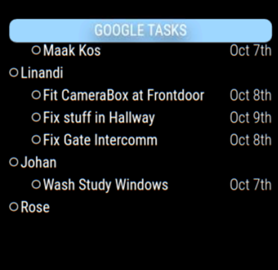
View on Google Tasks
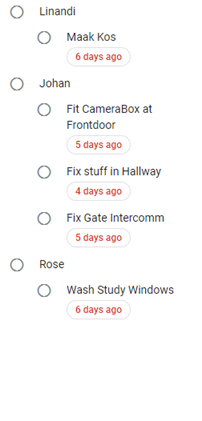
-
RE: Add 3rd page to MMM-Pages
@sdetweil I suspect I still have some issue
Below is my code
It does not add the 3rd Page, even the Page indicator only show 2 dots
What am I missing
Did I get the code past right this time :beaming_face_with_smiling_eyes:{ module: 'MMM-pages', config: { rotationTime: 30000, rotationDelay: 30000, modules: [ //Page 1 [ "calendar","newsfeed","MMM-Weather","Alerts","MMM-UpdateNotification","MMM-connection-status","MMM-NetworkConnection","MMM-GoogleTasks" ], //Page 2 [ "MMM-RTSPStream","MMM-NowPlayingOnSpotify","MMM-Tools","MMM-iFrame","MMM-WebView","MMM-TomTomTraffic"] //Page 3 ["MMM-HomeAssistant"] ], //Fixed Pages fixed: ["MMM-BackgroundSlideshow","MMM-TelegramBot","MMM-PIR-Sensor","clock","MMM-Weather","MMM-page-indicator","MMM-Alexa","MMM-GoogleAssistant","MMM-Detector"], //Hidden Pages hiddenPages: { "screenSaver": ["clock"], "admin": ["MMM-Config", "MMM-pages"], }, } }, -
RE: Add 3rd page to MMM-Pages
@sdetweil Noted, Thanks for the support
I am new to this an learning faster than expected -
Add 3rd page to MMM-Pages
Hi All
Need some help
My Mirror use 2 pages at present
I tried added a 3rd Page , but then the Mirror dont load
This is my code, will appreciate advise{ module: 'MMM-pages', config: { rotationTime: 30000, rotationDelay: 30000, modules: [[ "MMM-HomeAssistant","calendar","newsfeed","MMM-Weather","Alerts","MMM-UpdateNotification","MMM-connection-status","MMM-NetworkConnection","MMM-GoogleTasks" ], [ "MMM-RTSPStream","MMM-NowPlayingOnSpotify","MMM-Tools","MMM-iFrame","MMM-WebView","MMM-TomTomTraffic"]], fixed: ["MMM-TelegramBot","MMM-PIR-Sensor","clock","MMM-Weather","MMM-page-indicator","MMM-Alexa","MMM-GoogleAssistant","MMM-Detector"], hiddenPages: { "screenSaver": ["clock"], "admin": [ , "MMM-Config", "MMM-pages" ], }, } }, -
Multiple ics files to 1 calender support requested
Hi All
I have added the standard calendar module, and have linked my google calendar, but only items in the main calendar shows, Items from added calenders does not show, it seems I have to add multiple versions and add each ics file, but that defeats the objective of have 1 calender
Will appreciate any recommendation on a solution