This might be helpful https://github.com/AdamMoses-GitHub/MMM-DCMetroTrainTimes
 K
Offline
K
Offline
A New Chapter for MagicMirror: The Community Takes the Lead
Read the statement by Michael Teeuw here.
Read the statement by Michael Teeuw here.
Posts
-
RE: MMM-uber and MMM-lyft
@Sarb yea that was a confusing thing for me to do (I’ll consider changing in the next version). In the future make sure to just copy and paste from the GitHub page.
Glad you’re all sorted out!
-
RE: MMM-uber and MMM-lyft
@Sarb you’re encountering an access error and that exception is a symptom, not a cause. My advice would be to regenerate Lyft ID and Secret for your config or perhaps register as a new user and get a new ID.
-
RE: MMM-uber and MMM-lyft
@Sarb Are you sure you uncommented / that’s all of the Lyft outputs? There should be more.
-
RE: MMM-uber and MMM-lyft
@Sarb from the docs it looks like you supplied an invalid code. Can you regenerate your token and try again?
Also, what country are you in?
-
RE: MMM-uber and MMM-lyft
@Sarb Two things:
-
Make sure that your uberServerToken and clientID/clientSecret don’t contain the greater/less than characters in your config (these things:
<>). Those are placeholders. For example, if youruberServerTokenisabc123then the line in your config should readuberServerToken: 'abc123',without those characters. -
If that doesn’t work, can you go into the .js file for uber and un-comment this line. Then post the log. You should be looking for one that says
ERROR...
-
-
RE: MMM-uber and MMM-lyft
@Sarb your config looks good, but I want to see your log before I open an issue.
We need to view your JavaScript console. Access the mirror directly or whitelist the IP of another computer to access via a browser. Then, go to https://IP.of.Raspberry.Pi:8080 in Chrome and View>Developer>JavaScript Console.
See this this thread for more info.
-
RE: MMM-uber and MMM-lyft
@Sarb Can you post your config file and log? It sounds like a REST API failure…
-
RE: MMM-uber and MMM-lyft
@shashank that’s weird…the API calls out ‘POOL’. Do you mind if I ask what country you are in?
-
RE: MMM-uber and MMM-lyft
@shashank can you post the log from your console? I want to help you resolve this issue but I need more information.
Anything related to uber in your log should be posted. Please post in detail the things that you have tried. Any config file changes, etc.
Just saying that it’s not working does not help me help you
-
RE: MMM-uber and MMM-lyft
@shashank That means that no uber pool is available in your area. This is an error case that I haven’t dealt with explicitly.
To confirm this is the error, you need to look at the console log. You’ll see the ProcessUber returns ‘Time’ and then an object. Go through the object and look for pool as a ride type. It should look like this:
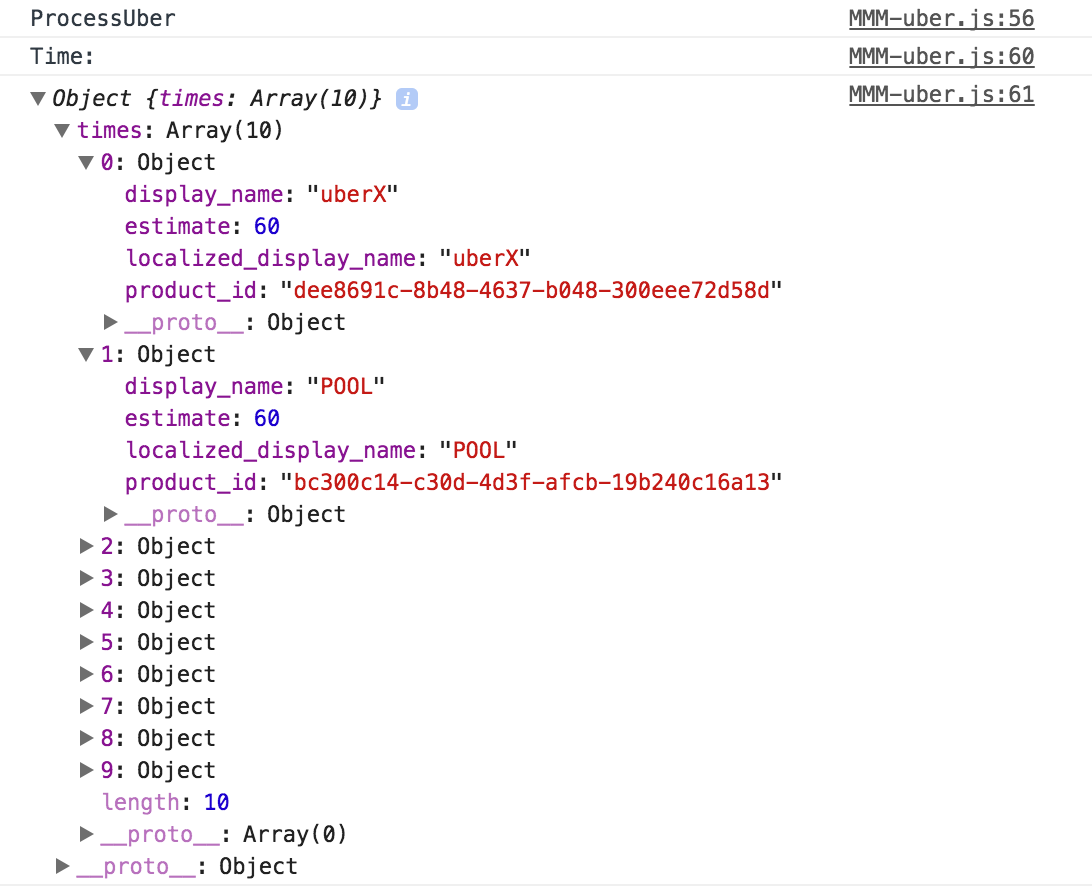
You can also try to order an uber pool on your phone to confirm that one is not available.
-
RE: MMM-uber and MMM-lyft
@shashank like I mentioned, your ride type needs to be capitalized. Use
'POOL'like shown below. Also, theride_type:needs to be placed into the config portion. You can put it under theuberServerToken.{ module: 'MMM-uber', position: 'top_left', header: 'Uber (DC)', config: { lat: XX.XXXX, // use your exact pickup loaction lng: XX.XXXX, // use your exact pickup loaction uberServerToken: 'your_uberServerToken', ride_type: 'POOL' } }, -
RE: MMM-uber and MMM-lyft
@shashank Can you post the mmm-uber portion of your config file? It’s working for me.
You may want to delete and re-download the repo in your Modules folder. I’ve pushed some changes since the first post.
-
RE: MMM-uber and MMM-lyft
@shashank it’s a typo in the documentation but
'POOL'should work. -
RE: MMM-uber and MMM-lyft
@onetwankyfive For sure!! Do you mind posting your css? I inherited it from the module I mentioned on my github.
Also, just so you know, there is a bug in the Lyft module. I’m testing the fix out now and I’ll push an update in the next day or two.
-
MMM-uber and MMM-lyft
These modules display ETA and surge pricing / primetime percentage for Uber and Lyft.
https://github.com/kyle-kelly/MMM-uber
https://github.com/kyle-kelly/MMM-lyft
Please report issues or submit pull requests. General feedback would be appreciated as well!
-
RE: CORS using node_helper.js for Uber and Lyft APIs
I was able to fix this. See below for the module code
/* global Module */

/* Magic Mirror
 * Module: Uber
 *
 * Shows the time and surge pricing for UberX
 *
 * By Kyle Kelly
 * based on MagicMirror work by Michael Teeuw http://michaelteeuw.nl
 * and by derickson https://github.com/derickson/MMderickson/tree/master/uber
 * MIT Licensed.
 */

Module.register("MMM-uber",{

	// Default module config.
	defaults: {
		lat: null,
		lng: null,
		ride_type: "uberX",
		uberServerToken: null,

		updateInterval: 5 * 60 * 1000, // every 5 minutes
		animationSpeed: 1000,
	},

	// Define required scripts.
	getScripts: function() {
		return ["moment.js", "https://code.jquery.com/jquery-2.2.3.min.js"];
	},

	// Define required styles.
	getStyles: function() {
		return ["MMM-uber.css"];
	},

	start: function() {
		Log.info("Starting module: " + this.name);

		// Set locale.
		moment.locale(config.language);

		// variables that will be loaded from service
		this.uberTime = null;
		this.uberSurge = null;

		this.loaded = false;
		Log.log("Sending CONFIG to node_helper.js in " + this.name);
		Log.log("Payload: " + this.config)
		this.sendSocketNotification('CONFIG', this.config);
	},

	// unload the results from uber services
	processUber: function(FLAG, result) {
		var self = this;
		Log.log("ProcessUber");

		// go through the time data to find the uberX product
		if (FLAG === "TIME"){
			Log.log("Time:");
			Log.log(result);
			for (var i = 0, count = result.times.length; i < count ; i++) {

				var rtime = result.times[i];

				if(rtime.display_name === this.config.ride_type){
					// convert estimated seconds to minutes
					this.uberTime = rtime.estimate / 60;
					break;
				}
			}
		}

		// go through the price data to find the uberX product
		else if (FLAG === "PRICE"){
			Log.log("Price:");
			Log.log(result);
			for( var i=0, count = result.prices.length; i< count; i++) {
				var rprice = result.prices[i];

				if(rprice.display_name === this.config.ride_type){
					// grab the surge pricing
					this.uberSurge = rprice.surge_multiplier;
					break;
				}
			}
		}
	},

	// Override dom generator.
	getDom: function() {
		var wrapper = document.createElement("div");

		var uber = document.createElement("div");
		uber.className = "uberButton";

		var uberIcon = document.createElement("img");
		uberIcon.className = "badge";
		uberIcon.src = "modules/MMM-uber/UBER_API_Badges_1x_22px.png";

		var uberText = document.createElement("span");

		if(this.loaded) {
			var myText = this.config.ride_type + " in "+ this.uberTime +" min ";
			Log.log("ubersurge: " + this.uberSurge);
			// only show the surge pricing if it is above 1.0
			if(typeof this.uberSurge !== "undefined" && this.uberSurge > 1.0){
				myText += " - " + this.uberSurge + "X surge pricing";
			}
			uberText.innerHTML = myText;
		} else {
			// Loading message
			uberText.innerHTML = "Checking Uber status ...";
		}

		uber.appendChild(uberIcon);
		uber.appendChild(uberText);

		wrapper.appendChild(uber);
		return wrapper;
	},

	socketNotificationReceived: function(notification, payload) {
		Log.log(this.name + " received a socket notification: " + notification + " - Payload: " + payload);
		if (notification === "TIME") {
			this.processUber("TIME", JSON.parse(payload));
			this.updateDom(this.config.animationSpeed)
		}
		else if (notification === "PRICE") {
			this.processUber("PRICE", JSON.parse(payload));
			this.loaded = true;
			this.updateDom(this.config.animationSpeed);
		}
	}

});
and the node_helper.js code
'use strict'; /* Magic Mirror * Module: MMM-uber * * By Kyle Kelly * MIT Licensed. */ const NodeHelper = require('node_helper'); var request = require('request'); var moment = require('moment'); module.exports = NodeHelper.create({ start: function() { var self = this; console.log("Starting node helper for: " + this.name); this.config = null; }, getData: function() { var self = this; this.sendSocketNotification("Test", 2); this.sendSocketNotification("LATITUDE", this.config.lat); this.sendSocketNotification("LONGITUDE", this.config.lng); request({ url: "https://api.uber.com/v1/estimates/time?start_latitude=" + this.config.lat + "&start_longitude=" + this.config.lng, method: 'GET', headers: { 'Authorization': 'Token ' + this.config.uberServerToken, 'Accept-Language': 'en_US', 'Content-Type': 'application/json' }, }, function (error, response, body) { if (!error && response.statusCode == 200) { self.sendSocketNotification("TIME", body); } else { self.sendSocketNotification("ERROR", "In TIME request with status code: " + response.statusCode); } }); request({ url: "https://api.uber.com/v1/estimates/price?start_latitude=" + this.config.lat + "&start_longitude=" + this.config.lng + "&end_latitude=" + this.config.lat + "&end_longitude=" + this.config.lng, method: 'GET', headers: { 'Authorization': 'Token ' + this.config.uberServerToken, 'Accept-Language': 'en_US', 'Content-Type': 'application/json' }, }, function (error, response, body) { if (!error && response.statusCode == 200) { self.sendSocketNotification("PRICE", body); } else { self.sendSocketNotification("ERROR", "In PRICE request with status code: " + response.statusCode); } }); setTimeout(function() { self.getData(); }, this.config.updateInterval); }, socketNotificationReceived: function(notification, payload) { //var self = this; this.sendSocketNotification("Test", 0); if (notification === 'CONFIG') { this.sendSocketNotification("Test", 1); this.config = payload; this.getData(); } } }); -
RE: CORS using node_helper.js for Uber and Lyft APIs
@cowboysdude I don’t think the user-agent string is required when making an HTTP request. According to the Uber API docs it doesn’t look like I need one.
-
RE: CORS using node_helper.js for Uber and Lyft APIs
@cowboysdude isn’t that what I am doing? Can you explain how your solution differs from mine?
-
RE: CORS using node_helper.js for Uber and Lyft APIs
@Anhalter42 I’m looking at the JavaScript console. The IP of my laptop is whitelisted, so I go to
https://IP.of.Raspberry.Pi:8080in Chrome and then go to View>Developer>JavaScript Console.Is there another way I can get statements to print to that console ?