the script /opt/mm/install/install.sh is executed with every reboot.
As workaround you could add
sleep 10s
docker compose up -d --force-recreate
at the end (where you have to play with the sleep seconds).
 K
Offline
K
Offline
the script /opt/mm/install/install.sh is executed with every reboot.
As workaround you could add
sleep 10s
docker compose up -d --force-recreate
at the end (where you have to play with the sleep seconds).
mmos is critical with pi zero 2w, I had a user who gave up, but it depends on installed modules and quality of used sd-card.
CONF_SWAPSIZE=1024 (if not changed by user)
well, I did not promote it because the image base was to old (beside other problems) but in 2024 I decided to do a complete refactor so now the image build (iso, not docker) is done by me with gitlab based on the current raspian bookworm os lite.
@scottwalsh said in MagicMirrorOS build intermittently not starting mm container (Version 2.30):
However, I am finding if power cycle it, sometimes the calendar does not load up and just have a blank screen.
I don’t know if this is related to the docker setup but I think not. I have encountered similar problems depending on slow hardware and/or heavy load on start due to many modules starting in parallel or starting after fresh boot.
So you could try to change the start order of the modules (order in config.js), e.g. put the calendar as first.
@sdetweil said in MagicMirrorOS build intermittently not starting mm container (Version 2.30):
@scottwalsh that is not MagicMirrorOS
that is karstens docker container
mmos uses my docker setup
you can do cron restart with pm2 too, see https://pm2.keymetrics.io/docs/usage/restart-strategies/
@morangen said in Calendar Recurring events on wrong day:
I’ll have to make sure it is actually updating and or pulling the latest version in.
yes, not everyone wants auto updating if a new image is available.
For this you can use tools like watchtower (as @sdetweil already mentioned).
The docker image is updated weekly (for getting updates of the underlying debian) but because mm only releases every 3 months there are no mm changes inside.
So beside auto updating you could do a manual docker pull ... every 3 months to get the new mm release …
@wswenson said in MMM-Flights:
I would like to see a configuration option to filter
now implemented with this commit
Thanks for the suggestion!
@wswenson said in MMM-Flights:
I tried to open an issue in Gitlabs, but wants me to create an account and pay for membership and such.
they are free see https://about.gitlab.com/pricing/
will look into the filter stuff …
see https://endoflife.date/nodejs
I recommend using even node versions (at the moment v22) as the odd ones have a short lifespan…
this can be caused by a specific module so you can try disabling one by one …
I deleted your config posted above because you published all your secrets in it …
@stashu said in MMM-Flights:
if there is a way I can hide the horizontal line which is under the ‘Flights’ label.
I updated the module, if you now set title and logoTitle to empty strings no header and no line is diplayed anymore.
@sdetweil said in Default weather module stuck loading after latest MM update:
@karsten13 dang I get that wrong EVERY time!
one of the reasons I wrote my own njk …
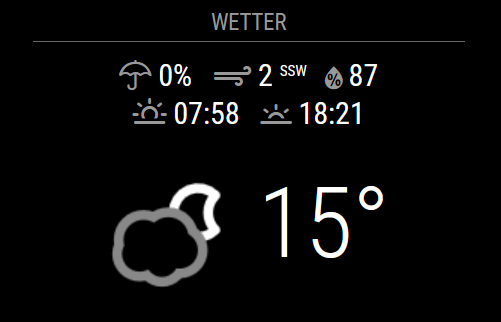
@pritikin71 said in Default weather module stuck loading after latest MM update:
Also is really weird the 18:48
this is not an actual time, but sunrise or sunset (depending on what comes next)
npm ERR! notsup Required: {“node”:“>=20.9.0 <21 || 22”}
npm ERR! notsup Actual: {“npm”:“10.1.0”,“node”:“v20.8.0”}
mm needs a node version v20 or v22 and minimum version is v20.9.0, you are running v20.8.0
yes, thanks.
We had similar errors with older electron versions running with node v18, but you are using the newest mm release.
please provide information about your mm-version and node/electron versions.
You find them in the logs, example:
[2024-10-03 23:10:32.636] [LOG]   Starting MagicMirror: v2.30.0-develop
...
[2024-10-03 23:10:33.352] [INFO]  System information:
### SYSTEM:   manufacturer: Microsoft; model: Docker Container; virtual: true
### OS:       platform: linux; distro: Debian GNU/Linux; release: 12; arch: x64; kernel: 5.15.153.1-microsoft-standard-WSL2
### VERSIONS: electron: undefined; used node: 22.9.0; installed node: 22.9.0; npm: 10.8.3; pm2:
### OTHER:    timeZone: Europe/Berlin; ELECTRON_ENABLE_GPU: undefined