Hello,
my bathroom, where my MM is , is too bright. So I would like to have all fonts bright. No darker shades.
Unfortunately, I could not find anything to this in this forum.
I would be happy if someone could help me.
Thanks in advance.
Lars
Hello,
my bathroom, where my MM is , is too bright. So I would like to have all fonts bright. No darker shades.
Unfortunately, I could not find anything to this in this forum.
I would be happy if someone could help me.
Thanks in advance.
Lars
Hello,
I have a problem with my two MMs. Both runs independently.
For both MMs, the monitor always turns off at the same time (MM one every day at about 8 a.m., MM two every day at about 21:30 p.m.) and stays off until the PI is restarted.
The monitor one turns off after about 3 hours after reboot, the other after about 16 hours after reboot.
For both PIs I installed the XScreensaver and deactivated the screensaver.
Monitor one has an installed PIR sensor but the other one does not.
When I connect via VNC, I can see the MM display. But not at the monitor.
I have unfortunately no idea, why the monitor turns off.
I would really appreciate if anyone have a good advice for me.
Thanks in advance.
Lars
Hello,
currently I am building a new MM and have at the beginning unusual problems.
I installed the MM blank and take my old config.js from my old MM. After that the MM starts normally via pm2.
As soon as I installed the first module, the MM does not start anymore via pm2.
The pm2-Logs are
pi@raspberrypi:~ $ pm2 logs MagicMirror
[TAILING] Tailing last 15 lines for [MagicMirror] process (change the value with --lines option)
/home/pi/.pm2/logs/MagicMirror-out.log last 15 lines:
0|MagicMir | All module helpers loaded.
0|MagicMir | Starting server on port 8080 ...
0|MagicMir | Server started ...
0|MagicMir | Connecting socket for: calendar
0|MagicMir | Starting node helper for: calendar
0|MagicMir | Connecting socket for: newsfeed
0|MagicMir | Starting module: newsfeed
0|MagicMir | Sockets connected & modules started ...
0|MagicMir | Launching application.
0|MagicMir | Create new calendar fetcher for url: https://calendar.google.com/…/…/private-xxxxxxxxxx/basic.ics - Interval: 300000
0|MagicMir | Create new calendar fetcher for url: https://calendar.google.com/…/…/private-xxxxxxxxxx/basic.ics - Interval: 300000
0|MagicMir | Create new news fetcher for url: http://www.tagesschau.de/xml/rss2 - Interval: 300000
0|MagicMir | Shutting down server...
0|MagicMir | Stopping module helper: calendar
0|MagicMir | Stopping module helper: newsfeed

/home/pi/.pm2/logs/MagicMirror-error.log last 15 lines:
0|MagicMir | { Error: ENOENT: no such file or directory, open 'package.json'
0|MagicMir | at Object.fs.openSync (fs.js:660:18)
0|MagicMir | at Object.fs.readFileSync (fs.js:565:33)
0|MagicMir | at Object.<anonymous> (/home/pi/MagicMirror/js/app.js:15:32)
0|MagicMir | at Module._compile (internal/modules/cjs/loader.js:654:30)
0|MagicMir | at Object.Module._extensions..js (internal/modules/cjs/loader.js:665:10)
0|MagicMir | at Module.load (internal/modules/cjs/loader.js:566:32)
0|MagicMir | at tryModuleLoad (internal/modules/cjs/loader.js:506:12)
0|MagicMir | at Function.Module._load (internal/modules/cjs/loader.js:498:3)
0|MagicMir | at Module.require (internal/modules/cjs/loader.js:598:17)
0|MagicMir | at require (internal/modules/cjs/helpers.js:11:18)
0|MagicMir | errno: -2,
0|MagicMir | code: 'ENOENT',
0|MagicMir | syscall: 'open',
0|MagicMir | path: 'package.json' }
When the MM start via pm2 the package.json file seems to be corrupt. When I start with DISPLAY =: 0 it works.
I would be grateful if someone could help me.
Thanks in advance.
Thank you for your help.
But suddenly a miracle happened.
Tomorrow morning I switched on my monitor and the MM runs. And I did not do anything. And I really haven´t a intelligent reason.
Now, when I reboot the Raspberry, the MM starts automatically.
Thank you for your time.
pm2 status is
pi@raspberrypi:~ $ pm2 status

│ Name        │ id │ mode  │ status │ ↺      │ cpu │ memory
│ MagicMirror │ 0  │ 2.6.0 │ fork   │ online │ 799 │ 0%     │ 16.8 MB   │

 Use `pm2 show <id|name>` to get more details about an app
and in pm2 log I get this every two seconds
pi@raspberrypi:~/.pm2 $ tail -f pm2.log
2019-02-15T15:36:47: PM2 log: App [MagicMirror:0] online
2019-02-15T15:36:48: PM2 log: App [MagicMirror:0] exited with code [1] via signal [SIGINT]
I tried the complete guide with creating an .sh-File and so on. But unfortenately with the same effect.
I have the same problem.
I installed a fresh MM with pm2. The MM started. But after a reboot the MM does not start automatically.
Unfortunately I have no idea.
It would be grateful, if someone could help me.
Thank you in advance
Hello,
my PIR-Sensor caused a black screen.
It worked fine until a few days ago.
Then the MM started and after a few hours the monitor switched off and does not switched on again.
Today I installed the PIR module (https://github.com/paviro/MMM-PIR-Sensor) again with the old PIN-settings. But now, when the MM start, there is only a black screen.
Thats the config
{
                module: 'MMM-PIR',
                position: 'bottom_center',
                config: {
                        sensorPIN: 4,
                        delay: 30000,
                        turnOffDisplay: true,
                        showCountdown: true,
                }
        },
Does anyone have a good idea?
I would be very grateful.
Thank you in advance.
Lars
Oh my god. What a stupid error. I installed the module in den /MagicMirror folder.
Again a Layer 8 problem.
Excuse me for wasting your time.
But I’m so thankful to you. :-)
Thank you for your help.
I started it like your recommendation and I got an error message. I saved the log-Files. But maybe a screenshot could help you.
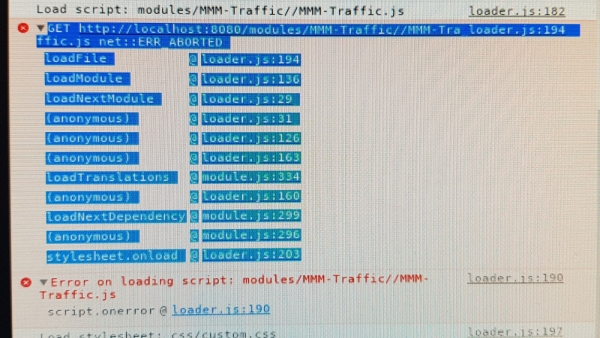
If you need the log Files please let me know.
Thank you in advance again
Lars
Hello,
I have some problems wird the module MMM-Traffic.
I installed it and in my config.js file I inserted the following example config from the git hub site https://github.com/SamLewis0602/MMM-Traffic
{
	module: 'MMM-Traffic',
	position: 'top_left',
	classes: 'dimmed medium', //optional, default is 'bright medium', only applies to commute info not route_name
	config: {
		api_key: 'your_apikey_here',
		mode: 'driving',
		origin: '4 Pennsylvania Plaza, New York, NY 10001',
		destination: '1 MetLife Stadium Dr, East Rutherford, NJ 07073',
		mon_destination: '116th St & Broadway, New York, NY 10027',
		fri_destination: '1 E 161st St, Bronx, NY 10451',
		arrival_time: '0800', //optional, but needs to be in 24 hour time if used.
		route_name: 'Home to Work',
		changeColor: true,
		showGreen: false,
		limitYellow: 5, //Greater than 5% of journey time due to traffic
		limitRed: 20, //Greater than 20% of journey time due to traffic
		traffic_model: 'pessimistic',
		interval: 120000 //2 minutes
	}
},
I added my API-Key from Google Maps Directions API. I use the “Directions API” from the Google Cloud Platform.
So, when I start my MM, there are no Informations from this module.
I have installed the MMM-GoogleMapsTraffic too. In this module I am using the “Maps JavaScript API”. And this module work fine. But this API doesn´t work with the module MMM-Traffic.
I am not sure, if I use the correct API. Maybe there is another problem.
Unfortunately, I do not remember what else I can do.
It would be great if anyone of you could help me.
Thank you in advance.
Lars
I tried both. …disable-gpu unfortunately does not not bring any improvement. So I took OpenGL out of the equation and it works.
Thank you for your advice. I will try it on Monday
Re: [RasPi2] Application not starting when OpenGL is enabled
I have the same problem as described above. The MM does not start.
> sh run-start.sh

libGL error: MESA-LOADER: failed to retrieve device information
MESA-LOADER: failed to retrieve device information
MESA-LOADER: failed to retrieve device information
Starting MagicMirror: v2.5.0
Loading config ...
Loading module helpers ...
No helper found for module: alert.
Initializing new module helper ...
Module helper loaded: updatenotification
No helper found for module: clock.
Initializing new module helper ...
Module helper loaded: calendar
No helper found for module: compliments.
No helper found for module: currentweather.
No helper found for module: weatherforecast.
Initializing new module helper ...
Module helper loaded: newsfeed
All module helpers loaded.
Starting server on port 8080 ...
Server started ...
Connecting socket for: updatenotification
Connecting socket for: calendar
Starting node helper for: calendar
Connecting socket for: newsfeed
Starting module: newsfeed
Sockets connected & modules started ...
Launching application.
And I have not a PIR Module installed too. The MM is absolute new installed and still nothing configured.
Does anyone have an idea why it does not start?
Thank you in advance
My Monitor has a DVI Interface, so I am using an hdmi dvi adapter. Could it be that? What could I do to rotate with DVI?
I tried it without the switch. But unfortunately it still doesn´t work.
Yes, that´s it.
Thank your for this great tip.
Hello,
I have an problem with the standard calendar.
The calendar should show only the beginning times of the appointments. But the calendar shows the beginning and end time of the appointments.
I configured my calendar like this
{^M
                        module: 'calendar',^M
                        header: 'Kalender',^M
                        position: 'top_left',^M
                        config: {^M
                                timeFormat: 'absolute', ^M
                                urgency: 0,^M
                                maxTitleLength: 15,
                                dateFormat: "dd, DD. MMM HH:mm",
                                fullDayEventDateFormat: "dd, DD MMM",
                                getRelative: 0, ^M
                                calendars: [^M
                                        {^M
                                                symbol: 'calendar-check-o ',^M
                                                url: 'https://calendar.google.com/calendar/ical/XXXXXXXX.ics'^M
                                        },^M
                                        {^M
                                        url: 'https://calendar.google.com/calendar/ical/XXXXXXXXXX.ics'^M
                                        }^M
I would be very grateful if someone could help me.
Thank you in advance.
Lars
Hello, I installed the latest version of MM.
My problem, i cannot rotate my screen. I followed the wiki manual von MichMich.
I added the following two lines to /boot/config.txt
#Enable the Open GL driver to decrease Electron's CPU usage
dtoverlay=vc4-kms-v3d
and I added the following line to ~/.config/lxsession/LXDE-pi/autostart
@xrandr --output HDMI-1 --rotate right
But the screen does not rotate.
Could it be a problem, that there is a Monitor/USB Switch between the raspberry and the monitor?
I would be very grateful if someone could help me.
Thank you in advance.
Lars
@raywo
Thank you. Now it can be configured by someone like me ;-)
Damn it! So a Layer 8 problem ;-) Now it works. Thank you, for your quick help.