@angeliKITTYx The module works fine for me. Error code 500 indicates an error on the API. You can’t do anything about that. Do you use the latest version of the module? There was an update two weeks ago.
 K
Online
K
Online
A New Chapter for MagicMirror: The Community Takes the Lead
Read the statement by Michael Teeuw here.
Read the statement by Michael Teeuw here.
Posts
-
RE: [MMM-OnThisDayWikiApi] - Get Wikipedia's OnThisDay using the Wikimedia API
-
RE: Introducing MMM-YouTubeWebView Module
if you open the developers window console tab view, do you see any errors. this module is all in browser
Unfortunately, I can’t see any errors there.
Initializing MagicMirror². translator.js:122 Loading core translation file: translations/en.json VM4 sandbox_bundle:2 Electron Security Warning (Insecure Content-Security-Policy) This renderer process has either no Content Security Policy set or a policy with "unsafe-eval" enabled. This exposes users of this app to unnecessary security risks. For more information and help, consult https://electronjs.org/docs/tutorial/security. This warning will not show up once the app is packaged. warnAboutInsecureCSP @ VM4 sandbox_bundle:2 translator.js:138 Loading core translation fallback file: translations/en.json loader.js:165 Load script: modules/default/clock/clock.js module.js:484 Module registered: clock loader.js:138 Bootstrapping module: clock loader.js:165 Load script: vendor/node_modules/moment/min/moment-with-locales.js loader.js:165 Load script: vendor/node_modules/moment-timezone/builds/moment-timezone-with-data.js loader.js:165 Load script: vendor/node_modules/suncalc/suncalc.js loader.js:142 Scripts loaded for: clock loader.js:180 Load stylesheet: modules/default/clock/clock_styles.css loader.js:145 Styles loaded for: clock loader.js:148 Translations loaded for: clock loader.js:165 Load script: modules/MMM-YouTubeWebView/MMM-YouTubeWebView.js module.js:484 Module registered: MMM-YouTubeWebView loader.js:138 Bootstrapping module: MMM-YouTubeWebView loader.js:142 Scripts loaded for: MMM-YouTubeWebView loader.js:145 Styles loaded for: MMM-YouTubeWebView loader.js:148 Translations loaded for: MMM-YouTubeWebView loader.js:180 Load stylesheet: css/custom.css clock.js:49 Starting module: clock module.js:45 Starting module: MMM-YouTubeWebView main.js:608 All modules started! -
RE: Introducing MMM-YouTubeWebView Module
Hi @doctorwhen! Thanks for this module! :-)
I tried to get it to run, but it just doesn’t. I don’t get an error message, just a black screen. I am using node version 18 and the latest version of MagicMirror.
Does the module work for you (or for someone else) with current versions?
That’s my config:
{ module: "MMM-YouTubeWebView", position: "middle_center", config: { video_id: "w3jLJU7DT5E", video_list: [ "CtVyl402W5s", "wmUVy43tqw4", "J_TxPQKcG7w", "avWZsKyuRVE", "IpkIGGJMHBA", "B9zgwx6mhrk", "6KvTDeHlIfI" ], autoplay: true, controls: true, loop: true, modestbranding: true, width: "800px", height: "450px" } } -
RE: Calendar module not showing events (fetch error)
It could also be that node is too old. Check whether you have node 18 or newer with:
node -v -
RE: MMM-NHL displays 'Loading'
The maintainer is working on implementing the new API: https://github.com/fewieden/MMM-NHL/pull/51
So I see two options for you:
- be patient and wait for it to be completed.
- switch to the develop branch and test the new implementation. But don’t forget to switch back to the master branch later.
-
RE: Module list updates since the beginning of November
@RaspiManu There is currently no other way than to insert a screenshot into the code’s branch. There are ideas to solve it differently (like extending the package.json with a URL to the screenshot), but I won’t be able to implement it in the near future. PRs would be of course very welcome :-)
-
RE: Module list updates since the beginning of November
@UncleRoger Thanks! There are two newer forks, but I can`t get them run. I mark the module as outdated for now.
-
RE: Module list updates since the beginning of November
@mumblebaj Cool.
I’ve updated the data. Your modules look now like this:
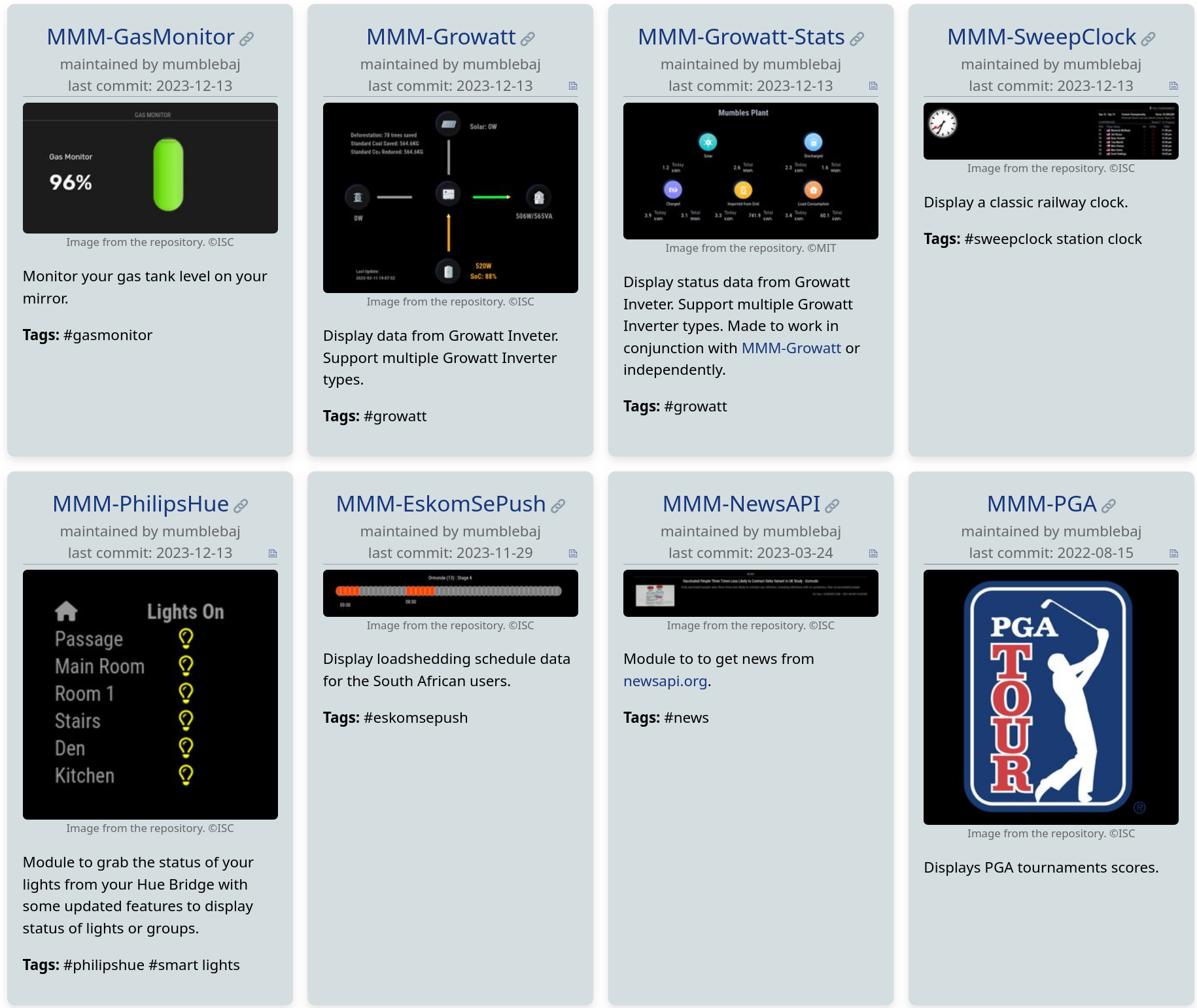
A screenshot for MMM-PGA would be nice :smiley:
-
RE: Module list updates since the beginning of November
@mumblebaj Sure :slightly_smiling_face: I have included a brief explanation of this in the README.
If there are several images in your repository, one image is selected according to the following logic: First search for an image that contains 'screenshot' or 'example' in it's name and if none is found, take the first image that is found. -
Module list updates since the beginning of November
Many changes have been made to the official module list since the beginning of November. I have created an overview for this. Since not everyone regularly follows the changes to the list, such an overview may be helpful for some of you.
I don’t know yet if I will create a new list in the future and even maybe automate the process a bit. I am quite up to date of the changes as I am working on a new unofficial module list which is based on the official list.
These are the changes from November 2 to December 12. The list may be incomplete, as a part was a little manual work.
New in the list
Check out these new modules:
- MMM-CalendarExt3Journal - https://github.com/MMRIZE/MMM-CalendarExt3Journal
- MMM-CivitAI - https://github.com/Andoramb/MMM-CivitAI
- MMM-CustomMessage - https://github.com/jpcaldwell30/MMM-CustomMessage
- MMM-DropboxPictures - https://github.com/MMRIZE/MMM-DropboxPictures
- MMM-EnvCanada - https://github.com/CharlesMorris78/MMM-EnvCanada
- MMM-EskomSePush - https://github.com/mumblebaj/MMM-EskomSePush
- MMM-FearAndGreedIndex - https://github.com/Pip1405/MMM-FearAndGreedIndex
- MMM-GasMonitor - https://github.com/mumblebaj/MMM-GasMonitor
- MMM-GoogleTasks - https://github.com/spydersoft-consulting/MMM-GoogleTasks
- MMM-Growatt - https://github.com/mumblebaj/MMM-Growatt
- MMM-Growatt-Stats - https://github.com/mumblebaj/MMM-Growatt-Stats
- MMM-HebrewCalendar - https://github.com/neshkoli/MMM-HebrewCalendar
- MMM-MailMessage - https://github.com/Unclearogre/MMM-MailMessage
- mmm-dropbox - https://github.com/michael5r/mmm-dropbox
- MMm-MinecraftServer - https://github.com/ItsMeBrille/MMm-MinecraftServer
- MMM-MonthlyCalendar - https://github.com/kolbyjack/MMM-MonthlyCalendar
- MMM-mycroft-bridge - https://github.com/oenstrom/MMM-mycroft-bridge
- MMM-MyMonthlyCalendar - https://github.com/htilburgs/MMM-MyMonthlyCalendar
- MMM-MyPrayerTimes - https://github.com/htilburgs/MMM-MyPrayerTimes
- MMM-ProxyImage - https://github.com/daxiang28/MMM-ProxyImage
- MMM-Pure-Snow - https://github.com/ptornhult/MMM-Pure-Snow
- MMM-QR-Remote-Link - https://github.com/JasonVonKrueger/MMM-QR-Remote-Link
- MMM-SleepWake - https://github.com/sdetweil/MMM-SleepWake
- MMM-stoic-quotes - https://github.com/pal-thomassen/MMM-stoic-quotes
- MMM-Tankerkoenig - https://github.com/wiesty/MMM-Tankerkoenig
- MMM-RTSPtoWeb - https://github.com/shbatm/MMM-RTSPtoWeb
- MMM-WetterOnline - https://github.com/bogenpirat/MMM-WetterOnline
- MMM-wundergroundBar - https://github.com/Fifteen15Studios/MMM-wundergroundBar
Maintainer changed
If you use one of this modules, you should consider to switch to the new repository.
- MMM-BMWConnected - https://github.com/jannekalliola/MMM-BMWConnected
- MMM-Callmonitor-Current-Call - https://github.com/armybean/MMM-Callmonitor-Current-Call
- DWD-RealtimeIrishRail - https://github.com/DavidLSmyth/DWD-RealtimeIrishRail
- MMM-EasyPix - https://github.com/KristjanESPERANTO/MMM-EasyPix
- MMM-EveryNews - https://github.com/themox/MMM-EveryNews
- MMM-ISS-Live" - https://github.com/KristjanESPERANTO/MMM-ISS-Live
- MMM-jokes - https://github.com/aegis1980/MMM-jokes
- MMM-PetFinder - https://github.com/PhantomOffKanagawa/MMM-PetFinder
- MMM-PGA - https://github.com/mumblebaj/MMM-PGA
- MMM-RNV - https://github.com/bogenpirat/MMM-RNV
- MMM-UKLiveBusStopInfo - https://github.com/AndyHazz/MMM-UKLiveBusStopInfo
- MMM-UKNationalRail - https://github.com/mattdy/MMM-UKNationalRail
Marked as outdated
If you use one of these modules, consider looking for an alternative or adopting the module as a maintainer.
- MMM-BMW-CC - https://github.com/mykle1/MMM-BMW-CC - Abandoned. The API endpoint changed. This module needs updated, but the author is inactive.
- MMM-BMW-DS - https://github.com/mykle1/MMM-BMW-DS - Deprecated. DarkSky API no longer works since 2023-03-31.
- MMM-Census - https://github.com/mykle1/MMM-Census - Abandoned. The API endpoint changed. There is a PR to fix that, but the author is inactiv.
- MMM-Covid19-Vaccination - https://github.com/fhinder/MMM-Covid19-Vaccination - Obsolete, no new data since 2022-04-27.
- MMM-covid19uk-stats - https://github.com/blighter/MMM-covid19uk-stats - Obsolete, no new data since 2022-05-20.
- MMM-darksky-hourly - https://github.com/jacquesCedric/MMM-darksky-hourly - Deprecated. DarkSky API no longer works since 2023-03-31.
- MMM-DarkSky24Hours - https://github.com/thobach/MMM-DarkSky24Hours - Deprecated. DarkSky API no longer works since 2023-03-31.
- MMM-DarkSkyForecast - https://github.com/jclarke0000/MMM-DarkSkyForecast - Deprecated. DarkSky API no longer works since 2023-03-31.
- MMM-DarkSkyRadar - https://github.com/vincep5/MMM-DarkSkyRada - Deprecated. DarkSky API no longer works since 2023-03-31.
- MMM-Discogs - https://github.com/mboskamp/MMM-Discogs - Abandoned. Repo has been archived at 2022-08-26.
- MMM-DropboxWallpaper - https://github.com/Mong-ni/MMM-DropboxWallpaper - Successor is MMM-DropboxPictures.
- MMM-EARTH-Live - https://github.com/mykle1/MMM-EARTH-Live - Abandoned. The URL to fetch the video dooesn’t work anymore. The author is inactive.
- MMM-Earthquake - https://github.com/mykle1/MMM-Earthquake - Deprecated. API is disabled.
- MMM-Events - https://github.com/mykle1/MMM-Events - Deprecated. Eventful API discontinued. This module needs updated.
- MMM-GPSWeather - https://github.com/mochman/MMM-GPSWeather - Abandoned. Repo has been archived at 2022-02-27.
- iFrame - https://github.com/desertblade/iFrame - Abandoned. Repo has been archived at 2019-03-08.
- MMM-json-feed - https://github.com/amcolash/MMM-json-feed - Deprecated. Repo has been archived at 2020-08-03.
- MMM-LICE - https://github.com/mykle1/MMM-LICE - Abandoned. No reactions to issues since years. Missing instructions to install ‘request’.
- MMM-Lunartic - https://github.com/mykle1/MMM-Lunartic - Deprecated. Doesn’t work anymore (API is down).
- MagicMirror-Olympia-Module - https://github.com/GHLasse/MagicMirror-Olympia-Module - Outdated: Only works for Rio 2016 Summer Olympics.
- mm-music-player - https://github.com/masters1222/mm-music-player - Abandoned. No reactions to issues since years. No installation instructions. It no longer seems to work.
- mmm-food2fork-recipes - https://github.com/spectroman/mmm-food2fork-recipes - Deprecated. food2fork API isn’t reachable anymore.
- motiondetector - https://github.com/alexyak/motiondetector - Abandoned. No reactions to issues since years. No installation instructions.
- MMM-NJTransit - https://github.com/dimitrystd/MMM-NJTransit - Deprecated. Old API doesn’t work anymore. There is a new API, but it’s not clear if keys are available. 2023-12-01
- MMM-OneTracker - https://github.com/seeshaughnessy/MMM-OneTracker - Deprecated. Module doesn’t work without workaround (
npm install node-fetch@2) and author doesn’t work on it anymore. Maybe he would react to a PR. Status as of 2023-12-03. - MMM-PIR - https://github.com/mboskamp/MMM-PIR - Abandoned. Repo has been archived at 2022-08-26.
- MMM-PLOW - https://github.com/mykle1/MMM-PLOW - Deprecated. DarkSky API no longer works since 2023-03-31.
- MMM-Pull - https://github.com/mboskamp/MMM-Pull - Abandoned. Repo has been archived at 2022-08-26.
- MMM-RKI-Covid19 - https://github.com/fhinder/MMM-RKI-Covid19 - Obsolete, no new data.
- MMM-Ruter - https://github.com/CatoAntonsen/MMM-Ruter - Abandoned. Repo has been archived at 2019-03-14. See MMM-Entur-tavle instead.
- MMM-Scenes - https://github.com/MMRIZE/MMM-Scenes - Deprecated. The successor is MMM-Scenes2.
- MMM-WeatherOrNot - https://github.com/mykle1/MMM-WeatherOrNot - Deprecated. DarkSky API no longer works since 2023-03-31.
-
RE: MMM-MagicReplicator
Nice. Don’t forget to add it to the modules list: https://github.com/MichMich/MagicMirror/wiki/3rd-party-modules :smiley:
-
RE: MMM-Carousel; Two of the Same Module?
@JeffreyDaro The carouselId has to be in the config part. Like this:
{ module: "calendar", position: "top_right", config: { carouselId: "cal1", ... } }, { module: "calendar", position: "top_right", config: { carouselId: "cal2", ... } }, -
RE: MMM-Carousel; Two of the Same Module?
@JeffreyDaro That’s possible with MMM-Carousel. Look for
carouselIdin the README file :-) -
RE: Automatic checking of all MagicMirror² modules
@karsten13 said in Automatic checking of all MagicMirror² modules:
did you try to authenticate with a user before making the api requests?
No, I didn’t. Thanks for the hint! I’ll try that! The documentation sounds promising:
Additionally, you can make more requests per hour when you are authenticated.
-
RE: Automatic checking of all MagicMirror² modules
@MZ-BER said in Automatic checking of all MagicMirror² modules:
Great work @KristjanESPERANTO. Really, really like this. Is there a way to also publish the github stars and # of forks? I also would love if there is a way to “like” a module.
Thank you for your appreciation! :-)
karsten13 has already suggested the GitHub API and I have tested it, but if you make requests for 1000 modules you’ll got blocked quickly. I haven’t found another good approach yet.
@MMRIZE said in Automatic checking of all MagicMirror² modules:
I suggest you and the community expand package.json to regularise the details of the module. (recommended but optional)
Storing additional data in the package.json is an interesting idea! But I would like to avoid maintaining data redundantly. So before we tackle this, it would be good to have an overview of the data that is already used for the website and where it is taken from. Plus an additional list of data that is still needed, ideally with ideas on how to collect it. What’s not easy to implement could perhaps be addressed by extending the packge.json.
@mumblebaj said in Automatic checking of all MagicMirror² modules:
My MMM-SweepClock doesn’t have a package.json either as all work done in the MMM-SweepClock.js file. I can add one for completeness and conformity. I also notice I did not have an image. I usually name my images image-1.png etc. so the main image is generally the first one.
At the moment the script has no other source for keywords and the license. And without the license information no image will be taken. If you want an image to be displayed on the website, you would have to specify a free license in the package.json.
@sdetweil said in Automatic checking of all MagicMirror² modules:
my MMM-SleepWake module does not have any UI… so there is no photo…
There is no obligation for an image. But perhaps it would be nice to use an icon that symbolizes motion detection instead of a screenshot. Like this maybe: https://openclipart.org/detail/306403/motion-detection?
-
RE: Automatic checking of all MagicMirror² modules
@sdetweil said in Automatic checking of all MagicMirror² modules:
@KristjanESPERANTO and, this impacts my scripts as i use package.json as the indicator for doing an npm install in the module folder.
There are some modules that only have devDependencies, so your script already makes unnecessary
npm installcalls. Can you adjust your trigger and check whether dependencies are set in the package.json? -
RE: Automatic checking of all MagicMirror² modules
@Jalibu said in Automatic checking of all MagicMirror² modules:
Hi @KristjanESPERANTO does it expect the example.png in a specific folder (such as img/ or /) or can it also lookup in docs/?
No, you can put it where ever you want :-)
-
RE: Automatic checking of all MagicMirror² modules
I thought “This” doesn’t fit so well because the sentence is on the page with the issues and not on the page of the modules where the keywords are used. Is the following issue messages less awkward? Do you have another idea?
There are no keywords in 'package.json'. We would use them as tags on the module list page.There is no 'package.json'. We need this file to gather information about the module for the module list page. -
RE: Automatic checking of all MagicMirror² modules
@BKeyport Sorry, I tend to use the logic of my native language in my English sentences 😅