MagicMirror Forum
    • Recent
    • Tags
    • Unsolved
    • Solved
    • MagicMirror² Repository
    • Documentation
    • 3rd-Party-Modules
    • Donate
    • Discord
    • Register
    • Login
    1. Home
    2. lkthomas
    3. Posts
    A New Chapter for MagicMirror: The Community Takes the Lead
    Read the statement by Michael Teeuw here.
    L
    Offline
    • Profile
    • Following 0
    • Followers 0
    • Topics 11
    • Posts 30
    • Groups 0

    Posts

    Recent Best Controversial
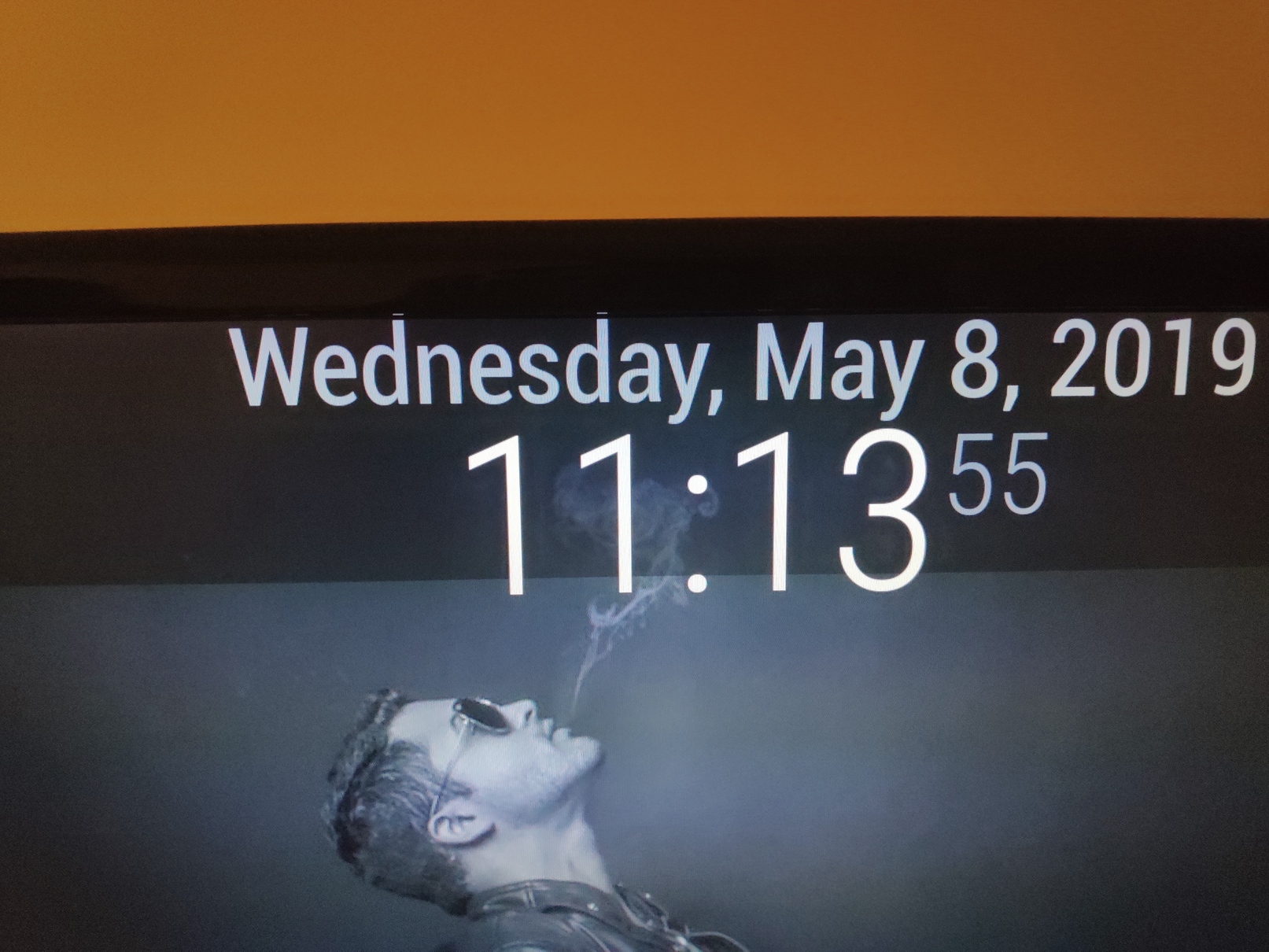
    • shade don't align with clock

      0_1557328664068_abc.jpg

       body {
          margin: 0px;
          position: absolute;
          height: 100%;
          width: 100%;
          background-color: #cccccc;
       }
      
      .clock .bright {
      font-size: 120px;
      }
      
      .clock .date {
      font-size: 55px;
      padding-bottom: 30px;
      padding-top: 5px;
      }
      
      
      .wi.dimmed.wi-sunset {
      color: orange;
      }
      .wi.dimmed.wi-sunrise {
      color: yellow;
      }
      
      
      .module {
              background-color:rgba(0,0,0,0.6);
              zoom: 185%;
      }


      As you could see “11:13” leg seems not covered by shade; Only top bar module having this issue, everything else is fine, how could I fix it?

      posted in Custom CSS
      L
      lkthomas
    • RE: how to adjust brightness based on time on RPi3?

      all good! thanks, I missed the dependencies installation section.

      posted in Troubleshooting
      L
      lkthomas
    • RE: how to adjust brightness based on time on RPi3?

      @ianperrin just tested, dimlevel at 20 and 80 also show black screen

      posted in Troubleshooting
      L
      lkthomas
    • align two modules height
                          module: "currentweather",
                          position: "bottom_left",
      
                          module: "weatherforecast",
                          position: "bottom_right",
      

      How could I align both modules height?

      posted in Troubleshooting
      L
      lkthomas
    • RE: how to adjust brightness based on time on RPi3?

      @sean

      pi@raspberrypi:~/MagicMirror/config $ xbacklight
      RANDR Query Version returned error -1

      no, doesn’t work in RPi3

      posted in Troubleshooting
      L
      lkthomas
    • how to adjust brightness based on time on RPi3?

      I want to adjust brightness to 100% during day time and 20% at night, how could I do that with RPi3?

      posted in Troubleshooting
      L
      lkthomas
    • MMM-WeatherBackground question

      if I am using currentweather (openweathermap) as the source, what keywords should I use on Collections?

      posted in Troubleshooting
      L
      lkthomas
    • RE: first installation on RPi3 failed

      looking okay after reboot, thanks

      posted in Troubleshooting
      L
      lkthomas
    • RE: first installation on RPi3 failed

      @lavolp3 said in first installation on RPi3 failed:

      n stable

      doesn’t help:

      pi@raspberrypi:~/MagicMirror $ sudo npm install -g npm@latest
      (node:6358) [DEP0022] DeprecationWarning: os.tmpDir() is deprecated. Use os.tmpdir() instead.
      npm WARN package.json path-is-inside@1.0.2 No README data
      npm WARN package.json sorted-object@2.0.1 No README data
      npm WARN package.json config-chain@1.1.12 No license field.
      npm WARN package.json cyclist@0.2.2 No license field.
      npm WARN package.json json-schema@0.2.3 No license field.
      npm WARN package.json punycode@1.4.1 punycode is also the name of a node core module.
      npm WARN package.json qrcode-terminal@0.12.0 No license field.
      npm WARN package.json string_decoder@1.1.1 string_decoder is also the name of a node core module.
      /usr/local/bin/npm -> /usr/local/lib/node_modules/npm/bin/npm-cli.js
      /usr/local/bin/npx -> /usr/local/lib/node_modules/npm/bin/npx-cli.js
      npm@6.5.0 /usr/local/lib/node_modules/npm

      pi@raspberrypi:~/MagicMirror $ sudo npm install -g n
      /usr/bin/n -> /usr/lib/node_modules/n/bin/n

      • n@2.1.12
        added 1 package from 4 contributors in 1.974s
        pi@raspberrypi:~/MagicMirror $ sudo n stable

        install : node-v11.6.0
        mkdir : /usr/local/n/versions/node/11.6.0
        fetch : https://nodejs.org/dist/v11.6.0/node-v11.6.0-linux-armv7l.tar.gz
        ######################################################################## 100.0%
        installed : v11.6.0

      pi@raspberrypi:~/MagicMirror $ npm install
      (node:6481) [DEP0022] DeprecationWarning: os.tmpDir() is deprecated. Use os.tmpdir() instead.
      npm WARN package.json current-week-number@1.0.7 license should be a valid SPDX license expression
      npm WARN package.json rrule-alt@2.2.8 No license field.
      npm WARN package.json valid-url@1.0.9 No license field.
      npm WARN deprecated time-grunt@2.0.0: Deprecated because Grunt is practically unmaintained. Move on to something better. This package will continue to work with Grunt v1, but it will not receive any updates.
      npm ERR! Error: Method Not Allowed
      npm ERR! at errorResponse (/usr/share/npm/lib/cache/add-named.js:260:10)
      npm ERR! at /usr/share/npm/lib/cache/add-named.js:203:12
      npm ERR! at saved (/usr/share/npm/node_modules/npm-registry-client/lib/get.js:167:7)
      npm ERR! at FSReqWrap.oncomplete (fs.js:135:15)
      npm ERR! If you need help, you may report this entire log,
      npm ERR! including the npm and node versions, at:
      npm ERR! http://github.com/npm/npm/issues

      npm ERR! System Linux 4.14.79-v7+
      npm ERR! command “/usr/bin/node” “/usr/bin/npm” “install”
      npm ERR! cwd /home/pi/MagicMirror
      npm ERR! node -v v8.11.1
      npm ERR! npm -v 1.4.21
      npm ERR! code E405
      npm ERR!
      npm ERR! Additional logging details can be found in:
      npm ERR! /home/pi/MagicMirror/npm-debug.log
      npm ERR! not ok code 0
      posted in Troubleshooting
      L
      lkthomas
    • first installation on RPi3 failed

      Folks, this is my first time to install MM, and I never had any prior experience on this.
      This is the error I am getting, anyone have idea why?

      pi@raspberrypi:~/MagicMirror $ npm install
      (node:6315) [DEP0022] DeprecationWarning: os.tmpDir() is deprecated. Use os.tmpdir() instead.
      npm WARN package.json current-week-number@1.0.7 license should be a valid SPDX license expression
      npm WARN package.json rrule-alt@2.2.8 No license field.
      npm WARN package.json valid-url@1.0.9 No license field.
      npm WARN deprecated time-grunt@2.0.0: Deprecated because Grunt is practically unmaintained. Move on to something better. This package will continue to work with Grunt v1, but it will not receive any updates.
      npm ERR! Error: Method Not Allowed
      npm ERR! at errorResponse (/usr/share/npm/lib/cache/add-named.js:260:10)
      npm ERR! at /usr/share/npm/lib/cache/add-named.js:203:12
      npm ERR! at saved (/usr/share/npm/node_modules/npm-registry-client/lib/get.js:167:7)
      npm ERR! at FSReqWrap.oncomplete (fs.js:135:15)
      npm ERR! If you need help, you may report this entire log,
      npm ERR! including the npm and node versions, at:
      npm ERR! http://github.com/npm/npm/issues

      npm ERR! System Linux 4.14.79-v7+
      npm ERR! command “/usr/bin/node” “/usr/bin/npm” “install”
      npm ERR! cwd /home/pi/MagicMirror
      npm ERR! node -v v8.11.1
      npm ERR! npm -v 1.4.21
      npm ERR! code E405
      npm ERR!
      npm ERR! Additional logging details can be found in:
      npm ERR! /home/pi/MagicMirror/npm-debug.log
      npm ERR! not ok code 0

      posted in Troubleshooting
      L
      lkthomas
    • 1 / 1