@sdetweil I am using RPi 3B+
L
Offline
A New Chapter for MagicMirror: The Community Takes the Lead
Read the statement by Michael Teeuw here.
Read the statement by Michael Teeuw here.
Posts
-
RE: suddenly the screen can't turn on
@MyMirror I got the same issue using FKMS with “vcgencmd display_power 1” command, it got blank screen after 2 seconds of showing the object on the monitor
-
RE: suddenly the screen can't turn on
@MyMirror testing now, but isn’t fkms deprecated already?
-
RE: suddenly the screen can't turn on
@sdetweil yes, it failed even before upgrading the OS, it’s not “upgrading”, it’s a fresh install
-
RE: suddenly the screen can't turn on
@sdetweil nope, I was using a 3 years old OS, so I did an upgrade to latest version of the OS on my RPi 3B+, problem still the same.
-
suddenly the screen can't turn on
I am using the following command to turn off and on the screen at the scheduled time, it has been working fine for years until the last few weeks, the screen will be on using --auto command but its blank, if I quickly do the --off again, wait until the screen go to sleep mode itself and run --auto, the screen will start without issue, since this problem is unpredictable, would it caused by hardware issue? would it be the cable or the screen?
export DISPLAY=:0 && xrandr --output HDMI-1 --off
export DISPLAY=:0 && xrandr --output HDMI-1 --auto -
RE: where is that "{DEGREE}" coming from?
@sdetweil I will have a look when I have time, for now, I just removed {DEGREE} string from en.json and called it a day, thanks.
-
RE: where is that "{DEGREE}" coming from?
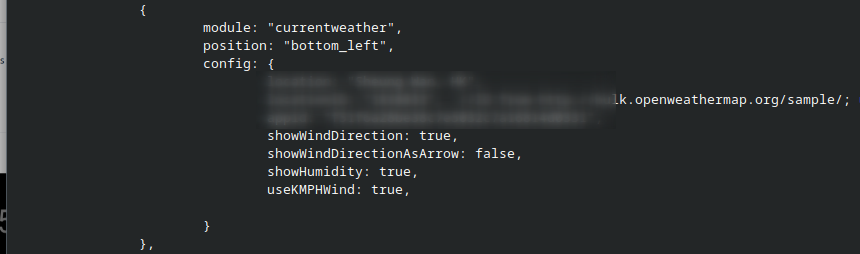
( I masked my location)
That’s my config, I copy from my old config which uses “currentweather”, and if I use “weather”, the bottom left widget will keep “Loading” and nothing appears.
-
RE: where is that "{DEGREE}" coming from?
@sdetweil should be English, how could I check?
-
RE: where is that "{DEGREE}" coming from?
@sdetweil Thanks but is this a glitch or I miss some config?
-
where is that "{DEGREE}" coming from?
module: “currentweather” is very strange on a fresh deployment,
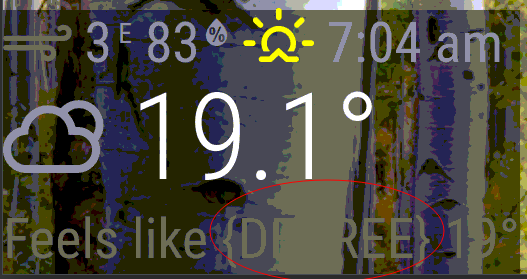
(Sorry for the color distortion, it’s normal as I took the screenshot from VNC which reduced the picture quality)
Question: how could I get rid of that “{DEGREE}” string?
-
From JSON to display on MM
I am very new to building my own module, I have a special bus ETA data which, I want to display it on MM; Here are the specs,
- JSON is downloaded from a fixed URL
- refresh data every 30 seconds
- display module on specific period (e.g in the morning)
- data_timestamp need to filter and get the closest time in relative to current time (You will see what I mean from the JSON sample below)
Question:
- which module should I use as an example for JSON iteration?
- How could I filter the closest timestamp with current time then display it in minute on MM?
Remark: Sample code doesn’t always come back with 3 sub-section
Sample code:
{
“type”: “ETA”,
“version”: “1.1”,
“generated_timestamp”: “2023-01-12T10:44:01+08:00”,
“data”: [
{
“co”: “NWFB”,
“route”: “26”,
“dir”: “O”,
“seq”: 20,
“stop”: “002759”,
“dest_tc”: “勵德邨”,
“dest_en”: “Lai Tak Tsuen”,
“eta”: “2023-01-12T10:53:43+08:00”,
“rmk_tc”: “”,
“eta_seq”: 1,
“dest_sc”: “励德邨”,
“rmk_en”: “”,
“rmk_sc”: “”,
“data_timestamp”: “2023-01-12T10:43:03+08:00”
},
{
“co”: “NWFB”,
“route”: “26”,
“dir”: “O”,
“seq”: 20,
“stop”: “002759”,
“dest_tc”: “勵德邨”,
“dest_en”: “Lai Tak Tsuen”,
“eta”: “2023-01-12T11:08:56+08:00”,
“rmk_tc”: “”,
“eta_seq”: 2,
“dest_sc”: “励德邨”,
“rmk_en”: “”,
“rmk_sc”: “”,
“data_timestamp”: “2023-01-12T10:43:03+08:00”
},
{
“co”: “NWFB”,
“route”: “26”,
“dir”: “O”,
“seq”: 20,
“stop”: “002759”,
“dest_tc”: “勵德邨”,
“dest_en”: “Lai Tak Tsuen”,
“eta”: “2023-01-12T11:29:05+08:00”,
“rmk_tc”: “”,
“eta_seq”: 3,
“dest_sc”: “励德邨”,
“rmk_en”: “”,
“rmk_sc”: “”,
“data_timestamp”: “2023-01-12T10:43:03+08:00”
}
]
} -
RE: remove a module forever after a specific date and time
@fozi I have a countdown to some event that is a one-off in my life, so after that date in a specific year (which cron can’t do a specific year), then that module will need to remove forever.
-
remove a module forever after a specific date and time
How could I remove a module forever after a specific date, month, year, time?
For example: 01-09-2021 01:00:00
MMM-ModuleScheduler seems unable to deal with “use once” scenario
-
RE: Sweeping second hand on the clock?
I didn’t ask for second hand to change color, I am actually asking if the second hand could “Sweep” and not tick in 1 second interval
-
Sweeping second hand on the clock?
Is that possible to have a sweeping second hand like a mechanical watch on the built-in clock dial?
-
MMM-cryptocurrency ETHBTC price?
is that possible to display ETHBTC with MMM-cryptocurrency?
Link: https://github.com/matteodanelli/MMM-cryptocurrency -
RE: shade don't align with clock
.clock .bright {
font-size: 120px;
padding-bottom: 20px;
}fixed!