MagicMirror Forum
    • Recent
    • Tags
    • Unsolved
    • Solved
    • MagicMirror² Repository
    • Documentation
    • 3rd-Party-Modules
    • Donate
    • Discord
    • Register
    • Login
    • Profile
    • Following 1
    • Followers 2
    • Topics 23
    • Posts 153
    • Groups 0
    M Offline
    1. Home
    2. MyMirror
    A New Chapter for MagicMirror: The Community Takes the Lead
    Read the statement by Michael Teeuw here.

    MyMirror

    @MyMirror

    8
    Reputation
    1.8k
    Profile views
    153
    Posts
    2
    Followers
    1
    Following
    Joined
    Last Online

    MyMirror Unfollow Follow
    • RE: Trouble with Wunderlist and/or Todoist - who can help?

      @MyMirror
      Ok … wunderlist does not work … i don’t know why but i get content from todoist :-)

      May i ask another question?
      Is it possible to have more then one account from todoist on my phone to use different tables?
      I want to use one for me, check and want also to give tasks for my children (clean up their rooms and more :-) , and want to share a grocery list with my wife …
      My children should only have their own plan …
      Can you give me an example (if possible)?

      Thanks !!

      posted in Troubleshooting
      M
      MyMirror
    • RE: Raspi turns HDMI after 10 minutes off

      Hi cowboysdude,

      thanks for the hint. After trying (without success) it shows me the way to this autostart:

      /home/pi/.config/lxsession/LXDE-pi/autostart
      Where i have to do the same.
      I got the infos from here: http://www.small-blog.de/raspberry-pi-bildschirmschoner-ausschalten/

      Now it works.
      Thanks

      posted in Troubleshooting
      M
      MyMirror
    • RE: birthdaylist

      @sdetweil
      No, i took your example after getting no output of mine.
      So the only changes are in the config regarding the currentMonthOnly and the max Entries.
      Hmmm :confused_face:

      posted in Requests
      M
      MyMirror
    • RE: Contribute to a module. Volunteers wanted! Easy!

      n307 Hamburg DE Germany

      posted in Troubleshooting
      M
      MyMirror
    • RE: birthdaylist

      @sdetweil
      Many thanks for the adjustments.
      Now it looks good.
      :thumbs_up_medium-light_skin_tone:

      posted in Requests
      M
      MyMirror
    • RE: MMM-MyWastePickup date problem

      @mickecarlsson
      Thanks for your hint.

      i actually had 2 blank lines at the end of the list.
      But nothing changed, no matter if there were 2, 1 or no blank lines at the end of the list (not even after a restart of the MM or of the whole Pi.

      Jens

      posted in Troubleshooting
      M
      MyMirror
    • RE: Looking for a module to display logs in realtime

      @schlomm
      That looks really good !!
      I’ll install it tonight and test it out.
      Thank you very much for your help!

      posted in Requests
      M
      MyMirror
    • RE: Version upgrade from 2.34.0 to 2.36.0 Calendar Probs

      @sdetweil
      Everything’s fine – that’s what I thought.
      That’s why I’ve set out my changes as clearly as possible.
      Thank you very much!

      posted in Troubleshooting
      M
      MyMirror
    • RE: Version upgrade from 2.34.0 to 2.36.0 Calendar Probs

      @sdetweil
      Everything’s fine – that’s what I thought.
      That’s why I’ve set out my changes as clearly as possible.
      Thank you very much!

      posted in Troubleshooting
      M
      MyMirror
    • RE: Version upgrade from 2.34.0 to 2.36.0 Calendar Probs

      @sdetweil
      Thank you very much for the tip.
      But I’ll leave it as it is for now.

      posted in Troubleshooting
      M
      MyMirror
    • RE: Version upgrade from 2.34.0 to 2.36.0 Calendar Probs

      @sdetweil
      Hi Sam, at the end i’ve to change a little bit more:
      I’ve created following folders under modules:

      pi@MM30626:~/MagicMirror/modules $ ls -al calendar/
      total 28
      drwxrwxr-x  3 pi pi  4096 Aug 12 19:34 .
      drwxrwxr-x 31 pi pi  4096 Aug 12 15:31 ..
      -rw-rw-r--  1 pi pi 15565 Jul 26 15:23 abholtermine_gefiltert.ics
      drwxrwxr-x  2 pi pi  4096 Aug 12 19:34 public
      pi@MM30626:~/MagicMirror/modules $ ls -al calendar/public/
      total 48
      drwxrwxr-x 2 pi pi 4096 Aug 12 19:34 .
      drwxrwxr-x 3 pi pi 4096 Aug 12 19:34 ..
      -rw-rw-r-- 1 pi pi 7271 Feb 18  2026 BL.png
      -rw-rw-r-- 1 pi pi 5559 Feb 18  2026 GR.png
      -rw-rw-r-- 1 pi pi 6886 Feb 18  2026 LA.png
      -rw-rw-r-- 1 pi pi 6558 Feb 18  2026 SW.png
      -rw-rw-r-- 1 pi pi 5670 Feb 18  2026 TA.png
      

      As you can see, there is my ics file and a public folder witth my pictures.
      E.g. “BL.png” means blue garbage can for paper, “GR.png” for green waste bin etc.

      The “abholtermine_gefiltert.ics” is a python output 'cause i have to take out some lines.

      This is how my config folder looks like:

      pi@MM30626:~/MagicMirror/config $ ls -al
      total 40
      drwxrwxr-x  2 pi   pi    4096 Aug 27 15:33 .
      drwxrwxr-x 17 pi   pi    4096 Aug 23 10:32 ..
      -rw-rw-r--  1 pi   pi      30 Aug 27 15:24 basepath.js
      -rw-rw-r--  1 pi   pi   18339 Aug 27 15:24 config.js
      -rw-rw-r--  1 pi   pi    2220 Aug 18 15:37 custom.css
      

      The description for the calendar in the config.js:

      		{
      //		siehe im MagicMirrir/css Veerzeichnis die custom.css und Bilder
      			module: "calendar",
      			header: "Mülltermine",
      			position: "top_left",
      			config: {
      					maximumNumberOfDays: 60,
      					maximumEntries: 4,
      					timeFormat:"HH:mm [Uhr]",
      					joiningWord:"um",
      					dateFormat:"DD.MMMM",
      					maximumNumberOfDays:"31",
      					maxTitleLength:"30",
      					customEvents: [
          						{
      							keyword: 'Abfuhr blaue',
      							symbol: '',
      							eventClass: 'muell-blau'
      						},
      						{
      							keyword: 'Abfuhr schwarze',
      							symbol: '',
      							eventClass: 'muell-schwarz'
      						},
      						{
      							keyword: 'Abfuhr grüne',
      							symbol: '',
      							eventClass: 'muell-gruen'
      						},
      						{
      							keyword: 'Problemabfall',
      							symbol: '',
      							eventClass: 'muell-rot'
      						}
      						],
      					coloredSymbolOnly: true,
      					coloredSymbol: true,
      					coloredText: true,
      					columns: true,
      				calendars: [
      					{
      						symbol: 'calendar',	//'calendar',
      						color: '#2e9afe',
      						url: 'webcal://localhost:8080/modules/calendar/abholtermine_gefiltert.ics'
      					}
      				]
      			}
      		},
      

      and my custom.css looks like this:

      /*****************************************************
       * Magic Mirror                                      *
       * Custom CSS                                        *
       *                                                   *
       * By Michael Teeuw http://michaelteeuw.nl           *
       * MIT Licensed.                                     *
       *                                                   *
       * Add any custom CSS below.                         *
       * Changes to this files will be ignored by GIT. *
       *****************************************************/
      
       body {
      
      
      }
      
      /* Gemeinsame Basis für alle Müll-Icons */
      /* =========================================================
         Mülltonnen-Symbole für das Standard Calendar-Modul
         ========================================================= */
      
      /* Standard-Font-Awesome-Symbol ausblenden */
      .calendar .event-wrapper.muell-blau .symbol span,
      .calendar .event-wrapper.muell-schwarz .symbol span,
      .calendar .event-wrapper.muell-gruen .symbol span,
      .calendar .event-wrapper.muell-laub .symbol span {
          display: none;
      }
      
      
      /* Symbol-Zelle der blauen Tonne */
      .calendar .event-wrapper.muell-blau .symbol {
          background-image: url("/modules/calendar/public/BL.png");
          background-repeat: no-repeat;
          background-position: center center;
          background-size: contain;
          width: 40px;
          height: 40px;
      }
      
      
      /* Symbol-Zelle der schwarzen/grauen Tonne */
      .calendar .event-wrapper.muell-schwarz .symbol {
          background-image: url("/modules/calendar/public/SW.png");
          background-repeat: no-repeat;
          background-position: center center;
          background-size: contain;
          width: 40px;
          height: 40px;
      }
      
      
      /* Symbol-Zelle der grünen Tonne */
      .calendar .event-wrapper.muell-gruen .symbol {
          background-image: url("/modules/calendar/public/GR.png");
          background-repeat: no-repeat;
          background-position: center center;
          background-size: contain;
          width: 40px;
          height: 40px;
      }
      
      
      /* Symbol-Zelle der Laubtonne */
      .calendar .event-wrapper.muell-laub .symbol {
          background-image: url("/modules/calendar/public/LA.png");
          background-repeat: no-repeat;
          background-position: center center;
          background-size: contain;
          width: 40px;
          height: 40px;
      }
      

      At the end i have my bins on the screen:
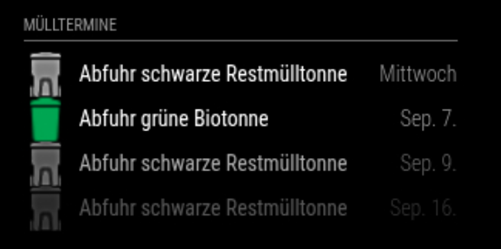
      output.png

      I’m sure there must be a much simpler way, but it took me quite a while to get the result, and that’s what counts in the end. ;-)

      BR
      Jens
      posted in Troubleshooting
      M
      MyMirror
    • RE: Upgrade

      There might also be a minor error in Sam’s restore script here.
      The “MMM-MyWastePickup” directory was the only one that triggered the “folder already exists” error following a fresh installation.

      restoring MMM-MyWastePickup
      module MMM-MyWastePickup contains package.json, doing npm install
      there were files saved for this module , restoring
      
       MMM-MyWastePickup folder already exists, skipping restore from https://github.com/jclarke0000/MMM-MyWastePickup.git 
      
      
      restoring MMM-NearCompliments
      module MMM-NearCompliments contains package.json, doing npm install
      
      posted in Bug Hunt
      M
      MyMirror
    • RE: Upgrade

      Moin (as we say here in Hamburg),
      I’ve just reinstalled my MM using Sam’s “Install MagicMirror²” script. The script displayed and verified Node version 22.22.1.
      I then ran Sam’s upgrade script, which expected Node version 22.22.2 and installed it.
      If that’s how it’s meant to be – everything’s fine.

      pimaster@MM0626:~/MagicMirror $ bash -c  "$(curl -sL https://raw.githubusercontent.com/sdetweil/MagicMirror_scripts/master/upgrade-script.sh)" apply
      update log will be in /home/pimaster/MagicMirror/installers/upgrade.log
      doing test run = false
      Node currently installed. Checking version number.
      Minimum Node version: v22.22.2
      Installed Node version: v22.21.1
      installing correct version of node and npm, please wait
      Check current Node installation ...
      Node currently installed. Checking version number.
      Minimum Node version: v22.21.1
      Installed Node version: v22.22.2
      No Node.js upgrade necessary.
      Check current NPM installation ...
      NPM currently installed. Checking version number.
      Minimum npm version: V10.9.7
      Installed npm version: V10.9.7
      No npm upgrade necessary.
      
      
      local version 2.37.0 already same as master 2.37.0
      moving css contents to config
      
      posted in Bug Hunt
      M
      MyMirror
    • RE: Version upgrade from 2.34.0 to 2.36.0 Calendar Probs

      @KristjanESPERANTO
      Thanks for this answer !
      I’ll wait.

      posted in Troubleshooting
      M
      MyMirror
    • Version upgrade from 2.34.0 to 2.36.0 Calendar Probs

      Hello everyone,
      Since upgrading to MM version 2.36.x, I’ve been having a problem with the display of my images, which are controlled via the calendar.
      I use an ICS file to display the collection times for my various bins on MM.
      Up to version 2.34.x, this worked quite smoothly with a little trick.
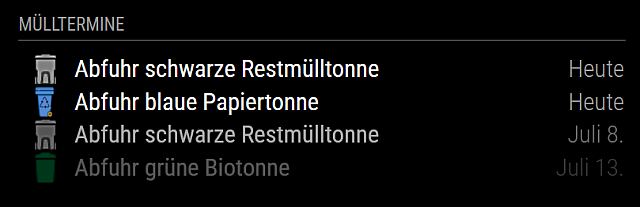
      This is what the display looked like in version 2.34.x (grey, blue, green images):
      Calender1.png

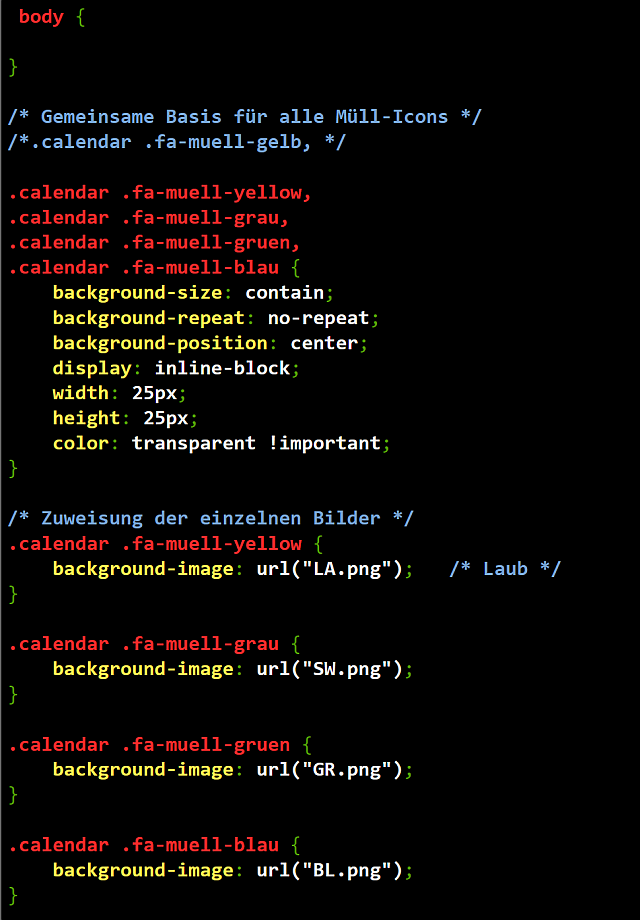
      Here is the custom.css file for the calendar:
      Calender2.png

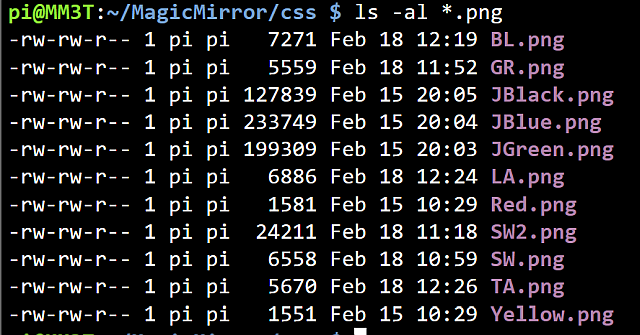
      The names and locations of the pictures:
      Calender3.png

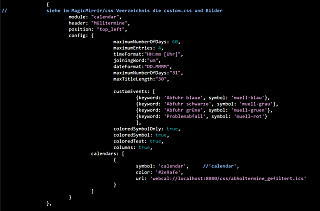
      The excerpt from the config.js file for the calendar module:
      Calender4.png

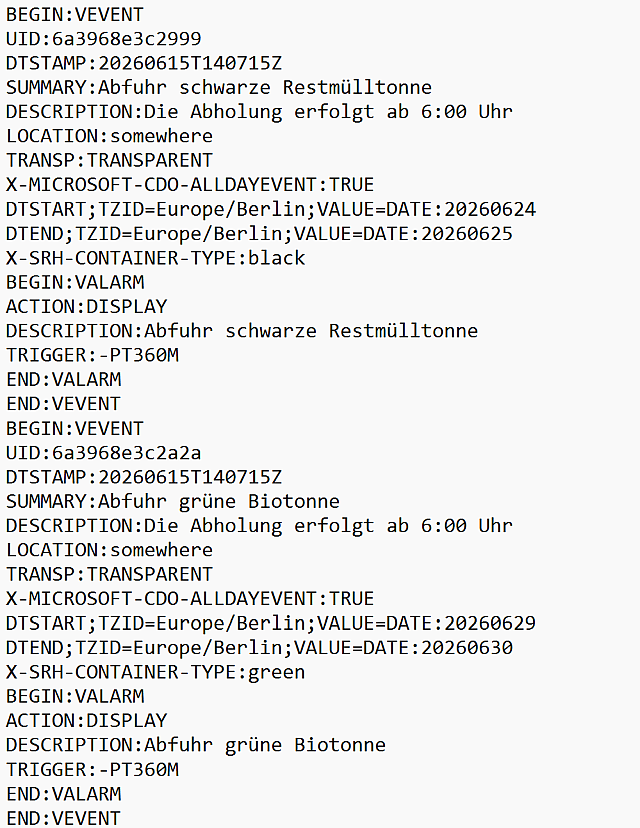
      And finally, here’s a short extract from my ics file:
      Calender5.png

      I used Sam’s Backup&Restore script to back up my modules. I then installed the new version 2.36.x on a new SD card and restored the modules using Sam’s script.
      Basically, everything is working again – apart from the display of the coloured bins.
      A test via a browser on my PC within my network showed me that I can’t display the images in the CSS folder.
      Attempts using the “default” or “vendor” directories also failed to produce the desired result.
      Does anyone have any idea how I can get the icons to display again?
      Many thanks

      posted in Troubleshooting
      M
      MyMirror
    • RE: MMM-MyTado

      @htilburgs
      You’re completly right …

      posted in Utilities
      M
      MyMirror
    • RE: MMM-MyTado

      @htilburgs
      Two more questions:
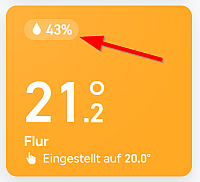
      Is it possible to provide the humidity and the exact open window as well?
      In the app both are visible:

      Open window:
      MMM-Tado_14.03.26_3a.png

      Humidity:
      MMM-Tado_14.03.26_4.png
      BR

      posted in Utilities
      M
      MyMirror
    • RE: MMM-MyTado

      @htilburgs
      @joefranz
      That looks good.

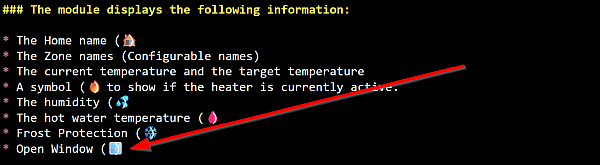
      I also saw this in the README (OpenWindow):
      OpenWindow1.png

      I often see this message in my app, but how can I activate it here too?

      posted in Utilities
      M
      MyMirror