@weedorbeat good idea. I’ll put that on my list.
L
Offline
A New Chapter for MagicMirror: The Community Takes the Lead
Read the statement by Michael Teeuw here.
Read the statement by Michael Teeuw here.
Posts
-
RE: MMM-DWD-WarnWeather - Wetterwarnungen
-
RE: MMM-DWD-WarnWeather - Wetterwarnungen
@Jopyth Thank you. Yes I will add it.
Sure I will fix it soon. -
RE: MMM-DWD-WarnWeather - Wetterwarnungen
Hey @tajno,
they don’t really provide an API. I did a bit of reverse engineering on their website and found that you can get a JSON file with all the warnings for Germany for a specific time.
This JSON contains warnings for all regions (Landkreise) of Germany.
If you find an API for Switzerland I can help you to implement it. -
RE: MMM-DWD-WarnWeather - Wetterwarnungen
I made some small changes to the formatting of the date. It now looks like this:
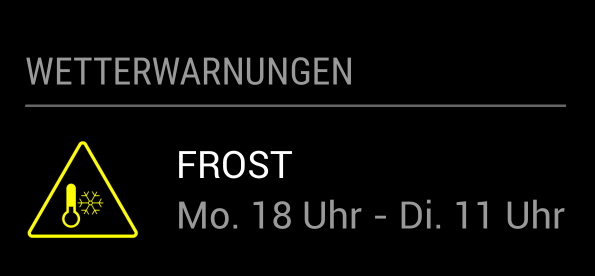
-
RE: MMM-Globe
@iMAGiC & @gshimself: thanks for your feedback. would it be possible, that one of you could post a picture of the module on a mirror. I just started building mine (don’t have the glass yet) and would like to know how it looks on a mirror. right now I can only look at it on my monitor.
-
RE: save some information from a xml or json to a txt file
Now it should work
#!/usr/bin/python # -*- coding: utf-8 -*- import codecs import json import subprocess APP_ID = '' FILE_PATH = 'test.txt' url = 'http://api.openweathermap.org/data/2.5/weather?id=2934486&lang=de&units=metric&mode=json&appid=' + APP_ID curl_req = 'curl -L ' + '"' + url + '"' p = subprocess.Popen(curl_req, stdout=subprocess.PIPE, shell=True) (output, err) = p.communicate() p_status = p.wait() try: decoded = json.loads(output) weather = decoded['weather'][0]['description'] temp = decoded['main']['temp'] f = codecs.open(FILE_PATH,'w', 'utf-8') f.write('Today is ' + weather + ' and ' + str(temp) + ' degrees.') f.close() except (ValueError, KeyError, TypeError): pass -
RE: save some information from a xml or json to a txt file
@gismo2006 I think I got the problem. The german description can contain letters like äöü etc. i will fix that later when i’m at home.
-
RE: save some information from a xml or json to a txt file
@gismo2006 here it is. just place your app id and the path of the file, where the text should go.
import json import subprocess APP_ID = '' FILE_PATH = 'test.txt' url = 'http://api.openweathermap.org/data/2.5/weather?id=2934486&lang=de&units=metric&mode=json&appid=' + APP_ID curl_req = 'curl -L ' + '"' + url + '"' p = subprocess.Popen(curl_req, stdout=subprocess.PIPE, shell=True) (output, err) = p.communicate() p_status = p.wait() try: decoded = json.loads(output) weather = decoded['weather'][0]['description'] temp = decoded['main']['temp'] f = open(FILE_PATH,'w') f.write('Today is ' + weather + ' and ' + str(temp) + ' degrees.') f.close() except (ValueError, KeyError, TypeError): pass -
MMM-Globe
Hey guys,
here is a module for displaying live pictures of our planet on your mirror.
The pictures are taken from the Himawari-8 satellite.
It’s also possible to use custom pictures.[card:LukeSkywalker92/MMM-Globe]
Preview:
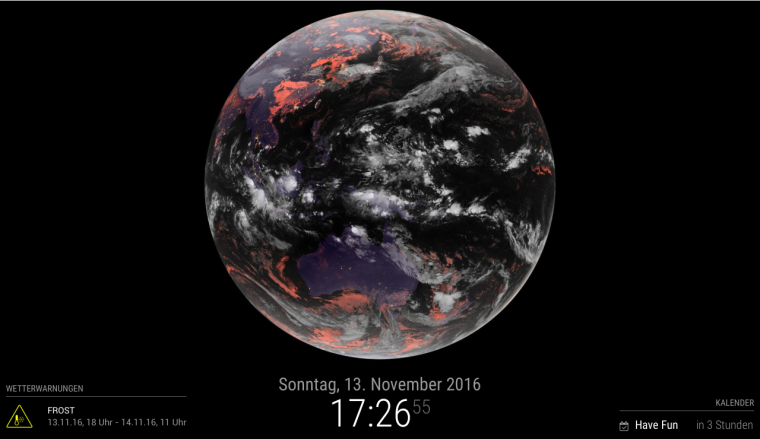
Hope you’ll enjoy it =)
-
RE: Earth globe
small preview =)
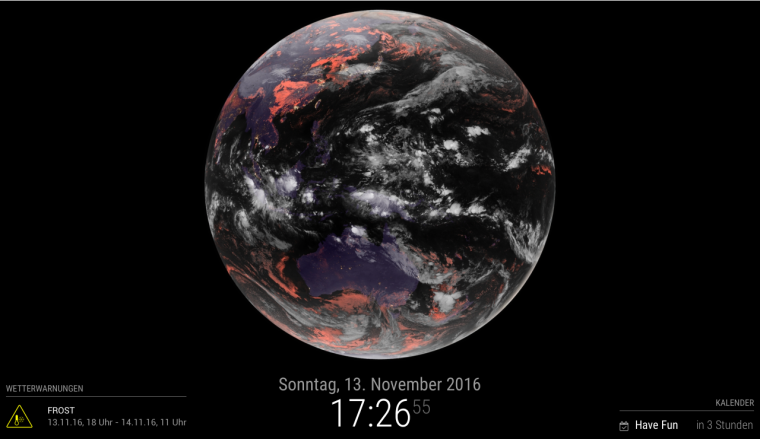
I’ll have to write a readme, then I’m done.
If you want to use a custom picture you just have to put your link in the config file and the module automatically uses this image. -
RE: Earth globe
@bibi I think you have to clone it to the modules folder. otherwise MagicMirror won’t find it. Just do it the normal way.
-
RE: Earth globe
So I made a small test here:
[card:LukeSkywalker92/MMM-Globe]so I could easily make the image update every x minutes and make configs for image-size and image-style just by changing the image-path.
-
RE: Earth globe
-
RE: Earth globe
hi @bibi,
that should be no problem. I think it would be interesting to use NASA’s EPIC (Earth Polychromatic Imaging Camera) API. There you would get two day old pictures of the globe. Here’s an example image:

You can also view the images here.
So if you would like to do that I can help you.
Displaying only an static image would not be very interesting for me.
greets Luke
-
RE: save some information from a xml or json to a txt file
Hey @gismo2006,
I think i can help you. As i started to develop MMM-DWD-WarnWeather, i used a little Pythonscript to explore the API. So if Python would be ok for you, just explain what Data should be written to your Text file and i can modify the Script for you.