MagicMirror Forum
    • Recent
    • Tags
    • Unsolved
    • Solved
    • MagicMirror² Repository
    • Documentation
    • 3rd-Party-Modules
    • Donate
    • Discord
    • Register
    • Login
    1. Home
    2. mayfield
    3. Posts
    A New Chapter for MagicMirror: The Community Takes the Lead
    Read the statement by Michael Teeuw here.
    M Offline
    • Profile
    • Following 0
    • Followers 0
    • Topics 14
    • Posts 42
    • Groups 0

    Posts

    Recent Best Controversial
    • After MM upgrade wont start

      Hello everyone

      I upgraded magicmirror from 2.18 to 2.19 using this script and are now getting and error, not sure how to solve this -

      bash -c  "$(curl -sL https://raw.githubusercontent.com/sdetweil/MagicMirror_scripts/master/upgrade-script.sh)" apply
      

      and now I’m getting this -

      pi@pi:~ $ cd ~ && cd MagicMirror && npm run start
      
      > magicmirror@2.19.0 start
      > DISPLAY="${DISPLAY:=:0}" ./node_modules/.bin/electron js/electron.js
      
      sh: 1: ./node_modules/.bin/electron: not found
      pi@pi:~/MagicMirror $ 
      
      
      posted in Troubleshooting
      M
      mayfield
    • RE: MMPM not working

      OK so I fixed this.

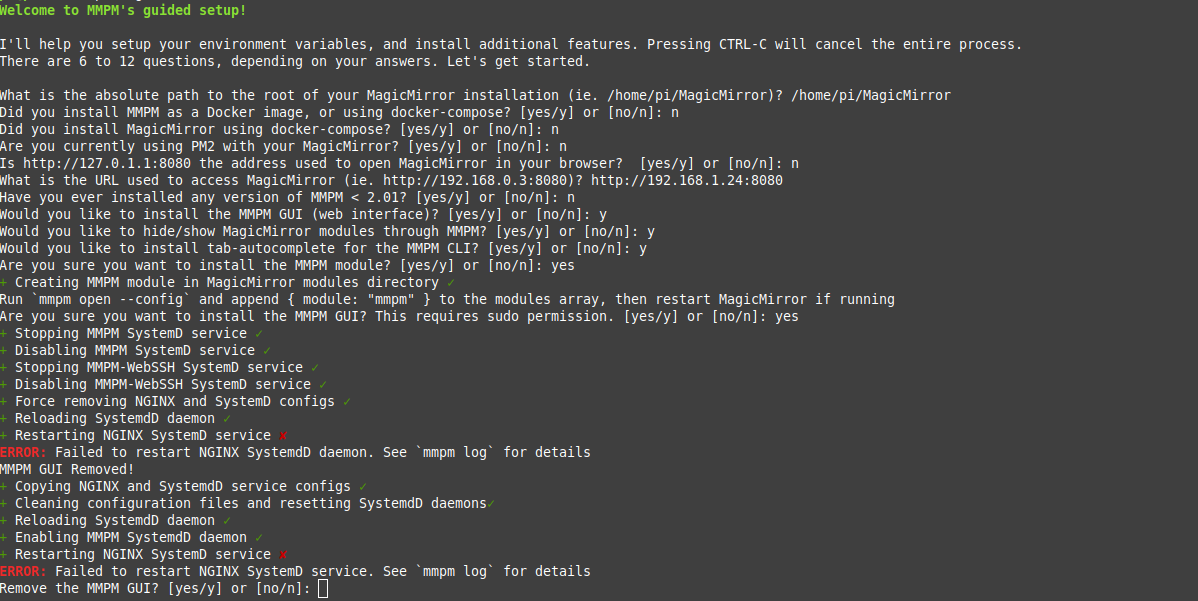
      I ssh into the pi and then ran mmpm --guided-setup then answered the questions and now its working again

      posted in Troubleshooting
      M
      mayfield
    • MMPM not working

      Hello everyone

      I just this morning upgraded the os on a PI3 and now cannot get MMPM to work I just get a 502 bad gateway, it was working prior to the os upgrade and was working great.

      I installed MMPM months and months ago and have had zero problems with it and right now are not sure how to troubleshoot this. All I have done is update Raspberry Pi OS release (dated 2022-01-28)

      Thanks
      Mick

      posted in Troubleshooting
      M
      mayfield
    • RE: MMM-MyWastePickup date problem

      @bravooscar Check your csv file and make sure all the slashes and commas are in their right places. This happened to me last night with the MMM-MyGarbage module and I noticed some of my entries had commas in the dates instead of slashes.

      posted in Troubleshooting
      M
      mayfield
    • RE: MMM-EventHorizon

      @swvalenti To post images to forums I use https://postimages.org/ and then share the link on your forum post.

      posted in Fun & Games
      M
      mayfield
    • RE: MMPM gui

      @sdetweil Thanks for the tip

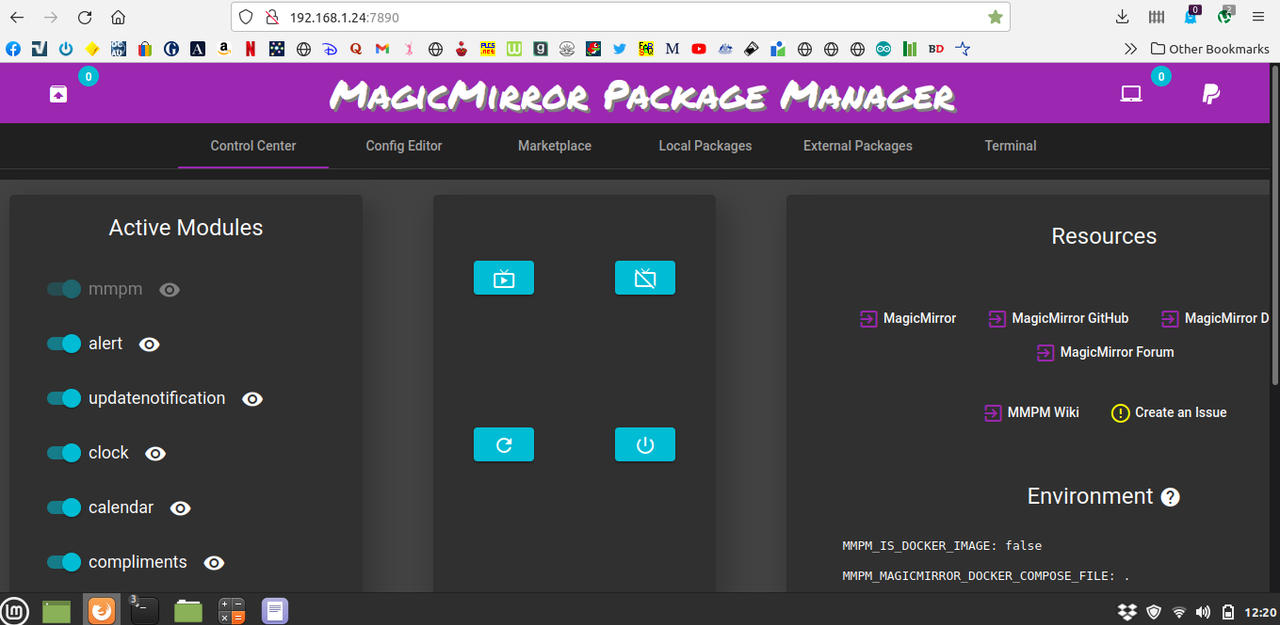
      I was reading through the command line options information and noticed when I ran mmpm list --gui-url in my terminal it returned http://127.0.1.1:7890 so I then changed the 8080 to 7890 and presto the mmpm web gui poped up not sure why?

      alt text

      posted in Troubleshooting
      M
      mayfield
    • RE: MMPM gui

      @swvalenti said in MMPM gui:

      @mayfield

      sudo systemctl status nginx
      

      You can try and reload and run that mmpm command again

      sudo systemctl reload nginx
      

      Hi thanks for the tip

      I have a feeling now that the problem may be Citadel server, Some time back before I found Magicmirror I was playing with Citadel email server. When I type http://192.168.1.24:8080 when MM is off the Citadel login web page shows up.

      I’m wondering if that would cause a conflict and I’m not sure how to remove citadel from the rpi

      posted in Troubleshooting
      M
      mayfield
    • RE: MMPM gui

      This is a screen shot when I run the mmpm install --gui

      alt text

      posted in Troubleshooting
      M
      mayfield
    • MMPM gui

      Hi all

      I’m having some trouble with the mmpm module, I have installed it as per the instructions and I can issue commands from the terminal line like - mmpm mm-ctl --hide compliments clock and it works however I can’t seem to get the gui to work.

      When I run mmpm env i get

      {
        "MMPM_MAGICMIRROR_ROOT": "/home/pi/MagicMirror",
        "MMPM_MAGICMIRROR_URI": "http://192.168.1.24:8080",
        "MMPM_MAGICMIRROR_PM2_PROCESS_NAME": "",
        "MMPM_MAGICMIRROR_DOCKER_COMPOSE_FILE": "",
        "MMPM_IS_DOCKER_IMAGE": false
      }
      

      I have added the module to config.js
      I have whitelisted the ip address of the laptop
      When I type http://192.168.1.24:8080 I get the magicmirror I don’t see the mmpm gui

      I’m not sure what I’ve missed

      posted in Troubleshooting
      M
      mayfield
    • RE: MMM-Compliments_plus

      @sdetweil OK thanks for the link, I did try this earlier and it didn’t work I must of not typed it properly - all good now

      posted in Troubleshooting
      M
      mayfield
    • MMM-Compliments_plus

      To get this to work can I just create a MMM-Compliments_plus folder in modules and then copy the files into it and then add the config into config.js?

      https://github.com/hangorazvan/compliments_plus/blob/master/README.md

      posted in Troubleshooting
      M
      mayfield
    • RE: Install another Magicmirror

      Thanks for that

      posted in General Discussion
      M
      mayfield
    • Install another Magicmirror

      Hi all

      I’ve got Magicmirror working pretty well, I’m using a rpi can I install another version of magicmirror along side my existing one, I’m only planning on running one at a time

      I just want to start again without loosing my current working version.

      Cheers
      Mick

      posted in General Discussion
      M
      mayfield
    • config.js & code formatting

      Hello everyone

      I’ve been having a great time playing around with MagicMirror so thanks to you all for the great work!

      Throughout the learning process and all the slips trips and falls my config file is very messy and the formatting isn’t at all very neat.

      What do guys do to keep your code in a neat and presentable way? Do you use any code editing software?What tips and tricks have you learnt?

      Cheers All
      Mick

      posted in General Discussion
      M
      mayfield
    • RE: Newby question MMOS

      @sdetweil Thanks for that, I thought I’d check before I start asking questions about it. I’ll go back and get the other MM working.

      posted in General Discussion
      M
      mayfield
    • Newby question MMOS

      Hi everyone - great forum

      I just wanted to clarify if the MMOS is supported here?

      I installed this version of MM from here -
      https://github.com/guysoft/MagicMirrorOS

      posted in General Discussion
      M
      mayfield
    • RE: Can't edit compliments.js

      @sdetweil said in Can't edit compliments.js:

      @mayfield

      ah mmos…
      then u have to run the command inside the docker container where mm is installed

      OK cheers I’ll do some reading and thanks everyone for the help much appreciated

      posted in Troubleshooting
      M
      mayfield
    • RE: Can't edit compliments.js

      @thgmirror said in Can't edit compliments.js:

      Hi @mayfield,

      Most of the times, commas are missing (here at least after the line with the position). Use the builtin function to check if it is valid…I use a website where you can enter the whole content of your config.js:
      https://esprima.org/demo/validate.html

      Greetings
      Thomas

      It was a comma on the position line lol Its working again thanks for the tip

      posted in Troubleshooting
      M
      mayfield
    • RE: Can't edit compliments.js

      @sdetweil said in Can't edit compliments.js:

      @thgmirror the built-in checker is

      from the MagicMirror folder do

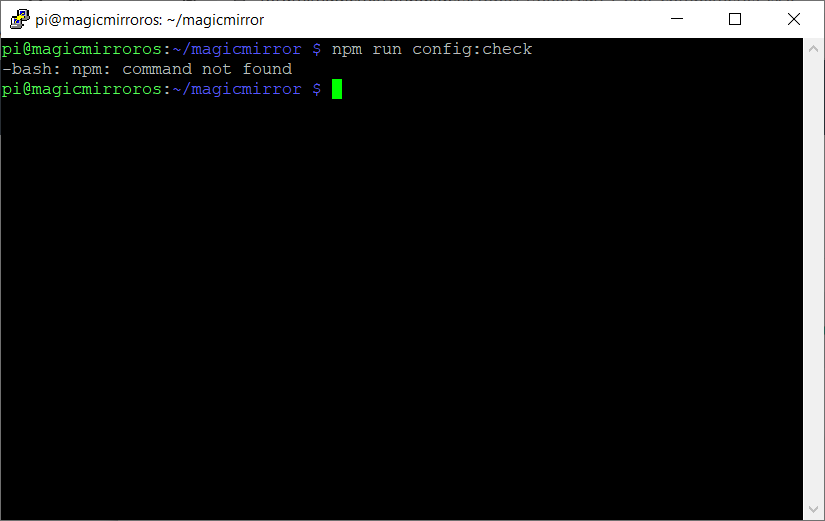
      npm run config:check
      

      Yes this was going to be another question I wanted to ask as that doesn’t work on mine and I’m not sure why yet

      I followed this site to flash a SD card https://github.com/guysoft/MagicMirrorOS

      and when I run that I get this I guess I need to install that
      alt text

      posted in Troubleshooting
      M
      mayfield
    • RE: Can't edit compliments.js

      I’ve been reading through the documentation from here https://docs.magicmirror.builders/modules/compliments.html#configuration-options

      Each time I add this to the config it stops working I’m obviously missing something.

      { 
                      module: "compliments",
                      position: "lower_third"
                      config: { 
                      compliments: { 
                      anytime: [
                              "Hey Wren!"
                      ],
                      morning: [
                              "blah blah blah",
                              "blah blah blah",
                              "blah blah blah"
                      ],
                      afternoon: [
                              "blah blah blah",
                              "Yblah blah blah",
                              "blah blah blah"
                      ],
                      evening: [
                              "blah blah blah",
                              "blah blah blah",
                              "blah blah blah"
                      ],
                      "....-01-01": [
                              "Happy new year!"
                      ]
              }
      }
                      },
      
      posted in Troubleshooting
      M
      mayfield
    • 1
    • 2
    • 3
    • 2 / 3