MagicMirror Forum
    • Recent
    • Tags
    • Unsolved
    • Solved
    • MagicMirror² Repository
    • Documentation
    • 3rd-Party-Modules
    • Donate
    • Discord
    • Register
    • Login
    1. Home
    2. Mr.Sponti
    3. Best
    A New Chapter for MagicMirror: The Community Takes the Lead
    Read the statement by Michael Teeuw here.
    Offline
    • Profile
    • Following 0
    • Followers 0
    • Topics 7
    • Posts 34
    • Groups 0

    Posts

    Recent Best Controversial
    • RE: Electron CPU usage

      Hello, here are some details on my configuration and the steps I’ve made to downgrade from 2.1.1 to MM 2.1.0 & electron 1.4.15. First, I use the following PI and OS

      • Pi 3 Model B, 1024MB RAM

      • Raspbian Stretch

      pi@Infoboard:~ $ uname -a
      Linux Infoboard 4.9.41-v7+ #1023 SMP Tue Aug 8 16:00:15 BST 2017 armv7l GNU/Linux
      

      Downgrade MagicMirror from 2.1.1 to 2.1.0:
      -rename of my MagicMirror folder to MagicMirrorSAVE
      -download and unzip MM 2.1.0
      -rename dir MagicMirror-2.1.0 to MagicMirror
      -cd to MagicMirror
      -npm install electron@1.4.15 # I didn’t install electron as a global package
      -nano package.json
      –> change electron version under dependencies to electron 1.4.15

      {
        "name": "magicmirror",
        "version": "2.1.0",
        "description": "A modular interface for smart mirrors.",
        "main": "js/electron.js",
        "scripts": {
          "start": "electron js/electron.js"
        },
        "repository": {
          "type": "git",
       ...
       "dependencies": {
          "electron": "1.4.15",
          "express": "^4.14.0",
          "express-ipfilter": "latest",
          "feedme": "latest",
      ....
      

      now, install MagicMirror

      -npm install
      -copy your own modules from the MagicMirrorSAVE to the respective MM2.1.0 directory
      -install necessary node modules for your own modules
      done
      Check the installed version of electron

      pi@Infoboard:~ $ more MagicMirror/node_modules/electron/dist/version
      v1.4.15
      

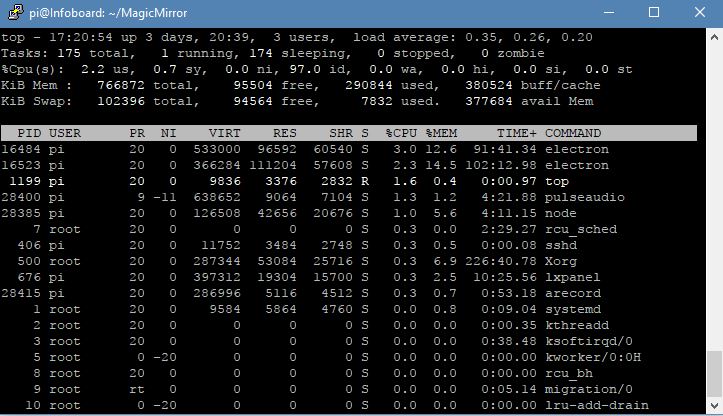
      run MM with ‘npm start’ and monitor the CPU usage with ‘top’
      and the magic is there: 2 to 3 % CPU usage in case you are not running newsfeed or other modules with a lot of rendering stuff. If I include the newfeed modul CPU usage will increase up to 30%. So, I go without newsfeed!
      alt text

      I hope that help some or the other.

      posted in Troubleshooting
      Mr.SpontiM
      Mr.Sponti
    • MagicMirror Pimatic (Home Automation) Dashboard

      First of all a big, very big thank you to Michael Teeuw!!!

      MagicMirror is really one of the greatest Raspberry projects followed by ‘pimatic - home automation controller’, another amazing Raspberry project. So far as I know both are developments from Dutchmen.
      After studying the documentation and several MM-moduls, I decided to use MagicMirror to setup a central dashboard for my family. Beside customizing of the standard moduls I used the modul ‘MMM-DWD-WarnWeather by LukeSkywalker92’ as a base to create a new modul for retrieving data from my pimatic home controller.
      I’m a complete novice to nodejs and all this web stuff, but my programming skill were sufficient to modify the Warnweather module and to integrate the the pimatic socket API.

      And voila, here is my dashboard providing now actual information from the internet plus status information from my IoT devices controlled by pimatic.

      alt text

      Special thanks, to those people taken time to document and to publish there solutions.
      (As soon as I’ve learned to use git, I will also publish the pimatic modul)

      Best regards and a happy new year!

      posted in Show your Mirror
      Mr.SpontiM
      Mr.Sponti
    • RE: Need help from an CSS expert!

      @tosti007 , @strawberry 3.141 - ok, you all right, it is not a failure to investigate a bit time to consult the internet and to learn new things!
      I found and implemented a solution based on a table definition:

      alt text

      That’s was exactly what I was looking for!

      posted in Development
      Mr.SpontiM
      Mr.Sponti
    • RE: digital photo frame

      Hi,

      over the Chrismas days I’ve created a slideshow modul which is close to the functionality of a “digital photo frame”.

      MMM-Photoshow

      At startup the modul scans a local directory structure and creates a repository of the image files to display. At this point in time the module hide itself and waits on a command to start. The slideshow will start by a notification message from another modul, hides all other modules and shows the pictures in fullscreen mode. New pictures wil show up by a configurable time intervall. If the exif tag of the photo provides an information on the date taken, this date is shown in a footer line at the bottom of the screen. In addtion the footer line shows an album name, the number of photos of the album and the last received notification message (command to steer the show).

      The slideshow is controlled by notification messages from a separate control modul. I’ve implemented a communication (socket io) to an external voice recognition modul based on snowboy. I think the modul (i.e alexyak/voicecontrol) would also work.
      It is possible to switch between photo albums (represented by subdirectories of the loaded directory structure), to go forward , backward or to stop the photoshow by speaking a command.
      It would be easy to modify the module with regular scans of the directory structure. There is already a command to reload the file structure during the run of the slideshow. Access to pictures on a remote server (i.e. NAS) works fine by mounting the remote folders into the local directory structure.
      With the command ‘INFO_BOARD’ the slideshow stop, hide itselfs and switch back to info mode by showing up all other module.

      I would be pleased if my modul can be used as a base for further development by a more experienced programmer like me.

      posted in Requests
      Mr.SpontiM
      Mr.Sponti
    • RE: Electron CPU usage

      @Mykle1 Yes, I downgraded due to high CPU usage with MM2.1.1 & electron1.4.17. Top showed a usage between 100 and 200% and my own written moduls had a really bad performance.

      posted in Troubleshooting
      Mr.SpontiM
      Mr.Sponti
    • 1 / 1