After upgrading my MagicMirror to v2.38.0 I updated the PWS Weather Provider so it now works with both v2.38.0 and earlier versions.
 M
Offline
M
Offline
A New Chapter for MagicMirror: The Community Takes the Lead
Read the statement by Michael Teeuw here.
Read the statement by Michael Teeuw here.
Posts
-
Personal Weather Station provider for default weather
-
RE: Wyze doorbell module
@plainbroke I just got a firmware update and I see RTSP is listed under advanced settings for my Wyze Pan Camera. I have not set it up yet. Earlier I tried using Wyze-Bridge and got it to work with my Wyze V1 camera. None of my newer Wyze cameras would work. It looked like newer firmware prevents the bridge connection.
-
Using a TV as a monitor
I know this information can be found in other hardware sites but I thought it might be helpful to have it here. I am using a Sanyo TV as the monitor for my Magic Mirror. I setup a cron to turn off the HDMI output of my Raspberry Pi nightly but when I turned it on in the morning the TV had gone into Standby and would not wake. I found that CEC needed to be turned on in the TV Settings. Then I could use CEC to wake the TV.
Here are my crontab entries for Debian 13.6 (Trixie).
# Turn monitor output on in the morning 0 5 * * * env WAYLAND_DISPLAY=wayland-0 XDG_RUNTIME_DIR=/run/user/1000 /usr/bin/wlr-randr --output HDMI-A-1 --on '*' # Wake the TV 5 5 * * * echo "on 0" | /usr/bin/cec-client -s -d 1 # Start Magic Mirror 10 5 * * * /home/marksimon/bin/mm start ##### # Stop Magic Mirror in the Evening 0 20 * * * /home/marksimon/bin/mm stop # Turn monitor output off in the morning 5 20 * * * env WAYLAND_DISPLAY=wayland-0 XDG_RUNTIME_DIR=/run/user/1000 /usr/bin/wlr-randr --output HDMI-A-1 --off '*' # Sleep the TV 10 20 * * * echo "off 0" | /usr/bin/cec-client -s -d 1 -
US Open Tennis provider added to MMM-BracketEngine module
A provider for the US Open Tennis Tournament has been added to the MMM-BracketEngine module. You can select any of the draws (MS, WS, MD, WD, XD, BS, or GS).
MMM-BracketEngine now has providers for (fifa, usopen, wimbledon, static). Let me know if there is a provider you want.
-
RE: New Module to download photos from Apple iCloud
@sdetweil I gave it a try and no photos displayed. I went back to my repo. The explanation I got from AI was this;
Why photos disappeared
non-fullscreen (bottom_center) crashes in getDomnotFS because EXIF is appended to this.wrapper (fullscreen-only) instead of the local wrapper. With default showExifDate: true, getDom throws → blank module. -
Simon's Simple - one screen to rule them all
Here is a shot of my MagicMirror layout. I wanted to get as much daily info into one screen as I could but also display photos at a size that was nice. Here is my module list;
calendars - directory for iCloud calendar sync
MMM-AirQuality
MMM-DailyBibleVerse
MMM-iCloudPhotos - syncs iCloud Photos Album to my Pi
MMM-ImagesPhotos
MMM-MoonPhase
MMM-Pinfo
MMM-PWSWeather - Provider for default weather module
MMM-UpliftingNews - An RSS reader with links to positive news. (Not in the list of 3rd Party Modules)
MMM-WordOfTheDay
Simon’s Simple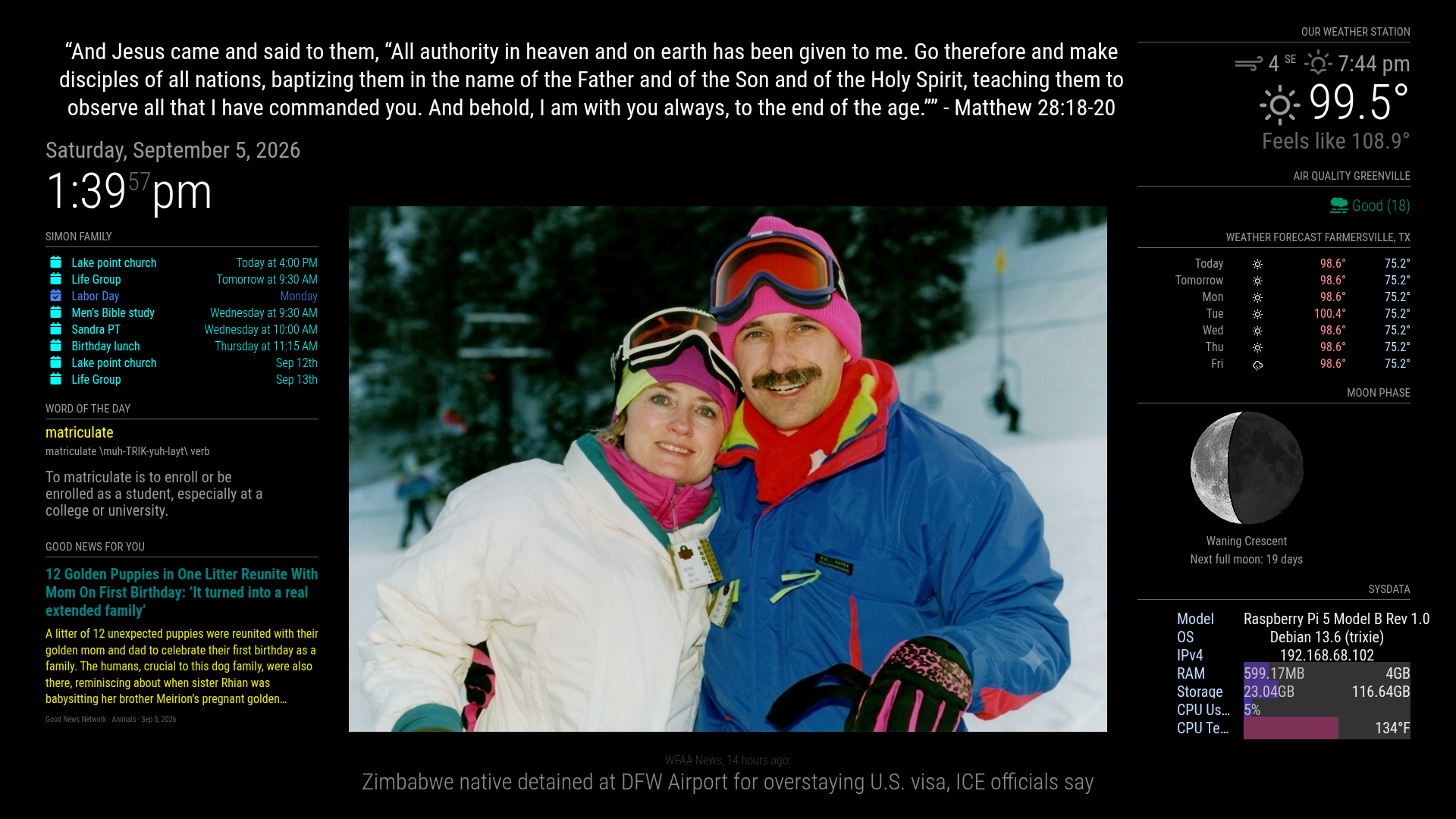
-
RE: New Module to download photos from Apple iCloud
-
RE: New Module to download photos from Apple iCloud
@sdetweil I was testing on an album with only 4 photos and set to sequential. What I found, with help of Claude, was Before the Dec 2023 fetch rewrite, every completed request did:
if (retry) {
  self.scheduleUpdate(self.loaded ? -1 : self.config.retryDelay);
}
After the rewrite it became:
if (!photosResponse.ok) {
  if (retry) self.scheduleUpdate(...);
}
So the directory list only refreshed on HTTP failure, not every getInterval. I have an updated MMM-ImagesPhotos.js with a fix but I don’t know the best way to send it. Would you like a diff, patch, GitHub branch, other?
-
RE: New Module to download photos from Apple iCloud
@Bungle68 Thanks let me know how it works for you. A few things I have found so far. I am using it with MMM-ImagesPhotos. When I add photos to the Album they sync to the uploads directory but they don’t display until I restart mm. It may just be my config values. Still testing. Also if I remove a photo from the Album a blank is shown for the removed photo until MMM-ImagesPhotos refreshes. I guess this is expected. I am looking into sending a Notification to force a refresh.
-
RE: Anyone download iCloud Photos to your Pi?
Got it working. MMM-iCloudPhotos Still testing with MMM-ImagesPhotos to see what update interval works for me.
-
New Module to download photos from Apple iCloud
I have a new module MMM-iCloudPhotos That will sync an Album from your Apple iCloud to your Magic Mirror. The Album does NOT need to be public and can be Personal or Shared.
With a Shared Album you and anyone you invite can add or remove photos from any Apple Device and they will appear on your mirror.
-
Raspberry Pi fan after update
All, not sure if this was just me but after upgrading my Pi 5B to OS 13.6 my fan stopped working. The fix was to add the following line in /boot/firmware/config.txt. I put it near the top.
dtoverlay=cooling_fan
-
RE: Anyone download iCloud Photos to your Pi?
Well this is not quite working yet. I hope to have it soon.
-
RE: Anyone download iCloud Photos to your Pi?
So I made a new module for this MMM-iCloudPhotos. That is me and Claude. It downloads any new photos from the iCloud Album you specify and deletes any photos that are no longer in the album. I am using it with MMM-ImagesPhotos but you can specify any directory to put the images in and use any display module.
-
Anyone download iCloud Photos to your Pi?
Re: iCloud photos
I am trying to use pyicloud library but do not have it working yet. -
RE: World Cup page
@slosticlai If you want to see the brackets I made a module MMM-BracketEngine that will display any single elimination sport bracket. There is a provider for the FIFA World Cup. Other provider can be added for other tournaments.
-
Default weather ignoring fade false ?
I have two instances of weather in my config. The first for current and using my pws provider. The second for forecast using weathergov. Both display data but the forecast seems to ignore the fade: false option. Here are the module entries from my config.js.
```{
module: “weather”,
position: “top_right”,
order: “1”,
header: “Our Weather Station”,
config: {
weatherProvider: “pws”,
stationId: “KTXFARME145”,
apiKey: “xxxxx”,
type: “current”
},
disabled: false,
label: “instance 1”,
hiddenOnStartup: false,
configDeepMerge: false,
animateIn: “none”,
animateOut: “none”,
index: 0
},
{
module: “weather”,
position: “top_right”,
order: “2”,
header: “Weather Forecast”,
config: {
weatherProvider: “weathergov”,
type: “forecast”,
lat: 33.173,
lon: -96.332
},
colored: true,
fade: false,
fadePoint: “1”,
maxEntries: “7”,
maxNumberOfDays: “7”,
disabled: false,
label: “instance 2”,
hiddenOnStartup: false,
configDeepMerge: false,
animateIn: “none”,
animateOut: “none”,
index: 1
}, -
MMM-PWSWeather updated for MM v2.35.0+
I have updated the MMM-PWSWeather provider v2.0 for MM v2.35.0+. The provider pws now runs as a server-side provider API. If you are running an older version of MM you can download the initial release.