All, not sure if this was just me but after upgrading my Pi 5B to OS 13.6 my fan stopped working. The fix was to add the following line in /boot/firmware/config.txt. I put it near the top.
dtoverlay=cooling_fan
 M
Offline
M
Offline
All, not sure if this was just me but after upgrading my Pi 5B to OS 13.6 my fan stopped working. The fix was to add the following line in /boot/firmware/config.txt. I put it near the top.
dtoverlay=cooling_fan
I know this information can be found in other hardware sites but I thought it might be helpful to have it here. I am using a Sanyo TV as the monitor for my Magic Mirror. I setup a cron to turn off the HDMI output of my Raspberry Pi nightly but when I turned it on in the morning the TV had gone into Standby and would not wake. I found that CEC needed to be turned on in the TV Settings. Then I could use CEC to wake the TV.
Here are my crontab entries for Debian 13.6 (Trixie).
# Turn monitor output on in the morning
0 5 * * * env WAYLAND_DISPLAY=wayland-0 XDG_RUNTIME_DIR=/run/user/1000 /usr/bin/wlr-randr --output HDMI-A-1 --on '*'
# Wake the TV
5 5 * * * echo "on 0" | /usr/bin/cec-client -s -d 1
# Start Magic Mirror
10 5 * * * /home/marksimon/bin/mm start
#####
# Stop Magic Mirror in the Evening
0 20 * * * /home/marksimon/bin/mm stop
# Turn monitor output off in the morning
5 20 * * * env WAYLAND_DISPLAY=wayland-0 XDG_RUNTIME_DIR=/run/user/1000 /usr/bin/wlr-randr --output HDMI-A-1 --off '*'
# Sleep the TV
10 20 * * * echo "off 0" | /usr/bin/cec-client -s -d 1
New module MMM-BracketEngine displays a mirrored knockout tournament bracket for any sport.
I took the MMM-FIFAWorldCup module and generalized it for any Bracket style Tournament. Providers fetch data from external APIs and normalize it into a common format; the engine renders it with a CSS Grid layout. You can also use a static bracket that you edit so you can display a tournament that has no online data (chess club, little league, etc.) . Providers for FIFA World Cup and Wimbledon are included.
This may be a little late but that’s what I get when you only use the free AI subscription. This module will put the FIFA World Cup Bracket on your Magic Mirror. Looks nice so far.
https://github.com/msimon360/MMM-FIFAWorldCup
Re: Fifa World Cup overview
I started looking into ways to display the 2026 World Cup and found this to work great. I used {MMM-WebView} (https://github.com/Iketaki/MMM-WebView ) and loaded native-stats.org [World Cup page](link url) (https://native-stats.org/competition/WC/) page.
I installed MMM-Jast v2.9.5 on a fresh Install of MagicMirror2 on my Raspberry Pi 5.
All I was getting was the word “Loading”. The problem was fixed when I downgraded yahoo-finance2 from 2.14.0 to 2.11.3 as in the Jast package.json.
cd ~/MagicMirror/modules/MMM-Jast
rm -rf node_modules package-lock.json
npm install yahoo-finance2@2.11.3 --save-exact
A provider for the US Open Tennis Tournament has been added to the MMM-BracketEngine module. You can select any of the draws (MS, WS, MD, WD, XD, BS, or GS).
MMM-BracketEngine now has providers for (fifa, usopen, wimbledon, static). Let me know if there is a provider you want.
MMM-PWSWeather is a module that displays real-time weather data from your Personal Weather Station at Weather Underground.
The provider can be used by the default weather module and other weather modules that support the weatherProvider configuration option.
I found the simple fix. I removed the position option from the Carousel module in the config.js file. Doh! I thought it said required but it said “NOT Required”.
Here is a shot of my MagicMirror layout. I wanted to get as much daily info into one screen as I could but also display photos at a size that was nice. Here is my module list;
calendars - directory for iCloud calendar sync
MMM-AirQuality
MMM-DailyBibleVerse
MMM-iCloudPhotos - syncs iCloud Photos Album to my Pi
MMM-ImagesPhotos
MMM-MoonPhase
MMM-Pinfo
MMM-PWSWeather - Provider for default weather module
MMM-UpliftingNews - An RSS reader with links to positive news. (Not in the list of 3rd Party Modules)
MMM-WordOfTheDay
Simon’s Simple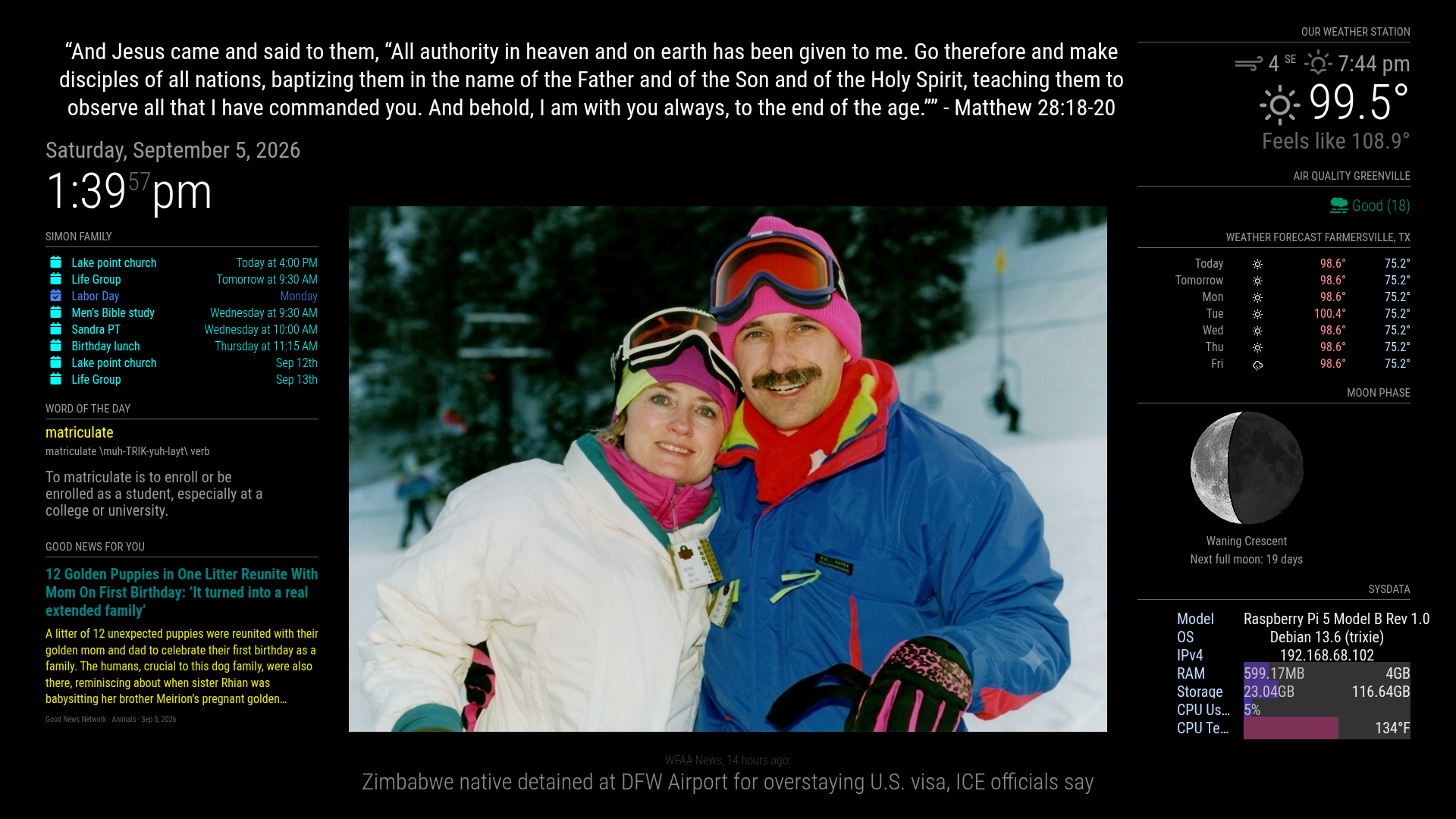
After upgrading my MagicMirror to v2.38.0 I updated the PWS Weather Provider so it now works with both v2.38.0 and earlier versions.
@plainbroke I just got a firmware update and I see RTSP is listed under advanced settings for my Wyze Pan Camera. I have not set it up yet. Earlier I tried using Wyze-Bridge and got it to work with my Wyze V1 camera. None of my newer Wyze cameras would work. It looked like newer firmware prevents the bridge connection.
I know this information can be found in other hardware sites but I thought it might be helpful to have it here. I am using a Sanyo TV as the monitor for my Magic Mirror. I setup a cron to turn off the HDMI output of my Raspberry Pi nightly but when I turned it on in the morning the TV had gone into Standby and would not wake. I found that CEC needed to be turned on in the TV Settings. Then I could use CEC to wake the TV.
Here are my crontab entries for Debian 13.6 (Trixie).
# Turn monitor output on in the morning
0 5 * * * env WAYLAND_DISPLAY=wayland-0 XDG_RUNTIME_DIR=/run/user/1000 /usr/bin/wlr-randr --output HDMI-A-1 --on '*'
# Wake the TV
5 5 * * * echo "on 0" | /usr/bin/cec-client -s -d 1
# Start Magic Mirror
10 5 * * * /home/marksimon/bin/mm start
#####
# Stop Magic Mirror in the Evening
0 20 * * * /home/marksimon/bin/mm stop
# Turn monitor output off in the morning
5 20 * * * env WAYLAND_DISPLAY=wayland-0 XDG_RUNTIME_DIR=/run/user/1000 /usr/bin/wlr-randr --output HDMI-A-1 --off '*'
# Sleep the TV
10 20 * * * echo "off 0" | /usr/bin/cec-client -s -d 1
A provider for the US Open Tennis Tournament has been added to the MMM-BracketEngine module. You can select any of the draws (MS, WS, MD, WD, XD, BS, or GS).
MMM-BracketEngine now has providers for (fifa, usopen, wimbledon, static). Let me know if there is a provider you want.
@sdetweil I gave it a try and no photos displayed. I went back to my repo. The explanation I got from AI was this;
Why photos disappeared
non-fullscreen (bottom_center) crashes in getDomnotFS because EXIF is appended to this.wrapper (fullscreen-only) instead of the local wrapper. With default showExifDate: true, getDom throws → blank module.
Here is a shot of my MagicMirror layout. I wanted to get as much daily info into one screen as I could but also display photos at a size that was nice. Here is my module list;
calendars - directory for iCloud calendar sync
MMM-AirQuality
MMM-DailyBibleVerse
MMM-iCloudPhotos - syncs iCloud Photos Album to my Pi
MMM-ImagesPhotos
MMM-MoonPhase
MMM-Pinfo
MMM-PWSWeather - Provider for default weather module
MMM-UpliftingNews - An RSS reader with links to positive news. (Not in the list of 3rd Party Modules)
MMM-WordOfTheDay
Simon’s Simple
@sdetweil I was testing on an album with only 4 photos and set to sequential. What I found, with help of Claude, was Before the Dec 2023 fetch rewrite, every completed request did:
if (retry) {
  self.scheduleUpdate(self.loaded ? -1 : self.config.retryDelay);
}
After the rewrite it became:
if (!photosResponse.ok) {
  if (retry) self.scheduleUpdate(...);
}
So the directory list only refreshed on HTTP failure, not every getInterval. I have an updated MMM-ImagesPhotos.js with a fix but I don’t know the best way to send it. Would you like a diff, patch, GitHub branch, other?
@Bungle68 Thanks let me know how it works for you. A few things I have found so far. I am using it with MMM-ImagesPhotos. When I add photos to the Album they sync to the uploads directory but they don’t display until I restart mm. It may just be my config values. Still testing. Also if I remove a photo from the Album a blank is shown for the removed photo until MMM-ImagesPhotos refreshes. I guess this is expected. I am looking into sending a Notification to force a refresh.