@Jopyth Yeah, I figure I’ll walk them through everything over the phone once they get them. I’ll just have them make a bookmark of the page. I guess if their IP changes they’ll call me telling me the page stopped working.
A New Chapter for MagicMirror: The Community Takes the Lead
Read the statement by Michael Teeuw here.
Read the statement by Michael Teeuw here.
O
Offline
Posts
-
RE: [Remote-Control] Shutdown, Configure and Update your MagicMirror
-
RE: Where are you from?
@cowboysdude I’m a little biased when it comes to beach towns as I’m originally from Southern California, but all in all its a nice little place.
If you have a chance you should really hop over to New Orleans the next time you’re down here. It’s only like a 6 hour drive.
-
RE: [Remote-Control] Shutdown, Configure and Update your MagicMirror
Let me start by saying “sorry”. My brain is all over the place right now, but I had a question.
I want to make a few mirrors for friends and family and use your module to make things simpler for them since they basically only now how to facebook and snapchat on their phones.
Would it be possible to set up a simple service in raspbian that would wait for an app to request an IP from the pi. Then the pi would broadcast its IP. The app would take the IP and automagically input it into the address bar and connect to the pi so that they could shutdown the pi properly from your module?
I really couldn’t code my way out of a paper bag, but I know there are websites that can create simple apps(I’m about too look at appmakr after I send this).
-
RE: Where to buy 2 way mirror in USA
I’m in texas. I found a place that sells full sheets(48"x96") of 3mm for $202. There’s also an amazon seller that has decent prices on smaller pieces and they offer prime shipping:
-
RE: How HOT Does it Get?
@Mykle1 Fing is a great app to find your pi on your network as well. They make it for android and ios.
-
RE: How HOT Does it Get?
@AAPS just checked my pi zero after running for a few days straight. 51.4c that’s with no fan, no heatsink, and the frame around the mirror covering it.
-
RE: midori cant connect to localhost
Honestly, I didn’t. I spent a few days off and on trying to get things going, finally I reached out to someone on the forum that had a working image and used that. I have a few more zero’s floating around though and I’m planning on trying again from scratch this weekend.
-
Pi Zero MM
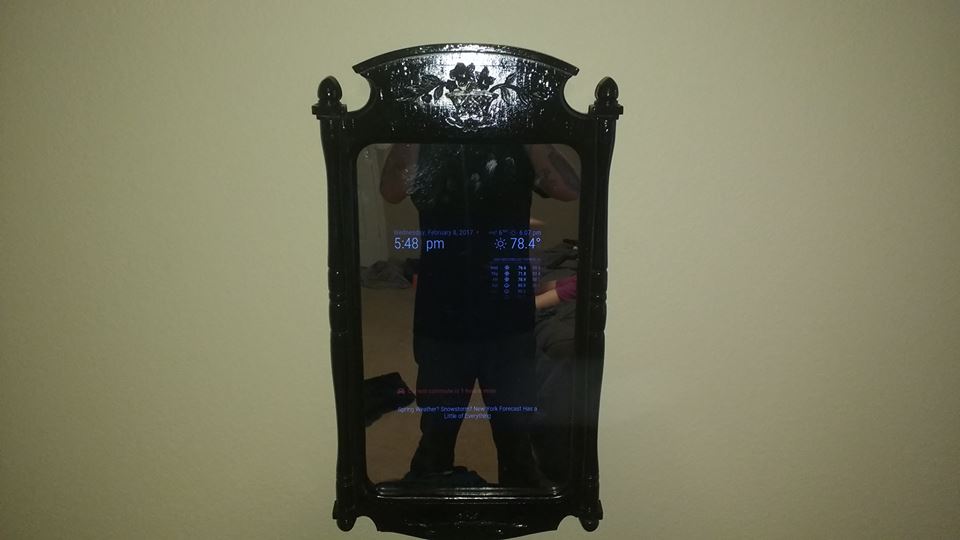
I didn’t take many pictures of the process.
Took a little longer than I planned because I had to reorder a thicker mirror. If you order from amazon go with the 3mm unless you want a funhouse mirror.
Pi zero $5 (micro center)
Parts for pi $18 (Amazon 8 in 1 makerspots)
Plexiglass $35 (Amazon 12x24 3mm)
Mirror body $8 (goodwill)
Misc plywood and fasteners ~$20
VGA to HDMI $8 (Amazon)
TV $20 (goodwill) -
midori cant connect to localhost
Got magicmirror to start on a pi zero following instrustions that I found on this forum. Now when midori starts I’m getting a connection refused on localhost:8080. I can ping localhost fine from terminal and I’ve added /120 in my whitelist.
-
RE: How I got my Magic Mirror working on a Raspberry Pi 0 (zero)
sorry for asking something that I can google, but I’m on lunch and trying to be quick. after I have everything up and running can I:
dd if=/dev/sdf of=/functioning_mm_image.isothat way I only have to fiddle with a few config options for the rest of the mirrors that I’m making?
-
RE: Which type of glass to use ?
@Mykle1 I bought the 1mm and the distortion is definitely there. From the right angles it looks more like a funhouse mirror. It will serve its purpose for the mirror that I’m building right now, but the next one will be 3mm for sure. The price actually isn’t too bad either.