@sdetweil I reinstalled using the guide inhere. So latest version I’m sure.
P
Offline
A New Chapter for MagicMirror: The Community Takes the Lead
Read the statement by Michael Teeuw here.
Read the statement by Michael Teeuw here.
Posts
-
RE: Update Electron failed - MagicMirror is broken on physical screen only
-
RE: Update Electron failed - MagicMirror is broken on physical screen only
Thanks.
I had to reinstall MagicMirror.
-
RE: Update Electron failed - MagicMirror is broken on physical screen only
@sdetweil Im not that experienced in Linux, so Im not sure what you mean here.
-
RE: Update Electron failed - MagicMirror is broken on physical screen only
@sdetweil
I just saw a local image in module MMM-globe was not updating on the screen, but on webinterface it updated fine. So I just read that it could be the Electron browser failing. So I tried to update it. It failed, because it said that something was not compatible.And from now on I just tried to install Electron again - and actually 6.1.7 is avaible still, but it didnt solve my problem now.
The Pi just shows the desktop and not MagicMirror when booted up. MagicMirror is just fine on webinterface.
-
Update Electron failed - MagicMirror is broken on physical screen only
Hi.
I have some issue with an image not updating in Electron browser but works fine in webinterface.
I tried to update Electron in Terminal and that failed. Now I have a broken Electron browser that will not start and my Magic mirror is not showing on the screen. Webinterface still works fine.
I have this version of Magic Mirror
“version”: “2.12.0”,and further down in package.json file it says:
“optionalDependencies”: {
“electron”: “^6.1.7”Is this really the version? seems awful old though.
Can someone help me roleback regarding the browser or can I do diagnotics of magic mirror and it will reinstall what is broken?
Thanks.
-
RE: Icons not showing on screen but webinterface ok
That doesnt sound good. Am I able to provent the feed from trying to show them, maybe?
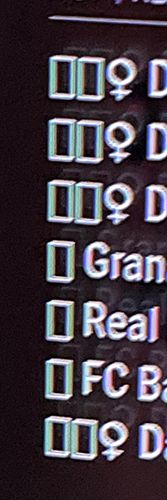
Mirror Output:
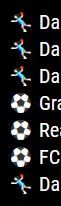
Mirror webinterface:
-
Icons not showing on screen but webinterface ok
Hi guys.
Icons not showing on the normal mirror screen -> hdmi output on RaspberryPi (shows white boxes in feed)
…but in webinterface it displays the icons fine.What could be wrong here?
It is calendar feed from ics / upcoming soccer matches (icon show the sport, ie soccer, handball etc.)
-
RE: Calendar is ending/hiding "all day event" soon on the day
I tried to put this into the config file/config loop
logLevel: [“INFO”, “LOG”, “WARN”, “ERROR”,“DEBUG”],
- and then npm start, but it gave me a lot of error and the mirror is not starting.
So I guess this is not for beginners…
-
RE: Calendar is ending/hiding "all day event" soon on the day
Im not sure where the “loglevel” array is in the config.js
Do you have an example - thanks :)
-
Calendar is ending/hiding "all day event" soon on the day
My Mirror is hiding ‘all day events’ very soon on the day of the event.
Why is that? I would like to have the full day event to stay showing all day on the event.
Where should I troubleshoot this? Timezone should be ok etc and clock work fine and is set my timezone.
Any ideas to troubleshoot?
Thanks
-
Calendar -2hours for "all day event"
Hi guys,
Im close to giving up on this. I really feel I have read many tickets and tried everything.
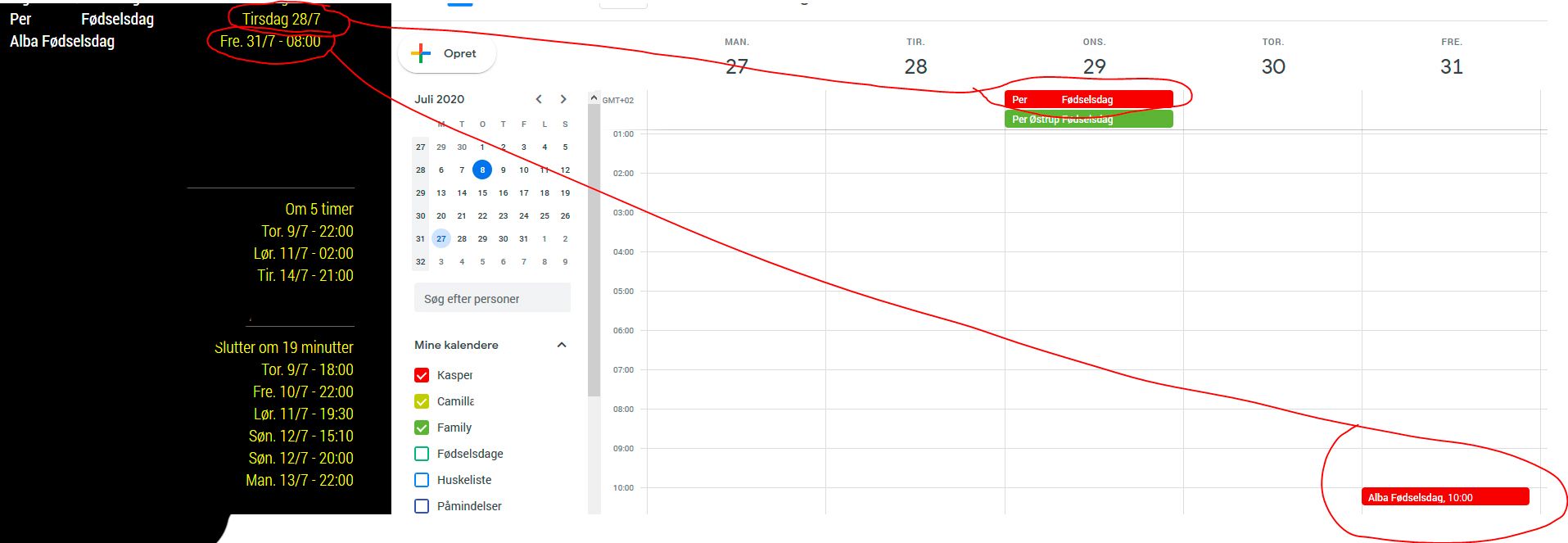
My local on Pi are set to the correct timezone AND I have showEnd: false, in config (as some mentioned as a solution) - using the defualt calendar module.
My problem is all my all day events is showed on the day before the correct date.
When I edit the All day event to start from 10am, it shows up in MagicMirror as 8am.Everything is working as it should when I create a new all day event, it shows fine - well… until I restarted the mirror a couple of times also those all day events showed up on the day before?
This is really annoying. I am on the newest version of Magic Mirror (2.12.0) and my gmail is setup to right timezone, and all events shows up correct in both browser and iphone.
To make it even more strange, 1 all day event is shown correctly… All events are from the same gmail calendar…What and where should I start? :-/ Thanks.
-
RE: MMM-MovieInfo
Is there a way to display releasedate? in a specific region :-)
Thanks
-
RE: Default newsfeed - make list?
@doublet said in Default newsfeed - make list?:
As I said, this is nowhere near complete, just playing around. Speed is the same as in the config. The rest can be done. I’ll look into it.
doublet, any chance you have time to fix this? Thanks.
-
RE: Garmin Connect Integration
Any news of a Garmin Module? It would be kinda awesome :-)
-
RE: Default newsfeed - make list?
Thanks. This is great. Now it works with .css file.
But:
It does not show the headers title for instance “CNN” - and no timestamps? Is it possible to add short timestamp before the news headline?
These have no effect:
showSourceTitle: true,
showPublishDate: true,And 1 last thing - Do you control the speed of the sliding somewhere - Or maybe just slide in new entries when you reach max entries?
Thanks, man!
-
RE: Default newsfeed - make list?
I have the custom.css file in modules/default/newsfeed/
:/and tried to name it custom.css and newsfeed.css
-
RE: Default newsfeed - make list?
I just tried your code, with default setting (copy/paste into newsfeed.js)
It looks like this when the feed is loading. Then it counts down and show 1 lines less every second? Is that in purpose?

-
RE: Default newsfeed - make list?
@doubleT
Thanks for the effort. Its a nice tweak you have made - its better than the original :)Yeah I ment 5 (or what you set) news headline from source 1 - maybe a bullit before each line (or a timestamp)
then you can fade to another source after some seconds you set.
Im not good to see, where you edit those things you have made? Can you make a dummy guide for me? hehe :)
Thanks - have a nice weekend.