@Muzziboy Great that it worked out! :)
R
Offline
A New Chapter for MagicMirror: The Community Takes the Lead
Read the statement by Michael Teeuw here.
Read the statement by Michael Teeuw here.
Posts
-
RE: Noob need help
One of my TV’s have some kind of automatic dimming based on the total brightness of what’s shown. Looks a bit like your video. So look in the settings/manual of the screen and see if you can find anything about this and if you can turn it off.
-
RE: My hallway 27" MagicMirror! (Sweden)
Looks really nice!!
Tip: as a Swede with kids, you might be interested in my school lunch module: https://github.com/retroflex/MMM-Skolmaten
-
RE: [MMM-Remote-Control] Can not access remote control module
@motdog If you open up a port for outside access of MM you’ll have to whitelist all IP’s since your phone changes IP. You will then expose it for everyone. This includes the config.js file, which might contain passwords to calendars etc. So be careful! Best option is to connect to your network using VPN. It is possible to setup a VPN server in some routers.
-
RE: Sometimes random modules gets hidden
Check the log file. Search for hide or similar. Maybe there is a notification from somewhere that hides the modules.
Also add the excellent MMM-Logging module to get time stamps in log file, helps a bit when debugging.
-
RE: Considering taking donations to support the MagicMirror project. Interested in your thoughts!
Donated here as well. Again, thanks for this amazing project! :)
-
RE: How to remotely add long links?
On Windows I like MobaXTerm. It allows you to access the command line and browse files on your Pi.
-
RE: Considering taking donations to support the MagicMirror project. Interested in your thoughts!
MM has been the most fun and at the same time useful project I’ve ever been involved with. I will definitely donate! And I wouldn’t have learned node.js and extended my Linux knowledge if it wasn’t for MM, which is worth a lot. Great work @MichMich!
I think single donations is the way to go (or at least the option for single donations). I think people are more hesitant to sign up for monthly/yearly donations.
-
RE: Control MM with a Google Home
@Sean Thanks. I have DDNS setup, I just prefer to keep all ports closed if possible. I also have VPN server setup in my router, but that really doesn’t help here.
From what I understand google action requires you to say to google home: “I want to speak to magicmirror” before you can trigger any command. Then the whole point with using voice to simplify is gone imo.
I will look into MMM-AlexaOnOff more and post if I succeed in connecting my google home.
-
Control MM with a Google Home
So I got a Google Home Mini for Christmas, so I’ve tinkered around a bit to try to control MagicMirror with it… but I haven’t found a way yet.
Most posts seems to be either about Alexa or to run Google assistant on the RPi itself. But someone must have done this before…
My tests so far:
-
Created an IFTTT applet that triggered a webhook to send notifications via MMM-RemoteControl. But my mirror IP is local. I had it port forwarded before, but when I realized anyone could access my config.js I turned that off. So I gave this up.
-
The above but tried to also use Tasker on Android (and other similar apps I don’t remember the name on). I struggled with this and got nowhere. Also, if I would succeed, it would only work when my phone is at home.
-
I installed MMM-TelegramBot. So now I can control my mirror from anywhere by chatting with the bot and for example texting “/hideall” to it. All modules are hidden instantly. Cool! I could also write to the chat via the rest api:
https://api.telegram.org/bot[token]/sendMessage?chat_id=[myuserid]&text=/hideall
That wrote /hideall in the chat, but did not trigger the hide all action. I guess it is because a bot sent message cannot trigger a bot command. -
Just now I found this:
https://forum.magicmirror.builders/topic/9211/mmm-alexaonoff-simple-mirror-control-from-external-home-assistant-alexa-google-home-hass-io
I haven’t tried that yet, but it is named AlexaOnOff and I found no mention of anyone using it with Google Home. Has anyone tested?
So… does anyone have any other bright ideas? :)
-
-
RE: Magic Mirror Blanks Several Hours
Not a solution to the root problem, but you can add the WatchDog module to automatically quit MM when UI freezes:
-
RE: [MMM-Logging] Module for better Node.js console logging with Timestamps and Function Calls
Amazing! I have missed time stamps a lot when debugging. And now we get file and line nr too. Great work!
-
RE: Wifi-power socket
If you’re thinking about how much power you use… The screen uses ~0.5W in stand-by and the Pi averages around 3W. A smart outlet uses ~2W. So there’s not much to save.
I would leave it on 24/7 and focus on on putting the screen into stand-by mode as often as possible, as that is where the real savings are.
-
RE: MMM-CountEvents
Thanks for a nice module! Added it as a countdown to Christmas Eve after request from my son :)
I added an empty title and instead set the output to: “%RESULT% days until Christmas Eve”. Looked good in my setup.
-
RE: mmm-suncalc - Text only display of sunrise, sunset and other sun events
Just found this old module and added it to my mirror. With some unicode and html the result is pretty nice, so I thought I’d share it:
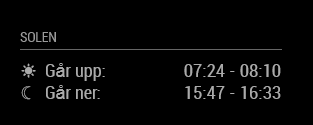
Ok, in Swedish, but it basically says “The sun… rises: / sets:”. I used dawn-sunrise and sunset-dusk for the time intervals. This gives approximately the time from when it’s almost dark to full day and vice versa.
Config:
		{
			module: 'mmm-suncalc',
			position: 'top_left',
			header: 'Solen',
			config: {
				latitude: xx.xxxx,
				longitude: xx.xxxx,
				text: '<table>' +
								'<tr><td>& #9728;</td><td>Går upp:</td><td style="text-align: right">[dawn] - [sunrise]</td></tr>' +
								'<tr><td>& #9790;</td><td>Går ner:</td><td style="text-align: right">[sunset] - [dusk]</td></tr>' +
							 '</table>'
			}
		},
Note that you need to remove the space between & and # in the config above. It was impossible to write the code in the forum otherwise. Also you need to change [ … ] to < … > for dawn, sunset etc.
-
RE: Birthday Calendar and Appointments
How about seting up a google account and add the birthdays to the google calendar as recurring events. Then use the default calendar module to show it?
-
RE: MMM-Chuck-Norris module won't apear
@mrheadbanger Not that it answers your question, but the compliments module can be configured in config.js to have your own custom compliments. See here:
https://github.com/MichMich/MagicMirror/tree/master/modules/default/compliments#default-valueThat way you don’t have to edit the compliments.js file. It is also generally a bad idea to edit the modules’ files as it becomes harder to update to new versions of magicmirror.
The config.js and custom css file are kept when updating to a new version. -
RE: Access control
You can setup a VPN server at home. Many routers have settings for this.
-
RE: MMM-WeeklySchedule
Just started using this module for my kid’s school schedule and just want to share that it’s really great! Especially like that you can switch to the next day in the afternoon.
-
RE: Error accessing remote.html
I deleted the MMM-RemoteControl folder and installed from scratch and now everything is working! Maybe I forgot to “npm install” after the last update… that’s the only thing I can think of since I had no local modifications to the code.