I’ve also looked for some alternatives. If you have a chance to host an own or to rent a nextcloud instance, you can use MMM-RandomPhoto. If you would like to use another cloud-service, you can copy your pictures to OneDrive and use MMM-OneDrive
A New Chapter for MagicMirror: The Community Takes the Lead
Read the statement by Michael Teeuw here.
Read the statement by Michael Teeuw here.
S
Offline
Posts
-
RE: alternative to googlephoto?
-
RE: Wayland question
Hi @sdetweil
I have tested your updated script and it works flawlessly. Exporting the neededWAYLANDenvironment variable was exactly what I was looking for.Since I install MagicMirror via an Ansible playbook, the required environment variables are not set in the used
.pm2/dump.pm2file - my previous approach was to restore a prepareddump.pm2file, but with your approach it is much more convenient :) -
RE: MMM-HomeAssistant
I’m just here to say “Thank you” - installed the module yesterday and after some struggling with my MQTT Backend all is working :)
-
RE: "clock" Module shows "some" message
@sdetweil Thanks for your response! I’ve restarted the whole host system (Raspberry Pi 4) several times and the message is gone.
Regarding your hint: I’ve actually tried it but hadnt any luck in identifying the correct DOM node. Also searching in the DOM tree for the word didn’t return any item.Nevermind: Issue is gone since restarting the whole system :)
-
"clock" Module shows "some" message
Hello all,
I’ve recently upgraded my magic mirror installation from v.2.22 to v.2.24 using the 3rd party upgrade script (https://github.com/sdetweil/MagicMirror_scripts).
Everything works well, all modules are up and running but for some reason the default “clock” module shows an message, which is not fully readable. I’ve already tried to search in the HTML Code for some of the words, but there are not found.Find below a screenshot showing the message:
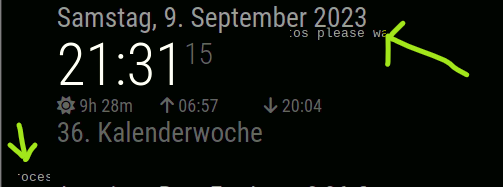
If I disable the clock module, the message will not pop up, so the message should be caused by the clock module, shouldn’t it?
Do you have any idea?
Thanks :)