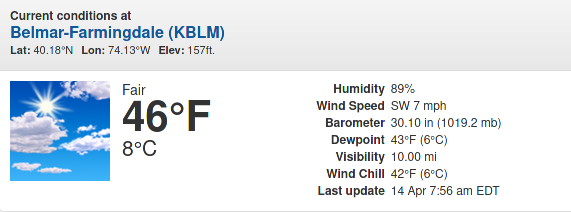
@hango
O.K. The time is displayed just no icon.
Thanks for the information.
Regards.
@hango
O.K. The time is displayed just no icon.
Thanks for the information.
Regards.
@hango
Hi,
The latest https://cdnjs.cloudflare.com/ajax/libs/font-awesome/5.15.3/css/fontawesome.min.css did not throw a 404 error
https://cdnjs.cloudflare.com/ajax/libs/weather-icons/2.0.12/css/weather-icons.min.css returns a 404 error. For fun I tried 2.0.11 to no avail. However 2.0.10 still works.
Another odd thing is that with showSun: true and onlyTemp: false there is no sunriseSunsetIcon displayed.
Cheers.
@hango
Hi.
I deleted my existing weather_plus module and did a “git clone”.
On the reboot the module came up “loading”.
Developers Tool showed 2 errors and 1 warning.
First error was “Failed to load resource the server responded with a staus of 404 font-awesome.min.css:1”
Second error was “Error on loading stylesheet: modules/weather_plus/weather_plus.css loader.js:215”
The warning was the Electron security message.
I removed the 404 error "import url("https://cdnjs.cloudflare.com/ajax/libs/font-awesome/5.14.0/css/font-awesome.min.css");" from the .css file.
On reboot the module loaded.
I tried to visit “https://cdnjs.cloudflare.com/ajax” to update the link but a “resources not found” message was returned.
Only “https://cdnjs.cloudflare.com/” exists.
Cheers.
Hi,
I downloading the new weather_plus onecall module to test it out.
Once configured, etc. I rebooted and the screen area where I assigned it was blank.
No loading error, nothing.
I toggled the developers tool and saw 1 error (1 warning re: Electron security). Console showed an error for "Uncaught SyntaxError: Unexpected token ‘:’ module.js:43.
I opened up the .js file and noticed that defaults had 2 showHumidity listed, one false and one true. I edited out the false showHumidity.
The apiBase: was set as https:://api.openweathermap.org/data/, so I edited it to “https:://api.openweathermap.org/data/”,
Ultimately I made additional changes to the .js
- Define required scripts. Removed “font-awesome.css” (font-awesome already loaded).
- Define required translations. deleted en&ro.json and made return false (en.json error).
The weather_plus.css contains 2 addresses. I deleted these as 5.14.0 is a 404 error.
@import url(“https://cdnjs.cloudflare.com/ajax/libs/font-awesome/5.14.0/css/font-awesome.min.css”);
@import url(“https://cdnjs.cloudflare.com/ajax/libs/weather-icons/2.0.10/css/weather-icons.min.css”);
I think that’s everything I did.
My config is -
{
module: “weather_plus”,
position: “top_right”,
config: {
lat: “xx.xxxxxx”,
lon: “-xx.xxxxxx”,
showWindDirectionAsArrow: false,
appid: “bunchofnumbers”,
}
},
I’m not sure if I had to do all the changes but it’s loading.
Nice module Hangorazvan.
Cheers
Hi. Take a look at this to see if it will help with your loading issue.
https://forum.magicmirror.builders/topic/14919/weather-module-location-id
Cheers.
@linxha
I captured an xml string from your location…
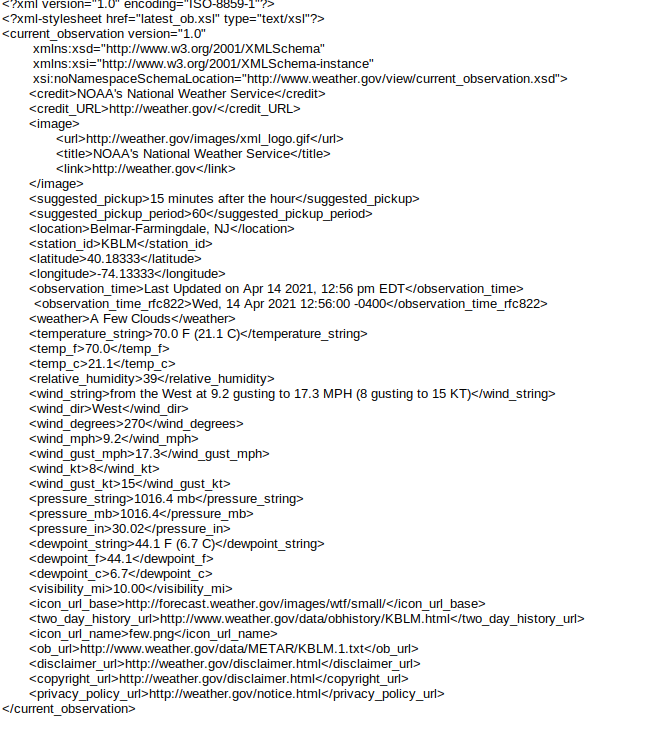
<current_observation version=“1.0”
xmlns:xsd=“http://www.w3.org/2001/XMLSchema”
xmlns:xsi=“http://www.w3.org/2001/XMLSchema-instance”
xsi:noNamespaceSchemaLocation=“http://www.weather.gov/view/current_observation.xsd”>
NOAA’s National Weather Service
<credit_URL>http://weather.gov/</credit_URL>
http://weather.gov/images/xml_logo.gif
… but I saw no ‘wind chill’ or ‘feels like’ information at the time I grabbed the file.
I’ve gone about as far as I can. Hopefully someone can add more to this for you.
Cheers.
With following set you should get correct weather… except wind chill.
language: “en”,
locale: “en-US”,
logLevel: [“INFO”, “LOG”, “WARN”, “ERROR”], // Add “DEBUG” for even more logging
timeFormat: 12,
units: “imperial”,
		config: {
			type: "current",
			weatherProvider: "weathergov", //Default value: openweathermap
			weatherEndpoint: "/forecast/hourly",
			degreeLabel: true,
			showFeelsLike: false,
			lat:        40.25571,
			lon:        -74.39416,
No matter what I tried Feels Like came up as 32degrees. The web site shows “wind chill” and openweathermap shows “feels like” and the current.njk translates “FEELS” - DEGREE. I’m scratching my head for now.
Cheers.
That’s odd. Your wind speed looks like it could be in meters/seconds but it should be about 3.3 @ 7 miles per hour. So, are you using the current weather module or the ‘new’ weather module?
Cheers
Hi,
What is your default for ‘units’ in the config.js file?
Config Options…
Possible values: config.units = Specified by config.js, default = Kelvin, metric = Celsius, imperial =Fahrenheit
and if your are asking about the current weather module
useKMPHwind Uses KMPH as units for windspeed.
Possible values:true or false
Default value: false
useBeaufort Pick between using the Beaufort scale for wind speed or using the default units.
Possible values: true or false
Default value: true
if you are using weather module - windUnits
What units to use for wind speed. If specified overrides units setting. Specified by config.js
Possible values: config.units = Specified by config.js, default = Kelvin, metric = Celsius, imperial = Fahrenheit
It’s best to check your options per module.
Cheers.
Hi,
FYI
I installed the latest MM version on a ‘play’ system. When using the ‘new’ weather module for current and forecast when I enter the ‘LocationID:’ 6 digit number the module only gets as far as loading. If I use ‘appid’ & ‘Location’ (location has to be valid ‘city’ supported by openweathermap) the module loads.
Cheers
Thanks, I always thought I needed double quotes.
O.K.
and… onlyTemp: ‘true’, would not have any quotes.
Are your single quotes ’ just an accident in your examples?
{
			module: "currentweather",
			position: "top_right",
			header: "my header",
			config: {
				location: "my village",
//				locationID: "numbers",  //ID from http://bulk.openweathermap.org/sample/; unzip the gz file and find your city
				appid: "wholelottanumbers",
				appendLocationNameToHeader: false,
				degreeLabel: true,
				useBeaufort: false,
				useKMPHwind: true,
				showHumidity: true
			}
		},
Hope this helps.
Hi,
I went through moment.js looking at ways to capitalize ‘domingo’ etc. I could create a function with ‘var str =’ and ‘var res =’, or do a moment.locale (“es”) define a var for months and days with uppercase and do a moment.UpdateLocale but all involving modifying the .js file.
There was a solution editing the /MagicMirror/vendor/node_modules/moment/min/moment-with-locales.js which would change every module.
However, this morning I tripped over just adding text-transform: capitalize to the .css for the module. I updated .clock and calendar_monthly. It worked. It’s simple and no messing with moment.locale and the .js
I learned some things poking around in moment.js but the .css solution was way easier.
Thank you for your insight and suggestions.
Cheers!
I went through the locales.js and everything was lowercase.
https://momentjs.com/downloads/moment-with-locales.js
The only thing that I can think of doing was setting the config.js back to en.json and in the clock/calendar.js create a translation string and put that into es.json and leave the month starting on Domingo and not Lunes (like in the English en.json ). It’s confusing anyway to look at the english calendar with the week starting on Sunday and then you look at the Spanish calendar and it starts on Monday and visually things are off by one.
Cheers
Hi,
The default in the .js is dateFormat: “MMM Do”, for fun have you tried “Do MMM”?
Cheers.
Hi.
I was wondering if anyone has ever tried to change the OpenWeather es language data from lower case to upper case? The clock/calendar modules for example display marzo instead of Marzo, days are in lower case, etc. She who must be obeyed was “commenting” on it. Is it possible to translate the es lowercase data to uppercase in translations es.json? I didn’t think I could because I thought the translated spanish data, plus calendar month starting on Domingo (oops - dom.), was data supplied from the OpenWeather app. It sure would be easier to do the translation in en.json. I did try “marzo”: “Marzo”, in the es.json file to no success. The month/day format is" MMM Do" in the .js so is it possible to do something weird with moment?
Wheee!
Thanks.
Sorry, my example was not explained properly. It was basically how not to put the Location/LocationID name in the header. In my example you would just edit the header to say header: “Weather Forecast for New York”, or in your case just “New York, USA”. With the appendLocationNameToHeader: false, I put this in to stop the the appid city ID being populated as my location because it wasn’t my village name but a nearby city. So in your instance, if I remember correctly, your don’t need header: it should be fine with appendLocationNameToHeader: true,
The default config for openmapweather
modules: [
{
module: “MMM-OpenmapWeather”,
position: “top_left”, // This can be any of the regions.
// Best results in left or right regions.
config: {
// See ‘Configuration options’ for more information.
location: “Phoenix,USA”,
locationID: “”, //Location ID from http://openweathermap.org/help/city_list.txt
appid: “abcde12345abcde12345abcde12345ab”, //openweathermap.org API key
colorIcon: true
}
}
]
should just be location:“New York”,
locationID: “5128581”,
appid: “xxxxxxxxxxx”,
If you want the USA, location “New York, USA” that might work. It may not like the USA part because it might conflict with the returned locationID of just New York - I can’t remember. If you want USA you’ll have to create the header “New York, USA” using my example. I hope your config.js file has a comma at the end of your appid".
Cheers, hope this helps.