MagicMirror Forum
    • Recent
    • Tags
    • Unsolved
    • Solved
    • MagicMirror² Repository
    • Documentation
    • 3rd-Party-Modules
    • Donate
    • Discord
    • Register
    • Login
    1. Home
    2. tomXGames
    3. Posts
    A New Chapter for MagicMirror: The Community Takes the Lead
    Read the statement by Michael Teeuw here.
    T
    Offline
    • Profile
    • Following 0
    • Followers 0
    • Topics 7
    • Posts 18
    • Groups 0

    Posts

    Recent Best Controversial
    • MMM-Buttons only working with the first button

      Hi!

      I set up MMM-Buttons with one button attached to pin 17. It all worked just fine.
      But now I want to have five buttons, so I attached another four. These don’t work, only the first one…

      I’ve configured the module like this:

      
      			{
      
      			    module: 'MMM-Buttons',
      
      			    config: {
      
      			        buttons: [
      
      			            {
      
      			                pin: 17,
      
      			                name: "Tom",
      
      			                shortPress: {
      
      			                    notification: "CURRENT_PROFILE",
      
      			                    payload: "Tom"
      
      			                },


      			            },
      					{
      
      			                pin: 27,
      
      			                name: "Alice",
      
      			                shortPress: {
      
      			                    notification: "CURRENT_PROFILE",
      
      			                    payload: "Alice"
      
      			                },


      			            },
      					{
      
      			                pin: 22,
      
      			                name: "default",
      
      			                shortPress: {
      
      			                    notification: "CURRENT_PROFILE",
      
      			                    payload: "default"
      
      			                },


      			            },
      					{
      
      			                pin: 18,
      
      			                name: "Jimmy",
      
      			                shortPress: {
      
      			                    notification: "CURRENT_PROFILE",
      
      			                    payload: "Jimmy"
      
      			                },


      			            },
      					{
      
      			                pin: 15,
      
      			                name: "Max",
      
      			                shortPress: {
      
      			                    notification: "CURRENT_PROFILE",
      
      			                    payload: "Max"
      
      			                },


      			            }


      			        ]
      
      			    }
      
      },


      Thanks for helping!

      Edit: The button clicks don’t get registered…

      posted in Troubleshooting
      T
      tomXGames
    • RE: After adding MMM-CalendarExt to a class (MMM-ProfileSwitcher) it doesn't show up on the mirror

      @Sean The ones sent with this.sendNotification()

      posted in Troubleshooting
      T
      tomXGames
    • RE: After adding MMM-CalendarExt to a class (MMM-ProfileSwitcher) it doesn't show up on the mirror

      @Sean I have another question… Where can I see the notifications?

      posted in Troubleshooting
      T
      tomXGames
    • RE: After adding MMM-CalendarExt to a class (MMM-ProfileSwitcher) it doesn't show up on the mirror

      @Sean Ok, thanks anyways for the help!

      posted in Troubleshooting
      T
      tomXGames
    • RE: After adding MMM-CalendarExt to a class (MMM-ProfileSwitcher) it doesn't show up on the mirror

      @Sean Thanks!

      I have another problem with MMM-Buttons… When I connect the two pins (pin 9 and pin 11 / Ground & GPIO 17) it doesn’t change the profile…
      Can you help out here? That would be great!

      /* Magic Mirror Config Sample
       *
       * By Michael Teeuw http://michaelteeuw.nl
       * MIT Licensed.
       *
       * For more information how you can configurate this file
       * See https://github.com/MichMich/MagicMirror#configuration
       *
       */
      
      var config = {
      	address: "localhost", // Address to listen on, can be:
      	                      // - "localhost", "127.0.0.1", "::1" to listen on loopback interface
      	                      // - another specific IPv4/6 to listen on a specific interface
      	                      // - "", "0.0.0.0", "::" to listen on any interface
      	                      // Default, when address config is left out, is "localhost"
      	port: 8080,
      	ipWhitelist: ["127.0.0.1", "::ffff:127.0.0.1", "::1"], // Set [] to allow all IP addresses
      	                                                       // or add a specific IPv4 of 192.168.1.5 :
      	                                                       // ["127.0.0.1", "::ffff:127.0.0.1", "::1", "::ffff:192.168.1.5"],
      	                                                       // or IPv4 range of 192.168.3.0 --> 192.168.3.15 use CIDR format :
      	                                                       // ["127.0.0.1", "::ffff:127.0.0.1", "::1", "::ffff:192.168.3.0/28"],
      
      	language: "de",
      	timeFormat: 24,
      	units: "metric",
      
      	modules: [
      		{
      			module: "alert",
          			classes: "default everyone"
      
      
      		},
      		{
      			module: "updatenotification",
      			position: "top_bar",
      			classes: "default everyone"
      
      
      		},
      		{
      			module: "clock",
      			position: "top_left",
      			classes: "default everyone"
      		},
      
      		{
      			module: "newsfeed",
      			position: "bottom_bar",
      			classes: "default",
      			config: {
      				feeds: [
      					{
      						title: "Neue Zürcher Zeitung",
      						url: "https://www.nzz.ch/recent.rss"
      					},
      
      
      				],
      				showSourceTitle: true,
      				showPublishDate: true,
      				broadcastNewsFeeds: true,
      				broadcastNewsUpdates: true
      			}
      		},
      
      		    {
      
            			module: "MMM-CalendarExt",
            			position: "top_left",
      			classes: "default everyone",
      			config: {
              		system: {
                				show: ["daily"],
                				locale: 'de',
                				redrawInterval:60000,
              			},
              			views: {
                				daily: {
                  						position:'lower_third',
                  						counts:7,
                					},
      
              				},
      
              			defaultCalendar: {
                						maxEntries:50,
                						maxDays:180,
                						interval: 1000*60*5,
              					},
      
              			calendars :[
                					{
                  						name: "Tommaso",
                  						url: "https://calendar.google.com/calendar/ical/tommaso.peduzzi%40gmx.ch/private-088063fff967db8474e57b3a7cdf176a/basic.ics",
      							profiles: ['Tom'],
                					},
                					{
                  						name: "Ferien",
                  						url: "https://www.ferienwiki.ch/exports/ferien/2019/ch/basel-stadt",
      							profiles: ['default'],
                					},
      
          
              				],
            				},
          		},    						
      		{
              		module: 'MMM-ProfileSwitcher',
      			classes: "default everyone",
             				config: {
                 					// See 'Configuration options' for more information.
          					}
        		},
              	{
      		            module: "currentweather",
      				classes: "default",
      		            position: "top_right",
      		            config: {
      		              location: "Basel",
      		              locationID: "6458763",  //ID from http://bulk.openweathermap.org/sample/city.list.json.gz; unzip the gz file and find your city
      		              appid: "4a58442ce61f6ae3de20fcfdecdb0327"
                				}
              	},
      	        {
      	            module: "weatherforecast",
      		    classes: "default everyone",
      	            position: "top_right",
      	            header: "Weather Forecast",
      	            config: {
      	              location: "Basel",
      	              locationID: "6458763",  //ID from http://bulk.openweathermap.org/sample/city.list.json.gz; unzip the gz file and find your city
      	              appid: "4a58442ce61f6ae3de20fcfdecdb0327"
      	          }
              	},
      		
      	
      		/*{
      
      		   	module: 'MMM-GPIO-Notifications',
      			classes: "default everyone",
      
      			    config: {
      
      			        '17': {
      
      			          gpio_state: 1,
      
      			          gpio_debounce: 10,
      
      			          notifications: [
      
      			            {
      
      					// see https://github.com/tosti007/MMM-ProfileSwitcher
      
      					// Switching Profiles
      
      					// this.sendNotification('CURRENT_PROFILE', 'DESIRED_PROFILE_NAME_HERE');
      
      			              notification: 'CURRENT_PROFILE', 										
      
      			              payload:  'Tom' 
      
      			            },


      			          ]
      
      			        }
      
      			    }
      
      			},*/
      
      
      			{
      			    module: 'MMM-Buttons',
      			    config: {
      			        buttons: [
      			            {
      			                pin: 17,
      			                name: "monitor_control",
      			                shortPress: {
      			                    notification: "CURRENT_PROFILE",
      			                    payload: "Tom"
      			                },
      
      			            },
      
      
      			        ]
      			    }
      },


      	]
      
      };
      
      
      /*************** DO NOT EDIT THE LINE BELOW ***************/
      if (typeof module !== "undefined") {module.exports = config;}



      posted in Troubleshooting
      T
      tomXGames
    • RE: After adding MMM-CalendarExt to a class (MMM-ProfileSwitcher) it doesn't show up on the mirror

      @Sean Thanks! How can I update it?

      posted in Troubleshooting
      T
      tomXGames
    • After adding MMM-CalendarExt to a class (MMM-ProfileSwitcher) it doesn't show up on the mirror

      Hi!

      It’s all in the title…

      Here’s my config:

      /* Magic Mirror Config Sample
       *
       * By Michael Teeuw http://michaelteeuw.nl
       * MIT Licensed.
       *
       * For more information how you can configurate this file
       * See https://github.com/MichMich/MagicMirror#configuration
       *
       */
      
      var config = {
      	address: "localhost", // Address to listen on, can be:
      	                      // - "localhost", "127.0.0.1", "::1" to listen on loopback interface
      	                      // - another specific IPv4/6 to listen on a specific interface
      	                      // - "", "0.0.0.0", "::" to listen on any interface
      	                      // Default, when address config is left out, is "localhost"
      	port: 8080,
      	ipWhitelist: ["127.0.0.1", "::ffff:127.0.0.1", "::1"], // Set [] to allow all IP addresses
      	                                                       // or add a specific IPv4 of 192.168.1.5 :
      	                                                       // ["127.0.0.1", "::ffff:127.0.0.1", "::1", "::ffff:192.168.1.5"],
      	                                                       // or IPv4 range of 192.168.3.0 --> 192.168.3.15 use CIDR format :
      	                                                       // ["127.0.0.1", "::ffff:127.0.0.1", "::1", "::ffff:192.168.3.0/28"],
      
      	language: "de",
      	timeFormat: 24,
      	units: "metric",
      
      	modules: [
      		{
      			module: "alert",
          			classes: "default everyone"
      
      
      		},
      		{
      			module: "updatenotification",
      			position: "top_bar",
      			classes: "default everyone"
      
      
      		},
      		{
      			module: "clock",
      			position: "top_left",
      			classes: "default everyone"
      		},
      
      		{
      			module: "newsfeed",
      			position: "bottom_bar",
      			classes: "default everyone",
      			config: {
      				feeds: [
      					{
      						title: "Neue Zürcher Zeitung",
      						url: "https://www.nzz.ch/recent.rss"
      					},
      
      
      				],
      				showSourceTitle: true,
      				showPublishDate: true,
      				broadcastNewsFeeds: true,
      				broadcastNewsUpdates: true
      			}
      		},
      
      		    {
      
            			module: "MMM-CalendarExt",
            			position: "top_left",
      			classes: "default everyone",
      			config: {
              		system: {
                				show: ["daily"],
                				locale: 'de',
                				redrawInterval:60000,
              			},
              			views: {
                				daily: {
                  						position:'lower_third',
                  						counts:7,
                					},
      
              				},
      
              			defaultCalendar: {
                						maxEntries:50,
                						maxDays:180,
                						interval: 1000*60*5,
              					},
      
              			calendars :[
                					{
                  						name: "Tommaso",
                  						url: "https://calendar.google.com/calendar/ical/123/basic.ics",
      							profiles: ['Tom'],
                					},
                					{
                  						name: "Ferien",
                  						url: "https://www.ferienwiki.ch/exports/ferien/2019/ch/basel-stadt",
      							profiles: ['default'],
                					},
      
          
              				],
            				},
          		},    						
      		{
              		module: 'MMM-ProfileSwitcher',
      			classes: "default everyone",
             				config: {
                 					// See 'Configuration options' for more information.
          					}
        		},
              	{
      		            module: "currentweather",
      				classes: "default",
      		            position: "top_right",
      		            config: {
      		              location: "Basel",
      		              locationID: "6458763",  //ID from http://bulk.openweathermap.org/sample/city.list.json.gz; unzip the gz file and find your city
      		              appid: "1234"
                				}
              	},
      	        {
      	            module: "weatherforecast",
      		    classes: "default everyone",
      	            position: "top_right",
      	            header: "Weather Forecast",
      	            config: {
      	              location: "Basel",
      	              locationID: "6458763",  //ID from http://bulk.openweathermap.org/sample/city.list.json.gz; unzip the gz file and find your city
      	              appid: "12345"
      	          }
              	},
      		
      	
      		{
      
      		   	module: 'MMM-GPIO-Notifications',
      			classes: "default everyone",
      
      			    config: {
      
      			        '17': {
      
      			          gpio_state: 1,
      
      			          gpio_debounce: 10,
      
      			          notifications: [
      
      			            {
      
      					// see https://github.com/tosti007/MMM-ProfileSwitcher
      
      					// Switching Profiles
      
      					// this.sendNotification('CURRENT_PROFILE', 'DESIRED_PROFILE_NAME_HERE');
      
      			              notification: 'CURRENT_PROFILE', 										
      
      			              payload:  'Tom' 
      
      			            },


      			          ]
      
      			        }
      
      			    }
      
      },


      	]
      
      };
      
      
      /*************** DO NOT EDIT THE LINE BELOW ***************/
      if (typeof module !== "undefined") {module.exports = config;}


      Thanks!

      posted in Troubleshooting
      T
      tomXGames
    • RE: After adding MMM-GPIO-Notifications, config.js doesn't work...

      @sdetweil
      Thanks for your help… I implemented your change and there’s no error anymore. But MMM-CalendarExt is not being shown, even though I put the class to “default everyone”. Do you have an idea, what I’m doing wrong here?

      posted in Troubleshooting
      T
      tomXGames
    • RE: After adding MMM-GPIO-Notifications, config.js doesn't work...

      @sdetweil Yeah that’s what I did

      posted in Troubleshooting
      T
      tomXGames
    • RE: After adding MMM-GPIO-Notifications, config.js doesn't work...

      @sdetweil The command still doesn’t work and after adding a comma, nothing is even shown. What am i doing wrong?

      posted in Troubleshooting
      T
      tomXGames
    • RE: After adding MMM-GPIO-Notifications, config.js doesn't work...

      @sdetweil said in After adding MMM-GPIO-Notifications, config.js doesn't work...:

      npm check:config

      It says, that there is no such command… I’m running it in the MagicMirror directory…

      posted in Troubleshooting
      T
      tomXGames
    • After adding MMM-GPIO-Notifications, config.js doesn't work...

      Hi!

      My config.js has an error in it and I’m not able to solve it. Here it is:

      /* Magic Mirror Config Sample
       *
       * By Michael Teeuw http://michaelteeuw.nl
       * MIT Licensed.
       *
       * For more information how you can configurate this file
       * See https://github.com/MichMich/MagicMirror#configuration
       *
       */
      
      var config = {
      	address: "localhost", // Address to listen on, can be:
      	                      // - "localhost", "127.0.0.1", "::1" to listen on loopback interface
      	                      // - another specific IPv4/6 to listen on a specific interface
      	                      // - "", "0.0.0.0", "::" to listen on any interface
      	                      // Default, when address config is left out, is "localhost"
      	port: 8080,
      	ipWhitelist: ["127.0.0.1", "::ffff:127.0.0.1", "::1"], // Set [] to allow all IP addresses
      	                                                       // or add a specific IPv4 of 192.168.1.5 :
      	                                                       // ["127.0.0.1", "::ffff:127.0.0.1", "::1", "::ffff:192.168.1.5"],
      	                                                       // or IPv4 range of 192.168.3.0 --> 192.168.3.15 use CIDR format :
      	                                                       // ["127.0.0.1", "::ffff:127.0.0.1", "::1", "::ffff:192.168.3.0/28"],
      
      	language: "de",
      	timeFormat: 24,
      	units: "metric",
      
      	modules: [
      		{
      			module: "alert",
      		},
      		{
      			module: "updatenotification",
      			position: "top_bar"
      		},
      		{
      			module: "clock",
      			position: "top_left"
      		},
      
      		{
      			module: "newsfeed",
      			position: "bottom_bar",
      			config: {
      				feeds: [
      					{
      						title: "Neue Zürcher Zeitung",
      						url: "https://www.nzz.ch/recent.rss"
      					},
      
      
      				],
      				showSourceTitle: true,
      				showPublishDate: true,
      				broadcastNewsFeeds: true,
      				broadcastNewsUpdates: true
      			}
      		},
      
      		    {
      
            			module: "MMM-CalendarExt",
            			position: "top_left",
            			config: {
              		system: {
                				show: ["daily"],
                				locale: 'de',
                				redrawInterval:60000,
              			},
              			views: {
                				daily: {
                  						position:'lower_third',
                  						counts:7,
                					},
      
              				},
      
              			defaultCalendar: {
                						maxEntries:50,
                						maxDays:180,
                						interval: 1000*60*5,
              					},
      
              			calendars :[
                					{
                  						name: "Tommaso",
                  						url: "https://calendar.google.com/calendar/ical/tommaso.peduzzi%40gmx.ch/private-088063fff967db8474e57b3a7cdf176a/basic.ics",
      							profiles: ['Tom'],
                					},
                					{
                  						name: "Ferien",
                  						url: "https://www.ferienwiki.ch/exports/ferien/2019/ch/basel-stadt",
      							profiles: ['default'],
                					},
      
          
              				],
            				}
          		},    						
      				{
              		module: 'MMM-ProfileSwitcher',
             				config: {
                 					// See 'Configuration options' for more information.
          					}
        			},
              {
                  module: "currentweather",
                  position: "top_right",
                  config: {
                    location: "Basel",
                    locationID: "6458763",  //ID from http://bulk.openweathermap.org/sample/city.list.json.gz; unzip the gz file and find your city
                    appid: "123"
                }
              },
              {
                  module: "weatherforecast",
                  position: "top_right",
                  header: "Weather Forecast",
                  config: {
                    location: "Basel",
                    locationID: "6458763",  //ID from http://bulk.openweathermap.org/sample/city.list.json.gz; unzip the gz file and find your city
                    appid: "123"
                }
              },


      			{
      			    module: 'MMM-GPIO-Notifications',
      			    config: {
      			        '17': {
      			          gpio_state: 1,
      			          gpio_debounce: 10,
      			          notifications: [
      			            {
      			              notification: "'CURRENT_PROFILE', 'Tom'",
      			              payload: { true }
      			            },
      			            {
      			              notification: 'SCREEN_ON',
      			              payload: { 'forced': false }
      			            }
      			          ]
      			        },
      			        '4': {
      			          gpio_state: 1,
      			          gpio_debounce: 20,
      			          notifications: [
      			            {
      			              'notification': 'SCREEN_TOGGLE',
      			              'payload': { 'forced': true }
      			            }
      			          ]
      			        }
      			    }
      },
      ]
      };
      
      
      /*************** DO NOT EDIT THE LINE BELOW ***************/
      if (typeof module !== "undefined") {module.exports = config;}


      Can anybody help me here?

      tomXGames

      posted in Troubleshooting
      T
      tomXGames
    • Custom colors on headers MMM-CalendarExt

      Hi!

      I was looking for someone to explain how to change the colors in the weekly view…
      0_1567699079741_Bildschirmfoto 2019-09-05 um 17.56.37.png
      The ones highlighted in the screenshot…

      Can anyone help me here?

      Thanks,

      tomXGames

      posted in Troubleshooting
      T
      tomXGames
    • RE: MMM-CalendarExt not showing up at all

      @Sean said in MMM-CalendarExt not showing up at all:

      You probably executed MM twice. (Or your previous MM was not killed normally) Check your pm2.

      That was it thanks.

      posted in Troubleshooting
      T
      tomXGames
    • RE: MMM-CalendarExt not showing up at all

      @Fr8Trayne Thanks, but I really need the multiple users to have separate calendars (from my understanding, that’s not possible with MMM-CalendarExt2).

      @Sean Thanks for your input! I only use the builtin modules, plus MMM-ProfileSwitcher. And my log looks like this:

      Connecting socket for: updatenotification
      Connecting socket for: MMM-CalendarExt
      Connecting socket for: newsfeed
      Starting module: newsfeed
      Sockets connected & modules started ...
      Whoops! There was an uncaught exception...
      { Error: listen EADDRINUSE 127.0.0.1:8080
          at Server.setupListenHandle [as _listen2] (net.js:1330:14)
          at listenInCluster (net.js:1378:12)
          at GetAddrInfoReqWrap.doListen [as callback] (net.js:1492:7)
          at GetAddrInfoReqWrap.onlookup [as oncomplete] (dns.js:55:10)
        errno: 'EADDRINUSE',
        code: 'EADDRINUSE',
        syscall: 'listen',
        address: '127.0.0.1',
        port: 8080 }
      MagicMirror will not quit, but it might be a good idea to check why this happened. Maybe no internet connection?
      If you think this really is an issue, please open an issue on GitHub: https://github.com/MichMich/MagicMirror/issues
      Launching application.
      

      It’s obviously connected to the internet. I also looked at what is running on port 8080, but it seems that electron is running there, so I see no problem…

      Thanks,

      tomXGames

      posted in Troubleshooting
      T
      tomXGames
    • MMM-CalendarExt not showing up at all

      Hi!

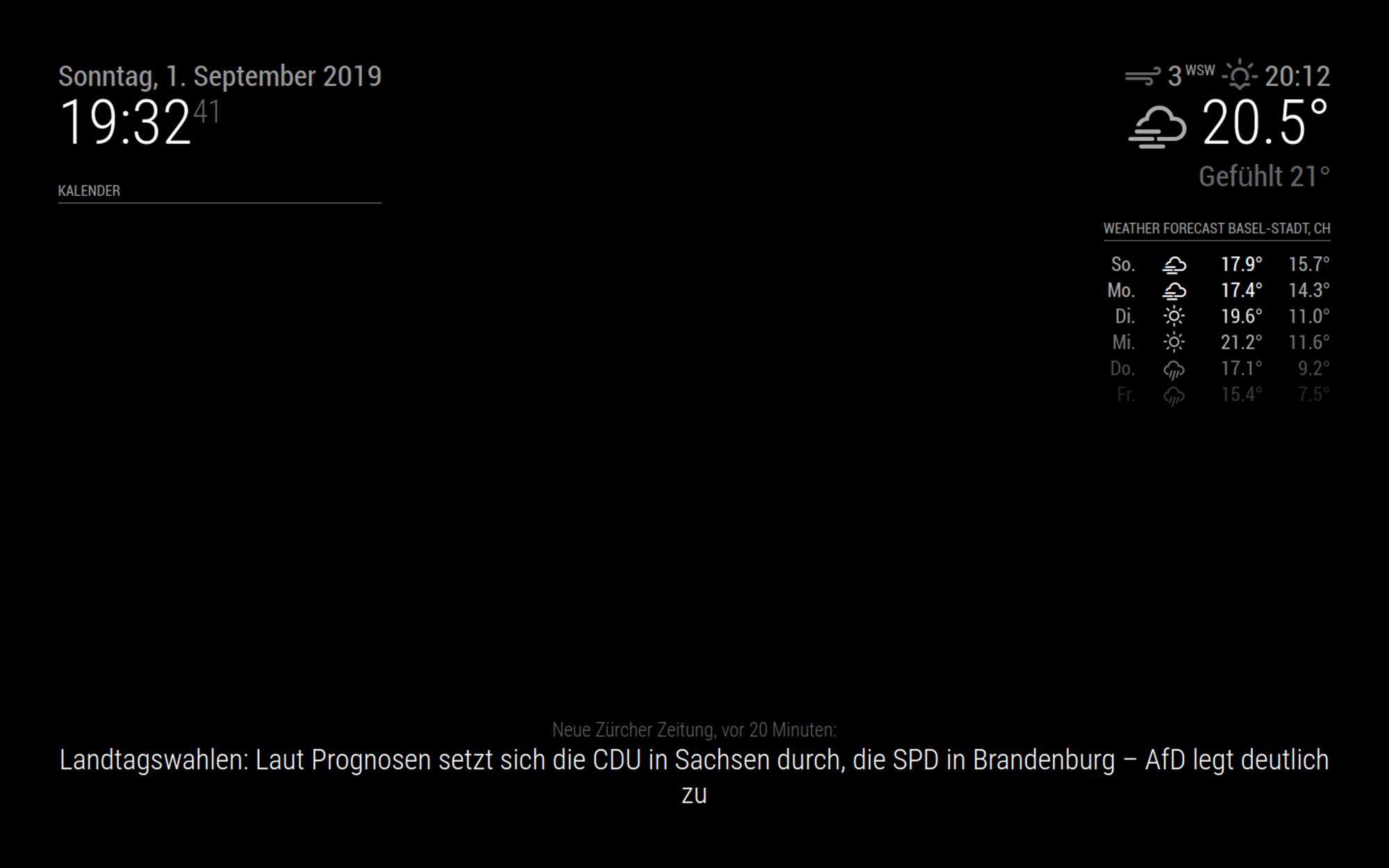
      I’ve been trying for about two hours to get this module to show up, but I can’t get it to do that. The only thing I see is the header. Here’s my config.js:

      {
      
            			module: "MMM-CalendarExt",
      			header: "Kalender",
            			position: "top_left",
            			config: {
              		system: {
                				show: ["daily", "upcoming"],
                				locale: 'de',
                				redrawInterval:60000,
              			},
              			views: {
                				daily: {
                  						position:'bottom_bar',
                  						counts:7,
                					},
                				upcoming: {
                  						position:'top_left',
                  						limit:5
                					},
              				},
      
              			defaultCalendar: {
                						maxEntries:50,
                						maxDays:180,
                						interval: 1000*60*5,
              					},
      
              			calendars :[
                					{
                  						name: "Tommaso",
                  						url: "webcal://www.calendarlabs.com/ical-calendar/ics/76/US_Holidays.ics"
                					},
          
              				],
            				}
          		},
      

      And here’s a screenshot of what I see:

      0_1567359242981_Bildschirmfoto 2019-09-01 um 19.32.41.png

      Can anyone help me, please?

      Thanks a lot,

      tomX

      posted in Troubleshooting
      T
      tomXGames
    • 1 / 1