unfortunately no I just tied that I log out and back in to dashboard it came up with Spotify code box to my google mail copy code in which let me use Spotify on the web. as I said I tried login back into dashboard still no button to create an app?
Any suggestions
V
Offline
A New Chapter for MagicMirror: The Community Takes the Lead
Read the statement by Michael Teeuw here.
Read the statement by Michael Teeuw here.
Posts
-
RE: MMM-OnSpotify Waiting for Authorization
-
RE: MMM-OnSpotify Waiting for Authorization
unfortunately when I go to the page to recreate a new app there’s no button on the page . I had deleted my old ones now I can’t make a new .
Do I just need wait for something to refresh?
any help please. -
RE: MMM-OnSpotify Waiting for Authorization
i’m haven’t got clue ho to Run the authorize command line
on my Magic Mirror it say onsptify connecting but its not
please guild me how run authorized or could show me completed app that should work
as I’m not sure I’m adding the correct thing in it.Creating a Spotify App
You cannot use MMM-NowPlayingOnSpotify credentials! (or from other module)
The scopes included in NPOS are different from the requiered for MMM-OnSpotify to work. You can use your old Client ID/Secret to get a new token.
any help what this means I’ve added a credential id and secret client id to my config.file
i’ve been on the page make n app as i said not if I’m filling this in correctly?
his is my app text only
https://developer.spotify.com/dashboard
I couldn’t past it in. Sorry my English is so bad .thanks any help
-
RE: MMM-OnSpotify Waiting for Authorization
Hi did you get onspotify running on your magic mirror I 'm trying get it running on my magic mirror I can only find secret client id and accsess Token but can’t find,
refresh “Token” any help install this Module .
I also tride to install spotify lyrics only had to add a token id .
but this is error message I get ?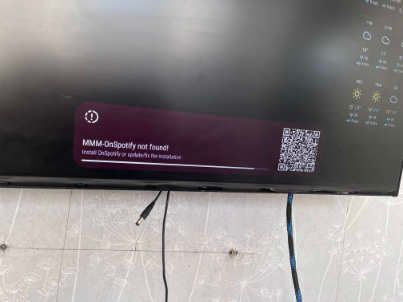
It looks like its trying to load on spotify that I’ve remove but not the install script
should just try to install MMM-onspotify, Do i add all config file ?Any help please
-
RE: MMM-OpenWeatherForecast formatting problem?
Your need look On MMM- openwesthermapforcast
Look for css style sheets you may find a copy and paste into you magic mirror modules css or see if you can change the size in your css that’s custom style sheet,
Just an idea haven’t look at it my self. But give it a try. -
RE: RPi5 running hot
You shouldn’t run any raspberry pi 5 without cooling fan on top it will break if run it without fan installed
Buy fan -
RE: Voice control
I’ve started again a little bit each day .
I’ve heard of mycroft voice control do know anything
about it and if so could i use this to control turning pages over like turn to page 1.
when ext MMM-pages was up and running i used EXT-bugsos somethingAny help please
-
RE: Voice control
wiped out oh no I know default is to boot to sd card so I thought i was building my magic mirror on to the sd card I was wrong. when i booted up my pi not sd card showing as it should so must be sd card so ill make back up onto usb stick all fine until I reboot it and loads up I can see the sd card so think it has every thing on it i start to copy sd to nvm drive then run it
but it was wrong and I wiped everything off the drive!We live and learn ha ha hope you like
-
RE: Voice control
Do you or any one know if a new voice control is going come out or is someone building one I think someone thire may a fix to google assistant or new one was coming out? i’m not sure as was it was weeks ago ?
-
Voice control
When will be a new voice control can I use Alexa voice control I’ll like add voice control to turn
My MMM-pages
If something needs a key or api could module maker put a link on the page to get the link or key api etc
As I had great difficulty finding the token for national Rail uk. Any help in finding. Tokens or api keys etc. -
RE: pages
I’ve added uk natioal rail to page 2 which is page 3 . just comes up loading
-
RE: pages
i installed uk national rail module but its not losading
any help I got the token from here LDBWS / OpenLDBWS)
i got ant email. after login in.it comes up with only loading but never dose.
yes run install script again.Any help please
-
RE: pages
I’m going to trying to add my config of my UK national Rail not loading
i got the token from national Rail Data Portal{
module: ‘MMM-page-indicator’,
position: ‘bottom_bar’,
config: {
activeBright: true,
}
},
{
module: “MMM-UKNationalRail”,
position: “top_right”,
header: “Departures”,
config: {
station: “RDH”,
token: “d921e466-a91e-4b3f-96a0-ba476081”,// <— REPLACE THIS WITH YOUR TOKEN
}
},
{
module: “newsfeed”,
position: “top_center”,
config: {
feeds: [
{
title: “BBC World News”,
url: “https://feeds.bbci.co.uk”
}
]
}
},
{ -
RE: pages
thank you that was well explained
I look forward to the new google photos will this be in 3rd party modules or on googles cloud console ?
or github ? -
RE: pages
Hi thanks I’ve added the first config it worked in I add the page, my
open weather maps did’t show up so update script and it worked but when moved Backgroundslideshows it stopped but i was wrong after a little while it came on the page I had set it to. Please explain how to up the second cofig.
? or all go in the brackets.
i haven’t looked at it for while .hope you understand
please explain best you can simplest wayI’m having difficulty in setting google what I’ve done
1 made project name photos1
2 googlephotos api added and enabled
3 downloaded credentials rename to
4 added it in modules folder in google photos folder
5 saved id code numbers in Geaney
6 published it
7 tride run code in terminal. code node v.2 run token something like this
8 did found
not sure what I’ve missed out ? -
RE: pages
ok thanks’ for you help do you know how to install pages with have 4 pages rotation. any help please.
-
RE: Happy wife is a happy life!
Hi do you know if a touch screen add rectangle bezel form Ali express would work under glass or over the glass?
as hopping to add one at later date using mirror glass if put it under the glass would it still work ? -
RE: Troublesshooting config
I have a copy of my config before adding page I’ve replaced it with that one so I can add the pages to that one if its working always make a copy before add any new modules.
thank again
-
RE: Troublesshooting config
Thanks what are page position can i use as see that s missing and could not see
any on the list use could give me a list of position I can use in pages like top-left
would this be the correct way to write it in the position space? I’ve seen it on
other modules but can remember all the position .thank for your help