MagicMirror Forum
    • Recent
    • Tags
    • Unsolved
    • Solved
    • MagicMirror² Repository
    • Documentation
    • 3rd-Party-Modules
    • Donate
    • Discord
    • Register
    • Login
    A New Chapter for MagicMirror: The Community Takes the Lead
    Read the statement by Michael Teeuw here.

    MMM-CalendarEXT2 - Calendar Read Failing When Time Value Is Missing from ics file

    Scheduled Pinned Locked Moved Solved Troubleshooting
    28 Posts 3 Posters 15.2k Views 3 Watching
    Loading More Posts
    • Oldest to Newest
    • Newest to Oldest
    • Most Votes
    Reply
    • Reply as topic
    Log in to reply
    This topic has been deleted. Only users with topic management privileges can see it.
    • S Offline
      sdetweil @edd189
      last edited by sdetweil

      @edd189 you could

      console.log("aValue='"+aValue+"'")
      

      to check its contents (in the mm startup output)

      Sam

      How to add modules

      learning how to use browser developers window for css changes

      E 1 Reply Last reply Reply Quote 0
      • E Offline
        edd189 @sdetweil
        last edited by

        @sdetweil

        I tried to put

        console.log(‘[CALEXT2] calendar: >> error on line 1111’);

        within the time.js file, found embedded within the CX2 directory. It didn’t output anything. Will a sub-rountine embedded a few layers down still output to the console? Do I need to reinstall or re-link anything?

        S 1 Reply Last reply Reply Quote 0
        • S Offline
          sdetweil @edd189
          last edited by sdetweil

          @edd189 generally yes, regardless of where it is…

          no, no need to do any compile

          sory, forgo this darned forum changes quotes not in a code block …

          make sure they are the straight up and down ones
          look back at my example

          Sam

          How to add modules

          learning how to use browser developers window for css changes

          E 2 Replies Last reply Reply Quote 0
          • E Offline
            edd189 @sdetweil
            last edited by

            @sdetweil Doh, the error reporter already shows me the aValue.

            aValue = 2022-01-01T::

            By my count, that is 13 characters. Let me see if simply changing 10 to 13 in the above code fixes it.

            1 Reply Last reply Reply Quote 0
            • E Offline
              edd189 @sdetweil
              last edited by

              @sdetweil Is this right?

              ICAL.Time.fromString = function fromString(aValue) {
              if (aValue.length > 10) {
              return ICAL.Time.fromDateTimeString(aValue);
              Log.log([CALEXT2] calendar: >> greater 10);
              Console.log($avalue.length );
              } else {
              return ICAL.Time.fromDateString(aValue);
              Log.log([CALEXT2] calendar: >> less 10);
              Console.log($avalue.length );
              }
              };

              S 1 Reply Last reply Reply Quote 0
              • S Offline
                sdetweil @edd189
                last edited by

                @edd189 said in MMM-CalendarEXT2 - Calendar Read Failing When Time Value Is Missing from ics file:

                Log.log([CALEXT2] calendar: >> greater 10);
                Console.log($avalue.length );

                no… those new statements are after the return… so will never be executed

                Log.log and console.log are the same here …

                Sam

                How to add modules

                learning how to use browser developers window for css changes

                E 2 Replies Last reply Reply Quote 0
                • E Offline
                  edd189 @sdetweil
                  last edited by

                  @sdetweil

                  Thanks for your help. Not sure I’m finding the right place where the call is made to fromDateTimeString. I found a few more instances in a file under the build directory. I was previously only looking under the lib directory.

                  Not sure how I missed it, but I need to take a break for the evening. Pick it back up later.

                  1 Reply Last reply Reply Quote 0
                  • E Offline
                    edd189 @sdetweil
                    last edited by

                    @sdetweil

                    Look at file design.js here: https://github.com/kewisch/ical.js/tree/main/lib/ical

                    What does line 401 do? The call on line 403 is where I get the error. I’m not familiar enough with java to know what decorate means.

                    S 1 Reply Last reply Reply Quote 0
                    • S Offline
                      sdetweil @edd189
                      last edited by

                      @edd189 sorry. no idea

                      Sam

                      How to add modules

                      learning how to use browser developers window for css changes

                      E 1 Reply Last reply Reply Quote 0
                      • E Offline
                        edd189 @sdetweil
                        last edited by

                        @sdetweil

                        Ok, plan B – read the ICS files, save them locally, append the time to the DTSTART and DTEND fields.

                        Create a script to do this automatically every 24 hours.

                        Wish me luck! I’m in over my head, but its kinda fun.

                        Any advice? I am running this on linux, so figured I can just run a cronjob every 24 hours. What’s the best service to language to use to write such a simple script?

                        S 1 Reply Last reply Reply Quote 1
                        • S Offline
                          sdetweil @edd189
                          last edited by

                          @edd189 people write in python, I do most of mine in bash shell.

                          Sam

                          How to add modules

                          learning how to use browser developers window for css changes

                          E 1 Reply Last reply Reply Quote 0
                          • M Offline
                            MMRIZE
                            last edited by

                            Sorry for late reply. I was outside in holidays. I’ll study what your issue is tomorrow.

                            1 Reply Last reply Reply Quote 0
                            • E Offline
                              edd189 @sdetweil
                              last edited by

                              @sdetweil

                              I went with an sh script. I run this every morning at 3am. Does the trick by fixing the calendar file (appends a made up time to the end where its missing) and saving locally. I had to point CX2 to a local file instead of the webcal link, but that is no problem.

                              The worst part was that the two calendars had slightly different formatting. The US Holidays had some sort of hidden return character at the end of the string, and it took me forever to figure out how awk should deal with that.

                              #!/bin/sh

                              #download files
                              curl “https://www.calendarlabs.com/ical-calendar/ics/76/US_Holidays.ics” --output us_holidays_raw.ics
                              curl “https://api.team-manager.gc.com/ics-calendar-documents/user/6e0678b2-2e99-44ce-9e3a-e32ac9ff6e78.ics?teamId=secret_id_string&token=secret_id_string” --output baseball_raw.ics

                              #clean files
                              awk ‘{if(($1 ~ /DTSTART/) && length($1)==16) {print $0"T050000Z"} else {print $0}}’ dirtdawgs_raw.ics > baseball_awk1.ics
                              awk ‘{if(($1 ~ /DTEND/) && length($1)==14) {print $0"T195959Z"} else {print $0}}’ dirtdawgs_awk1.ics > baseball_awk2.ics

                              awk ‘{if(($1 ~ /DTSTART/) && length($1)==17) {print substr($0,1,16)“T050000Z”} else {print $0}}’ us_holidays_raw.ics > us_holidays_awk1.ics
                              awk ‘{if(($1 ~ /DTEND/) && length($1)==15) {print substr($0,1,14)“T195959Z”} else {print $0}}’ us_holidays_awk1.ics > us_holidays_awk2.ics

                              #copy and delete temp files
                              /bin/cp us_holidays_awk2.ics us_holidays.ics
                              /bin/cp baseball_awk2.ics baseball.ics
                              /bin/cp us_holidays.ics /home/edd/MagicMirror/config/us_holidays.ics
                              /bin/cp dirtdawgs.ics /home/edd/MagicMirror/config/baseball.ics
                              rm us_holidays_awk1.ics
                              rm us_holidays_awk2.ics
                              rm baseball_awk1.ics
                              rm baseball_awk2.ics

                              exit

                              S 1 Reply Last reply Reply Quote 1
                              • S Offline
                                sdetweil @edd189
                                last edited by

                                @edd189 nice work!

                                Sam

                                How to add modules

                                learning how to use browser developers window for css changes

                                1 Reply Last reply Reply Quote 1
                                • M Offline
                                  MMRIZE
                                  last edited by MMRIZE

                                  Sorry for my late reply.

                                  First, I’m apologize for neglecting management. I was so tired to maintain it.

                                  Second,

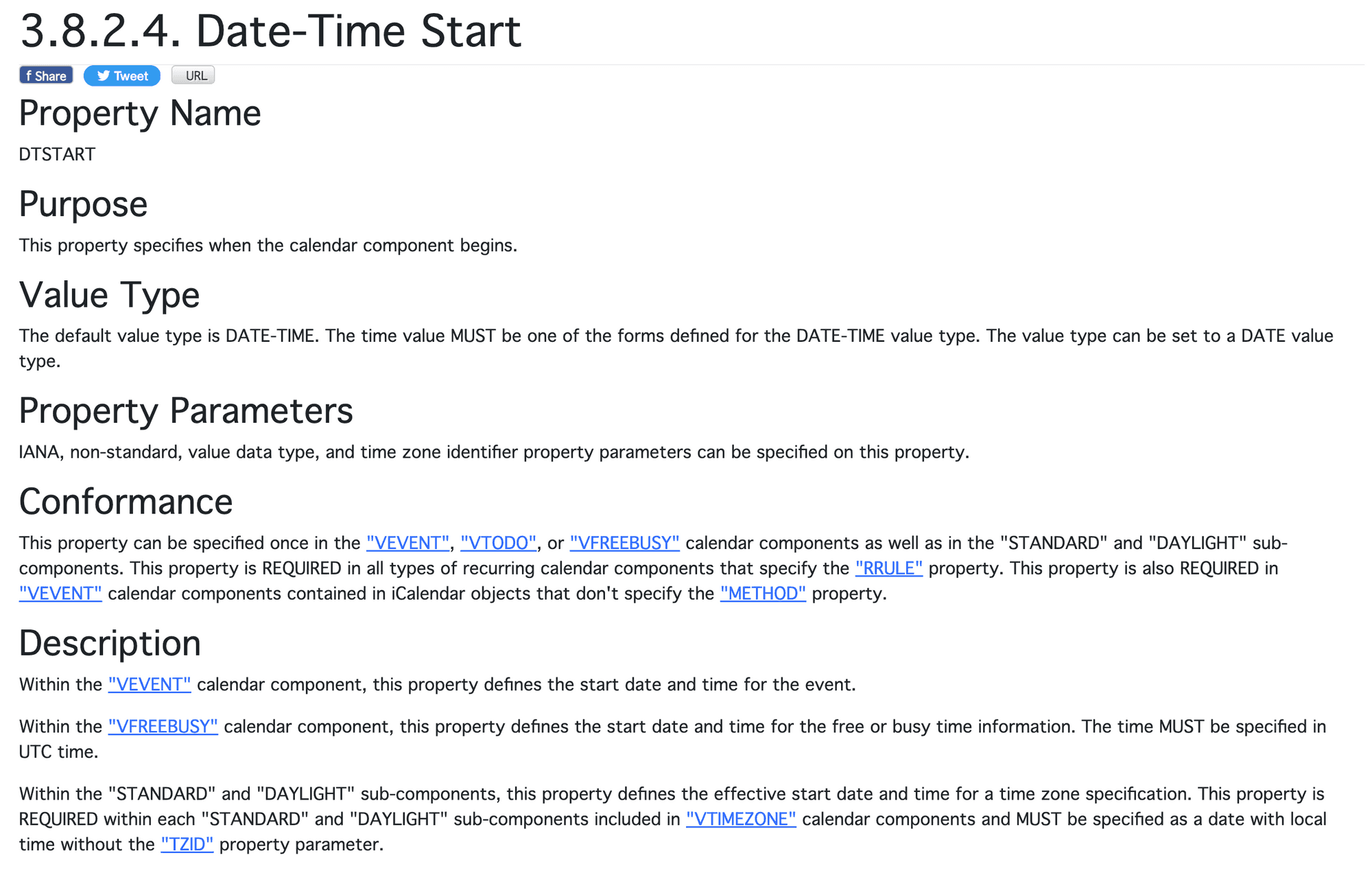
                                  DTSTART:20220101
                                  

                                  is not a valid format by specification(RFC 5545). The default value of DTSTART MUST be date-time format({DATE + “T” + TIME) and, when DATE format is used, it SHOULD be described.
                                  67ccd9b3-0d0b-479e-8e32-c4055ffccaaa-image.png
                                  The valid format of this case would be;

                                  DTSTART;VALUE=DATE:20220101
                                  

                                  However, many ical providers don’t follow standard rules, and many ical parsers generally are parsing some non-standard formats. Unfortunately in this case, the parser that this module depends on, doesn’t accept this kind of non-standards.
                                  The parser (kewisch/ical.js) was formerly maintained by Mozilla, so I thought this parser would be promising and better than node-ical of default MM’s caledar lays on. Well, somehow it would be better. Still ical.js is more popular, more times downloaded than node-ical.

                                  But there is no perfect thing. I was tired to report/fix all the bugs which are not derived from me, so that’s why I gave up and delegated ical parsing to the other(default calendar/MMM-GoogleCalendar, …) in CX3.

                                  Anyway, what I suggest is, how about using different ics for US holidays? Especially if only this calendar would be a problem.

                                  E 1 Reply Last reply Reply Quote 0
                                  • E Offline
                                    edd189 @MMRIZE
                                    last edited by edd189

                                    @MMRIZE

                                    Thanks for looking into it. Over the weekend I did determine that its was the ical.js node module that you referenced being the source of the error. I tried to understand the code and edit it myself, but gave up and just applied a bandaid to the problematic calendars (see my post above with the sh script).

                                    I actually have multiple calendars that are problematic, so I needed the fix to be universal. I think my script works pretty well for a novice who hasn’t done much programming since college 20+ years ago!

                                    I tried to use your CX3 module, but for some reason it won’t display on my Chromecast. It pops up fine on a web browser on my computer. My setup is a linux VM running the magic mirror software and then using Cast All The Things (CATT) to push the MM through a Chromecast to my display in the kitchen. I don’t think there is anything to dig into here, because I imagine the Chromecast is not a common method for this software. I may eventually migrate to a local RPI anyways, because the Chromecast seems to be limited to a 720p resolution.

                                    S 1 Reply Last reply Reply Quote 1
                                    • S Offline
                                      sdetweil @edd189
                                      last edited by

                                      @edd189 the problem on chromecast w EXT3 is the javascript es6 chaining operator

                                      https://forum.magicmirror.builders/topic/17677/mirror-showing-not-all-modules-on-all-devices/11?_=1686341739088

                                      Sam

                                      How to add modules

                                      learning how to use browser developers window for css changes

                                      1 Reply Last reply Reply Quote 1

                                      Hello! It looks like you're interested in this conversation, but you don't have an account yet.

                                      Getting fed up of having to scroll through the same posts each visit? When you register for an account, you'll always come back to exactly where you were before, and choose to be notified of new replies (either via email, or push notification). You'll also be able to save bookmarks and upvote posts to show your appreciation to other community members.

                                      With your input, this post could be even better 💗

                                      Register Login

                                      • 1
                                      • 2
                                      • 2 / 2
                                      • First post
                                        Last post
                                      Enjoying MagicMirror? Please consider a donation!
                                      MagicMirror created by Michael Teeuw.
                                      Forum managed by Sam, technical setup by Karsten.
                                      This forum is using NodeBB as its core | Contributors
                                      Contact | Privacy Policy