Read the statement by Michael Teeuw here.
MMM-ValuesByNotification, CSS Advice...
-
I can’t seem to figure this out.
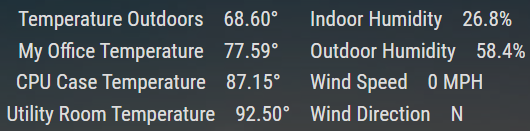
I currently have the following display set up:
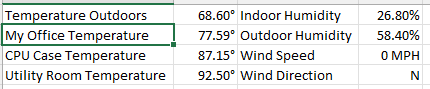
What I want is something more like this, ignoring the lines and font size (Excel)
Can anyone help figure this out? ( @wishmaster270 tagged as author )
Existing CSS changes in custom.css:
/* ValuesByNotification */

.MMM-ValuesByNotification .vbn .groupWrapper {
    border-radius: 0px;
    border-style: none;
}

.MMM-ValuesByNotification .vbn .groupsWrapper, .MMM-ValuesByNotification .vbn .groupWrapper, .MMM-ValuesByNotification .vbn .itemsWrapper, .MMM-ValuesByNotification .vbn .valueWrapper{
    flex-direction: row;
    column-gap: 20px;
    flex-grow: 1;
}

.MMM-ValuesByNotification .vbn .groupsWrapper {
    column-gap: 10px;
}

.MMM-ValuesByNotification .vbn .groupsWrapper {
}


.MMM-ValuesByNotification .vbn .itemsWrapper {
	row-gap: 0px;
	column-gap: 0px;
	flex-direction: column;
}

.MMM-ValuesByNotification .vbn .itemTitle {
    text-decoration: none;
    margin: 0px;
}

.MMM-ValuesByNotification .vbn .valuesWrapper {
	flex-direction: column;
	gap: 0px;
	row-gap: 0px;
	column-gap: 0px;
}
Thanks!
The “E” in “Javascript” stands for “Easy”
-
@BKeyport Hi and sure I will try to help.
I think a possible way would be to set somemin-width.
Can you share your module config?
It’s easier for me to setup a test environment with it. -
@BKeyport Hi,
tested some things. You want it to look something like this, right:
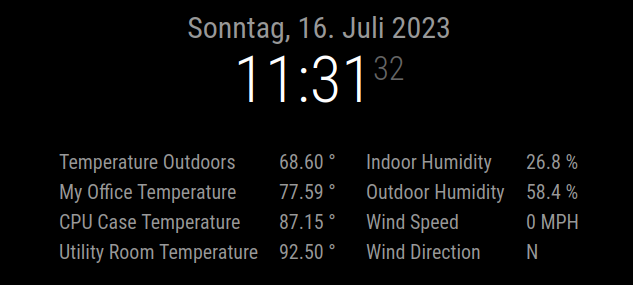
I used these special config options:
- As you do not display any group or item title i set the positions to “e” only. Which means only elements, nothing else.
- As the titles of the first and second column are very different (the second column has shorter titles) i decided to add the classes “col1” and “col2” to the items.
- As i did not want to setup a complete environment i set the “naValue” of each value to the values of your screenshot. Please skip that step!
{
			module: "MMM-ValuesByNotification",
			position: "top_center",
			//header: "Module-1",
			config: {
				updateInterval: 3600,
				groupPositions: "e",
				itemPositions: "e",
				unitSpace: true,
				groups: [
					{
						items: [
							{
								notification: "TEST1",
								classes: "col1",
								values: [
									{
										valueTitle: "Temperature Outdoors",
										naValue: "68.60",
										valueUnit: "°"
									},
								]
							},
							{
								notification: "TEST2",
								classes: "col2",
								values: [
									{
										valueTitle: "Indoor Humidity",
										naValue: "26.8",
										valueUnit: "%"
									},
								]
							},
							{
								notification: "TEST3",
								classes: "col1",
								values: [
									{
										valueTitle: "My Office Temperature",
										naValue: "77.59",
										valueUnit: "°"
									},
								]
							},
							{
								notification: "TEST4",
								classes: "col2",
								values: [
									{
										valueTitle: "Outdoor Humidity",
										naValue: "58.4",
										valueUnit: "%"
									},
								]
							},
							{
								notification: "TEST5",
								classes: "col1",
								values: [
									{
										valueTitle: "CPU Case Temperature",
										naValue: "87.15",
										valueUnit: "°"
									},
								]
							},
							{
								notification: "TEST6",
								classes: "col2",
								values: [
									{
										valueTitle: "Wind Speed",
										naValue: "0",
										valueUnit: "MPH"
									},
								]
							},
							{
								notification: "TEST7",
								classes: "col1",
								values: [
									{
										valueTitle: "Utility Room Temperature",
										naValue: "92.50",
										valueUnit: "°"
									},
								]
							},
							{
								notification: "TEST8",
								classes: "col2",
								values: [
									{
										valueTitle: "Wind Direction",
										naValue: "N",
										valueUnit: " "
									},
								]
							},
						]
					},
				]
			},
		},
I then set the following custom.css options:
.MMM-ValuesByNotification{ width: 700px; } .MMM-ValuesByNotification .vbn .groupWrapper { border-radius: 0px; border-style: none; } .MMM-ValuesByNotification .vbn .itemsWrapper { flex-direction: row; flex-wrap: wrap; column-gap: 30px; } .MMM-ValuesByNotification .vbn .itemWrapper { flex-direction: row; justify-content: unset; } .MMM-ValuesByNotification .vbn .valueWrapper { flex-direction: row; column-gap: 10px; justify-content: unset; } .MMM-ValuesByNotification .vbn .col1 .valueWrapper { min-width: 277px; } .MMM-ValuesByNotification .vbn .col2 .valueWrapper { min-width: 213px; } .MMM-ValuesByNotification .vbn .valueTitle { text-align: left; } .MMM-ValuesByNotification .vbn .col1 .valueTitle { min-width: 210px; } .MMM-ValuesByNotification .vbn .col2 .valueTitle { min-width: 150px; } -

CSS in custom.css is exactly as you did, with the exception of having the overall display “inline-flex” with other modules to have the top bar fill horizontally rather than vertically.
Here’s my config as present.
{ module: "MMM-ValuesByNotification", // https://github.com/Tom-Hirschberger/MMM-ValuesByNotification position: "top_bar", config: { animationSpeed: 0, updateInterval: 15, groupPositions: "e", itemPositions: "e", reuseCount: 99, transformerFunctions: { degToCompass: (num) => { val = ((num/22.5)+.5) | 0; arr = ["N","NNE","NE","ENE","E","ESE", "SE", "SSE","S","SSW","SW","WSW","W","WNW","NW","NNW"]; res = arr[(val % 16)]; return res; }, }, groups: [ { items: [ { notification: "WeatherLink", classes: "col1", values: [ { valueTitle: "Temperature Outdoors", valueUnit: "°", jsonpath: "data.conditions[0].temp", valueFormat: "Number(${value}).toFixed(2)", }, ], }, { notification: "TempRoom", classes: "col1", values: [ { valueTitle: "My Office Temperature", valueUnit: "°", jsonpath: "temperature_f", valueFormat: "Number(${value}).toFixed(2)", }, ], }, { notification: "TempCase", classes: "col1", values: [ { valueTitle: "CPU Case Temperature", valueUnit: "°", jsonpath: "temperature_f", valueFormat: "Number(${value}).toFixed(2)", }, ], }, { notification: "WeatherLink", classes: "col1", values: [ { valueTitle: "Utility Room Temperature", valueUnit: "°", jsonpath: "data.conditions[1].temp_in", valueFormat: "Number(${value}).toFixed(2)", }, ], }, { notification: "WeatherLink", classes: "col2", values: [ { valueTitle: "Indoor Humidity", valueUnit: "%", jsonpath: "data.conditions[1].hum_in", }, { valueTitle: "Outdoor Humidity", valueUnit: "%", jsonpath: "data.conditions[0].hum", }, { valueTitle: "Wind Speed", valueUnit: "MPH", jsonpath: "data.conditions[0].wind_speed_last", unitSpace: true, }, { valueTitle: "Wind Direction", jsonpath: "data.conditions[0].wind_dir_last", valueTransformers: ["degToCompass"], }, ] }, ], }, ], }, }, -
@BKeyport Hi,
thank you for the config. There was a main difference in yours and mine. You added the last four values in one item, i had single items.
There was a problem with the column definitions in you config, but i think i figured the things out.
Its a little bit messy but i think it will work:custom.css
.MMM-ValuesByNotification{
  width: 700px;
}

.MMM-ValuesByNotification .vbn .groupWrapper {
  border-radius: 0px;
  border-style: none;
}

.MMM-ValuesByNotification .vbn .itemsWrapper {
  flex-direction: row;
  flex-wrap: wrap;
  column-gap: 30px;
  justify-content: space-around;
}

.MMM-ValuesByNotification .vbn .itemWrapper {
  flex-direction: row;
  justify-content: unset;
}

.MMM-ValuesByNotification .vbn .valueWrapper {
  flex-direction: row;
  column-gap: 10px;
  justify-content: unset;
}

.MMM-ValuesByNotification .vbn .col1 .valueWrapper {
  min-width: 290px;
}

.MMM-ValuesByNotification .vbn .col2 .valueWrapper {
  min-width: 260px;
}

.MMM-ValuesByNotification .vbn .wrap1 {
  justify-content: flex-start;
}

.MMM-ValuesByNotification .vbn .valueTitle {
  text-align: left;
}

.MMM-ValuesByNotification .vbn .col1 .valueTitle {
  min-width: 210px;
}

.MMM-ValuesByNotification .vbn .col2 .valueTitle {
  min-width: 200px;
}
config.js:
{
	module: "MMM-ValuesByNotification", // https://github.com/Tom-Hirschberger/MMM-ValuesByNotification
	position: "top_center",
	config: {
		animationSpeed: 0,
		updateInterval: 15,
		groupPositions: "e",
		itemPositions: "e",
		reuseCount: 99,
		transformerFunctions: {
			degToCompass: (num) => {
				val = ((num/22.5)+.5) | 0;
				arr = ["N","NNE","NE","ENE","E","ESE", "SE", "SSE","S","SSW","SW","WSW","W","WNW","NW","NNW"];
				res = arr[(val % 16)];
				return res;
			},
		},
		groups: [
			{
				items: [
					{
						notification: "WeatherLink",
						classes: "col1",
						values: [
							{
								valueTitle: "Temperature Outdoors",
								valueUnit: "°",
								jsonpath: "data.conditions[0].temp",
								valueFormat: "Number(${value}).toFixed(2)",
							},
						],
					},
					{
						notification: "TempRoom",
						classes: "col2",
						values: [
							{
								valueTitle: "My Office Temperature",
								valueUnit: "°",
								jsonpath: "temperature_f",
								valueFormat: "Number(${value}).toFixed(2)",
							},
						],
					},
					{
						notification: "TempCase",
						classes: "col1",
						values: [
							{
								valueTitle: "CPU Case Temperature",
								valueUnit: "°",
								jsonpath: "temperature_f",
								valueFormat: "Number(${value}).toFixed(2)",
							},
						],
					},
					{
						notification: "WeatherLink",
						classes: "col2",
						values: [
							{
								valueTitle: "Utility Room Temperature",
								valueUnit: "°",
								jsonpath: "data.conditions[1].temp_in",
								valueFormat: "Number(${value}).toFixed(2)",
							},
						],
					},
					{
						notification: "WeatherLink",
						classes: "col1",
						values: [
							{
								valueTitle: "Indoor Humidity",
								valueUnit: "%",
								jsonpath: "data.conditions[1].hum_in",
							},
						]
					},
					{
						notification: "WeatherLink",
						classes: "col2",
						values: [
							{
								valueTitle: "Outdoor Humidity",
								valueUnit: "%",
								jsonpath: "data.conditions[0].hum",
							},
						]
					},
					{
						notification: "WeatherLink",
						classes: "col1",
						values: [
							{
								valueTitle: "Wind Speed",
								valueUnit: "MPH",
								jsonpath: "data.conditions[0].wind_speed_last",
								unitSpace: true,
							}
						]
					},
					{
						notification: "WeatherLink",
						classes: "col2",
						values: [
							{
								valueTitle: "Wind Direction",
								jsonpath: "data.conditions[0].wind_dir_last",
								valueTransformers: ["degToCompass"],
							},
						]
					},
				],
			},
		],
	},
}
Edit: Maybe i have time to search for an easier solution at the weekend.
-
@wishmaster270 Getting closer, now just out of order, but much better organized.

It is also not sharing the top bar the way I like on the test screen, haven’t had time to go check the real display.
-
@BKeyport Hi and sorry, my fault.
I added the items in the wrong order to the group.The main idea is that all items are in a row. Every time the space on the right side is not enough to display the next item a new line starts.
As the maximum width of the module is set to 700px only two items fit in a row. Thats why we get two columns here but the order of the items in the config matters.In the config i additionally add the classes
col1andcol2to the items. This way i can set the width of the titles in the first column different to the ones of the second column.I re-arranged the items to the structure of the initial post and increased the width of the titles a little bit:
{
	module: "MMM-ValuesByNotification", // https://github.com/Tom-Hirschberger/MMM-ValuesByNotification
	position: "top_center",
	config: {
		animationSpeed: 0,
		updateInterval: 3600,
		groupPositions: "e",
		itemPositions: "e",
		reuseCount: 99,
		transformerFunctions: {
			degToCompass: (num) => {
				val = ((num/22.5)+.5) | 0;
				arr = ["N","NNE","NE","ENE","E","ESE", "SE", "SSE","S","SSW","SW","WSW","W","WNW","NW","NNW"];
				res = arr[(val % 16)];
				return res;
			},
		},
		groups: [
			{
				items: [
					{
						notification: "WeatherLink",
						classes: "col1",
						values: [
							{
								valueTitle: "Temperature Outdoors",
								valueUnit: "°",
								jsonpath: "data.conditions[0].temp",
								valueFormat: "Number(${value}).toFixed(2)",
							},
						],
					},
					{
						notification: "WeatherLink",
						classes: "col2",
						values: [
							{
								valueTitle: "Indoor Humidity",
								valueUnit: "%",
								jsonpath: "data.conditions[1].hum_in",
							},
						]
					},
					{
						notification: "TempRoom",
						classes: "col1",
						values: [
							{
								valueTitle: "My Office Temperature",
								valueUnit: "°",
								jsonpath: "temperature_f",
								valueFormat: "Number(${value}).toFixed(2)",
							},
						],
					},
					{
						notification: "WeatherLink",
						classes: "col2",
						values: [
							{
								valueTitle: "Outdoor Humidity",
								valueUnit: "%",
								jsonpath: "data.conditions[0].hum",
							},
						]
					},
					{
						notification: "TempCase",
						classes: "col1",
						values: [
							{
								valueTitle: "CPU Case Temperature",
								valueUnit: "°",
								jsonpath: "temperature_f",
								valueFormat: "Number(${value}).toFixed(2)",
							},
						],
					},
					{
						notification: "WeatherLink",
						classes: "col2",
						values: [
							{
								valueTitle: "Wind Speed",
								valueUnit: "MPH",
								jsonpath: "data.conditions[0].wind_speed_last",
								unitSpace: true,
							}
						]
					},
					{
						notification: "WeatherLink",
						classes: "col1",
						values: [
							{
								valueTitle: "Utility Room Temperature",
								valueUnit: "°",
								jsonpath: "data.conditions[1].temp_in",
								valueFormat: "Number(${value}).toFixed(2)",
							},
						],
					},
					{
						notification: "WeatherLink",
						classes: "col2",
						values: [
							{
								valueTitle: "Wind Direction",
								jsonpath: "data.conditions[0].wind_dir_last",
								valueTransformers: ["degToCompass"],
							},
						]
					},
				],
			},
		],
	},
}
.MMM-ValuesByNotification{ width: 700px; } .MMM-ValuesByNotification .vbn .groupWrapper { border-radius: 0px; border-style: none; } .MMM-ValuesByNotification .vbn .itemsWrapper { flex-direction: row; flex-wrap: wrap; column-gap: 30px; justify-content: space-around; } .MMM-ValuesByNotification .vbn .itemWrapper { flex-direction: row; justify-content: unset; } .MMM-ValuesByNotification .vbn .valueWrapper { flex-direction: row; column-gap: 10px; justify-content: unset; } .MMM-ValuesByNotification .vbn .col1 .valueWrapper { min-width: 310px; } .MMM-ValuesByNotification .vbn .col2 .valueWrapper { min-width: 285px; } .MMM-ValuesByNotification .vbn .wrap1 { justify-content: flex-start; } .MMM-ValuesByNotification .vbn .valueTitle { text-align: left; } .MMM-ValuesByNotification .vbn .col1 .valueTitle { min-width: 220px; } .MMM-ValuesByNotification .vbn .col2 .valueTitle { min-width: 210px; } -
@wishmaster270 Great start, now to adjust to fit… 🤣
Edit: here I am adjusting it and trying to figure out why it wouldn’t move up to the bar, then I realized, you had it in Top Center. 😞😞😞😞😖😖😖😖


Hello! It looks like you're interested in this conversation, but you don't have an account yet.
Getting fed up of having to scroll through the same posts each visit? When you register for an account, you'll always come back to exactly where you were before, and choose to be notified of new replies (either via email, or push notification). You'll also be able to save bookmarks and upvote posts to show your appreciation to other community members.
With your input, this post could be even better 💗
Register Login