MagicMirror Forum
    • Recent
    • Tags
    • Unsolved
    • Solved
    • MagicMirror² Repository
    • Documentation
    • 3rd-Party-Modules
    • Donate
    • Discord
    • Register
    • Login
    A New Chapter for MagicMirror: The Community Takes the Lead
    Read the statement by Michael Teeuw here.

    Changing icons of the modules Current Weather and Weather Forecast

    Scheduled Pinned Locked Moved Development
    301 Posts 30 Posters 1.6m Views 33 Watching
    Loading More Posts
    • Oldest to Newest
    • Newest to Oldest
    • Most Votes
    Reply
    • Reply as topic
    Log in to reply
    This topic has been deleted. Only users with topic management privileges can see it.
    • T Offline
      trividar @santiago5
      last edited by

      @santiago5 oooooh I have the same question, is there a way to implement the .mov icons? If yes, how? THX

      1 Reply Last reply Reply Quote 0
      • V Offline
        Vilas
        last edited by

        Here is a perfect collection of https://templatefor.net/free-weather-icons-sets/

        1 Reply Last reply Reply Quote 0
        • G Offline
          Genosphere
          last edited by

          Nice set up here, tried out the code and worked the first time. My only issue is I am only getting 3 days showing in the forecast. I tried adding “maxNumberOfDays: 5,” but nothing happened… Any idea what it could be?

          				{
          			module: "currentweather",
          			position: "top_right",
          			config: {
          				onlyTemp:true,
          				maxNumberOfDays: 5,
          				location: "Swissvale",
          				locationID: "5215064", //ID from http://bulk.openweathermap.org/sample/city.list.json.gz; unzip the gz file and find your city
          				appid: "appid"
          			}
          		},
          		{
          			module: "weatherforecast",
          			position: "top_right",
          			header: "Weather Forecast",
          			config: {
          				maxNumberOfDays: 5,
          				location: "Swissvale",
          				locationID: "5215064", //ID from http://bulk.openweathermap.org/sample/city.list.json.gz; unzip the gz file and find your city
          				appid: "appid"
          			}
          		},
          

          Still new here, so let me know if you need me to provide any thing else.

          Skol

          W 1 Reply Last reply Reply Quote 1
          • W Offline
            Wenike @Genosphere
            last edited by

            @Genosphere try the fix that @oemel09 mentioned here and see if that fixes the number of days issue

            G 1 Reply Last reply Reply Quote 0
            • G Offline
              Genosphere @Wenike
              last edited by

              @Wenike Perfect fix! Well it does what it needs to anyway. haha

              Skol!

              1 Reply Last reply Reply Quote 1
              • P Offline
                PhilReis @santiago5
                last edited by

                hello @santiago5 @trividar can you send me a link from the icon, which you want to implemented?

                T 1 Reply Last reply Reply Quote 0
                • T Offline
                  trividar @PhilReis
                  last edited by

                  @PhilReis I wrote you a direct message.

                  1 Reply Last reply Reply Quote 0
                  • M Offline
                    manu85340
                    last edited by

                    Hello everyone, I put a message on this forum and I hope it is still active… I am trying to change the icons of the original weather module and it does not work, I created an “icons” file "in the css folder I made a git clone of the link address for the animated modules, I copied the lines in the custom.css file and despite all this the icons on the mirror remain identical, if you could Helping me would be really nice, thank you

                    S 1 Reply Last reply Reply Quote 0
                    • S Do not disturb
                      sdetweil @manu85340
                      last edited by

                      @manu85340 can u show us the stuff you added in custom.css

                      Sam

                      How to add modules

                      learning how to use browser developers window for css changes

                      1 Reply Last reply Reply Quote 0
                      • M Offline
                        manu85340
                        last edited by sdetweil

                        Hello @sdetweil and thank you for your response, I follow the lines that I added in the custom folder, I also have the impression that the icon download is not I did a git pull https ://www.amcharts.com/free-animated-svg-weather-icons/
                        and I put this in the custom:

                        /* Aenderungen Wetter Icon */
                        /* Aenderungen aktuelles Wetter */
                        
                        .currentweather .weathericon {
                          position: absolute;
                          z-index: 0;
                          height: 200px;
                          right: 180px;
                          margin-top: -65px;
                        }
                        
                        .currentweather .wi-day-sunny {
                        content: url("/css/icons/day.svg");
                        }
                        
                        .currentweather .wi-day-cloudy {
                        content: url("/css/icons/cloudy-day-1.svg");
                        }
                        
                        .currentweather .wi-rain {
                        content: url("/css/icons/rainy-6.svg");
                        }
                        
                        .currentweather .wi-night-clear {
                        content: url("/css/icons/night.svg");
                        }
                        
                        .currentweather .wi-night-cloudy {
                        content: url("/css/icons/cloudy-night-2.svg");
                        padding-right: 15px;
                        padding-top: 10px;
                        }
                        
                        .currentweather .wi-cloudy {
                        content: url("/css/icons/cloudy.svg");
                        }
                        
                        .currentweather .wi-showers {
                        content: url("/css/icons/rainy-7.svg");
                        }
                        
                        .currentweather .wi-thunderstorm {
                        content: url("/css/icons/thunder.svg");
                        }
                        
                        .currentweather .wi-snow {
                        content: url("/css/icons/snowy-6.svg");
                        }
                        
                        .currentweather .wi-cloudy-windy {
                        content: url("/css/icons/cloudy-day-3.svg");
                        }
                        
                        .currentweather .wi-night-rain {
                        content: url("/css/icons/rainy-6.svg");
                        }
                        
                        .currentweather .wi-night-snow {
                        content: url("/css/icons/snowy-6.svg");
                        }
                        
                        .currentweather .wi-night-thunderstorm {
                        content: url("/css/icons/thunder.svg");
                        }
                        
                        .currentweather .wi-night-showers {
                        content: url("/css/icons/rainy-7.svg");
                        }
                        
                        .currentweather .wi-fog {
                        content: url("/css/icons/cloudy.svg");
                        }
                        
                        .currentweather .wi-night-alt-cloudy-windy {
                        content: url("/css/icons/cloudy-night-1.svg");
                        }
                        
                        /* Aenderungen Wettervorhersage */
                        
                        .weatherforecast .weathericon {
                          position: absolute;
                          left: 35px;
                          z-index: 1;
                          margin-top: -30px;
                          height: 60px;
                        }
                        
                        .weatherforecast .wi-day-sunny {
                        content: url("/css/icons/day.svg");
                        padding-left: 6px;
                        padding-top: 5px;
                        height: 50px;
                        }
                        
                        .weatherforecast .wi-day-cloudy {
                        content: url("/css/icons/cloudy-day-1.svg");
                        }
                        
                        .weatherforecast .wi-rain {
                        content: url("/css/icons/rainy-6.svg");
                        padding-left: 8px;
                        padding-top: 5px;
                        height: 45px;
                        }
                        
                        .weatherforecast .wi-night-clear {
                        content: url("/css/icons/night.svg");
                        }
                        
                        .weatherforecast .wi-night-cloudy {
                        content: url("/css/icons/cloudy-night-2.svg");
                        height: 50px;
                        padding-left: 5px;
                        padding-top: 7px;
                        }
                        
                        .weatherforecast .wi-cloudy {
                        content: url("/css/icons/cloudy.svg");
                        }
                        
                        .weatherforecast .wi-showers {
                        content: url("/css/icons/rainy-7.svg");
                        }
                        
                        .weatherforecast .wi-thunderstorm {
                        content: url("/css/icons/thunder.svg");
                        }
                        
                        .weatherforecast .wi-snow {
                        content: url("/css/icons/snowy-6.svg");
                        }
                        
                        .weatherforecast .wi-cloudy-windy {
                        content: url("/css/icons/cloudy-day-3.svg");
                        height: 45px;
                        padding-left: 8px;
                        padding-top: 7px;
                        }
                        
                        .weatherforecast .wi-night-rain {
                        content: url("/css/icons/rainy-6.svg");
                        padding-left: 8px;
                        padding-top: 5px;
                        height: 45px;
                        }
                        
                        .weatherforecast .wi-night-snow {
                        content: url("/css/icons/snowy-6.svg");
                        }
                        
                        .weatherforecast .wi-night-thunderstorm {
                        content: url("/css/icons/thunder.svg");
                        }
                        
                        .weatherforecast .wi-night-showers {
                        content: url("/css/icons/rainy-7.svg");
                        }
                        
                        .weatherforecast .wi-fog {
                        content: url("/css/icons/cloudy.svg");
                        }
                        
                        .weatherforecast .wi-night-alt-cloudy-windy {
                        content: url("/css/icons/cloudy-night-1.svg");
                        height: 50px;
                        padding-left: 5px;
                        padding-top: 7px;
                        }
                        
                        S 1 Reply Last reply Reply Quote 0
                        • M Offline
                          manu85340
                          last edited by

                          Sorry si not a « git pull » but a « git clone »

                          S 1 Reply Last reply Reply Quote 0
                          • S Do not disturb
                            sdetweil @manu85340
                            last edited by sdetweil

                            @manu85340 currentweather and weatherforecast were old modules no longer shipped.

                            so the class prefix won’t work.

                            I’m on my phone now. so it’s slow to figure out what it should be…

                            I would open the developers window and see what the class names used are
                            .see here for how to use the dev window

                            https://forum.magicmirror.builders/post/90135

                            Sam

                            How to add modules

                            learning how to use browser developers window for css changes

                            1 Reply Last reply Reply Quote 0
                            • S Do not disturb
                              sdetweil @manu85340
                              last edited by sdetweil

                              @manu85340 change all the
                              . currentweather
                              and
                              . weatherforecast

                              to
                              .weather

                              Sam

                              How to add modules

                              learning how to use browser developers window for css changes

                              M 1 Reply Last reply Reply Quote 0
                              • M Offline
                                manu85340
                                last edited by

                                @sdetweil thank you for your answer, I am in France and with the time difference I will try this tomorrow, thank you for your help

                                1 Reply Last reply Reply Quote 0
                                • M Offline
                                  manu85340 @sdetweil
                                  last edited by sdetweil

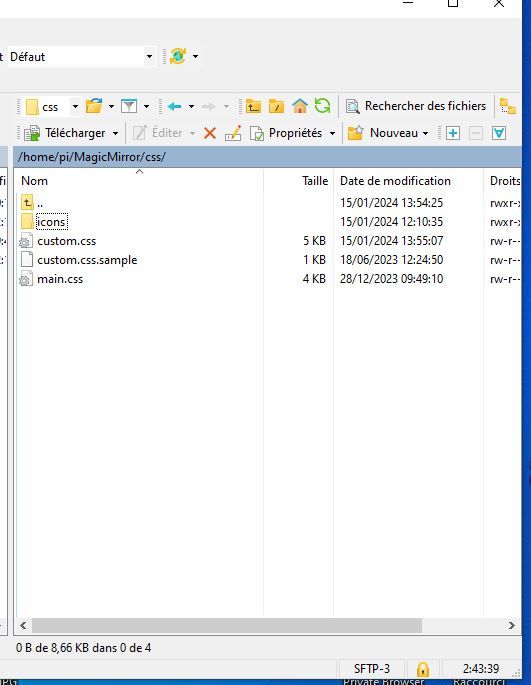
                                  @sdetweil ello I tried to do what you told me but when I put these lines in the custom file I no longer have any icons at all, to summarize the situation I put the copy of the files that I have on the MM folder:
                                  1 file with the “icons” folder that I created with an icons mkdir
                                  2 the file with the animated icons
                                  3 my ms.config for the weather part
                                  4 the modified file (as you asked me)
                                  I’m sorry to bother you but I’m lost and your help is precious
                                  thanks in advance
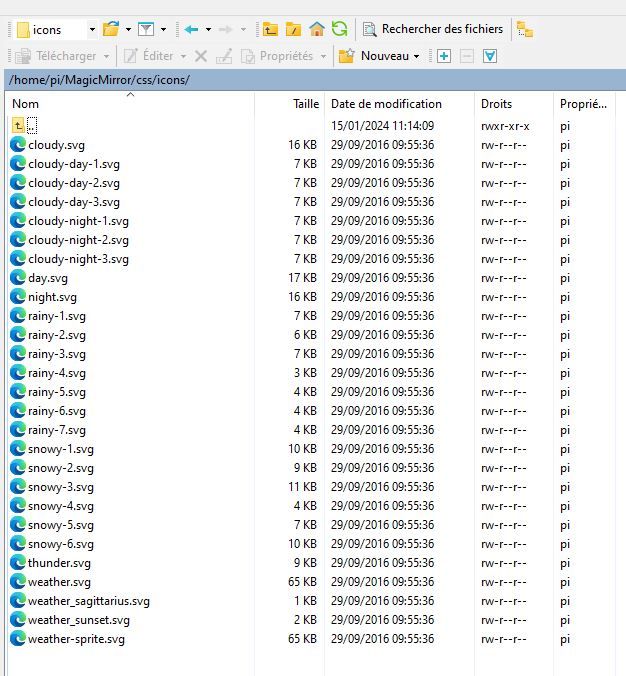
                                  fichiers animes dans le dossier css.cons.JPG crétaion du dossier css icons.JPG

                                  config.js :
                                  {
                                  			disabled: false,
                                  			module: "weather",
                                  			position: "top_right",
                                  			header: "Meteo Ile d'Olonne",
                                  			config: {
                                  				weatherProvider: "openweathermap",
                                  				type: "current",
                                  				location: "Olonne-sur-Mer,France",
                                  				locationID: "2989572", //ID from http://bulk.openweathermap.org/sample/city.list.json.gz; unzip the gz file and find your city
                                  				apiKey: "	XXXXXXXXXXXXXXXXXXXXXXXXX"
                                  			}
                                  		},


                                  		{
                                  			disabled: false,
                                  			module: "weather",
                                  			position: "top_right",
                                  		
                                  			header: "Meteo",
                                  			config: {
                                  				weatherProvider: "openweathermap",
                                  				type: "forecast",
                                  				location: "Olonne-sur-Mer,France",
                                  				locationID: "2989572", //ID from http://bulk.openweathermap.org/sample/city.list.json.gz; unzip the gz file and find your city
                                  				apiKey: "XXXXXXXXXXXXXXXXXXXXXXXXXXX"
                                  			}
                                  		},
                                  

                                  css custom:

                                  /* Aenderungen Wetter Icon /
                                  / Aenderungen aktuelles Wetter */
                                  
                                  .weather .weathericon {
                                  position: absolute;
                                  z-index: 0;
                                  height: 200px;
                                  right: 180px;
                                  margin-top: -65px;
                                  }
                                  
                                  .weather .wi-day-sunny {
                                  content: url(“/css/icons/day.svg”);
                                  }
                                  
                                  .weather .wi-day-cloudy {
                                  content: url(“/css/icons/cloudy-day-1.svg”);
                                  }
                                  
                                  .weather .wi-rain {
                                  content: url(“/css/icons/rainy-6.svg”);
                                  }
                                  
                                  .weather .wi-night-clear {
                                  content: url(“/css/icons/night.svg”);
                                  }
                                  
                                  .weather .wi-night-cloudy {
                                  content: url(“/css/icons/cloudy-night-2.svg”);
                                  padding-right: 15px;
                                  padding-top: 10px;
                                  }
                                  
                                  .weather .wi-cloudy {
                                  content: url(“/css/icons/cloudy.svg”);
                                  }
                                  
                                  .weather .wi-showers {
                                  content: url(“/css/icons/rainy-7.svg”);
                                  }
                                  
                                  .weather .wi-thunderstorm {
                                  content: url(“/css/icons/thunder.svg”);
                                  }
                                  
                                  .weather .wi-snow {
                                  content: url(“/css/icons/snowy-6.svg”);
                                  }
                                  
                                  .weather .wi-cloudy-windy {
                                  content: url(“/css/icons/cloudy-day-3.svg”);
                                  }
                                  
                                  .weather .wi-night-rain {
                                  content: url(“/css/icons/rainy-6.svg”);
                                  }
                                  
                                  .weather .wi-night-snow {
                                  content: url(“/css/icons/snowy-6.svg”);
                                  }
                                  
                                  .weather .wi-night-thunderstorm {
                                  content: url(“/css/icons/thunder.svg”);
                                  }
                                  
                                  .weather .wi-night-showers {
                                  content: url(“/css/icons/rainy-7.svg”);
                                  }
                                  
                                  .weather .wi-fog {
                                  content: url(“/css/icons/cloudy.svg”);
                                  }
                                  
                                  .weather .wi-night-alt-cloudy-windy {
                                  content: url(“/css/icons/cloudy-night-1.svg”);
                                  }
                                  
                                  /* Aenderungen Wettervorhersage */
                                  
                                  .weather .weathericon {
                                  position: absolute;
                                  left: 35px;
                                  z-index: 1;
                                  margin-top: -30px;
                                  height: 60px;
                                  }
                                  
                                  .weather .wi-day-sunny {
                                  content: url(“/css/icons/day.svg”);
                                  padding-left: 6px;
                                  padding-top: 5px;
                                  height: 50px;
                                  }
                                  
                                  .weather .wi-day-cloudy {
                                  content: url(“/css/icons/cloudy-day-1.svg”);
                                  }
                                  
                                  .weather .wi-rain {
                                  content: url(“/css/icons/rainy-6.svg”);
                                  padding-left: 8px;
                                  padding-top: 5px;
                                  height: 45px;
                                  }
                                  
                                  .weather .wi-night-clear {
                                  content: url(“/css/icons/night.svg”);
                                  }
                                  
                                  .weather .wi-night-cloudy {
                                  content: url(“/css/icons/cloudy-night-2.svg”);
                                  height: 50px;
                                  padding-left: 5px;
                                  padding-top: 7px;
                                  }
                                  
                                  .weather .wi-cloudy {
                                  content: url(“/css/icons/cloudy.svg”);
                                  }
                                  
                                  .weather .wi-showers {
                                  content: url(“/css/icons/rainy-7.svg”);
                                  }
                                  
                                  .weather .wi-thunderstorm {
                                  content: url(“/css/icons/thunder.svg”);
                                  }
                                  
                                  .weather .wi-snow {
                                  content: url(“/css/icons/snowy-6.svg”);
                                  }
                                  
                                  .weather .wi-cloudy-windy {
                                  content: url(“/css/icons/cloudy-day-3.svg”);
                                  height: 45px;
                                  padding-left: 8px;
                                  padding-top: 7px;
                                  }
                                  
                                  .weather .wi-night-rain {
                                  content: url(“/css/icons/rainy-6.svg”);
                                  padding-left: 8px;
                                  padding-top: 5px;
                                  height: 45px;
                                  }
                                  
                                  .weather .wi-night-snow {
                                  content: url(“/css/icons/snowy-6.svg”);
                                  }
                                  
                                  .weather .wi-night-thunderstorm {
                                  content: url(“/css/icons/thunder.svg”);
                                  }
                                  
                                  .weather .wi-night-showers {
                                  content: url(“/css/icons/rainy-7.svg”);
                                  }
                                  
                                  .weather .wi-fog {
                                  content: url(“/css/icons/cloudy.svg”);
                                  }
                                  
                                  .weather .wi-night-alt-cloudy-windy {
                                  content: url(“/css/icons/cloudy-night-1.svg”);
                                  height: 50px;
                                  padding-left: 5px;
                                  padding-top: 7px;
                                  }
                                  
                                  
                                  S 1 Reply Last reply Reply Quote 0
                                  • S Do not disturb
                                    sdetweil @manu85340
                                    last edited by

                                    @manu85340 said in Changing icons of the modules Current Weather and Weather Forecast:

                                    “/css/icons/day.svg”

                                    when I downloaded and unzipped the icons, they were in the css/icons/static folder

                                    BUT make sure your " marks are vertical , not leaning

                                    when I corrected them to vertical it worked , yoiu can see they were picked up from the custom.css
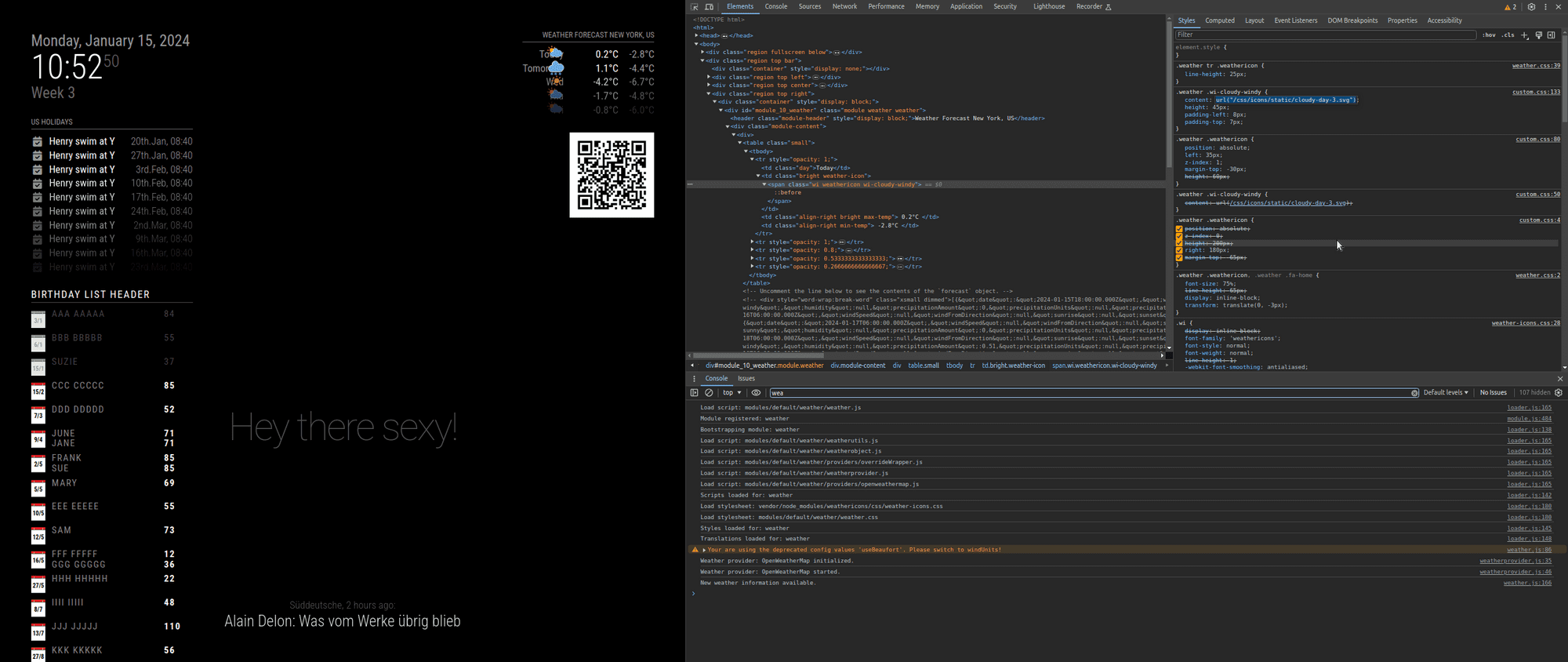
                                    Screenshot at 2024-01-15 10-52-51.png

                                    also, for all config or css info posted, please use the code block wrapper

                                    paste the text into the editor
                                    select all the text you pasted
                                    hit the button </>

                                    Sam

                                    How to add modules

                                    learning how to use browser developers window for css changes

                                    M M 2 Replies Last reply Reply Quote 0
                                    • M Offline
                                      manu85340 @sdetweil
                                      last edited by

                                      @sdetweil thank you I will try, even if I admit that I have not understood everything, I will keep you informed of my progress, thank you again for your help

                                      1 Reply Last reply Reply Quote 0
                                      • M Offline
                                        Manu85 @sdetweil
                                        last edited by

                                        @sdetweil hello, I waited this morning to read your response and have clear ideas, but I do not have the level of knowledge required to do what you are asking me :-( , I have never used "code block wrapper " etc. and I have never coded, you are really very nice but this is beyond my skills, I managed to install the MM on my raspberry pi 3b+, I know how to install modules from github, make some adaptations in the custom css file by following tutorials but my skills stop there, initially I just wanted to change the icons of the weather module, the module is very good because the icons are not very pretty but I realize that it is not is not as simple as I thought, I am really sorry to have wasted your time and I thank you again for your patience and your sharing of knowledge, I have the temperament of a winner but in this specific case I reach my limits :-)

                                        S 1 Reply Last reply Reply Quote 0
                                        • S Do not disturb
                                          sdetweil @Manu85
                                          last edited by

                                          @Manu85 it’s ok, none of us knew much when we started. so take your time.

                                          to use a code block in these messages

                                          • paste in your text (like from config.js)

                                          • then select all that text

                                          • and then push the button above the editor that looks like </>

                                          I copied your pasted text into my custom.css
                                          and the double quote marks became curved.
                                          this is a special word processing quote mark, which is different that text mode quote mark
                                          css needs the text type, straight up and down
                                          (this is because of the lack of the code block wrapper)

                                          this prevented the css from being processed correctly

                                          Sam

                                          How to add modules

                                          learning how to use browser developers window for css changes

                                          M 1 Reply Last reply Reply Quote 0
                                          • M Offline
                                            Manu85 @sdetweil
                                            last edited by

                                            @sdetweil thank you for your patience and for your help, I copied all the lines for the custom css and I pasted it into the “site text editor” sorry for the terms but they are probably not good, then I selected the text, I pressed the </> button and on the other window I had the modified text (see screen copy) then I copied this new text and I copied it into the custom css and the original weather icons have disappeared but I don’t have any new icons, see the other screenshot, I will get there thanks to you :-)
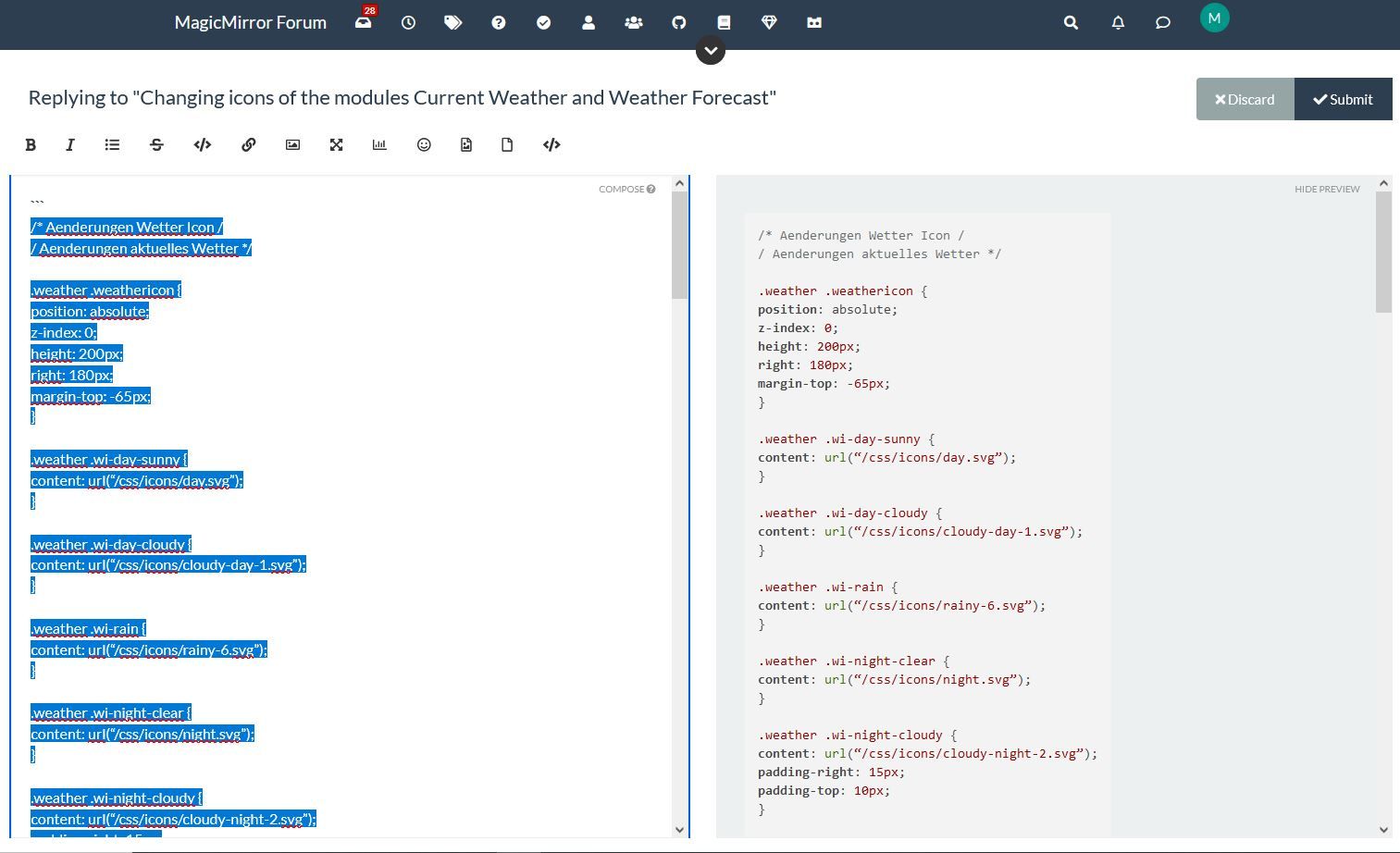
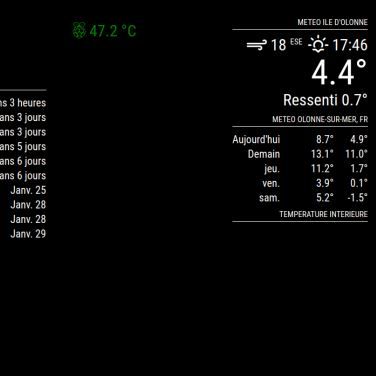
                                            selection pour css custom1.JPG Copie ecran MM.JPG

                                            S 1 Reply Last reply Reply Quote 0

                                            Hello! It looks like you're interested in this conversation, but you don't have an account yet.

                                            Getting fed up of having to scroll through the same posts each visit? When you register for an account, you'll always come back to exactly where you were before, and choose to be notified of new replies (either via email, or push notification). You'll also be able to save bookmarks and upvote posts to show your appreciation to other community members.

                                            With your input, this post could be even better 💗

                                            Register Login

                                            • 1
                                            • 2
                                            • 3
                                            • 4
                                            • 5
                                            • 6
                                            • 15
                                            • 16
                                            • 4 / 16
                                            • First post
                                              Last post
                                            Enjoying MagicMirror? Please consider a donation!
                                            MagicMirror created by Michael Teeuw.
                                            Forum managed by Sam, technical setup by Karsten.
                                            This forum is using NodeBB as its core | Contributors
                                            Contact | Privacy Policy