MagicMirror Forum
    • Recent
    • Tags
    • Unsolved
    • Solved
    • MagicMirror² Repository
    • Documentation
    • 3rd-Party-Modules
    • Donate
    • Discord
    • Register
    • Login
    A New Chapter for MagicMirror: The Community Takes the Lead
    Read the statement by Michael Teeuw here.

    Trying to create a white background with black text to the clock module title block.

    Scheduled Pinned Locked Moved Development
    15 Posts 2 Posters 9.0k Views 2 Watching
    Loading More Posts
    • Oldest to Newest
    • Newest to Oldest
    • Most Votes
    Reply
    • Reply as topic
    Log in to reply
    This topic has been deleted. Only users with topic management privileges can see it.
    • S Offline
      synint Project Sponsor
      last edited by

      I am trying to create a white background with black text to the clock module title block.

      The custom CSS file I am using (see below) does not seem to effect the clock title block and all I am getting is white text and no white background. Any help would be appreciated.

      Custom CSS File

      /* Custom CSS Sample
       *
       * Change color and fonts here.
       *
       * Beware that properties cannot be unitless, so for example write '--gap-body: 0px;' instead of just '--gap-body: 0;'
       */
      
      /* Uncomment and adjust accordingly if you want to import another font from the google-fonts-api: */
      /* @import url('https://fonts.googleapis.com/css2?family=Poppins:wght@100;300;400;700&display=swap'); */
      
      :root {
        --color-text: #000;
        --color-text-dimmed: #000;
        --color-text-bright: #000;
        --color-background: black;
      
        --font-primary: "Roboto Condensed";
        --font-secondary: "Roboto";
      
        --font-size: 20px;
        --font-size-small: 0.75rem;
      
        --gap-body-top: 60px;
        --gap-body-right: 60px;
        --gap-body-bottom: 60px;
        --gap-body-left: 60px;
      
        --gap-modules: 30px;
      }
      .module.clock (
         background-color:rgba(255,255,255,0.5);
         border-radius:8px;
         padding:8px;
      )
      )
      
      S 2 Replies Last reply Reply Quote 0
      • S Offline
        sdetweil @synint
        last edited by sdetweil

        @synint said in Trying to create a white background with black text to the clock module title block.:

        .module.clock (
        background-color:rgba(255,255,255,0.5);
        border-radius:8px;
        padding:8px;
        )

        the 1st and last parens need to be braces {}
        also don’t need .module

        also don’t edit the root settings, for color… affects everything…

        just do it in the .clock override

        color:  black 
        

        Sam

        How to add modules

        learning how to use browser developers window for css changes

        1 Reply Last reply Reply Quote 0
        • S Offline
          sdetweil @synint
          last edited by

          @synint also

          the clock module sets these classes

          	// Style Wrappers
          		dateWrapper.className = "date normal medium"; 
          		timeWrapper.className = "time bright large light";
          		secondsWrapper.className = "seconds dimmed";
          		sunWrapper.className = "sun dimmed small";
          		moonWrapper.className = "moon dimmed small";
          		weekWrapper.className = "week dimmed medium";


          you could over ride ,
          this worked

          .clock {
             background-color:white;
             border-radius:8px;
             padding:8px;
          }
          .clock .time{
           	color: black;
          }
          

          Sam

          How to add modules

          learning how to use browser developers window for css changes

          S 1 Reply Last reply Reply Quote 0
          • S Offline
            synint Project Sponsor @sdetweil
            last edited by

            @sdetweil

            His Sam applied the changes as detailed below but it still has not added a white background,

            /* Custom CSS Sample
             *
             * Change color and fonts here.
             *
             * Beware that properties cannot be unitless, so for example write '--gap-body: 0px;' instead of just '--gap-body: 0;'
             */
            
            /* Uncomment and adjust accordingly if you want to import another font from the google-fonts-api: */
            /* @import url('https://fonts.googleapis.com/css2?family=Poppins:wght@100;300;400;700&display=swap'); */
            
            :root {
              --color-text: #000;
              --color-text-dimmed: #000;
              --color-text-bright: #000;
              --color-background: black;
            
              --font-primary: "Roboto Condensed";
              --font-secondary: "Roboto";
            
              --font-size: 20px;
              --font-size-small: 0.75rem;
            
              --gap-body-top: 60px;
              --gap-body-right: 60px;
              --gap-body-bottom: 60px;
              --gap-body-left: 60px;
            
              --gap-modules: 30px;
             
            .clock {
               background-color:white;
               border-radius:8px;
               padding:8px;
            }
            .clock .time{
             	color: black;
            }
            
            S 1 Reply Last reply Reply Quote 0
            • S Offline
              sdetweil @synint
              last edited by

              @synint lack of a closing } on the root entry causes an error and the rest of the css is not processed

              I would NOT override the root… as it affects EVERY module…

              Sam

              How to add modules

              learning how to use browser developers window for css changes

              S 1 Reply Last reply Reply Quote 0
              • S Offline
                sdetweil @sdetweil
                last edited by

                @synint I re-read your original post

                you said clock title block…

                what is that ? the header? (which is optional and not used on the clock)

                Sam

                How to add modules

                learning how to use browser developers window for css changes

                S 1 Reply Last reply Reply Quote 0
                • S Offline
                  synint Project Sponsor @sdetweil
                  last edited by

                  @sdetweil

                  Hi Sam,

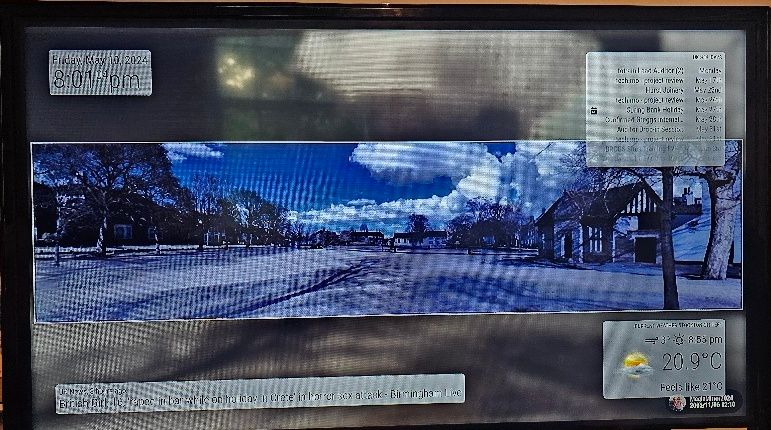
                  I thought it would be easier if I showed an image of my MagicMirror screen and explain what I mean.

                  As you can see the clock text top left of the image covers the image and when the image has a light background you can not see/read the text easily. So I would like to make the background of the text white with say 50% opacity and the text black. I have also added below the last CSS.Custom file but still not showing white background.

                  20240501_183629-02.jpeg

                  CSS Custom file

                  /* Custom CSS Sample
                   *
                   * Change color and fonts here.
                   *
                   * Beware that properties cannot be unitless, so for example write '--gap-body: 0px;' instead of just '--gap-body: 0;'
                   */
                  
                  /* Uncomment and adjust accordingly if you want to import another font from the google-fonts-api: */
                  /* @import url('https://fonts.googleapis.com/css2?family=Poppins:wght@100;300;400;700&display=swap'); */
                  
                  
                  }
                  .module.clock (
                     background-color:rgba(255,255,255,0.5);
                     border-radius:8px;
                     padding:8px;
                  )
                  )
                  

                  Cheers,
                  John

                  S 2 Replies Last reply Reply Quote 0
                  • S Offline
                    sdetweil @synint
                    last edited by sdetweil

                    @synint yes try mine instead

                    Also add, after .time

                    , .date
                    

                    Sam

                    How to add modules

                    learning how to use browser developers window for css changes

                    1 Reply Last reply Reply Quote 0
                    • S Offline
                      sdetweil @synint
                      last edited by

                      @synint tge stuff before the open brace {
                      is called the selector clause

                      it selects the elements the stuff inside the braces will be applied to

                      .module.clock

                      on the elements with BOTH classes ( no space between them)… AND ONLY THOSE elements

                      but (it, only one) doesn’t have text or a background

                      Mine says

                      for the elements within class .clock and below change its background.

                      and secondly within .clock change the text color in .time

                      Sam

                      How to add modules

                      learning how to use browser developers window for css changes

                      S 1 Reply Last reply Reply Quote 0
                      • S Offline
                        synint Project Sponsor @sdetweil
                        last edited by

                        @sdetweil

                        Hi Sam,

                        Thank you and based on your comments the clock is now working correctly.

                        I have 3 other modules I am trying to apply the same styling and using the CSS Customer file as detailed below I am getting the following visual appearance.

                        clock - Working
                        calendar - White box appears but text is also white
                        MMM-OpenmapWeather - No change to appearance
                        newsfeed - No change to appearance

                        /* Custom CSS Sample
                         *
                         * Change color and fonts here.
                         *
                         * Beware that properties cannot be unitless, so for example write '--gap-body: 0px;' instead of just '--gap-body: 0;'
                         */
                        
                        /* Uncomment and adjust accordingly if you want to import another font from the google-fonts-api: */
                        /* @import url('https://fonts.googleapis.com/css2?family=Poppins:wght@100;300;400;700&display=swap'); */
                        
                        
                        .clock {
                           background-color:white;
                           border-radius:8px;
                           padding:8px;
                        }
                        .clock .time, .date{
                         	color: black;
                        }
                        
                        .calendar {
                           background-color:white;
                           border-radius:8px;
                           padding:8px;
                        }
                        .calendar .calendar-check{
                         	color: black;
                        
                        .MMM-OpenmapWeather {
                           background-color:white;
                           border-radius:8px;
                           padding:8px;
                        }
                        .MMM-OpenmapWeather {
                         	color: black;
                        }
                        
                        .newsfeed {
                           background-color:white;
                           border-radius:8px;
                           padding:8px;
                        }
                        .newsfeed {
                         	color: black;
                        }
                        

                        Kind regards,
                        John

                        S 1 Reply Last reply Reply Quote 0
                        • S Offline
                          sdetweil @synint
                          last edited by sdetweil

                          @synint every module is different

                          many styles are not inherited from its parent

                          see this on how to use the developers window elements tab to find the classes and styles to use

                          https://forum.magicmirror.builders/post/90135

                          Sam

                          How to add modules

                          learning how to use browser developers window for css changes

                          S 2 Replies Last reply Reply Quote 0
                          • S Offline
                            synint Project Sponsor @sdetweil
                            last edited by

                            @sdetweil

                            Hi Sam,

                            Thank you for the link and I am going to try and sort the style issue over the weekend.

                            I will let you know how I get on.

                            Cheers,
                            John

                            1 Reply Last reply Reply Quote 0
                            • S Offline
                              synint Project Sponsor @sdetweil
                              last edited by

                              @sdetweil

                              Hi Sam,

                              It has taken me some time but I have now managed to get white boxes around the module text. The white box was created adding additional lines of code to custom.css file see code below. However I was unable to change the text colour in the white boxes so ended up changing the root section of the main.css file see code below. I know you said do not change the root code but could not find any other way of changing font colour.

                              The one thing I would still like to do is remove image and date/time at the bottom right hand corner.

                              Cheers,
                              John

                              Custom CSS Code

                              /* Custom CSS Sample
                               *
                               * Change color and fonts here.
                               *
                               * Beware that properties cannot be unitless, so for example write '--gap-body: 0px;' instead of just '--gap-body: 0;'
                               */
                              
                              /* Uncomment and adjust accordingly if you want to import another font from the google-fonts-api: */
                              /* @import url('https://fonts.googleapis.com/css2?family=Poppins:wght@100;300;400;700&display=swap'); */
                              
                              
                              .clock {
                                 background-color:rgba(255,255,255,0.5);
                                 border-radius:8px;
                                 padding:8px;
                              }
                              .clock .time{
                               	color: black;
                              }
                              
                              
                               .MMM-OpenmapWeather {
                                 background-color:rgba(255,255,255,0.5);
                                 border-radius:8px;
                                 padding:8px;
                              }
                              
                              .calendar {
                                 background-color:rgba(255,255,255,0.5);
                                 border-radius:8px;
                                 padding:8px;
                              }
                              
                              .newsfeed {
                                 background-color:rgba(255,255,255,0.5);
                                 border-radius:8px;
                                 padding:8px;
                              
                              }
                              .newsfeed .module-content{
                                 color: black;
                                 
                              }
                              

                              main.css file code

                              :root {
                                --color-text: #OOOOOO;
                                --color-text-dimmed: #OOOOOO;
                                --color-text-bright: #OOOOOO;
                                --color-background: #000;
                                --font-primary: "Roboto Condensed";
                                --font-secondary: "Roboto";
                                --font-size: 20px;
                                --font-size-xsmall: 0.75rem;
                                --font-size-small: 1rem;
                                --font-size-medium: 1.5rem;
                                --font-size-large: 3.25rem;
                                --font-size-xlarge: 3.75rem;
                                --gap-body-top: 60px;
                                --gap-body-right: 60px;
                                --gap-body-bottom: 60px;
                                --gap-body-left: 60px;
                                --gap-modules: 30px;
                              }


                              ![0_1715368462168_20240510_200104-01.jpeg](Uploading 34%)

                              S S 2 Replies Last reply Reply Quote 0
                              • S Offline
                                synint Project Sponsor @synint
                                last edited by

                                Did not attach image on past post.

                                @synint 20240510_200104-01.jpeg

                                1 Reply Last reply Reply Quote 0
                                • S Offline
                                  sdetweil @synint
                                  last edited by

                                  @synint said in Trying to create a white background with black text to the clock module title block.:

                                  so ended up changing the root section of the main.css file see code below

                                  just copy that root section to custom.css
                                  then modify.

                                  again the developers window should make quick work of finding the right selector and style setting
                                  Sam

                                  How to add modules

                                  learning how to use browser developers window for css changes

                                  1 Reply Last reply Reply Quote 0

                                  Hello! It looks like you're interested in this conversation, but you don't have an account yet.

                                  Getting fed up of having to scroll through the same posts each visit? When you register for an account, you'll always come back to exactly where you were before, and choose to be notified of new replies (either via email, or push notification). You'll also be able to save bookmarks and upvote posts to show your appreciation to other community members.

                                  With your input, this post could be even better 💗

                                  Register Login

                                  • 1 / 1
                                  • First post
                                    Last post
                                  Enjoying MagicMirror? Please consider a donation!
                                  MagicMirror created by Michael Teeuw.
                                  Forum managed by Sam, technical setup by Karsten.
                                  This forum is using NodeBB as its core | Contributors
                                  Contact | Privacy Policy