Read the statement by Michael Teeuw here.
MagicMirror Failing on Raspberry Pi Zero W Rev 1.1
-
@sdetweil I mean … I have no idea how I created that. I simply followed the same steps as last time and then executed a few of the commands you told me, e.g.
pm2 delete 0,pm2 delete 1, andpm2 save -f. Then I called your fix’em up script:bash -c "$(curl -sL https://raw.githubusercontent.com/sdetweil/MagicMirror_scripts/master/fixuppm2.sh)" the log will be saved in /home/dvg/MagicMirror/installers/pm2_setup.logand after that I called
pm2 savefollowed bypm2 start MagicMirrorand theninstallers/mm.sh &when I was asking you about my cluttered Terminal screen.Then I called
pm2 restart MagicMirrorwhich told me:Use --update-env to update environment variables [PM2][ERROR] Process or Namespace MagicMirror not foundSo then I called
npm start &which gave me[1] 12338 > magicmirror@2.28.0 start > ./run-start.sh $1 ./run-start.sh: line 79: 11841 Killed node serveronlySo I did a
sudo rebootand everything seemed to be working fine. But my out log was empty so I callednpm run serverat your direction, and here we are. -
@davidgagne the log is empty cause the pm2 app name is used for file names
-
@sdetweil Hm. I do have a file
/.pm2/pm2.logthat’s filled with thousands of these:2024-08-04T00:35:12: PM2 log: App [MagicMirror:1] exited with code [1] via signal [SIGINT] 2024-08-04T00:35:13: PM2 log: App [MagicMirror:1] starting in -fork mode- 2024-08-04T00:35:13: PM2 log: App [MagicMirror:1] online 2024-08-04T00:35:19: PM2 log: App [MagicMirror:1] exited with code [1] via signal [SIGINT] 2024-08-04T00:35:19: PM2 log: App [MagicMirror:1] starting in -fork mode- 2024-08-04T00:35:19: PM2 log: App [MagicMirror:1] online 2024-08-04T00:35:25: PM2 log: App [MagicMirror:1] exited with code [1] via signal [SIGINT] 2024-08-04T00:35:25: PM2 log: App [MagicMirror:1] starting in -fork mode- 2024-08-04T00:35:25: PM2 log: App [MagicMirror:1] onlineThe last entry in that file is from 2024-08-04T21:22:04, which is around/about the last time I rebooted the Pi.
The tail of that log file looks like this:
2024-08-04T21:16:54: PM2 log: pid=3352 msg=failed to kill - retrying in 100ms
2024-08-04T21:16:54: PM2 log: Process with pid 3352 still alive after 1600ms, sending it SIGKILL now...
2024-08-04T21:16:55: PM2 log: App [pm2:0] exited with code [0] via signal [SIGKILL]
2024-08-04T21:16:55: PM2 log: pid=3352 msg=process killed
2024-08-04T21:16:56: PM2 log: PM2 successfully stopped
2024-08-04T21:22:02: PM2 log: ===============================================================================
2024-08-04T21:22:02: PM2 log: --- New PM2 Daemon started ----------------------------------------------------
2024-08-04T21:22:02: PM2 log: Time                 : Sun Aug 04 2024 21:22:02 GMT-0400 (Eastern Daylight Time)
2024-08-04T21:22:02: PM2 log: PM2 version          : 5.4.2
2024-08-04T21:22:02: PM2 log: Node.js version      : 20.9.0
2024-08-04T21:22:02: PM2 log: Current arch         : arm
2024-08-04T21:22:02: PM2 log: PM2 home             : /home/dvg/.pm2
2024-08-04T21:22:02: PM2 log: PM2 PID file         : /home/dvg/.pm2/pm2.pid
2024-08-04T21:22:02: PM2 log: RPC socket file      : /home/dvg/.pm2/rpc.sock
2024-08-04T21:22:02: PM2 log: BUS socket file      : /home/dvg/.pm2/pub.sock
2024-08-04T21:22:02: PM2 log: Application log path : /home/dvg/.pm2/logs
2024-08-04T21:22:02: PM2 log: Worker Interval      : 30000
2024-08-04T21:22:02: PM2 log: Process dump file    : /home/dvg/.pm2/dump.pm2
2024-08-04T21:22:02: PM2 log: Concurrent actions   : 2
2024-08-04T21:22:02: PM2 log: SIGTERM timeout      : 1600
2024-08-04T21:22:02: PM2 log: ===============================================================================
2024-08-04T21:22:04: PM2 log: [Watch] Start watching pm2
2024-08-04T21:22:04: PM2 log: App [pm2:0] starting in -fork mode-
2024-08-04T21:22:04: PM2 log: App [pm2:0] online
And in the
/.pm2/logs/directory I haveMagicMirror-error.log,MagicMirror-out.log,pm2-error.log, andpm2-out.log.That last one appears to contain what I would have expected to see in the MM-out.log.
I am not opposed to flashing the drive and starting from scratch if you think I should.
-
@davidgagne I really have no idea where you are.
Flash the legacy image
Boot , don’t update
Run my install script -
@davidgagne The Pi Zero has 512KB memory, the default swapfile size setting is 100KB, and the swapfile is located on the SDcard which is not very fast.
I would suggest changing the swapfile size to 2048KB by editing /etc/dphys-swapfile and changing CONF_SWAPSIZE=100 to CONF_SWAPSIZE=2048.
You might consider moving from the SDcard to an SSD which will provide quicker data access and improved security against SDcard failure.
Lastly, you might consider changing from a Pi Zero to a Pi Zero 2 or something with more processing power. I use a Pi 3 Model A+ with a USB attached SSD and 2048GB swapfile size.
Butch
-
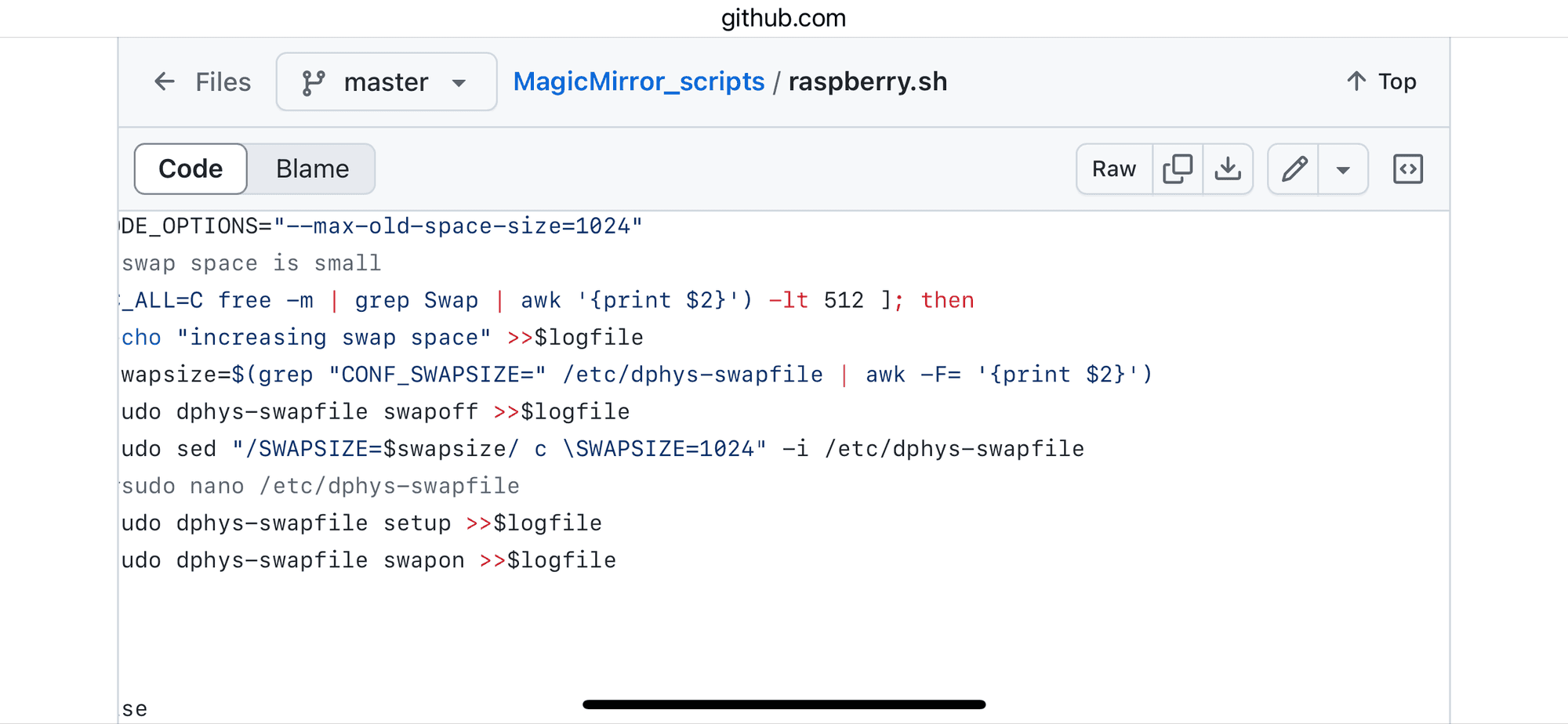
@butchkemper my install script increases the swap file size if its small (200meg or less).
-
@sdetweil @butchkemper I just checked that file and it has no CONF_SWAPSIZE variable.
There is a SWAPSIZE variable set to 1024.
Is there a chance that @sdetweil’s script misnamed that variable?
-
-
-
@butchkemper said in MagicMirror Failing on Raspberry Pi Zero W Rev 1.1:
You might consider moving from the SDcard to an SSD which will provide quicker data access and improved security against SDcard failure.
If I connect an SSD via the data port and remove the SIM, will the 0 boot from the SSD? Or is there a way to configure the SIM to have it switch to the SSD or something?
-
@davidgagne pi 0 doesnt support boot from ssd/usb
you can make a hybrid, boot from read only sd , run from ssd

Hello! It looks like you're interested in this conversation, but you don't have an account yet.
Getting fed up of having to scroll through the same posts each visit? When you register for an account, you'll always come back to exactly where you were before, and choose to be notified of new replies (either via email, or push notification). You'll also be able to save bookmarks and upvote posts to show your appreciation to other community members.
With your input, this post could be even better 💗
Register Login