Read the statement by Michael Teeuw here.
Monthly Calendar View
-
Oh, you just want a calendar view, not an actual Google (or other) calendar with events on it. That’s different, and relatively easy.
-
I’m definitely thinking more of a full calendar with events. I plan on my screen being in landscape mode, upwards of 23". My “dashboard” so to speak would have a header with a weather module, this monthly calendar taking up about 80% of screen and then maybe an RSS feed along the bottom for news. I’ve tried messing with custom RSS feeds for Google calendar and iframe, and it’s just plain ugly.
-
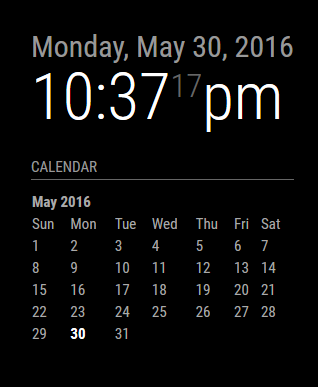
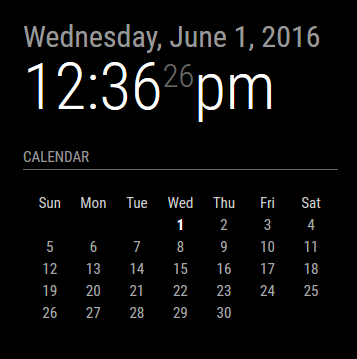
I said I was not going to write any code this weekend. Really, I did. But when thinking of a simple calendar display, it was way easier for me to just sit down and fiddle. This is still in its infancy, but this is what I’m working on for now. It’s a simple, empty calendar display with nothing other than today highlighted. It is still the same (default) calendar module. You just pick which you want displayed, either a blank one, or one where you configure your calendar URLs for it to fetch the data. At least, this is what I did for now. I may end up pulling it out and into a separate module, together with the weekly display one that I’m also working on.
There’s no formatting present, in fact it’s all done with tables, something I am going to change as I really don’t like tables. Much easier to format when you’re dealing with CSS elements. But at least I can give you a taste of what it looks like so far.
Just the blank calendar:
And if I stack them:
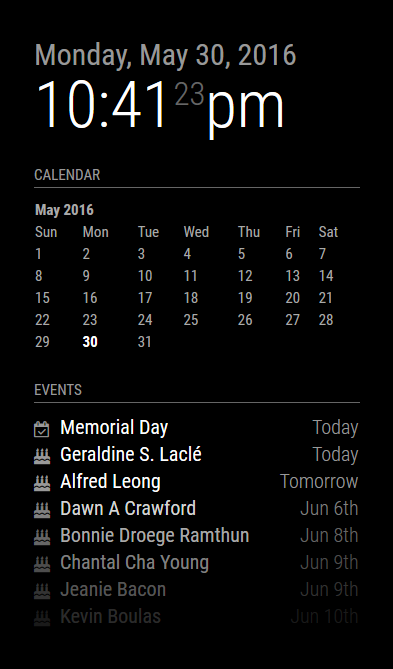
Comments/Suggestions/Requests/Questions … let 'em rip.
Things still todo:
- Replace table with CSS elements
- Allow for proper language translation
- Cosmetics
-
Even the Calender in the form you did it there would be an awesome module to add, or perhaps just build it into the main program, so that we can choose inside the config what kind of look you want to have on the calender…
And something else for your liddle ‘to do’ - list:
Week starts with Monday or Sunday :) -
The better question is, what’s the preferred display, something small and in the corner, or having it take up the full width of the monitor? I’m of the school where I want small, concise and not taking up all the space. However, this isn’t about me, it’s about the user. :)
I think I will pull it out of the default calendar module and keep @MichMich’s default calendar implementation as-is, while I push this into a different module. I need to figure out what to call it, or how to make it work with the other one without breaking things. Having made the decision to pull it out of the default module also means I can easily integrate other features without causing too much bloat on the default one, such as a weekly view version.
And yes, having the week start on Monday vs. Sunday is easily implemented …
-
I like the look of that module you made, but speaking for just myself, I was looking for a large scale calendar with multiple calendars populating the days. I know you had talked about adding a css to iframe, but that seems to have been made more difficult by google. Plus I want to just use it as a module along with other features of this project.
Again, I’m looking for more of a home based dashboard for the family, as opposed to a mirror, but I like the setup of this project.Thanks for your efforts!
-
One thing at a time @billp100. Your request is still in my queue. I did this yesterday because it was on my mind and it’s easier for me to just write the code out while I’m thinking about it, than it is to just ponder ideas and stick to my ‘I shall not write code this long weekend.’ mantra. So yeah, it happened.
Basically, this is what I have in my queue:
- compact monthly view of a calendar (what I’ve done above and still being worked on)
- full screen width calendar with events populated (this has issues I’m trying to address)
- a running week of events (somewhat in progress already)
For the issues I’m referring to above, I look at my own calendar and days where I have so many things going on that it will not all display in the allowable space. On a regular computer, you can click to expand the day and see it all. You can’t do that on a default, touch-free MM install. Adding that ability now relies on the user also including a touch screen, or a mouse to navigate the calendar. To me it does no good if I have a calendar where I can not see all the events.
Now, this may not be an issue for you specifically, but I have to think of the over all population and every possible scenario and how to address them. So yeah, I’m still working on that and trying to figure out a (better) solution.
-
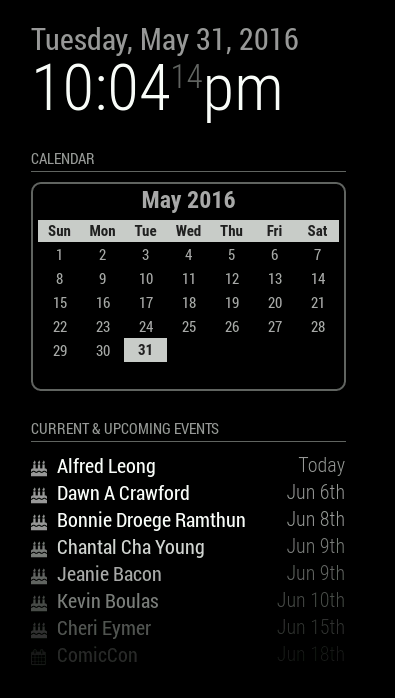
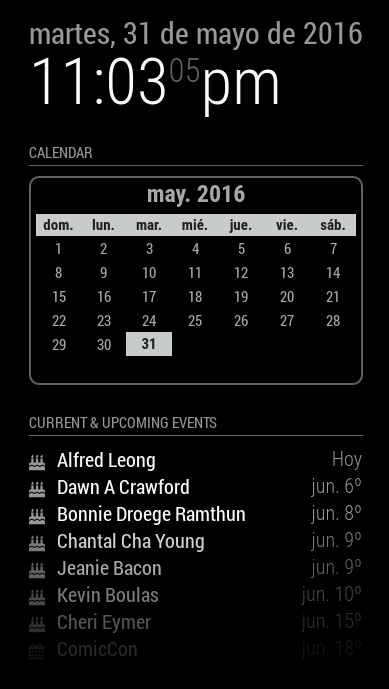
And after a quick rewrite to use Moment.js instead of cumbersome Javascript calculations, I also did a bit of styling. I opted not to go the CSS route because the reality is, this is table-worth data, not CSS. It solves a lot of headaches to be honest. I did incorporate proper language translations. It just reads your locale and uses that.
- Still to-do is allowing for a Sun/Mon start of the week.
-
@KirAsh4 …that looks amazing! exactly what i looking for…
-
I think I prefer the first styling 😅 but maybe that’s just me :)
-
@paviro said in Weekly Calendar:
I think I prefer the first styling 😅 but maybe that’s just me :)
It is not only you :) I also prefer the first style.
Sometimes a little less is a little more ;-) -
CSS styling can be changed by anyone. At this point I’m just playing with it whenever I take a break from actually writing code. There are still bits of code that I don’t like. The trouble with being OCD.
-
I reverted to much simpler times. One of the things that irked me is that I’m displaying a month/year on the calendar when it’s displayed right above it in the clock module. So, I made it optional. One can choose to turn off the header or leave it on. For those of you who don’t display the clock (or who put it elsewhere), it’s helpful to leave the header on, but if you have the clock enabled, there’s no sense in adding the month and year right below it again. This trims the header and keeps a clean interface.
And I left the ability for the end user to create a custom CSS file and modify the look (I turned the header back on for this preview):
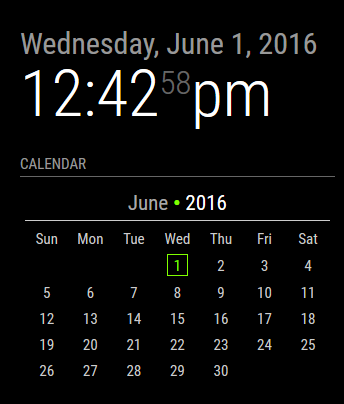
In the above example, the custom CSS added a bullet point in between the month and year (which does not exist in the default CSS), made the year digits brighter, and colorized the current day. There are several nested elements that will allow the user to customize how they want their calendar to look. I’m looking at you guys who also have a colorized version of the weather module. :)
-
I really like that touch of green in there…
Well done! -
That’s the custom CSS being implemented. By default it doesn’t have any color nor border. The user can edit their CSS and personalize it that way. Essentially the code reads:
// Module defaults defaults: { ... displayMonthyear: true, cssStyle: "default" /* Current options are 'default', 'block', 'custom' */ }, // Required styles getStyles: function() { switch(this.config.cssStyle) { case "block": return ["styleDefault.css", "styleBlock.css"]; break; case "custom": return ["styleDefault.css", "styleCustom.css"]; break; default: return ["styleDefault.css"]; } }, -
So as it turns out, it’s extremely easy to let the calendar Do Its Own Thing as far as figuring out what day to start the week on, Sunday or Monday. It litereally done by the system’s LOCALE, which you control by setting a language option in the main
'config.js'. Below is a screen shot of the English ('en') versus Spanish ('es') setting: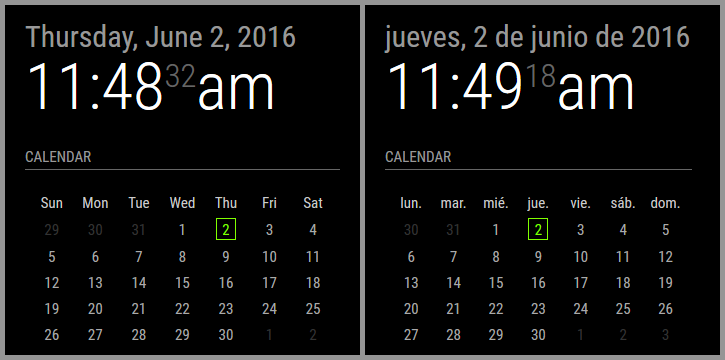
Notice how the Spanish one starts on Monday (lunes) whereas the English one starts on Sunday. I am not manually calculating this to draw the calendar. Moment.js takes care of this automatically.
Here’s the drawback: if your LOCALE defines the start of the week as Sunday, but you want to VISUALLY set the calendar to Monday (or vice verse), that would require me to actually manually calculate the entire calendar and draw it out. It’s a pain in the rear to be honest.
-
A bit late to the party thanks to a delightful holiday, but I must say: nice work on the calendar.
One small suggestion: change the green color to an inverted black and white digit. I prefer the MM to be fully B&W. -
@MichMich, it is, by default, B/W. Users can set a custom CSS to change the colors, like I did as a test.
-
@KirAsh4 Nice work!
-
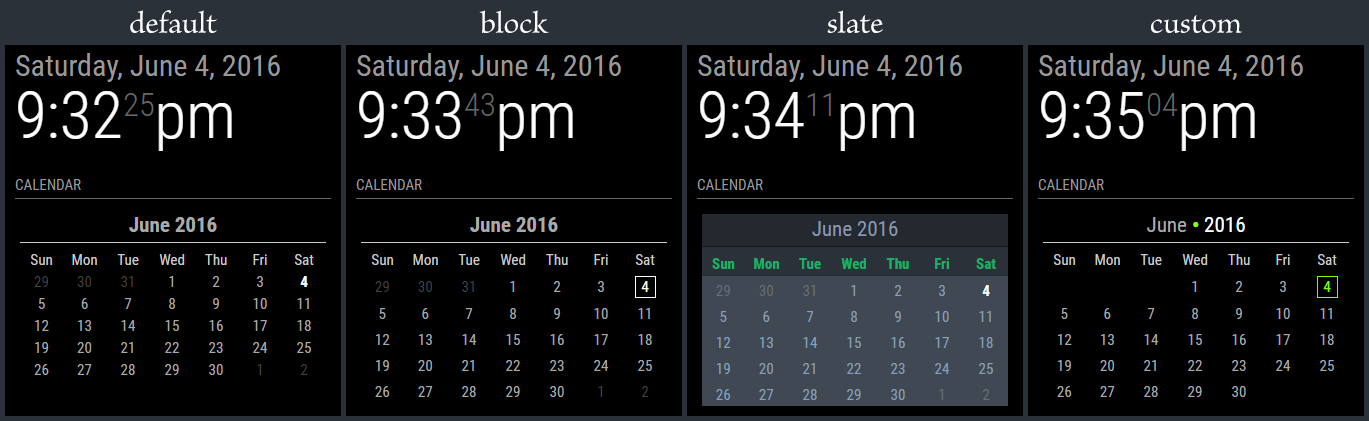
I can spend days coming up with style ideas, but I think I’m done fiddling with this. It’s time to move on to the next step in the process. I’m cleaning up the branches on GitHub and getting ready to open the flood gates. In the mean time, here’s the 4 styles that I’m including. Note that the ‘slate’ style is really meant for people who have a mirror-less display as the colors probably won’t show very well through a 2-way mirror.
- The calendar is language aware, meaning it will translate to your language setting.
- The calendar will automatically start on either Monday or Sunday depending on your language setting.
- The header (month and year) can be suppressed (not shown) if desired.
- Customization can be done through the custom CSS file
- Current day is highlighted through CSS styling.
- Probably more stuff I forget at the moment … I’ll have it all written out in the README file, including the full styling tree.

Hello! It looks like you're interested in this conversation, but you don't have an account yet.
Getting fed up of having to scroll through the same posts each visit? When you register for an account, you'll always come back to exactly where you were before, and choose to be notified of new replies (either via email, or push notification). You'll also be able to save bookmarks and upvote posts to show your appreciation to other community members.
With your input, this post could be even better 💗
Register Login