MagicMirror Forum
    • Recent
    • Tags
    • Unsolved
    • Solved
    • MagicMirror² Repository
    • Documentation
    • 3rd-Party-Modules
    • Donate
    • Discord
    • Register
    • Login
    A New Chapter for MagicMirror: The Community Takes the Lead
    Read the statement by Michael Teeuw here.

    I cant get my Calender or my MMMBitcoin to work, any help please?

    Scheduled Pinned Locked Moved Unsolved Troubleshooting
    19 Posts 3 Posters 2.4k Views 3 Watching
    Loading More Posts
    • Oldest to Newest
    • Newest to Oldest
    • Most Votes
    Reply
    • Reply as topic
    Log in to reply
    This topic has been deleted. Only users with topic management privileges can see it.
    • C Offline
      clarkcrew32
      last edited by

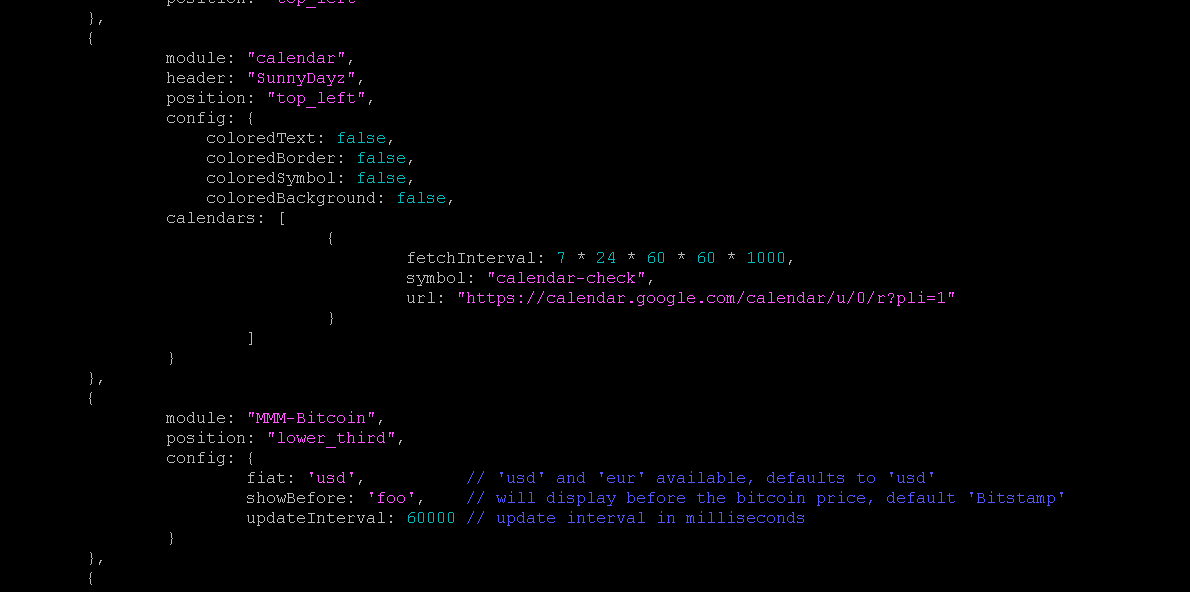
      I havent been able to get anything on my calender to show, i think its cuz its not a .ical? Im trying to get the color full weeks view but got nothing but what defualt top left looks like when installed.

      I tried to install MMMBitcoin as well but nothing. Do i need to do more than just type in the nano.config.js?
      fa026b7b-8227-42de-9c4e-51b136df7053-image.png

      S 1 Reply Last reply Reply Quote 0
      • S Do not disturb
        sdetweil @clarkcrew32
        last edited by sdetweil

        @clarkcrew32 the calendar module ONLY processes ics files…
        there is no embedded view support.

        you can use one of the modules that does iframe and view the calendar that way
        or use the default with ICS and use something like MMM-CalendarExt3 or MMM-MiniMonth to see a wall calendar view

        on bitcoin
        can you show the message output from npm start
        if you are using pm2 to autolaunch MM, then
        pm2 logs --lines=xxxx
        where xxx is some number of the most recent lines, default 15 (may need 100 or more to view that far back_

        Sam

        How to add modules

        learning how to use browser developers window for css changes

        C 1 Reply Last reply Reply Quote 0
        • C Offline
          clarkcrew32 @sdetweil
          last edited by

          @sdetweil how do i clear my config.js and start from default?

          S 1 Reply Last reply Reply Quote 0
          • S Do not disturb
            sdetweil @clarkcrew32
            last edited by

            @clarkcrew32

            cd ~/MagicMirror/config
            cp config.js.sample config.js
            

            that copies the sample we provide

            Sam

            How to add modules

            learning how to use browser developers window for css changes

            C 2 Replies Last reply Reply Quote 0
            • C Offline
              clarkcrew32 @sdetweil
              last edited by

              @sdetweil awesome thakn you, anyway for me to check for errors before i leave nano config.js screen?

              S 2 Replies Last reply Reply Quote 0
              • C Offline
                clarkcrew32 @sdetweil
                last edited by

                @sdetweil you are like gold lol

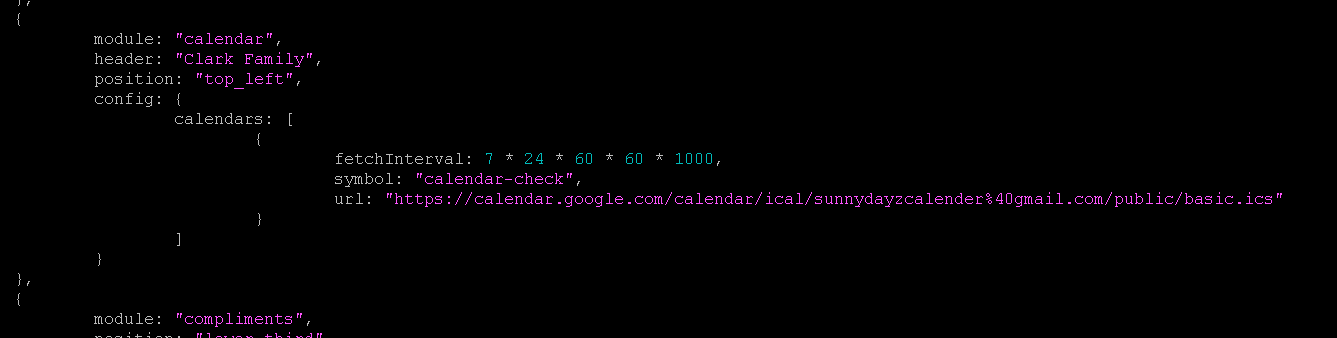
                still cant get this to work tho as i found a way to do .ics file calender
                90227a19-e0c4-4841-89b9-4de73fdbd33b-image.png

                S 1 Reply Last reply Reply Quote 0
                • S Do not disturb
                  sdetweil @clarkcrew32
                  last edited by sdetweil

                  @clarkcrew32 that fetch us on every 7 days

                  during dev i would change it to a few minutes 5*60*1000

                  another thing to test

                  from a terminal window try to download the ics

                  curl -sL  the_cal_url >somefile.txt
                  

                  then examine the contents of somefile.txt
                  for BEGIN:VEVENT…

                  Sam

                  How to add modules

                  learning how to use browser developers window for css changes

                  1 Reply Last reply Reply Quote 0
                  • S Do not disturb
                    sdetweil @clarkcrew32
                    last edited by

                    @clarkcrew32 check for errors

                    not in nano
                    but you can run the checker

                    npm run config:check

                    we do that on every startup now and fail if there is some problem.

                    Sam

                    How to add modules

                    learning how to use browser developers window for css changes

                    R 1 Reply Last reply Reply Quote 0
                    • R Offline
                      raymondjspigot @sdetweil
                      last edited by

                      @clarkcrew32 hiya I’m not familiar with the MMM-Bitcoin module, but just taking a look at the github page for it at https://github.com/valmassoi/MMM-bitcoin it doesn’t look like the install instructions are complete (it only suggests adding the module config to your config.js)

                      AFAIK to install a module to your mirror, you’re going to need to clone the repository to your modules directory, as well as add its config.

                      (apologies, you might know to do this all already, but just to make sure …)

                      try going

                      cd ~/MagicMirror/modules
                      git clone https://github.com/valmassoi/MMM-bitcoin

                      and the module should be cloned to your modules directory

                      then add the config entry into your config.js file, save the changes and try running your MagicMirror again.

                      (I don’t see any obvious typos for the MMM-Bitcoin entry in your config.js screenshot at the top, it looks like you edited it with nano just fine the first time).

                      1 Reply Last reply Reply Quote 1
                      • S Do not disturb
                        sdetweil @clarkcrew32
                        last edited by

                        @clarkcrew32 the bitcoin module has a problem.
                        it uses s library we stopped shipping 3 years ago.
                        but the author didn’t document its use.

                        so, in the module folder do
                        npm install request

                        Sam

                        How to add modules

                        learning how to use browser developers window for css changes

                        C 1 Reply Last reply Reply Quote 0
                        • C Offline
                          clarkcrew32 @sdetweil
                          last edited by

                          @sdetweil

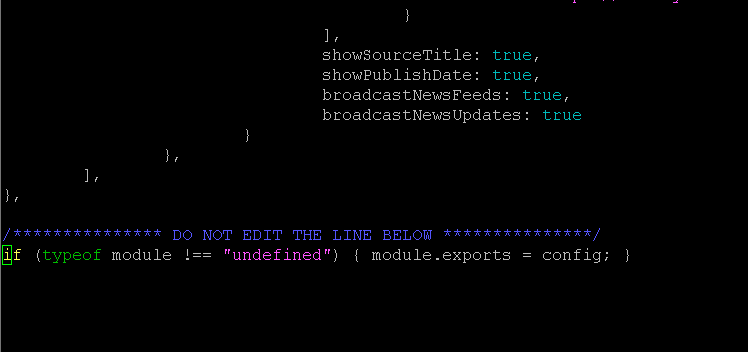
                          im geting an error at the very last line here
                          0eb9a79c-40b5-4302-b875-3b8670c343e0-image.png

                          S 1 Reply Last reply Reply Quote 0
                          • S Do not disturb
                            sdetweil @clarkcrew32
                            last edited by

                            @clarkcrew32 that last },

                            should not have a comma

                            the collapsed structure looks like this (for example, ignore individual values)

                              var config = {
                                address: "0.0.0.0",
                                 port: 8090,
                                basePath: "/",
                                language: "en",
                                serverOnly: "local",
                                locale: "en-US",
                                logLevel: [
                                  "INFO",
                                  "LOG",
                                  "WARN",
                                  "ERROR"
                                ],
                                timeFormat: 24,
                                units: "metric",
                                electronOptions: {
                                  x: "2560",
                                  y: "0"
                                },
                                useHttps: false,
                                ipWhitelist: [],
                                modules: [
                            
                                ]  // <--- end of modules
                              }  // <--- end of confg:
                            ;  //<<------- note this is not a comma
                            
                            /*************** DO NOT EDIT THE LINE BELOW ***************/
                            if (typeof module !== "undefined") {module.exports = config;}
                            

                            Sam

                            How to add modules

                            learning how to use browser developers window for css changes

                            C 1 Reply Last reply Reply Quote 0
                            • C Offline
                              clarkcrew32 @sdetweil
                              last edited by

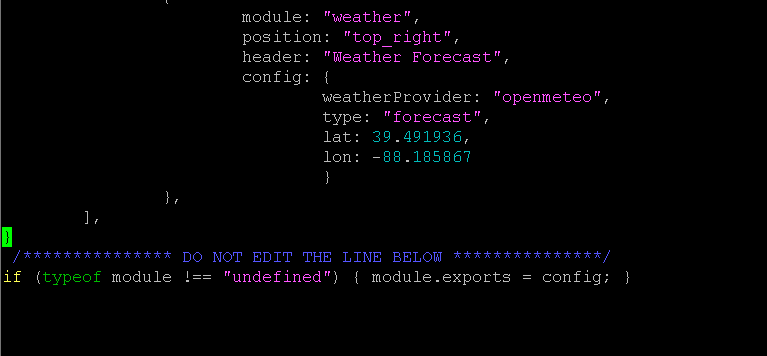
                              @sdetweil i cant figure this out, what should that section be
                              a8cb479d-0074-4ebd-af25-eb0a9ab5a785-image.png

                              S 1 Reply Last reply Reply Quote 0
                              • S Do not disturb
                                sdetweil @clarkcrew32
                                last edited by

                                @clarkcrew32 that should work,
                                if not show the error

                                Sam

                                How to add modules

                                learning how to use browser developers window for css changes

                                C 1 Reply Last reply Reply Quote 0
                                • C Offline
                                  clarkcrew32 @sdetweil
                                  last edited by

                                  @sdetweil

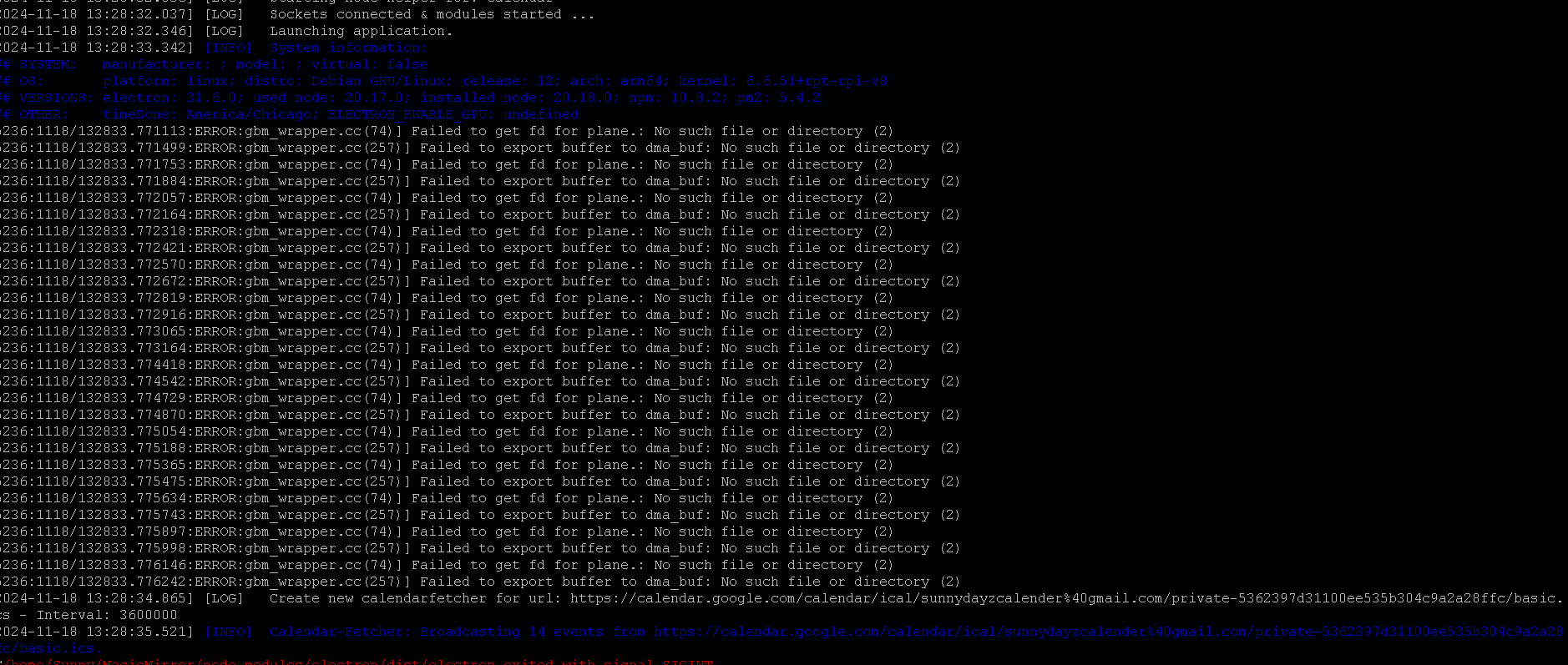
                                  ok i figured that out so i have a nice start here but i noticed allthese errors wheni go to run it, any idea what the errors are?
                                  be1f5813-e5b4-411d-ab27-5292c1d6ffdc-image.png

                                  S 1 Reply Last reply Reply Quote 0
                                  • S Do not disturb
                                    sdetweil @clarkcrew32
                                    last edited by

                                    @clarkcrew32 no idea, another weird electron useless warning

                                    Sam

                                    How to add modules

                                    learning how to use browser developers window for css changes

                                    C 1 Reply Last reply Reply Quote 0
                                    • C Offline
                                      clarkcrew32 @sdetweil
                                      last edited by

                                      @sdetweil

                                      Well im very appreciative of your help, i got everything kinda running. I think my screen is too small as some things are blended in. My next goal here is to get some color and to add some sports schedules. Any idea for those? I either have to add multiple calenders or put it into one calender but google isnt working like that for some reason.

                                      S 1 Reply Last reply Reply Quote 0
                                      • S Do not disturb
                                        sdetweil @clarkcrew32
                                        last edited by sdetweil

                                        @clarkcrew32 the MM calendar cal can process multiple urls at once and merge them
                                        calendars[
                                        {url: cal1},
                                        {url: cal2},
                                        ]

                                        or you can run multiple instances of the calendar module and put them where ever
                                        if you use the color enabling options you can have colored text and symbols

                                        we only process ICS files… not embedding the google wall cal view

                                        sports, see the 3rd party module list in the top banner here

                                        Screenshot at 2024-11-18 15-24-33.png

                                        Sam

                                        How to add modules

                                        learning how to use browser developers window for css changes

                                        S 1 Reply Last reply Reply Quote 0
                                        • S Do not disturb
                                          sdetweil @sdetweil
                                          last edited by

                                          @clarkcrew32 can this be marked resolved?

                                          Sam

                                          How to add modules

                                          learning how to use browser developers window for css changes

                                          1 Reply Last reply Reply Quote 0

                                          Hello! It looks like you're interested in this conversation, but you don't have an account yet.

                                          Getting fed up of having to scroll through the same posts each visit? When you register for an account, you'll always come back to exactly where you were before, and choose to be notified of new replies (either via email, or push notification). You'll also be able to save bookmarks and upvote posts to show your appreciation to other community members.

                                          With your input, this post could be even better 💗

                                          Register Login

                                          • 1 / 1
                                          • First post
                                            Last post
                                          Enjoying MagicMirror? Please consider a donation!
                                          MagicMirror created by Michael Teeuw.
                                          Forum managed by Sam, technical setup by Karsten.
                                          This forum is using NodeBB as its core | Contributors
                                          Contact | Privacy Policy