Read the statement by Michael Teeuw here.
"Invalid Date" appears in Weather module. MM v2.29.0
-
@sdetweil said in "Invalid Date" appears in Weather module. MM v2.29.0:
@reilley I copied your config and used my apikey
no other changes (well I wrapped your config in code block to keep the quotes correct for copy/paste)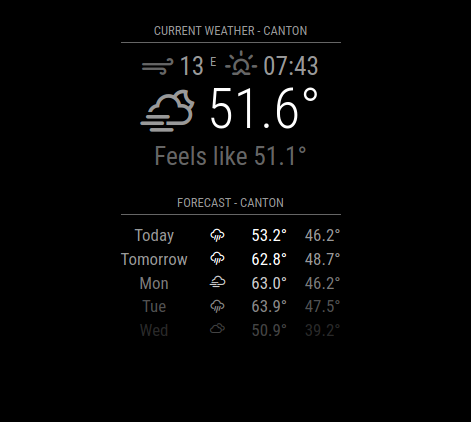
So my code worked for you and the only change was the API key? This key worked two days ago, so not sure what’s happening here.
-
@reilley said in "Invalid Date" appears in Weather module. MM v2.29.0:
So my code worked for you and the only change was the API key?
correct
-
@sdetweil said in "Invalid Date" appears in Weather module. MM v2.29.0:
@reilley said in "Invalid Date" appears in Weather module. MM v2.29.0:
So my code worked for you and the only change was the API key?
correct
That’s nuts. Why would an API key work two days ago and not today? Seems like maybe there’s a configuration problem elsewhere but I not sure where it would be since I made no changes to weather.js or other .js files associated with the Weather module.
-
@reilley I don’t know… try my approach
docd ~/MagicMirror/config cp config.js.sample testcfg.js cd ..then edit the testcfg.js and paste your weather info from config.js here
then change the units to imperial
save
then on the terminal windowexport MM_CONFIG_FILE=config/testcfg.js npm start -
@sdetweil - nope, same result
-
@reilley ok, next thing
weather is done all in browser,
on the MagicMirror screen ctrl-shift-i to
open the developer window, select the console tab,
put wea in the filter fieldlook for any messages
-
@reilley - oh, I think I know what’s wrong now.
-
@sdetweil - you’re gonna laugh, but I found the issue. I was using an inactive API key. My backup was too old and was before the v2.29.0 API 3.0 requirement. Sorry to drag you through this!
-
@reilley glad you found it!
-
@reilley I just realized I experienced something similar, but I was preoccupied with other tasks and didn’t take the time to investigate.
Here’s a screenshot for reference:
https://github.com/cgillinger/MMM-WeatherEffects/blob/main/screenshots/rich.pngBased on my screenshots (as mentioned, I was focused on tweaking the module and only noticed it afterward), it seems to be intermittent.
I’m using api-free providers, eg SMHI.
-
I have the same issue. These are my settings:
module: "weather", position: "top_right", config: { lat: "52.262524", lon: "6.797571", apiKey: "****", appendLocationNameToHeader: false, type: "current", degreeLabel: true, decimalSymbol: ",", showWindDirection: false, showFeelsLike: false -
@VinGroot current release is 2.30 . still happening there ?
-
@sdetweil yes, still happening.
just noticed this second page, trouble shooting now. I get a 401 unauthorized error. -
@VinGroot well 401 means apikey not right
-
I figured it out. I use the free plan, so I cannot use API version 3.0. I have to use API version 2.5. Furthermore I have to use the /weather endpoint.
I got it working again by adding these 2 settings:
apiVersion: '2.5' weatherEndpoint: "/weather" -
@VinGroot awesome
-
S sdetweil has marked this topic as solved on
-
I have rebuilt my installation and used backup .js files.
Everything has worked apart from the weather module.
I am getting the ‘Invalid date’ message a temperature of NaN.
I have tried adding the apiVersion: ‘2.5’
weatherEndpoint: “/weather”Lines into the config.js file but then MagicMirror doesn’t load.
the section of config.sys is:
{ module: "weather", position: "top_right", config: { weatherProvider: "openweathermap", type: "current", location: "Machat", locationID: "2983291", //ID from http://bulk.openweathermap.org/sample/city.list.json.gz; unzip the gz file and find your city apiKey: "cxxxxxxxxxxxx57f81f9d82849a2fc21a" } }, { module: "weather", position: "top_right", header: "Weather Forecast", config: { weatherProvider: "openweathermap", type: "forecast", location: "Machat", locationID: "2983291", //ID from http://bulk.openweathermap.org/sample/city.list.json.gz; unzip the gz file and find your city apiKey: "cxxxxxxx57f81f9d82849a2fc21a" } }, -
@lif are you on 2.29 or 2.30?
cd ~/MagicMirror grep version package. json -
@lif said in "Invalid Date" appears in Weather module. MM v2.29.0:
> I have tried adding the apiVersion: '2.5'
> weatherEndpoint: "/weather"
each of those lines had trailing commas, right?
-
@sdetweil said in "Invalid Date" appears in Weather module. MM v2.29.0:
@lif said in "Invalid Date" appears in Weather module. MM v2.29.0:
> I have tried adding the apiVersion: '2.5'
> weatherEndpoint: "/weather"
each of those lines had trailing commas, right?
Not that line but that wasn’t the problem :-)
Thanks for the link showing how to subscribe to OpenWeathermap which solved the problem.
-
S sdetweil has marked this topic as solved on
Hello! It looks like you're interested in this conversation, but you don't have an account yet.
Getting fed up of having to scroll through the same posts each visit? When you register for an account, you'll always come back to exactly where you were before, and choose to be notified of new replies (either via email, or push notification). You'll also be able to save bookmarks and upvote posts to show your appreciation to other community members.
With your input, this post could be even better 💗
Register Login