Read the statement by Michael Teeuw here.
Help with MMM-ModuleSchedule - not hiding
-
I recently tried to install MMM-ModuleScheduler trying to get this suggestion to work:
I tried to follow the documentation online, but I can’t seem to get the MMM-EasyPix to hind until for now, and then show in March.
This is what I have in my config file:
   {module: 'MMM-ModuleScheduler',
        config: {
        }
    },

	{module: "MMM-EasyPix",
		pages: {"Main Calendar": "top_center"},
		position: "top_center",
		classes: "march",
		config: {
			module_schedule: {from: '* * 1 3 *', to: '* * * 4 *'}, /* march */
			picName: "Leprechaun.png",
			maxWidth: "75%",
			updateInterval: 30 * 60 * 1000,
			}
    },
Do I have the config file correct? or is there something else I am missing?
-
@cheminge 1st thing is to get easypix to display your image in the right place
-
I did some digging, it seems I had the “classes:” wrong in the first one.
It needs to be:
classes: "scheduler",So more like this:
	{module: "MMM-EasyPix",
		pages: {"Main Calendar": "bottom_right"},
		position: "bottom_right",
		classes: "scheduler",
		config: {
			module_schedule: {from: '0 0 1 3 *', to: '59 23 31 3 *'},
			picName: "Leprechaun.png",
			maxWidth: "75%",
			updateInterval: 30 * 60 * 1000,
			}
    },
Now, I can’t get anything to show up unless I take out the “module_schedule” like the code below. when add it back in, nothing shows up.
With today being January 30th, 2025 this should fall after “from” and before “to”.
	{module: "MMM-EasyPix",
		pages: {"Main Calendar": "top_right"},
		position: "top_right",
		classes: "scheduler",
		config: {
			/*module_schedule: {from: '0 0 1 1 *', to: '59 23 31 1 *'},*/
			picName: "Yeah_Mon.png",
			maxWidth: "75%",
			updateInterval: 30 * 60 * 1000,
		}
    },
Any suggestions on what else I am missing?
-
@cheminge thats crontab type
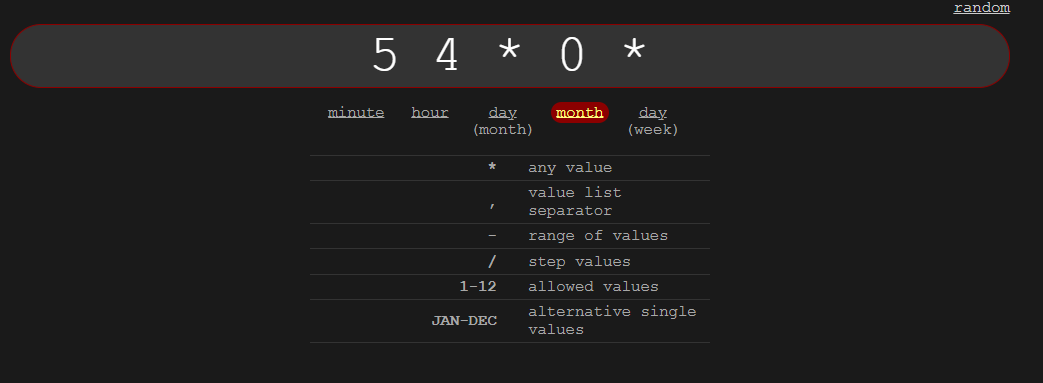
0 0 for hour minute means ONLY Then .not 1 min after midnight
* * 1 1
means anytime on 1/1we support crontab in compliments, and i recommend
this site to get the 1st 5 tokens like needed here
https://crontab-generator.org/ -
I have noticed something strange with this module.
In my log I get this message :
[2025-02-01 09:42:27.196] [LOG]   MMM-ModuleScheduler is scheduling MMM-EasyPix using "* * 1 1 *" and "59 23 31 1 *" with dim level undefined
[2025-02-01 09:42:27.206] [WARN]  Month '1' is limited to '29' days.
February has “29” days. Not January.
So the month in my config file that I use from “https://crontab.guru/” doesn’t match what you would expect from this scheduler.
In the documentation it say
“Months 0-11 (Jan-Dec)”I have updated to use this as a key:
Month
1 = February
2= March
3 = April
4 = May
5 = June
6 = July
7 = August
8 = September
9 = October
10 = November
11 = DecemberI noticed month “0” doesn’t work for January.
Now that we are in February, it seems to be working after I set what I want to see in February as the month to be “1”
-
@cheminge yes cron uses 0-11 for month
-
-
@cheminge yes, you are correct.
The Gen I linked to also uses 1 for JanuaryWeird
-
I have updated my months to be words instead of numbers, and at first it was working, but now it is not hiding the second example module:
1st Example
module_schedule: {from: '* * * FEB *', to: '59 23 28 FEB *', dimLevel: '100'},For March I am using:
2nd Example
module_schedule: {from: '* * * MAR *', to: '59 23 30 MAR *', dimLevel: '100'},I would expect as of today (February 23rd, 2025) , the FEB would show, and it does. I don’t expect to see the MAR module, but it continues to show.
For now I have it committed it out, but How can I get this to hide for now, and start showing March 1st?
-
@cheminge i think dimlevel 0 is hidden
100 is shown -
@cheminge also, what is the default behavior if the module(s) are not in the ‘current’ timeframe? or not in any schedule?
Hello! It looks like you're interested in this conversation, but you don't have an account yet.
Getting fed up of having to scroll through the same posts each visit? When you register for an account, you'll always come back to exactly where you were before, and choose to be notified of new replies (either via email, or push notification). You'll also be able to save bookmarks and upvote posts to show your appreciation to other community members.
With your input, this post could be even better 💗
Register Login