MagicMirror Forum
    • Recent
    • Tags
    • Unsolved
    • Solved
    • MagicMirror² Repository
    • Documentation
    • 3rd-Party-Modules
    • Donate
    • Discord
    • Register
    • Login
    A New Chapter for MagicMirror: The Community Takes the Lead
    Read the statement by Michael Teeuw here.

    Weather issue

    Scheduled Pinned Locked Moved Solved Troubleshooting
    10 Posts 2 Posters 1.0k Views 2 Watching
    Loading More Posts
    • Oldest to Newest
    • Newest to Oldest
    • Most Votes
    Reply
    • Reply as topic
    Log in to reply
    This topic has been deleted. Only users with topic management privileges can see it.
    • A Offline
      atl944
      last edited by

      Hi, new to MagicMirror and looking for a little advise. Not sure why my weather is showing some weird temps. I am using the default config.js file and I tried changing some of the values with Fahrenheit to Celsius. But that did not make difference. I am just trying to set it to Bluffton, SC 29910.

      Any help would be appreciated.

      I am attaching a screen showing the wrong values and my config.js file.

      thanks
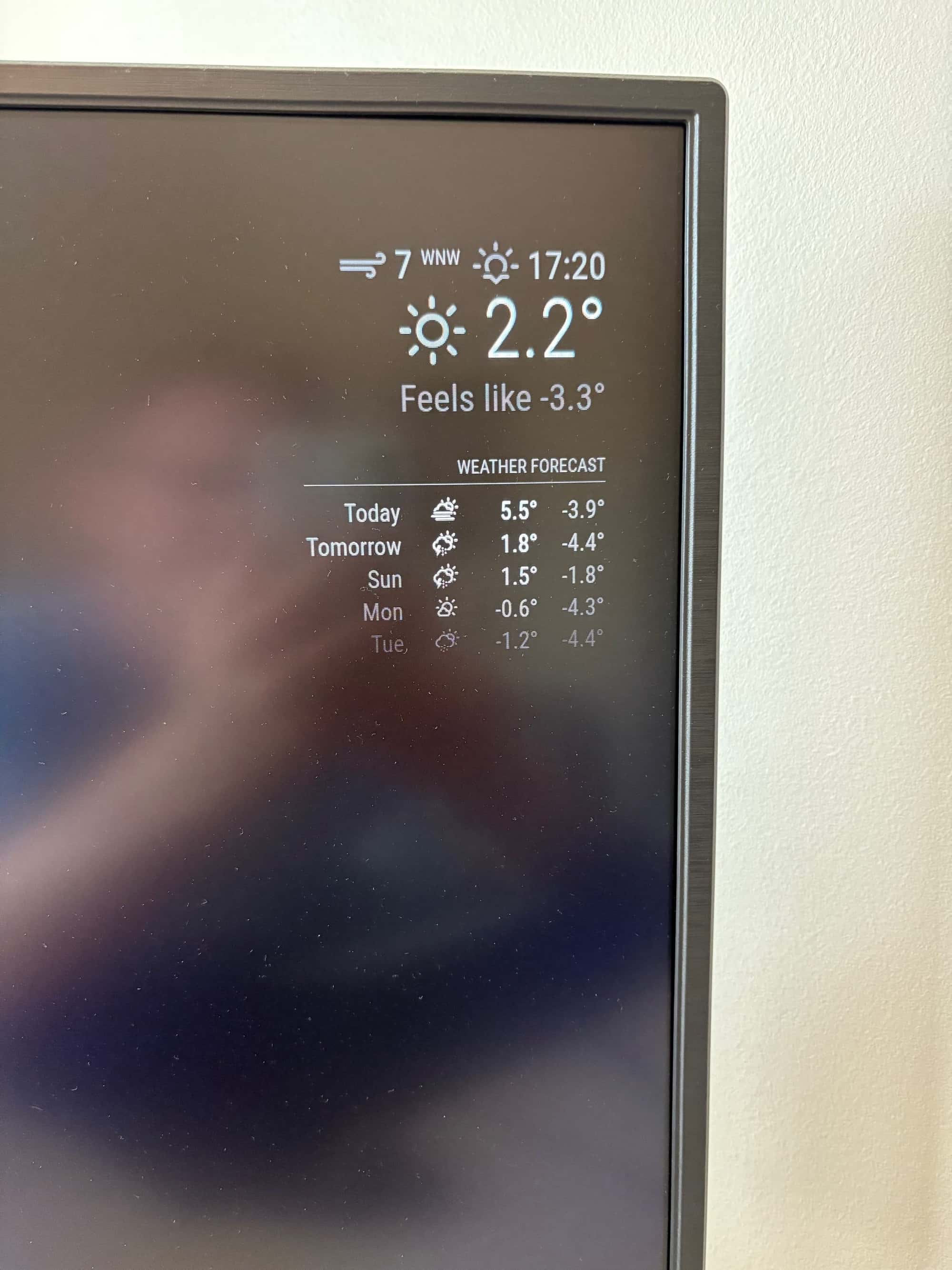
      screen.jpg
      [config.js](Invalid file type. Allowed types are: .jpg, .jpeg, .png, .gif, .png, .jpg, .jpeg, .gif)

      S 1 Reply Last reply Reply Quote 0
      • S Do not disturb
        sdetweil @atl944
        last edited by sdetweil

        @atl944 temp is set to Celsius/metric

        settings in config.js you may want to change

                language: "en",
                locale: "en-US",
                timeFormat: 12,
                units: "imperial",
        

        these are mine changed

        Sam

        How to add modules

        learning how to use browser developers window for css changes

        A 1 Reply Last reply Reply Quote 0
        • S Do not disturb
          sdetweil @atl944
          last edited by

          @atl944 can u copy/paste the weather config
          xxx out your apikey

          Sam

          How to add modules

          learning how to use browser developers window for css changes

          A 2 Replies Last reply Reply Quote 0
          • A Offline
            atl944 @sdetweil
            last edited by sdetweil

            @sdetweil Not using an API key, but here i s what I have:

            {
            			module: "weather",
            			position: "top_right",
            			config: {
            				weatherProvider: "openmeteo",
            				type: "current",
            				lat: 40.776676,
            				lon: -73.971321
            			}
            		},
            		{
            			module: "weather",
            			position: "top_right",
            			header: "Weather Forecast",
            			config: {
            				weatherProvider: "openmeteo",
            				type: "forecast",
            				lat: 40.776676,
            				lon: -73.971321
            			}
            		},
            
            S 1 Reply Last reply Reply Quote 0
            • S Do not disturb
              sdetweil @atl944
              last edited by sdetweil

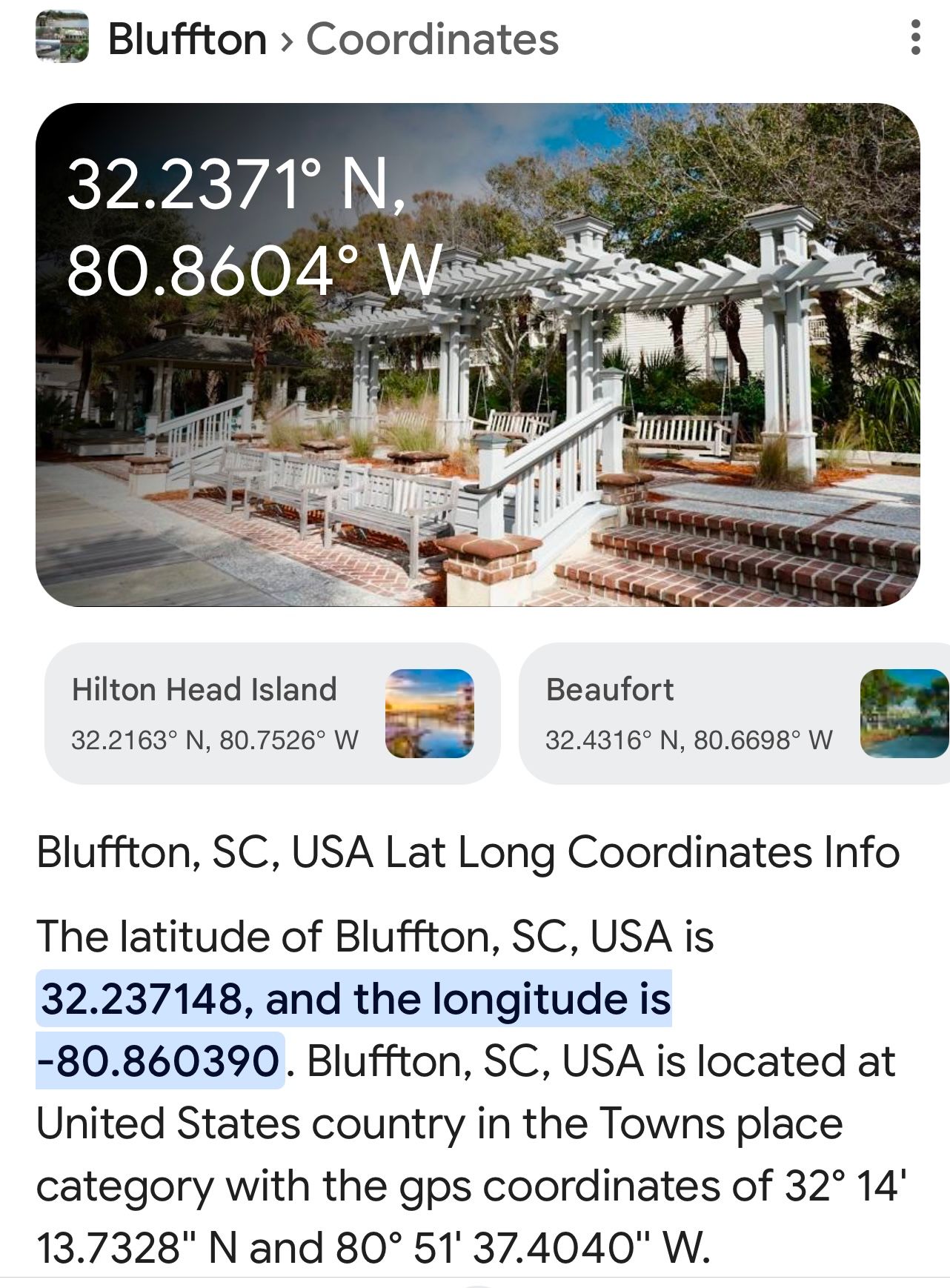
              @atl944 lat/lon for Bluffton, SC

              IMG_0739.jpeg

              the lat/lon in in the sample is ny central park

              Sam

              How to add modules

              learning how to use browser developers window for css changes

              1 Reply Last reply Reply Quote 0
              • A Offline
                atl944 @sdetweil
                last edited by sdetweil

                @sdetweil thanks for the help…

                
                {			module: "weather",
                			position: "top_right",
                			config: {
                				weatherProvider: "openmeteo",
                				type: "current",
                				lat: 40.776676,
                				lon: -73.971321 {
                			}
                		},
                		{
                			module: "weather",
                			position: "top_right",
                			header: "Weather Forecast",
                			config: {
                				weatherProvider: "openmeteo",
                				type: "forecast",
                				lat: 40.776676,
                				lon: -73.971321
                			}
                		},
                
                S 1 Reply Last reply Reply Quote 0
                • S Do not disturb
                  sdetweil @atl944
                  last edited by sdetweil

                  @atl944 don’t post duplicate messages. anyone with reputation below 2 gets every message reviewed before publishing

                  but you didn’t put the correct values in for lat/lon

                  those are the sample values

                  Sam

                  How to add modules

                  learning how to use browser developers window for css changes

                  A 1 Reply Last reply Reply Quote 0
                  • A Offline
                    atl944 @sdetweil
                    last edited by

                    @sdetweil
                    sorry about the dup post, didn’t think the first one posted.

                    If that is for NY, why is it displaying 2.2 >? What is that? It can’t be 2.2 degrees.

                    thanks again

                    S 1 Reply Last reply Reply Quote 0
                    • S Do not disturb
                      sdetweil @atl944
                      last edited by sdetweil

                      @atl944 temp is set to Celsius/metric

                      settings in config.js you may want to change

                              language: "en",
                              locale: "en-US",
                              timeFormat: 12,
                              units: "imperial",
                      

                      these are mine changed

                      Sam

                      How to add modules

                      learning how to use browser developers window for css changes

                      A 1 Reply Last reply Reply Quote 0
                      • A Offline
                        atl944 @sdetweil
                        last edited by

                        @sdetweil

                        You don’t know how much I appreciate the help, I will make the changes and test.

                        On another note, do you have any good resources for MagicMirror in general?

                        S 1 Reply Last reply Reply Quote 0
                        • S Do not disturb
                          sdetweil @atl944
                          last edited by sdetweil

                          @atl944 said in Weather issue:

                          do you have any good resources for MagicMirror in general

                          what do you mean?

                          there is the doc, linked in the top menu
                          https://docs.magicmirror.builders/configuration/introduction.html#basic-configuration-of-magicmirror2
                          and here of course

                          we don’t provide any video tutorials, altho others have done that for some solutions

                          i am the moderator here, but also module developer, and support the install/upgrade scripts, and backup/restore scripts too…

                          Sam

                          How to add modules

                          learning how to use browser developers window for css changes

                          1 Reply Last reply Reply Quote 0
                          • S sdetweil has marked this topic as solved on
                          Hello! It looks like you're interested in this conversation, but you don't have an account yet.

                          Getting fed up of having to scroll through the same posts each visit? When you register for an account, you'll always come back to exactly where you were before, and choose to be notified of new replies (either via email, or push notification). You'll also be able to save bookmarks and upvote posts to show your appreciation to other community members.

                          With your input, this post could be even better 💗

                          Register Login

                          • 1 / 1
                          • First post
                            Last post
                          Enjoying MagicMirror? Please consider a donation!
                          MagicMirror created by Michael Teeuw.
                          Forum managed by Sam, technical setup by Karsten.
                          This forum is using NodeBB as its core | Contributors
                          Contact | Privacy Policy