MagicMirror Forum
    • Recent
    • Tags
    • Unsolved
    • Solved
    • MagicMirror² Repository
    • Documentation
    • 3rd-Party-Modules
    • Donate
    • Discord
    • Register
    • Login
    A New Chapter for MagicMirror: The Community Takes the Lead
    Read the statement by Michael Teeuw here.

    MMM-GoogleMapsTraffic

    Scheduled Pinned Locked Moved Solved Troubleshooting
    10 Posts 3 Posters 1.7k Views 4 Watching
    Loading More Posts
    • Oldest to Newest
    • Newest to Oldest
    • Most Votes
    Reply
    • Reply as topic
    Log in to reply
    This topic has been deleted. Only users with topic management privileges can see it.
    • K Offline
      kmanne
      last edited by

      I am trying to add Google Maps Traffic for my MagicMirror and having issues with it.

      I am receiving an error with “Sorry, Something went wrong. This page didnt load Google Maps correctly. See the JavaScript console for technical details.”

      I am using https://github.com/vicmora/MMM-GoogleMapsTraffic repo and having the above error and when I tried git clone https://github.com/sdetweil/MMM-GoogleMapsTraffic.git the module isn’t displaying.

      Am I missing something or Do I need to use any different repo?

      Note: I have my API key with a credit card activated.

      S 2 Replies Last reply Reply Quote 0
      • K Offline
        kmanne
        last edited by

        Thank You @sdetweil & @chrisfr1976 . I have verified the module in depth and the issue is with the API key. I have generated a new API Key and I can load the Google Maps now.

        Really appreciate your assistance.

        1 Reply Last reply Reply Quote 0
        • S Offline
          sdetweil @kmanne
          last edited by sdetweil

          @kmanne i will have to look at my fork, later today

          Sam

          How to add modules

          learning how to use browser developers window for css changes

          1 Reply Last reply Reply Quote 0
          • S Offline
            sdetweil @kmanne
            last edited by

            @kmanne I used my fork and added my apikey

            using the default config example in the doc
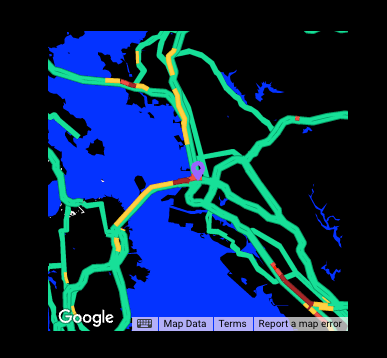
            Snip20250324_2.png

            Sam

            How to add modules

            learning how to use browser developers window for css changes

            C 1 Reply Last reply Reply Quote 0
            • C Offline
              chrisfr1976 @sdetweil
              last edited by

              See also my fork: MMM-GoogleMapsTraffic.
              Runs fine without any issue since months.

              Regards, Chris.

              K 1 Reply Last reply Reply Quote 1
              • K Offline
                kmanne
                last edited by

                Thank You @sdetweil & @chrisfr1976 . I have verified the module in depth and the issue is with the API key. I have generated a new API Key and I can load the Google Maps now.

                Really appreciate your assistance.

                1 Reply Last reply Reply Quote 0
                • S sdetweil has marked this topic as solved on
                • K Offline
                  kmanne @chrisfr1976
                  last edited by

                  @chrisfr1976 - I have been using Google Maps since 3 weeks and I noticed that the maps doesnt get updated with traffic unless I zoom out or zoom in. It is displaying the maps with traffic the last time I zoomed out or zoomed in. I dont see API calls in my google profile as well. Did you notice this on your end?

                  S C 2 Replies Last reply Reply Quote 0
                  • S Offline
                    sdetweil @kmanne
                    last edited by

                    @kmanne the module should refresh the info every 15 minutes (default updateInterval setting)

                    Sam

                    How to add modules

                    learning how to use browser developers window for css changes

                    K 1 Reply Last reply Reply Quote 0
                    • C Offline
                      chrisfr1976 @kmanne
                      last edited by

                      @kmanne I can check next weekend. I‘m not at home at the moment. .

                      Regards, Chris.

                      1 Reply Last reply Reply Quote 0
                      • K Offline
                        kmanne @sdetweil
                        last edited by

                        @sdetweil - Correct. But it is not updating the maps unless I zoom out or zoom in.

                        I tried adding the refresh of 15 mins in the module, but still the same issue.

                        C 1 Reply Last reply Reply Quote 0
                        • C Offline
                          chrisfr1976 @kmanne
                          last edited by chrisfr1976

                          @kmanne
                          Hi,
                          I’ve just updated the code to a more robust solution with more log entry. Use git pull in the MMM-GoogleMapsTraffic-module folder.
                          Check if it works for you. Check the console logs of any issues.

                          Regards, Chris.

                          1 Reply Last reply Reply Quote 0

                          Hello! It looks like you're interested in this conversation, but you don't have an account yet.

                          Getting fed up of having to scroll through the same posts each visit? When you register for an account, you'll always come back to exactly where you were before, and choose to be notified of new replies (either via email, or push notification). You'll also be able to save bookmarks and upvote posts to show your appreciation to other community members.

                          With your input, this post could be even better 💗

                          Register Login

                          • 1 / 1
                          • First post
                            Last post
                          Enjoying MagicMirror? Please consider a donation!
                          MagicMirror created by Michael Teeuw.
                          Forum managed by Sam, technical setup by Karsten.
                          This forum is using NodeBB as its core | Contributors
                          Contact | Privacy Policy