MagicMirror Forum
    • Recent
    • Tags
    • Unsolved
    • Solved
    • MagicMirror² Repository
    • Documentation
    • 3rd-Party-Modules
    • Donate
    • Discord
    • Register
    • Login
    A New Chapter for MagicMirror: The Community Takes the Lead
    Read the statement by Michael Teeuw here.

    Which version of Debian to use

    Scheduled Pinned Locked Moved General Discussion
    20 Posts 2 Posters 3.7k Views 2 Watching
    Loading More Posts
    • Oldest to Newest
    • Newest to Oldest
    • Most Votes
    Reply
    • Reply as topic
    Log in to reply
    This topic has been deleted. Only users with topic management privileges can see it.
    • D Offline
      DarrenO 0
      last edited by

      Which version of Debian are people using for their MMs?
      I’m currently still running my MM on Debian 11 as I have an issue with moving building a new MM on Debian 12.

      The issue I have is that when I build a new Debian 12 machine (bare metal or virtual) I cannot seem to get the MM to automatically display and Debian only ever displays the Activities Overview.
      During the Desktop environment section of the OS installation, I only opt to install the default Desktop environment and unselect the Gnome environment.

      What do/have people done to get around this?

      S 1 Reply Last reply Reply Quote 0
      • S Offline
        sdetweil @DarrenO 0
        last edited by

        @DarrenO-0 just install the default display env. MagicMirror is a browser app, and we require whatever the browser requires

        debian 12 (bookworm) is the current base for raspi os
        new one (trixie) coming soon

        Sam

        How to add modules

        learning how to use browser developers window for css changes

        D 1 Reply Last reply Reply Quote 0
        • D Offline
          DarrenO 0 @sdetweil
          last edited by

          @sdetweil Thanks, so during the OS installation, when I get to the point where I am prompted to select and install software, I should just keep the default selected options of Debian desktop environment and GNOME?

          S 1 Reply Last reply Reply Quote 0
          • S Offline
            sdetweil @DarrenO 0
            last edited by sdetweil

            @DarrenO-0 are you using the prebuilt raspi os images? i dont see those prompts

            https://www.raspberrypi.com/software/

            ill have to try the bare debian vm again

            Sam

            How to add modules

            learning how to use browser developers window for css changes

            D 1 Reply Last reply Reply Quote 0
            • D Offline
              DarrenO 0 @sdetweil
              last edited by

              @sdetweil No, using the Debian .iso distro from the debian.org site.
              I’m installing on a NUC, not a RasPi.

              S 2 Replies Last reply Reply Quote 0
              • S Offline
                sdetweil @DarrenO 0
                last edited by

                @DarrenO-0 got it

                Sam

                How to add modules

                learning how to use browser developers window for css changes

                1 Reply Last reply Reply Quote 0
                • S Offline
                  sdetweil @DarrenO 0
                  last edited by

                  @DarrenO-0 I installed the latest debian 12.x on my intel machine, in vmware.
                  and hit enter when it said gnome

                  started, added me to sudoers. installed curl, and then ran my install script

                  and MM came up at end of install
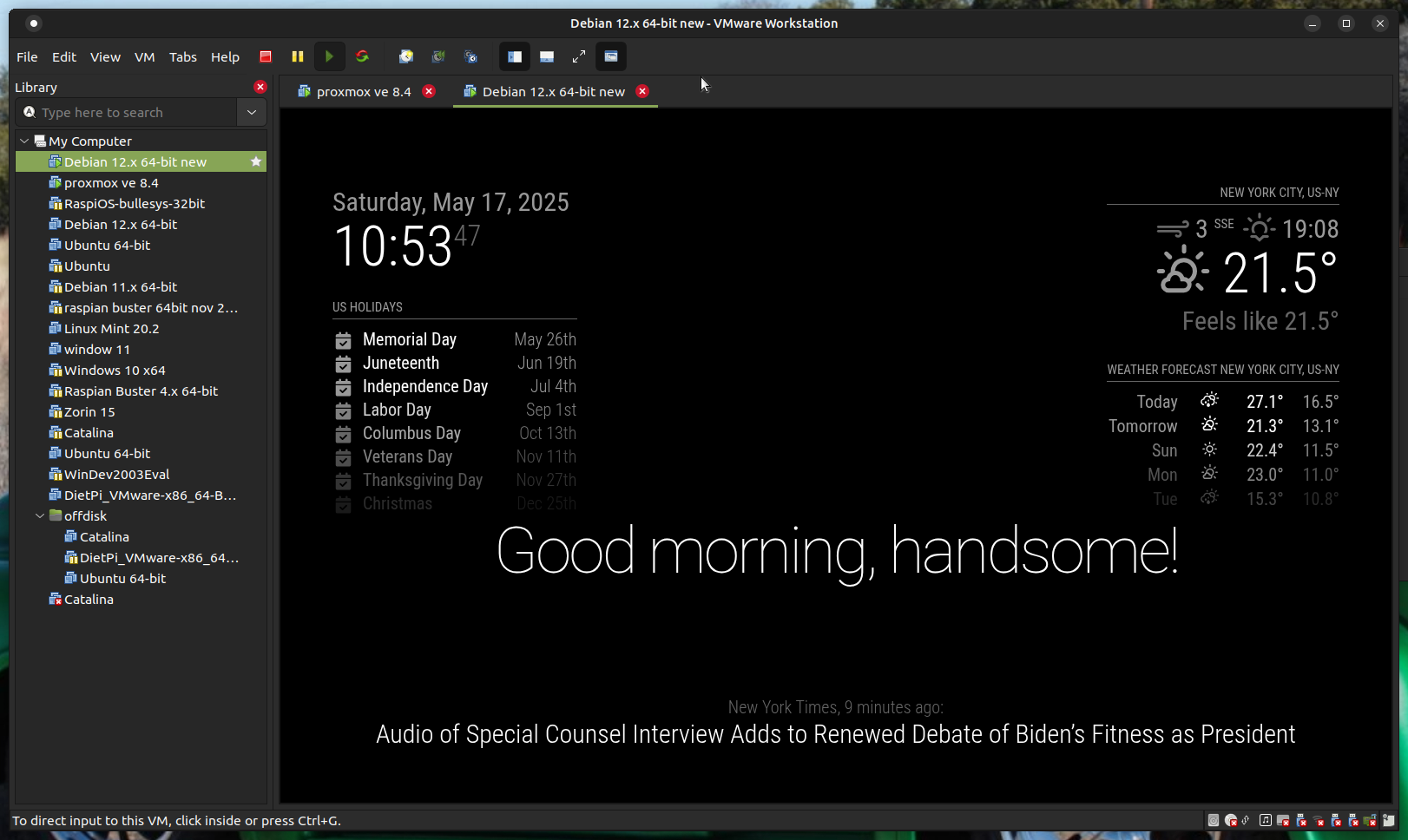
                  Screenshot at 2025-05-17 10-53-47.png

                  Sam

                  How to add modules

                  learning how to use browser developers window for css changes

                  D 2 Replies Last reply Reply Quote 0
                  • D Offline
                    DarrenO 0 @sdetweil
                    last edited by

                    @sdetweil
                    I re-installed Debian12 and left the default Desktop Environment selections of Debian and GNOME selected.
                    Pretty much the vanilla/default install.
                    Did you have to do anything regarding how, when the Debian is eventually displayed, that MM is shown automatically?
                    I can’t seem to get MM to show and even though pm2 is enabled and running, I am stuck at the Desktop view where the Activities Overview button is shown in the top-left corner.

                    If I can’t get around this, the alternative is to run it as a headless installation and just access MM via browser from other computers.

                    S 1 Reply Last reply Reply Quote 0
                    • D Offline
                      DarrenO 0 @sdetweil
                      last edited by

                      @sdetweil
                      I also configured Debian to autologin as a given user account that I created during the installation process so I am not prompted to login after the computer reboots and it just goes straight to the Desktop.

                      S 1 Reply Last reply Reply Quote 0
                      • S Offline
                        sdetweil @DarrenO 0
                        last edited by

                        @DarrenO-0 i ran my install script, said yes to pm2
                        MagicMirror came up at the end.

                        i did not set auto login, but i will change it and reboot
                        i dont expect problems

                        Sam

                        How to add modules

                        learning how to use browser developers window for css changes

                        1 Reply Last reply Reply Quote 0
                        • S Offline
                          sdetweil @DarrenO 0
                          last edited by

                          @DarrenO-0 my mm.sh was broken, fixed now… the UI is running under wayland, not X11
                          so we need a different command…

                          I have fixed it, deleted the pm2 app, deleted the MagicMirror folder and then rerun the install script

                          MM came up
                          I rebooted
                          MM came up, NOT in the full screen view but in the reduced desktop view touch it and it goes full screen like the main panel does…

                          have to look at that

                          if you used my installer, you can fix the one file by doing

                          cd ~/MagicMirror/installers
                          curl -sL https://raw.githubusercontent.com/sdetweil/MagicMirror_scripts/refs/heads/master/mm.sh >mm.sh
                          sudo reboot
                          

                          mine looks like this after reboot
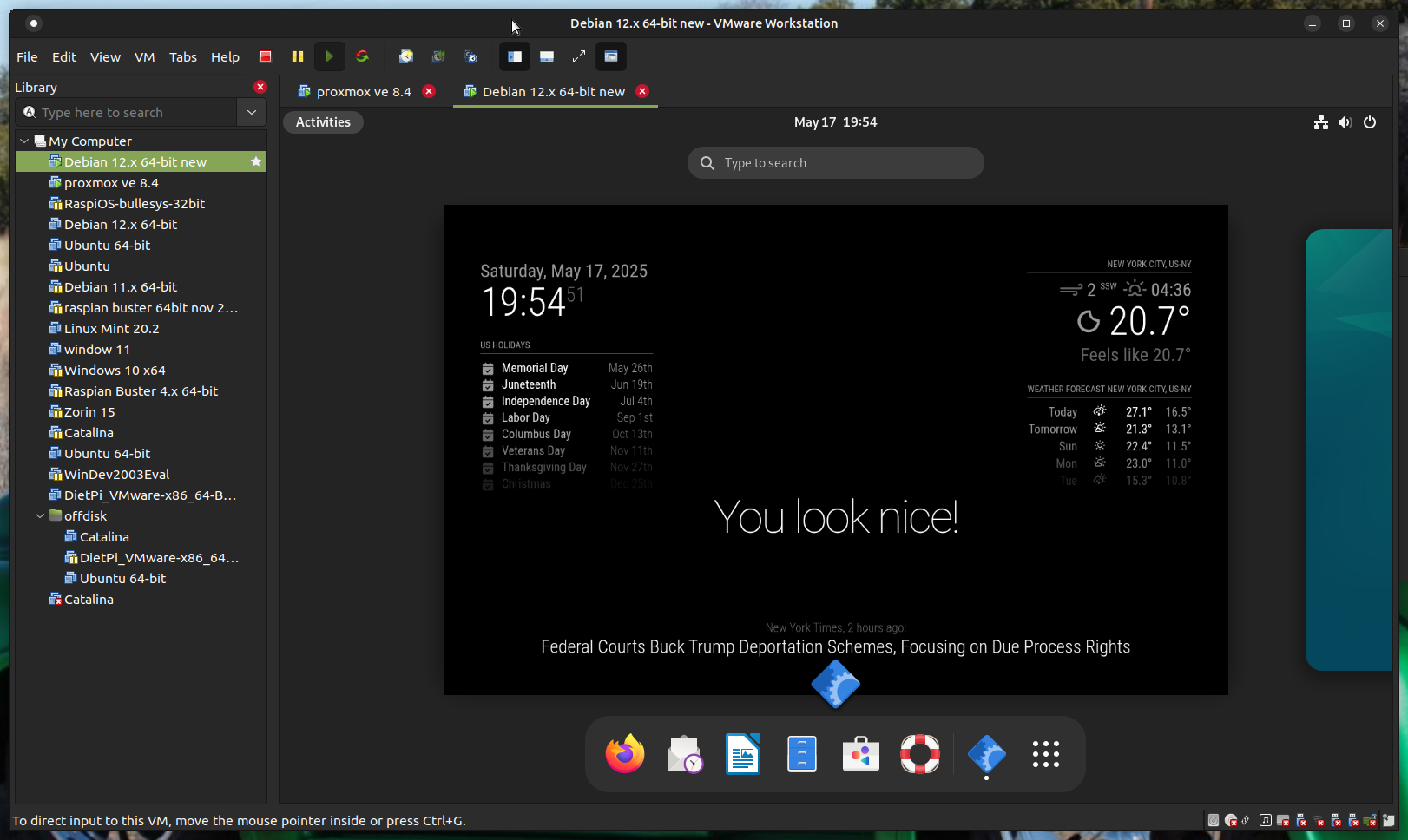
                          Screenshot at 2025-05-17 19-54-51.png

                          Sam

                          How to add modules

                          learning how to use browser developers window for css changes

                          S 1 Reply Last reply Reply Quote 0
                          • S Offline
                            sdetweil @sdetweil
                            last edited by sdetweil

                            @DarrenO-0 actually to make the terminal window fullscreen you have to relaunch it
                            in the mm.sh

                            this didn’t work either

                            #!/bin/bash
                            cd ~/MagicMirror
                            
                            if [ $(ps -ef | grep -v grep | grep -i -e xway -e labwc | wc -l) -ne 0 ]; then 
                               gnome-terminal --full-screen -- npm run start:wayland
                               sleep 99999999s
                            else
                               DISPLAY=:0 npm start
                            fi 
                            
                            #DISPLAY=:0 npm start
                            

                            be careful, the gnome-terminal execute a command returns after executing, so pm2 thinks the app failed and will restart it… SO you get a loop…
                            need the sleep

                            Sam

                            How to add modules

                            learning how to use browser developers window for css changes

                            D 1 Reply Last reply Reply Quote 0
                            • D Offline
                              DarrenO 0 @sdetweil
                              last edited by

                              @sdetweil
                              not working for me, even after following the steps you have detailed above.
                              When the computer boots, i still just get to the Desktop view where similar to your last image but MM still never displays.

                              I’m gonna stick with Debian 11 and on my old/original NUC instead of going to Debian 12 on my new NUC, unless you know where I can download the Debian 11 ISO (no longer available from the debian site) and I can install it on the new NUC.

                              S 1 Reply Last reply Reply Quote 0
                              • S Offline
                                sdetweil @DarrenO 0
                                last edited by

                                @DarrenO-0 i do not know where the older archives are

                                Sam

                                How to add modules

                                learning how to use browser developers window for css changes

                                D 1 Reply Last reply Reply Quote 0
                                • D Offline
                                  DarrenO 0 @sdetweil
                                  last edited by

                                  @sdetweil
                                  I’ve decided to stick with Debian12 (v12.11.0) on my NUC and try to work this matter out as I really want to move on from the existing Debian11 NUC.

                                  I have installed the OS with the vanilla settings added SSH Server, leaving the default Desktop Environments of Debian Desktop and GNOME Desktop selected.

                                  After completion, I added the nominated user account to the sudo group and configured it in the DE to auto-login to circumvent being prompted to select a user and enter a password if/when the host is rebooted.
                                  The Desktop loads and displayed as expected and does not show the Desktop Overview, as per your previous screenshot.

                                  I installed MM via your script and updated npm to the latest version as indicated during the MM install process. MM still did not display. I also tried your updated mm.sh script without success.
                                  I am also unable to view MM via a browser from another computer after setting ipWhitelist to [] (commented out the original) and restarting pm2.

                                  Checking the pm2 error logs does indicate something to do with the Wayland platform :

                                  0|MagicMirror  | [229988:0522/141042.895081:ERROR:wayland_connection.cc(199)] Failed to connect to Wayland display: No such file or directory (2)
                                  0|MagicMirror  | [229988:0522/141042.895519:ERROR:ozone_platform_wayland.cc(276)] Failed to initialize Wayland platform
                                  0|MagicMirror  | [229988:0522/141042.895701:ERROR:env.cc(257)] The platform failed to initialize.  Exiting.
                                  0|MagicMirror  | /home/serveradmin/MagicMirror/node_modules/electron/dist/electron exited with signal SIGSEGV
                                  
                                  S 1 Reply Last reply Reply Quote 0
                                  • S Offline
                                    sdetweil @DarrenO 0
                                    last edited by sdetweil

                                    @DarrenO-0 also need to set

                                    address:"0.0.0.0",
                                    

                                    as it defaults to “localhost”, which means only apps inside this systen can connect.

                                    ok, its still trying to use wayland display

                                    try this before the if in mm.sh

                                    export WAYLAND_DISPLAY=wayland-0
                                    

                                    Sam

                                    How to add modules

                                    learning how to use browser developers window for css changes

                                    D 1 Reply Last reply Reply Quote 0
                                    • D Offline
                                      DarrenO 0 @sdetweil
                                      last edited by

                                      @sdetweil
                                      I found a way to get MM working on Debian 12 without the use of the Wayland windowing system and steps you provided to get that working.

                                      After initially provisioning the host with the OS, when I was prompted to login, I had to click the Gear icon and select the GNOME on Xorg option, then login as normal.
                                      Once logged in and presented with the Desktop Overview, I enabled the Automatic Login option in Settings > Users.

                                      I then installed the No Overview extension https://extensions.gnome.org/extension/4099/no-overview/ so the GNOME Desktop is displayed instead of the Desktop Overview view after logging in.
                                      This also disables/turns off the Hot Corner and Active Screen Edges options in Settings > Multitasking > General

                                      Installed MM via your script as normal and MM displayed immediately.

                                      Other steps I took to configure the host were to set:
                                      In Settings > Power

                                      • Screen Blank = Never
                                      • Automatic Suspend = Off

                                      In Settings > Multitasking > Workspaces

                                      • Selected Fixed number of workspaces
                                      • Set Number of Workspaces = 1

                                      The Overview view and all other GUI features of the host OS can still be accessed by hitting the Windows key on the keyboard.

                                      Hope this helps others who may come across the same issue as I had if/when they upgrade their MM host to Debian 12 (or higher).

                                      S 1 Reply Last reply Reply Quote 0
                                      • S Offline
                                        sdetweil @DarrenO 0
                                        last edited by

                                        @DarrenO-0 back to xorg

                                        I guess the no overview extension also doesn’t work w wayland

                                        Sam

                                        How to add modules

                                        learning how to use browser developers window for css changes

                                        D 1 Reply Last reply Reply Quote 0
                                        • D Offline
                                          DarrenO 0 @sdetweil
                                          last edited by

                                          @sdetweil
                                          it could, but to be honest I don’t know, as I installed it after changing to the xorg desktop

                                          S 1 Reply Last reply Reply Quote 0
                                          • S Offline
                                            sdetweil @DarrenO 0
                                            last edited by sdetweil

                                            @DarrenO-0 it also works on wayland compositor
                                            get a short view of the desktop before MM comes up

                                            Sam

                                            How to add modules

                                            learning how to use browser developers window for css changes

                                            1 Reply Last reply Reply Quote 0

                                            Hello! It looks like you're interested in this conversation, but you don't have an account yet.

                                            Getting fed up of having to scroll through the same posts each visit? When you register for an account, you'll always come back to exactly where you were before, and choose to be notified of new replies (either via email, or push notification). You'll also be able to save bookmarks and upvote posts to show your appreciation to other community members.

                                            With your input, this post could be even better 💗

                                            Register Login

                                            • 1 / 1
                                            • First post
                                              Last post
                                            Enjoying MagicMirror? Please consider a donation!
                                            MagicMirror created by Michael Teeuw.
                                            Forum managed by Sam, technical setup by Karsten.
                                            This forum is using NodeBB as its core | Contributors
                                            Contact | Privacy Policy