Read the statement by Michael Teeuw here.
MMM-BambuLabNotify - 3D printer notifications
-
Hi everyone! I’ve been tinkering around with MM for a few years and just recently renewed my interest in it. I’m also into 3D printing, using a BambuLab printer, which is located in another room, while my MM is in the main living room. I thought it would be nice for MM to show me a notification when a print is finished or has an issue. So, I used ChatGTP to write my first module. Maybe someone else will find it useful
-
@LuckyDucker said in MMM-BambuLabNotify - 3D printer notifications:
Throws a 404 Page can’t be found. Maybe you need to make it public?
-
Getting a 404 on GitHub. Can you check permissions and verify URL please?
Also, what mechanism are you using to poll the printer(s)? Will it work with multiple printers?
-
@amarand Sorry, the new repo is at git lab , see later post
Also, It uses MQTT for polling, and I only created it to listen to one printer (since that’s all I have).
-
I don’t know why but both accounts were flagged after trying to add my module to https://github.com/MagicMirrorOrg/MagicMirror/wiki/3rd-party-modules. So, they’re both hidden now. I’ve opened support tickets with Github.
-
@LuckyDucker unfortunately still 404 :(
-
@viktorzonix again 404 … Yesterday it was visible - for a short time.
Unfortunately I’ve missed to clone :-(@LuckyDucker - something is really strange with your github …
Regards,
Ralf -
Sorry everyone. I don’t know why my Github account was suspended after trying to edit the MagicMirror Wiki, but Github support has been non-existant. I’ve move the repo over to GitLab now. Unfortunately, I can’t edit the original post.
-
@LuckyDucker I edited the post
-
@sdetweil Thank you!
-
So, it’s been a few months since I released this and I know I had a bumpy start with github, but I was just wondering if anyone has found it useful or if you have any feedback for improvements. If you’ve found it useful, I’d appreciate a star rating too. Thanks in advance. :)
-
@LuckyDucker HEy, I wanted to connect my X1C with a PIN and the Bambulab doc says, X1C cannot connect via PIN. Will there be a future update for the X1C to connect it? This would be great since a lot of people bought this model. Thanks in advance!
-
Hi @ThaliaFromPrussia !
The “PIN” mentioned in that BambuLab doc is for pairing/binding inside Bambu Studio, and the X1/X1C doesn’t use that same PIN flow.MMM-BambuLabNotify does not connect using the Studio PIN, it connects over the printer’s LAN MQTT (TLS) interface using the printer’s LAN Access Code (sometimes just shown as “Access Code”) along with the printer’s IP and serial number, see the README for where to find those.
Unfortunately, I only have an A1, so I’m not able to personally verify that MMM-BambuLabNotify works with an X1/X1C. But, if you’re able to get it connected using the proper Access Code, I’d appreciate confirmation.
Thanks! -
Hi everyone,
I just wanted to stop in and share that I’ve released MMM-BambuLabNotify v1.5 with a few fun updates.New in this version:
- Customizable status, panel, and toast text for alternate wording/languages
- Nozzle and bed temperature display
- Celsius/Fahrenheit display option
- AMS filament display with filament colors, type, and empty slots
- Active filament indicator while printing
- Updated panel layout with printer name, status, job name, temperatures, and AMS info
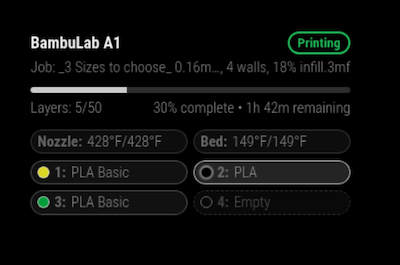
The module is available here:
https://github.com/LuckyDuckTx/MMM-BambuLabNotifyI’d love feedback, especially from anyone using different Bambu printers or AMS setups. If something does not display correctly, please feel free to open an issue on GitHub so I can improve compatibility.
Also, if you find the module useful, a GitHub star would be greatly appreciated and helps others find it.
Thanks!


Hello! It looks like you're interested in this conversation, but you don't have an account yet.
Getting fed up of having to scroll through the same posts each visit? When you register for an account, you'll always come back to exactly where you were before, and choose to be notified of new replies (either via email, or push notification). You'll also be able to save bookmarks and upvote posts to show your appreciation to other community members.
With your input, this post could be even better 💗
Register Login