Read the statement by Michael Teeuw here.
Script seems to be failing
-
I am setting up a new MM and using Sam’s alternative install method. I have done this several times with no issues.
I copied the script as instructed, executed it. It runs for a bit but then I get the following failure message.
This is being done via Pi Connect.
Here are the lines I get.Installing helper tools ... nvm_command is sudo n v22.18.0 installing correct version of node and npm, please wait tar: bin: Directory renamed before its status could be extracted tar: Exiting with failure status due to previous errors Error: failed to extract archive for 22.18.0 node failed to install, exiting -
-
@ankonaskiff17 said in Script seems to be failing:
tar: bin: Directory renamed before its status could be extracted
all the search lists that error as mostly occurring on docker…and a known file system error
is this a docker container?? -
@sdetweil This is not a Docker install.
I would note that I had a very difficult time with installing Pi OS even before I got to the point of using your alternative MM install script.
I tried to run the script again just a few minutes before this reply with the same result. The log file should be on its way to you via your address.I am going to run through the Pi OS install then follow right behind with a fresh attempt at MM install.
The folks who manage the Pi OS just upgraded the Imager tool last week.
Coincidentally I did two separate Pi OS installs in last couple of weeks. One was before the Imager was upgraded, and one after the Imager upgrade.Had no issues with the Pi OS install via the older Imager tool. After the upgrade I had nothing but trouble. My low level of programming knowledge tells me that the problem is with the Pi OS image , not the imager tool but either way, it may be that the failure to install the MM is being caused by whatever is causing me trouble with Pi OS setup.
I want to see what happens start to finish.
-
@ankonaskiff17 thanks… got the log, it shows installing the right nodejs version,
BUT the check returns the old… SO…
I didn’t see what pi this was on? 4/5?
i can retest here… -
@sdetweil Sorry for the ultra-slow reply. I think this was a stumble at Raspberry Pi
I had 3 separate Raspberry Pi 4B’s that I needed to do some tweaking on over the course of the last 2 - 3 weeks.
Want to note that I have an app I use to delete partitions, format drives in any of the formats out there FAT,NTFS etc. I’ve used it forever but just want to mention I use that tool rather than the format tool in Windows.So, the first Pi4 was one set up to run Pi-Hole. I messed it up somehow but net result was I started over formatted SD card, used Pi Imager, chose the Pi 4 64 bit Pi OS and loaded Pi OS on this Pi4. No problems whatsoever. It was unknown to me at the time but an update to the Raspberry Pi Imager was right around the corner. The imager application GUI was slightly different but the OS install went just fine.
A few days later I went to tackle Pi 4B number 2.
Formatted the SD Card like I normally do and that went fine. Started the Imager tool and it immediately told me there was an update to the imager and to do the update. I did that with no problems.
Just like the Pi4 above, I chose Pi4 64 bit Pi OS Full desktop version which I always do, even though I do not necessarily need to.The “new” Imager steps through the process a bit different than the older version did, but much of that seems to be just a glossy wrapper around raspi-config. Worked my way through the various steps. The last step is they tell the user there are updates ask if you want to update or skip. That is the last step, I did it a couple of times skipping the updates and doing the updates but it had no bearing on the Pi Imager problem that was going to hit me next.
Once the update step is either completed or skipped the next window is Congratulations, installation is done, click to launch the Desktop.
That click took me back to the first configuration step consistently. The two Pi4’s had been sitting in a drawer for a while so I thought maybe that Pi is doing something flaky. I have a 3D printer and those printers seem to like to destroy SD cards so I got a fresh SD card out along with the second Pi4. Did the whole install process with the Pi Imager tool and got the same exact result. Endless loop through the initial Pi setup. Called it a day at that point.Next day I got up and took a crack at seeing if I could get the Imager to make it through the entire process, which it did.
I then tried to run the MM install script which gave me the failure I posted about.I have today, with the original Pi4 it had no issues installing the current version of Pi OS so went right to the MM install script and it all installed just fine.
I went back to Github because you can see when things are updated and was curious about if any Imager or OS updates were taking place at the same time as my problems and yes, there were a bunch of updates that took place at the same time.
I’m looking at the MM initial screen one gets telling me my overweight *** looks hot so l think this was an issue that was really a Pi Imager and OS image problem. -
@ankonaskiff17 thanks for the update. I use one of two
Imagers and never have a problem . -
they changed several things in Nov./Dec. 2025
- they now use cloud-init in Raspberry Pi OS
- the new Pi Imager v2 does not allow customizations (user, ssh, wifi, …) when using an image file from disk
Links:
-
@karsten13 interesting
-
@sdetweil The comments directly above by @karsten13 about some changes done are above my pay grade but I worry that in the quest to “make things better” RaspberryPi will build themselves right out of the niche Pi’s were created for.
-
@ankonaskiff17 I hear yah
they are trying to NOT build (and support) UNIQUE things… as they are buried in adding new stuff…
so, I expect changes to keep happening, AND that the pi as it was, is no longer the ‘only’ SBC in town as the competition heats up with mini-pcs …
all of the things in cloud_init are things the raspiconfig app could set,
I try to stay away from all that system, config stuff, as there are too many platforms to keep track of whatever works…
-
@sdetweil Having installed the latest greatest Pi OS version, it is a lot more complicated process and some of it does not work.
Some of the items they do prior to writing to the sd card I have had to go into raspi-config to set. So doing the same configuration step twice is not good.
I suppose they are trying to capture a portion of the market they did not have before.
The curse of going public. Quarterly earnings.
I just looked at their ticker for the first time ever and not a stock I would ever buy . -
@ankonaskiff17 hm, the 2.0 imager did all the setup right the other day, same as before, user, network, ssh
-
@sdetweil I’ve had to go in on my last two installs and reenter the locale stuff. I know you are not a fan of the old VNC option which Pi has built their own and brought screen sharing in-house with Connect but is a challenge to get up and running. I had to go into raspi-config to enable it. I’ve gotten it going on my my recent installs but not without fumbling around some to get there.
I think the warning one gets about using user Pi and that I should change it is overkill.Connect, if I remember you can enable in the configuration before you actually write the image to the sd card but nope.
Last install I skipped over enabling Connect in the pre-configuration and did it in Raspi-config.
Notice this screen shot and Control Centre vs raspi-config . So enabling Connect and Locale were where I had problems.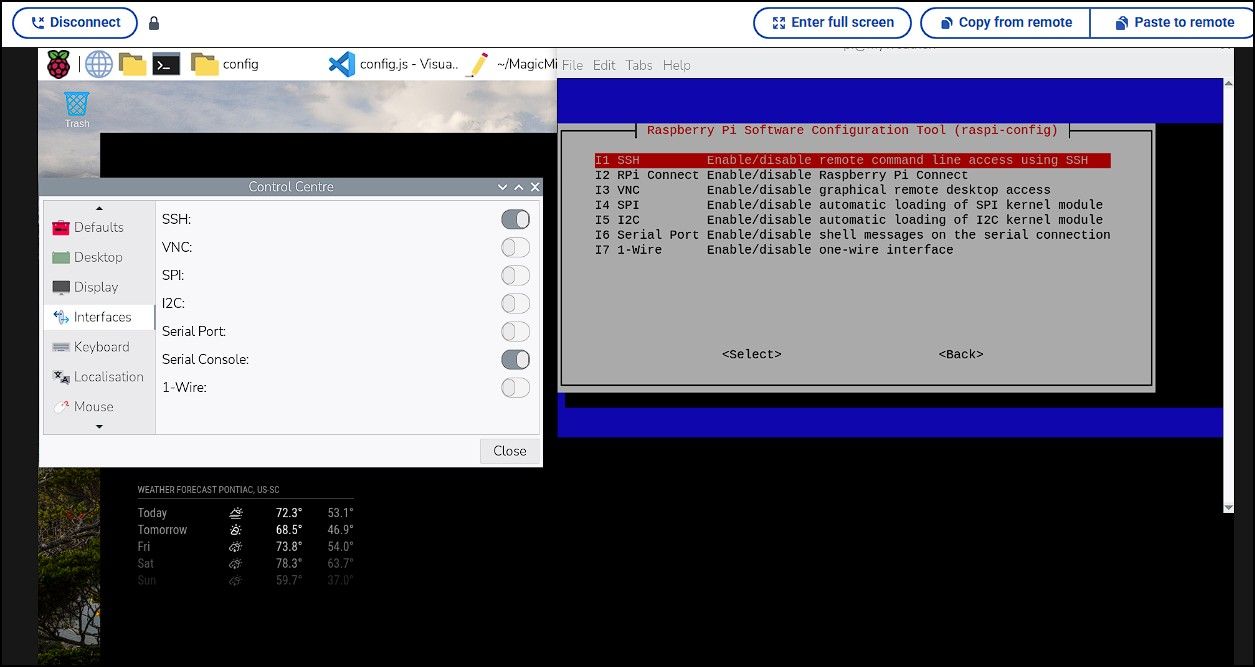
-
@ankonaskiff17 I dont use vnc, only ssh
And dont have issues w locale


Hello! It looks like you're interested in this conversation, but you don't have an account yet.
Getting fed up of having to scroll through the same posts each visit? When you register for an account, you'll always come back to exactly where you were before, and choose to be notified of new replies (either via email, or push notification). You'll also be able to save bookmarks and upvote posts to show your appreciation to other community members.
With your input, this post could be even better 💗
Register Login