MagicMirror Forum
    • Recent
    • Tags
    • Unsolved
    • Solved
    • MagicMirror² Repository
    • Documentation
    • 3rd-Party-Modules
    • Donate
    • Discord
    • Register
    • Login
    A New Chapter for MagicMirror: The Community Takes the Lead
    Read the statement by Michael Teeuw here.

    MMM-Webuntis

    Scheduled Pinned Locked Moved Education
    75 Posts 12 Posters 11.1k Views 12 Watching
    Loading More Posts
    • Oldest to Newest
    • Newest to Oldest
    • Most Votes
    Reply
    • Reply as topic
    Log in to reply
    This topic has been deleted. Only users with topic management privileges can see it.
    • H Offline
      HeikoGr @RobertMuc
      last edited by

      @RobertMuc

      Du hast recht, die vielen Möglichkeiten machen alles sehr unübersichtlich. Sorry. Die Schule meiner Kinder nutzt Umtis ziemlich viel - daher will ich so viel wie möglich anzeigen lassen können. Die meisten Optionen sind jedoch optional. Du kannst dich langsam heranarbeiten.

      Eigentlich solltest du nichts ändern müssen. Per default sollten lessons und exams (also Ausfälle und Klassenarbeiten) angezeigt werden.

      So sieht es mit Elternaccount aus. Angezeigt werden dann die ausfallenden stunden heute und morgen von allen Kinder:

      
              {
                  module: "MMM-Webuntis",
                  header: "Stundenplanänderungen ",
                  position: "top_right",
                  config: {
                      updateInterval: 5 * 60 * 1000,
      
                      username: 'USERNAME',
                      password: 'PASSWORT',
                      school: 'SCHULE',
                      server: 'SCHULE.webuntis.com',
      
                      displayMode: 'lessons',
                      lessons: {
                            nextDays: 1, // widget-specific days ahead
                          },
      
                  }
              },
      

      Wenn du einen Schüler spezifischen qr login hast, bleibt dieser im students object stehen - wie bisher. Der eltern Block fällt dann weg.

      R 1 Reply Last reply Reply Quote 0
      • H Offline
        HeikoGr @RobertMuc
        last edited by

        @RobertMuc achso, ganz vergessen zu erwähnen: ich hab auch sehr wenig Platz (oder zu viele Informationen) auf meinem display. Aus dem Grund setze ich das wundervolle Modul MMM-Carousel ein. Das Grid ist dann auf Seite 2.

        1 Reply Last reply Reply Quote 1
        • R Offline
          RobertMuc @HeikoGr
          last edited by

          Danke Heiko für die schnelle Antwort. Ich hatte tatsächlich das lessons Objekt falsch. Danke auch nochmal für den Hinweis mit dem Carousel. Sehr gute Idee.

          Gruß und Danke!!!

          Robert

          R 1 Reply Last reply Reply Quote 0
          • R Offline
            RobertMuc
            last edited by

            Hi @Heikogr ,

            wieder mal ich. Bei uns gibt es leider keinen ElternAccount. Habe aber 3 Kinder mit 3 mal den direct credentials. Funktioniert eigentlich alles, aber es bleibt halt leer… Any idea?

            Hier mal ein Auszug aus dem Log.

            [DEBUG] [lib] [AuthService] REST auth token obtained successfully
            [DEBUG] [lib] [AuthService] Student login (direct credentials): personId=5500 = studentId (same person)
            [INFO] 👤 Login PersonId: 5500
            [INFO] ⚠️ No valid studentId resolved (check config)
            Gruß
            Robert

            1 Reply Last reply Reply Quote 0
            • R Offline
              RobertMuc @RobertMuc
              last edited by

              BTW, ich fand MMM-Pages, da man damit besser gleiche Module auf unterschiedliche Pages verteilen kann (z.B. unterschiedliche Google Sheets, oder calendar).

              Robert

              H 1 Reply Last reply Reply Quote 0
              • H Offline
                HeikoGr
                last edited by HeikoGr

                Hallo,

                das ist ein Fall den ich leider so nicht nachvollziehen kann, da wir einen Eltern Account haben und unsere Kinder sich per Office365 anmelden.

                das Problem ist, dass das Modul die studentId braucht, mit dem login aber erstmal nur die personId bekommt.

                du hast jetzt folgende Möglichkeiten:

                • die neueste Version ausprobieren (ich habe sehr viel geändert die letzten Tage) - es kann sein, dass es damit schon funktioniert
                • Für jedes Kind in untis einloggen und einen qrcode erzeugen - dann kannst du diesen qrcode string in die config.js eintragen (der weg funktioniert ziemlich sicher!), oder:
                • im webuntis.com die studentId rausbekommen (steht zum Beispiel in der URL bei "Mein Stundenplan) und diese in der config.js hinterlegen (könnte funktionieren), oder:
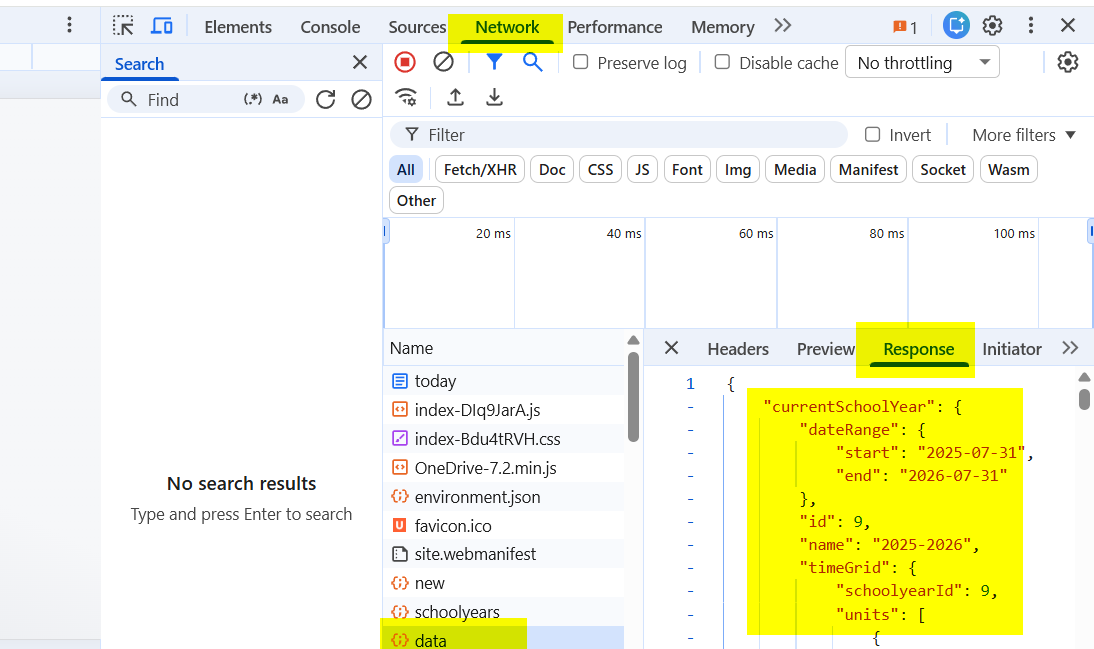
                • in der Developer Ansicht im Browser (F12 drücken) im Tab Netzwerk die Response von der Resource “data” mir zur Verfügung stellen. Achtung: vorher alle sensiblen Daten entfernen. Der markierte Bereich (currentSchoolYear) ist nur ein winziger Teil der Daten)
                171ece91-2089-4c85-a527-fe084aa09e90-image.png

                R 2 Replies Last reply Reply Quote 0
                • H Offline
                  HeikoGr @RobertMuc
                  last edited by

                  @RobertMuc geht mit MMM-Carousel auch, aber soweit ich weiss ist das mit Pages tatsächlich einfacher. Ich bleibe trotzdem bei Carousel 😎

                  1 Reply Last reply Reply Quote 0
                  • R Offline
                    RobertMuc @HeikoGr
                    last edited by

                    Hi @HeikoGr ,

                    erst einmal wieder Danke.

                    Hier meine Response. Ich habe alle IDs mal ausprobiert. Keine davon wurde akzeptiert.

                    QRCode sieht bei mir auch ganz anders aus.

                    Andere Webuntis Version?

                    Robert

                    {
                        "currentSchoolYear": {
                            "dateRange": {
                                "start": "2025-09-16",
                                "end": "2026-07-31"
                            },
                            "id": 16,
                            "name": "2025/2026",
                            "timeGrid": {
                                "schoolyearId": 16,
                                "units": [
                                  }
                                ]
                            }
                        },
                        "departments": [],
                        "isPlayground": false,
                        "oneDriveData": {
                            "hasOneDriveRight": false,
                            "oneDriveClientVersion": "V8",
                            "oneDriveClientId": "d4acf9ca-5400-48f0-96db-e356769fa9fb"
                        },
                        "tenant": {
                            "displayName": "xx",
                            "id": "xx",
                            "wuHostName": null,
                            "name": "xx"
                        },
                        "ui2020": true,
                        "user": {
                            "id": xxx,
                            "locale": "de",
                            "name": "xx",
                            "email": "xxx",
                            "permissions": {
                                "views": [
                                    "TODAY",
                                    "TIMETABLE_NEW_STUDENTS_MY",
                                    "TIMETABLE_NEW_CLASSES",
                                    "MESSAGE_CENTER",
                                    "MESSAGE_CENTER_2021",
                                    "PROFILE",
                                    "PERMISSION_STUDENT_TT_OWN",
                                    "PERMISSION_CLASS_TT_OWN",
                                    "PERMISSION_CLASS_TT_ALL",
                                    "MY_DATA",
                                    "STUDENT_HOMEWORK",
                                    "STUDENT_CLASSREG_ENTRIES"
                                ]
                            },
                            "person": {
                                "displayName": "xxx",
                                "id": xx,
                                "imageUrl": null
                            },
                            "roles": [
                                "STUDENT"
                            ],
                            "students": [],
                            "lastLogin": "2026-01-15T07:18:16.425"
                        },
                        "permissions": [
                            "CONTACTDETAILS:R:0:ASSIGNED",
                            "LESSONTOPIC:R:0:ALL",
                            "TT_VIEW:R:1:ASSIGNED",
                            "TT_VIEW:R:5:ASSIGNED",
                            "HOMEWORK:R:0:ALL",
                            "MESSAGES:R:0:ALL",
                            "TT_OVERVIEW:R:1:ALL",
                            "CLASSEVENT:R:0:ASSIGNED"
                        ],
                        "settings": [
                            "system.linesperpage:15",
                            "system.firstDayOfWeek:2",
                            "system.showlessonsofday:false",
                            "system.emailadmin:xxx"
                        ],
                        "pollingJobs": [],
                        "isSupportAccessOpen": true,
                        "licenceExpiresAt": "2999-12-31",
                        "holidays": [
                        ]
                    }
                    
                    1 Reply Last reply Reply Quote 0
                    • R Offline
                      RobertMuc @HeikoGr
                      last edited by

                      HI @HeikoGr,

                      bei mir sieht der Call ganz anders aus und keine der IDs funktioniert (siehe unten). Wenn ich mir den call für die Entries anschaue , sieht das ganze so aus.
                      /WebUntis/api/rest/view/v1/timetable/entries?start=2026-01-12&end=2026-01-16&format=1&resourceType=STUDENT&resources=823&periodTypes=&timetableType=MY_TIMETABLE&layout=START_TIME

                      Aber diese id funktioniert auch nicht, wenn ich sie als StudentID übergebe …

                      Puh.

                      Robert

                      {
                          "currentSchoolYear": {
                              "dateRange": {
                                  "start": "2025-09-16",
                                  "end": "2026-07-31"
                              },
                              "id": 16,
                              "name": "2025/2026",
                              "timeGrid": {
                                  "schoolyearId": 16,
                                  "units": [
                                    }
                                  ]
                              }
                          },
                          "departments": [],
                          "isPlayground": false,
                          "oneDriveData": {
                              "hasOneDriveRight": false,
                              "oneDriveClientVersion": "V8",
                              "oneDriveClientId": "d4acf9ca-5400-48f0-96db-e356769fa9fb"
                          },
                          "tenant": {
                              "displayName": "xx",
                              "id": "xx",
                              "wuHostName": null,
                              "name": "xx"
                          },
                          "ui2020": true,
                          "user": {
                              "id": xxx,
                              "locale": "de",
                              "name": "xx",
                              "email": "xxx",
                              "permissions": {
                                  "views": [
                                      "TODAY",
                                      "TIMETABLE_NEW_STUDENTS_MY",
                                      "TIMETABLE_NEW_CLASSES",
                                      "MESSAGE_CENTER",
                                      "MESSAGE_CENTER_2021",
                                      "PROFILE",
                                      "PERMISSION_STUDENT_TT_OWN",
                                      "PERMISSION_CLASS_TT_OWN",
                                      "PERMISSION_CLASS_TT_ALL",
                                      "MY_DATA",
                                      "STUDENT_HOMEWORK",
                                      "STUDENT_CLASSREG_ENTRIES"
                                  ]
                              },
                              "person": {
                                  "displayName": "xxx",
                                  "id": xx,
                                  "imageUrl": null
                              },
                              "roles": [
                                  "STUDENT"
                              ],
                              "students": [],
                              "lastLogin": "2026-01-15T07:18:16.425"
                          },
                          "permissions": [
                              "CONTACTDETAILS:R:0:ASSIGNED",
                              "LESSONTOPIC:R:0:ALL",
                              "TT_VIEW:R:1:ASSIGNED",
                              "TT_VIEW:R:5:ASSIGNED",
                              "HOMEWORK:R:0:ALL",
                              "MESSAGES:R:0:ALL",
                              "TT_OVERVIEW:R:1:ALL",
                              "CLASSEVENT:R:0:ASSIGNED"
                          ],
                          "settings": [
                              "system.linesperpage:15",
                              "system.firstDayOfWeek:2",
                              "system.showlessonsofday:false",
                              "system.emailadmin:xxx"
                          ],
                          "pollingJobs": [],
                          "isSupportAccessOpen": true,
                          "licenceExpiresAt": "2999-12-31",
                          "holidays": [
                          ]
                      }
                      
                      H 1 Reply Last reply Reply Quote 0
                      • H Offline
                        HeikoGr @RobertMuc
                        last edited by

                        @RobertMuc

                        Versuch mal mit 823:

                            students: [
                              {
                                title: 'Name des Kindes',
                                studentId: 823,
                                // qrcode: 'untis://setschool?url=**example**.webuntis.com&school=**example**&user=**<user>**&key=**<key>**',
                                // OR use direct credentials if no QR code:
                                username: 'user@example.com',
                                password: '<password>',
                                school: 'example',
                                server: 'example.webuntis.com',  // without https://
                              },
                        

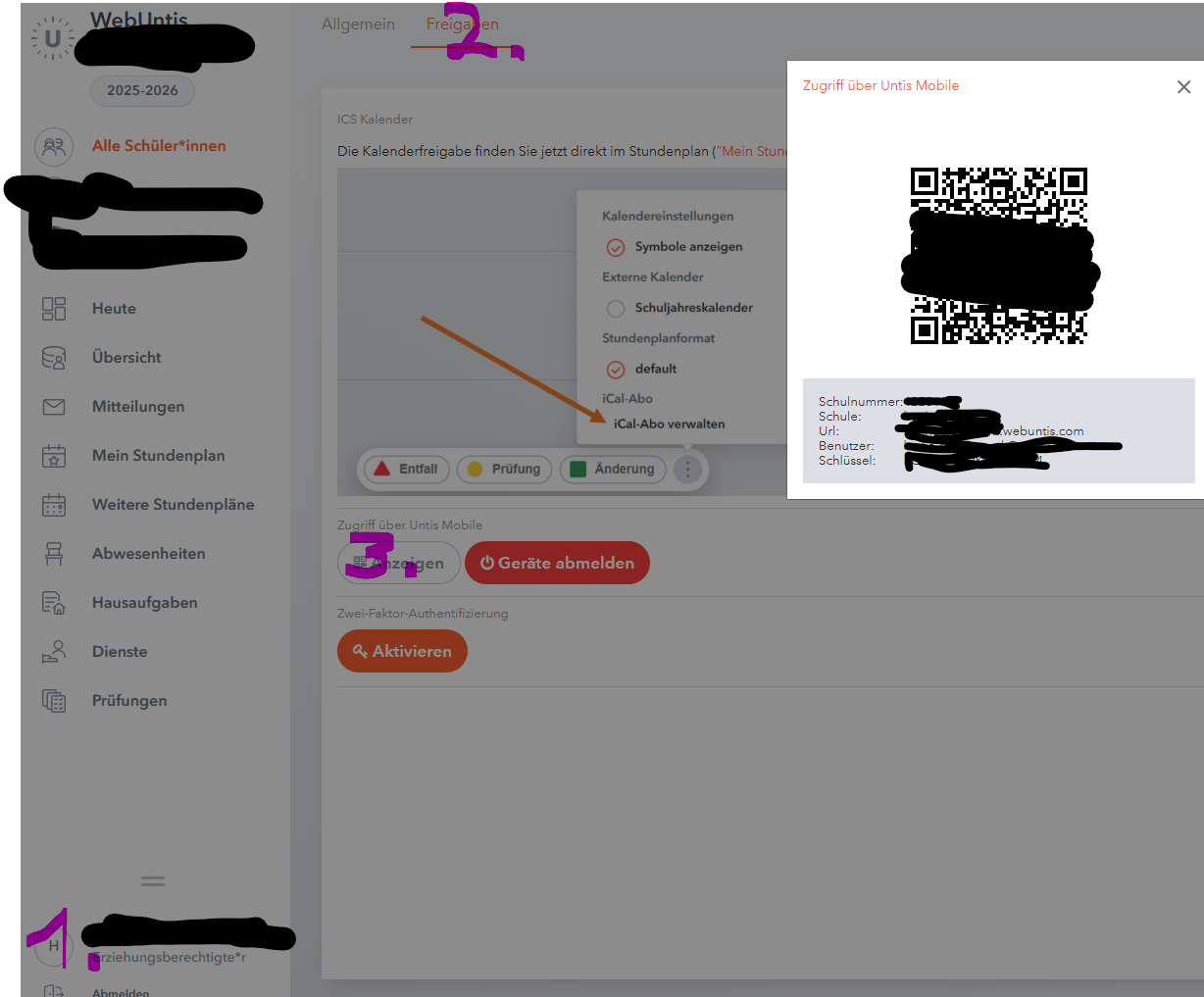
                        und QR Code funktioniert nicht? du kannst die Werte aus der webuntis Oberfläche direkt in den String an die entsprechende Stelle eintragen oder den QRCode mit einer entsprechenden App decodieren und hier den Wert übernehmen.

                        Der Screenshot zeigt jetzt auf die schnelle die Elternoberfläche, funktioniert bei den Kindern aber genauso:
                        85504f72-fb21-4613-b96e-aeffe24e19c9-image.png

                        R 1 Reply Last reply Reply Quote 0
                        • R Offline
                          RobertMuc @HeikoGr
                          last edited by

                          Hi @heikogr,

                          danke, danke.

                          Also, ich habe dann mal wieder die qrcode Variante versucht, und die ging jetzt tatsächlich. Hatte es ernsthaft schon ein paar Mal probiert, aber jetzt ging es … Naja… Muss nicht alles verstehen.

                          Vielen, vielen Dank für den hervorragenden und freundlichen Support…

                          Gruß
                          Robert

                          1 Reply Last reply Reply Quote 0
                          • O Offline
                            OliWer
                            last edited by OliWer

                            Also have to leave a big shout out for Heiko. He really cares about this module and helps as much as he can when it comes to all the difference configs/usage scenarios by the different schools. And the new features like the grid etc. are really nice. Thanks!!!

                            Edit: Feature Request: In the list the entries for cancelled lessons are crossed. In the grid view they are red. Behind my mirror glas I (with my color seeing issues) have a bit of a trouble of seeing something is canceled (my daughter don’t - its a me issue^^). But would it be possible to maybe get it also crossed or something that indicates it instead/in addition to the coloring?

                            H 1 Reply Last reply Reply Quote 0
                            • H Offline
                              HeikoGr @OliWer
                              last edited by HeikoGr

                              @OliWer Thank you for your kind words.

                              with the latest commit (from today) you can add this to your custom.css (older versions have slightly diverent css-classes, but it’s also possible):

                              .MMM-Webuntis .lesson-cancelled {
                                text-decoration: line-through;
                              }
                              

                              I’ve extended the readme to explain all possibilities

                              1 Reply Last reply Reply Quote 0
                              • O Offline
                                ochja
                                last edited by

                                Hello Heiko,

                                thank you for your work.

                                Ive just started my mm-project and I would like to use your module.
                                I read it supports students and parents, but I would like to use my teacher account.
                                Is this also possible? Ive tried a bit but had no luck yet, to get things running.

                                H 1 Reply Last reply Reply Quote 0
                                • H Offline
                                  HeikoGr @ochja
                                  last edited by

                                  @ochja it should be possible to add support for teacher accounts - but i have no ways to implement/support/test it.

                                  Can you turn on logging (for MagicMirror and Webuntis module) an send me the logs?
                                  You may need to redact the logs before sending me any files.

                                  O 1 Reply Last reply Reply Quote 0
                                  • O Offline
                                    ochja @HeikoGr
                                    last edited by

                                    @HeikoGr
                                    It would be great if you could take a look at the logs. Before trying the QR code method, I also tried the “normal” login, but I didn’t get any further.

                                    logs:
                                    https://we.tl/t-zTm0HFmRPn

                                    1 Reply Last reply Reply Quote 0
                                    • M Offline
                                      magicghost
                                      last edited by

                                      Hi,

                                      My 1st post and my 1st 24h with MagicMirrow:

                                      I was able to get the webuntis app working with the QR code link after I changed the login name, which contains a „ö“ letter. The QR code has the letter <0xF6> rewritten.

                                      I get the changes of the timetable, how I can get a full timetable for today and next day, so that I can get rid of the printed timetable.

                                      Thanks

                                      Erik

                                      H 1 Reply Last reply Reply Quote 0
                                      • H Offline
                                        HeikoGr @magicghost
                                        last edited by

                                        @magicghost

                                        this should work as minimum working example for your requirements.

                                            {
                                              module: "MMM-Webuntis",
                                              position: "top_right",
                                              config: {
                                                displayMode: 'grid',
                                                grid: {
                                                  nextDays: 1, // today plus tomorrow = 2 days
                                                  maxLessons: 0, // max lessons per day (0 = no limit)
                                                },
                                                students: [
                                                  {
                                                    title: "NAME",
                                                    qrcode: "untis://setschool?...", //your qrcode
                                                  },
                                                ],
                                              }
                                            },
                                        
                                        M 1 Reply Last reply Reply Quote 0
                                        • M Offline
                                          magicghost @HeikoGr
                                          last edited by

                                          @HeikoGr

                                          Great - exactly what I wanted. Thanks!
                                          One small question - I have two kids and both kids with two days in one tall box. Is it possible to get them side by side?

                                          Thanks

                                          H 1 Reply Last reply Reply Quote 0
                                          • H Offline
                                            HeikoGr @magicghost
                                            last edited by

                                            @magicghost yes, just define two modules. or maybe there are some fancy css hacks possible? i choose the first option for my two kids.

                                            M 1 Reply Last reply Reply Quote 0

                                            Hello! It looks like you're interested in this conversation, but you don't have an account yet.

                                            Getting fed up of having to scroll through the same posts each visit? When you register for an account, you'll always come back to exactly where you were before, and choose to be notified of new replies (either via email, or push notification). You'll also be able to save bookmarks and upvote posts to show your appreciation to other community members.

                                            With your input, this post could be even better 💗

                                            Register Login

                                            • 1
                                            • 2
                                            • 3
                                            • 4
                                            • 3 / 4
                                            • First post
                                              Last post
                                            Enjoying MagicMirror? Please consider a donation!
                                            MagicMirror created by Michael Teeuw.
                                            Forum managed by Sam, technical setup by Karsten.
                                            This forum is using NodeBB as its core | Contributors
                                            Contact | Privacy Policy