Read the statement by Michael Teeuw here.
Default Weather Module Stuck on loading.
-
Hello, my default weather module quit working after updating to the latest MagicMirror version (2.34.0). it was a few versions behind, so I am imagining that something changed in the request that I am missing in the config but I cannot seem to track down what it might be. The API request is getting a 401 error, and using the api key itself in my browser I am able to retrieve the information, but something in the module request is causing an error I believe.
My current config (a bit of a mess as I have been trying to troubleshoot for awhile)
			module: 'weather',
			position: 'top_right',
			config: {
				weatherEndpoint: '/weather',
				apiVersion: '2.5',
				weatherProvider: 'openweathermap',
				locationID: '5946768',
				apiKey: 'xxxxxx',
				//lat: 53.5462,
				//long: -113.4937,
				roundTemp: true,
				degreeLabel: true,
				colored: true,
				fade: false
this returns an error "GET https://api.openweathermap.org/data/2.5/weather?id=5946768&units=metric&lang=en&APPID=xxxx 401 (unauthorized)
In the few days prior to updating, the forecast was also showing the days as a string (01/10/26) rather than the day of the week as it had been doing previous. This is what prompted me to update to the latest version of MM in the first place.
-
@fnmuffinman good, thx
Do this
sudo npm install -g n
sudo n 22.21.1
hash -r
node -v
Should show v 22.21.1
If not stop and adviseIf ok
Then docd ~/MagicMirror npm installThen start MagicMirror
-
-
my default weather module quit working as well, however my weatherEndpoint is Openmeteo. Is that one also relying on api calls as well and that’s why it stopped working?
-
@fnmuffinman no. I haven’t seen any limits on that provider
Weather is done all in browser
Open the browser developers window
ctrl-shift-i
Select the console tab
Put weath in the filter fieldShow the messages
-
@flyedge also, using the new v3 api settings
The location is specified using lat/lon (not long)
And the only weather types are current and forecast
And endpoint would not be needed, but if provided needs to be ‘/onecall’See
https://docs.magicmirror.builders/modules/weather.html#configuration-options -
@sdetweil so after messing around and trying out a new module (might change my problem here) but seems it still won’t load. I am still pretty green at troubleshooting modules so excuse my lack of knowledge here. I have a screenshot of the spot you asked but for the new module:
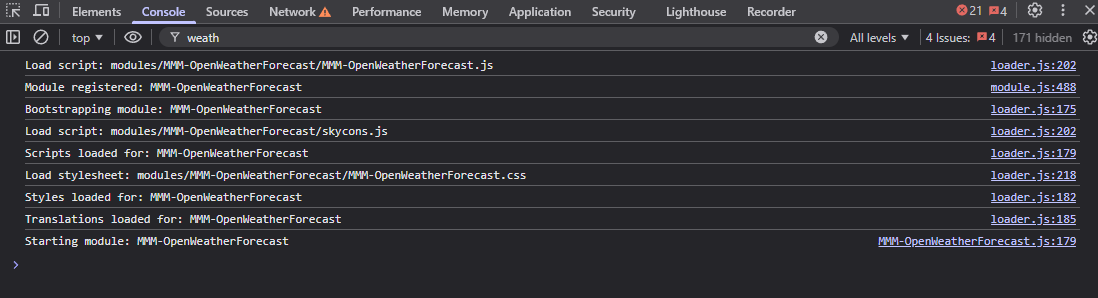
-
@fnmuffinman which module are you using
git remote -v
In the module folder
Tom’s is v3 api only
The original is v2.5 only
From Toms version readme
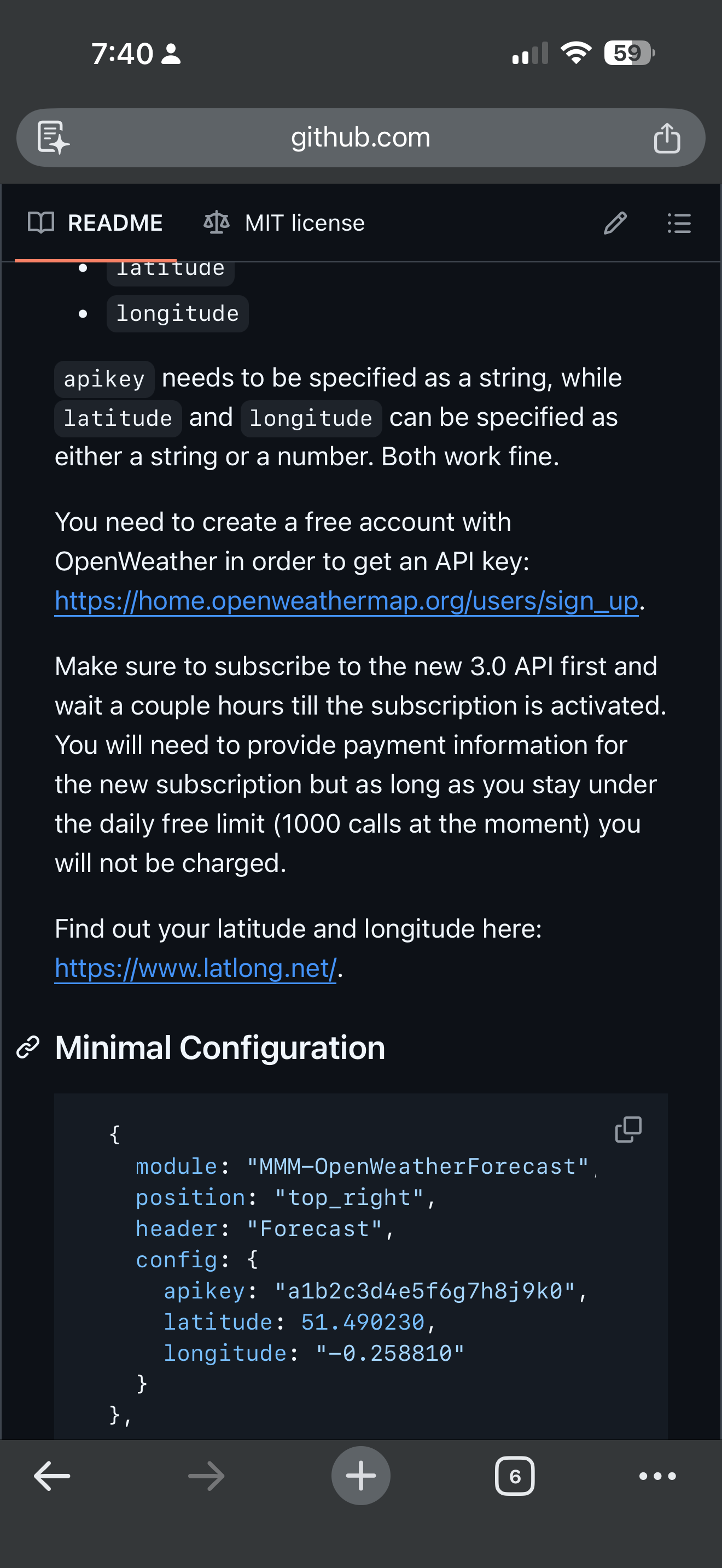
-
@fnmuffinman these modules use a helper so debug info is where you npm start , IF the author presents logging
-
@sdetweil alrighty so I got a bit further after a bit more testing and digging into the pm2 logs so here is where I am at.
I am using this module: https://github.com/Tom-Hirschberger/MMM-OpenWeatherForecast
Here is a screenshot of the current error I am seeing in the dev tools
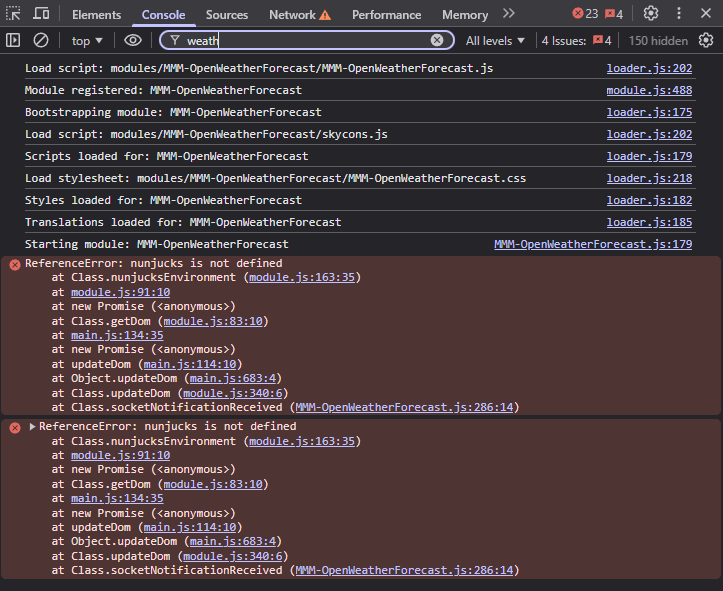
I was seeing a 401 Unauthorized error for a bit but figured out the 3.0 API call thing. I did test the URL from the website with my lat and long with the API key it works. I no longer see those errors in my pm2 logs on the mirror. Here is a screenshot of my current config in the config.js as well
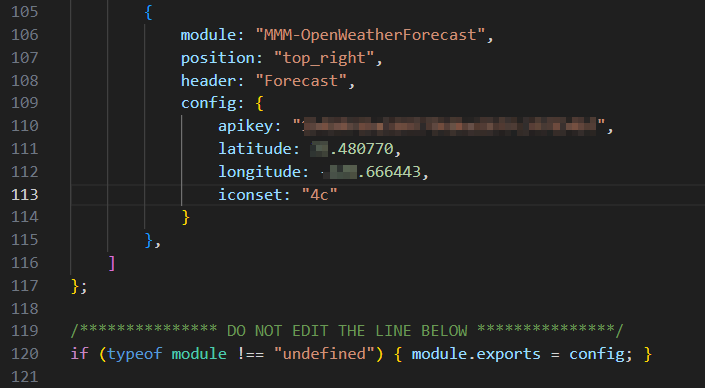
Sorry didn’t want to dox or give my api key :) also as further troubleshooting, here is a screenshot of the api.openweathermap.org URL to show it does work
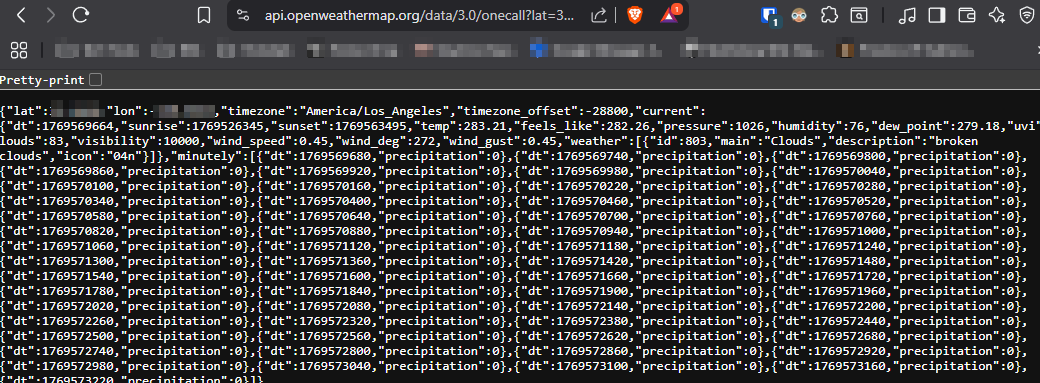
appreciate the help! my first time truly digging into why a module isn’t working. I have alot more respect for coders lol
-
@fnmuffinman did you do the npm install in the module folder?
-
@sdetweil I was pretty sure I did but I ran it again and rebooted the mirror to the same results. Still the same error as the above screenshot in the dev tools console. Not sure if it matters, but I do have the mirror booting headless. I don’t remember exactly but it’s part of the startup script so when I reboot the pi, it automatically runs MM and loads it onscreen
-
@fnmuffinman what do you mean headless?
If no display here, you need to do
npm run serverAnd access from somewhere else
Make sure to enable config.js to allow other machine access -
@sdetweil sorry wrong terminology. It is running on a pi connected to a display. I meant headless in I don’t have peripherals on it, just ssh into it from my pc
-
@fnmuffinman how did you install MagicMirror
What version are you running
cd ~/MagicMirror grep version package.json -

Sorry for the delay!
-
@sdetweil Hi, just checking in to see if you saw my last reply above! If not, I was going to create a new thread with all the troubleshooting you have graciously help me out with to start from there
-
@fnmuffinman I did, sorry been traveling.
Can you Open the developers window
ctrl-shift-I
Select the console tab
Add weath to the filter field -
@sdetweil No worries, I figured you were probably busy! Here is what comes up
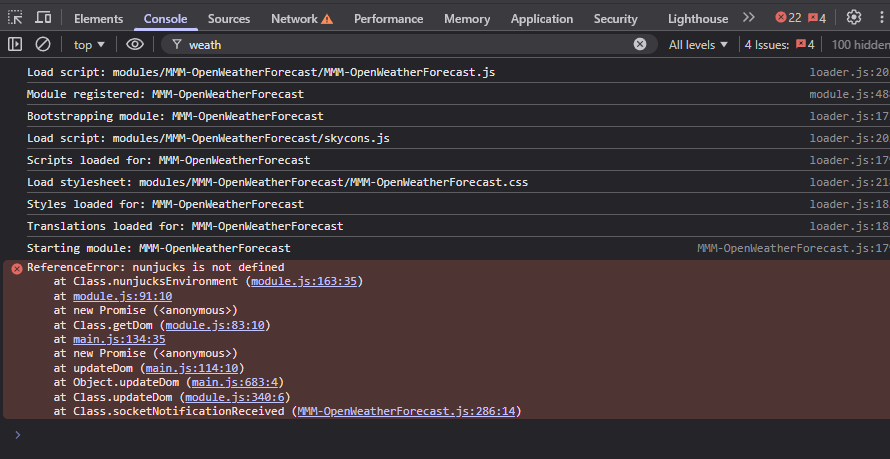
-
@fnmuffinman ok, a little more debug
cd ~/MagicMirror
grep nunj package.json
should return
"nunjucks": "^3.2.4",then
cd node_modules
ls nunjucks -laF
should return (I am on mac at the moment, with MagicMirror just installed, so dates will be different
drwxr-xr-x   10 sam  staff    320 Feb  3 08:20 ./
drwxr-xr-x  685 sam  staff  21920 Feb  3 08:21 ../
drwxr-xr-x    4 sam  staff    128 Feb  3 08:20 bin/
drwxr-xr-x   10 sam  staff    320 Feb  3 08:20 browser/
-rw-r--r--    1 sam  staff   2309 Feb  3 08:20 index.js
-rw-r--r--    1 sam  staff   1311 Feb  3 08:20 LICENSE
drwxr-xr-x    3 sam  staff     96 Feb  3 08:20 node_modules/
-rw-r--r--    1 sam  staff   3138 Feb  3 08:20 package.json
-rw-r--r--    1 sam  staff   2127 Feb  3 08:20 README.md
drwxr-xr-x   23 sam  staff    736 Feb  3 08:20 src/
then I want to redo the MagicMirror npm install
cd ~/MagicMirror
rm -rf node_modules
npm install
then restart MagicMirror however you do it…
-
@sdetweil alright so i ran those commands. when I got to
ls nunjucks -laF
It returned that directory did not exist, which i would imagine is part of my issue. I then continued with the rest of the commands, then I got this error.
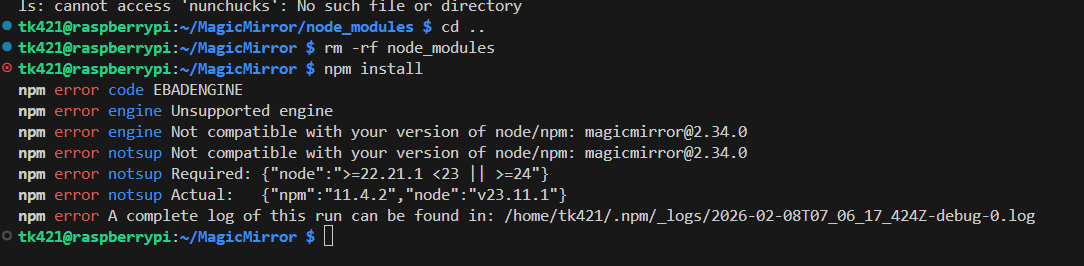
For context, recently I saw notifications on my mirror stating some modules needed to be updated. I ran through the docs for updating those but it’s possible I messed that up and caused myself a bigger problem here.
Hello! It looks like you're interested in this conversation, but you don't have an account yet.
Getting fed up of having to scroll through the same posts each visit? When you register for an account, you'll always come back to exactly where you were before, and choose to be notified of new replies (either via email, or push notification). You'll also be able to save bookmarks and upvote posts to show your appreciation to other community members.
With your input, this post could be even better 💗
Register Login