MagicMirror Forum
    • Recent
    • Tags
    • Unsolved
    • Solved
    • MagicMirror² Repository
    • Documentation
    • 3rd-Party-Modules
    • Donate
    • Discord
    • Register
    • Login
    A New Chapter for MagicMirror: The Community Takes the Lead
    Read the statement by Michael Teeuw here.

    MMM-Life360

    Scheduled Pinned Locked Moved Showcase
    17 Posts 3 Posters 563 Views 3 Watching
    Loading More Posts
    • Oldest to Newest
    • Newest to Oldest
    • Most Votes
    Reply
    • Reply as topic
    Log in to reply
    This topic has been deleted. Only users with topic management privileges can see it.
    • H
      hrmax23 @plainbroke
      last edited by

      @plainbroke On the tab row next to ‘Properties’ is a scroll button ‘>>’. Try clicking that and look for a ‘Network’ tab.

      plainbrokeP 1 Reply Last reply
      Reply Quote 0
      • plainbrokeP
        plainbroke @hrmax23
        last edited by plainbroke

        @hrmax23
        Found that finally.

        image.jpeg

        Is the Authorization: Bearer what I am looking for?
        It is a very long authorization code.

        Slow learner. But trying anyways.
        MM is on Raspberry Pi 4B w/8gb ram loaded on a 128gb nvme drive.
        Running Trixie and the latest MM version.

        H 1 Reply Last reply
        Reply Quote 0
        • H
          hrmax23 @plainbroke
          last edited by

          @plainbroke correct. It’s the long string after ‘bearer’

          plainbrokeP 1 Reply Last reply
          Reply Quote 0
          • plainbrokeP
            plainbroke @hrmax23
            last edited by

            @hrmax23
            Ok got it working.
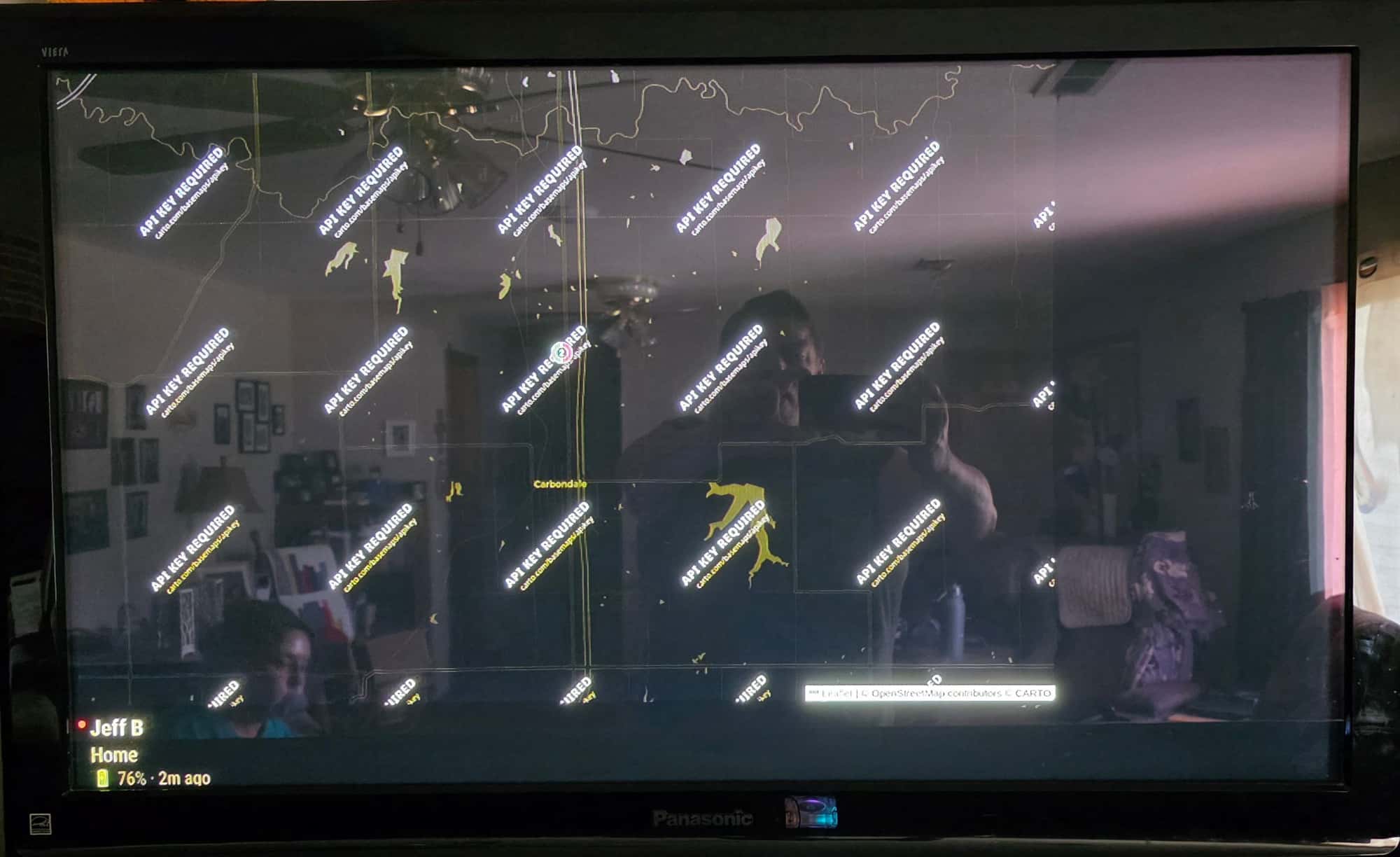
            But I am getting this on my screen instead of the map.
            1000010879.jpg
            Ideas???

            Slow learner. But trying anyways.
            MM is on Raspberry Pi 4B w/8gb ram loaded on a 128gb nvme drive.
            Running Trixie and the latest MM version.

            H 1 Reply Last reply
            Reply Quote 0
            • H
              hrmax23 @plainbroke
              last edited by

              @plainbroke are you using the light or dark map in your config? Try the opposite one and see if the behaves the same.

              plainbrokeP 1 Reply Last reply
              Reply Quote 0
              • plainbrokeP
                plainbroke @hrmax23
                last edited by

                @hrmax23
                I think that fixed it, appreciate all the help getting your module setup.
                Pretty cool module.
                We have been using Life360 since it came out in 2020…

                Slow learner. But trying anyways.
                MM is on Raspberry Pi 4B w/8gb ram loaded on a 128gb nvme drive.
                Running Trixie and the latest MM version.

                H 1 Reply Last reply
                Reply Quote 0
                • H
                  hrmax23 @plainbroke
                  last edited by

                  @plainbroke glad it’s working and useful!

                  plainbrokeP 1 Reply Last reply
                  Reply Quote 1
                  • plainbrokeP
                    plainbroke @hrmax23
                    last edited by

                    @hrmax23
                    Ok, one last question.
                    How do I get the dark to work instead of giving the screen, I showed above, with all the “api key required” requests? Is there a certain one I need to use to get the dark screen? I think the wierd part is that it shows the dark map and our locations, but overlays that “api key required” on each section…
                    I mean it works great with the light screen but wow is that bright in the evenings…

                    Slow learner. But trying anyways.
                    MM is on Raspberry Pi 4B w/8gb ram loaded on a 128gb nvme drive.
                    Running Trixie and the latest MM version.

                    karsten13K 1 Reply Last reply
                    Reply Quote 0
                    • karsten13K
                      karsten13 @plainbroke
                      last edited by

                      @plainbroke

                      Looking into the source code a carto map is used when darkMap is true.

                      A free api key is required to get rid of the ugly overlays, you can get it here.

                      The module currently has no config option for this key, so you have to change the line 455 in MMM-Life360.js from

                              url: "https://{s}.basemaps.cartocdn.com/dark_all/{z}/{x}/{y}{r}.png",
                      

                      to

                              url: "https://{s}.basemaps.cartocdn.com/dark_all/{z}/{x}/{y}{r}.png?key=abc",
                      

                      to get it working (replace abc with the real key).

                      1 Reply Last reply
                      Reply Quote 0
                      • H
                        hrmax23
                        last edited by

                        Thanks @karsten13 . I’ve updated the module to add the API key to the config.

                        plainbrokeP 1 Reply Last reply
                        Reply Quote 2
                        • plainbrokeP
                          plainbroke @hrmax23
                          last edited by

                          @hrmax23
                          @karsten13
                          Thank you for the help that looks much better than!!!

                          Slow learner. But trying anyways.
                          MM is on Raspberry Pi 4B w/8gb ram loaded on a 128gb nvme drive.
                          Running Trixie and the latest MM version.

                          1 Reply Last reply
                          Reply Quote 0

                          Hello! It looks like you're interested in this conversation, but you don't have an account yet.

                          Getting fed up of having to scroll through the same posts each visit? When you register for an account, you'll always come back to exactly where you were before, and choose to be notified of new replies (either via email, or push notification). You'll also be able to save bookmarks and upvote posts to show your appreciation to other community members.

                          With your input, this post could be even better 💗

                          Register Login

                          • 1 / 1
                          • First post
                            Last post
                          Enjoying MagicMirror? Please consider a donation!
                          MagicMirror created by Michael Teeuw.
                          Forum managed by Sam, technical setup by Karsten.
                          This forum is using NodeBB as its core | Contributors
                          Contact | Privacy Policy