MagicMirror Forum
    • Recent
    • Tags
    • Unsolved
    • Solved
    • MagicMirror² Repository
    • Documentation
    • 3rd-Party-Modules
    • Donate
    • Discord
    • Register
    • Login
    A New Chapter for MagicMirror: The Community Takes the Lead
    Read the statement by Michael Teeuw here.

    Garmin Connect Integration

    Scheduled Pinned Locked Moved Requests
    16 Posts 7 Posters 14.9k Views 10 Watching
    Loading More Posts
    • Oldest to Newest
    • Newest to Oldest
    • Most Votes
    Reply
    • Reply as topic
    Log in to reply
    This topic has been deleted. Only users with topic management privileges can see it.
    • S Offline
      scarri
      last edited by

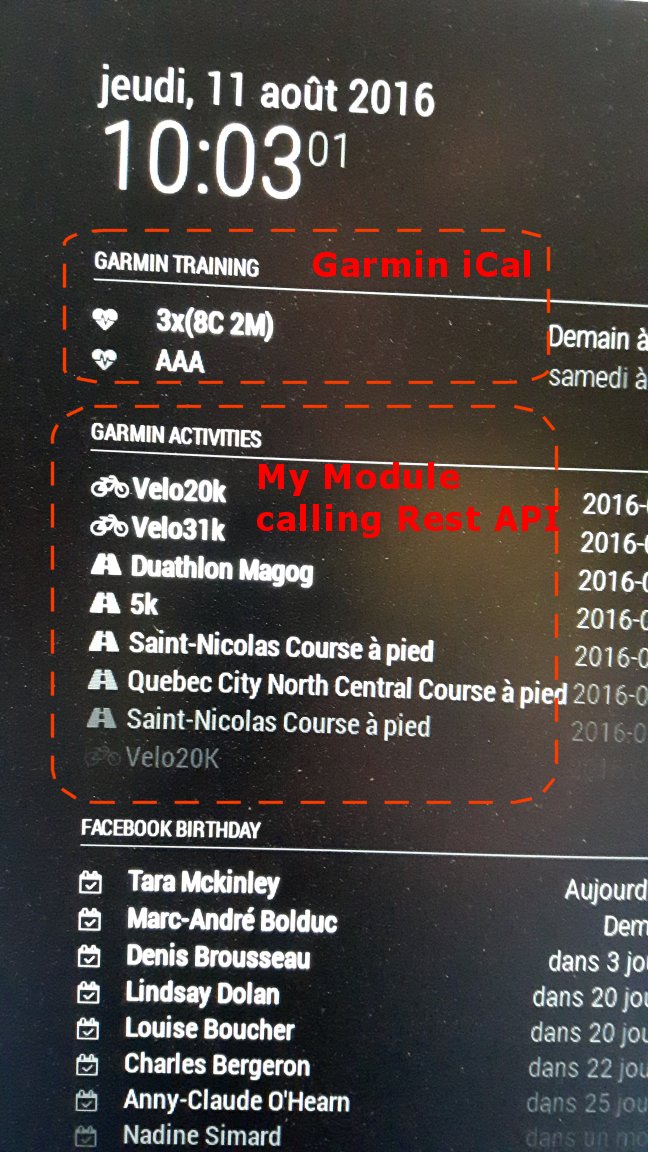
      0_1470924539790_garmin.jpg

      D 1 Reply Last reply Reply Quote 1
      • S Offline
        sameershah23
        last edited by

        Super cool. Would it be possible to create a step by step guide on how you accomplished this?
        I come from a non coding background, and hence I am not good with creating my own modules.

        Looks super cool !! Great work! :)

        S 1 Reply Last reply Reply Quote 0
        • D Offline
          d3r @scarri
          last edited by

          @scarri that’s pretty cool.
          I thought we had to pay to get access to the garmin api.

          S 1 Reply Last reply Reply Quote 0
          • S Offline
            scarri @d3r
            last edited by

            @d3r Here what you can and cannot do. Here the best URL than I found :
            http://charzam.com/20013/06/16/google-connect-api-rest

            I’m using into my module this :
            Public activities:
            http://connect.garmin.com/proxy/activitylist-service/activities/[USER GARMIN]?start=1&limit=10

            1 Reply Last reply Reply Quote 0
            • S Offline
              scarri @sameershah23
              last edited by KirAsh4

              @sameershah23
              Garmin iCal :
              go into the MagicMirror\config\config file and add this in the MODULES section:

              		{
              			module: 'calendar',
              			header: 'Garmin training',
              			position: 'top_left',
              			fetchInterval: 5000, // Update every 5 minutes.
              			config: {
              				calendars: [
              					{
              						symbol: 'heartbeat',
              						url: 'YOUR URL PROVIDE BY GARMIN CONNECT'					      
              					}				
              				]
              			}
              		},
              

              then to get your iCal Garmin URL, go to Garmin Connect, go to Calender, on the upper right of the calender you should see a arrow buttom giving you 2 options : publish activities on you device or publish the calender. Choose “publish the calender” and copy this url into the url property of config section. And Done!

              Note from Moderator: Please use Markdown on code snippets for easier reading.

              1 Reply Last reply Reply Quote 0
              • S Offline
                scarri
                last edited by

                I just post my first node.js project “GarminActivities” here :
                https://github.com/scarri/MMM-GarminActivities

                It’s my first upload project to github. At this point, I don’t know yet how to do a git installation process…

                But the code is there.

                D 1 Reply Last reply Reply Quote 2
                • D Offline
                  d3r @scarri
                  last edited by

                  @scarri
                  Hey, thanks for the module.
                  I got the garmin training calendar to work but cannot get the activities history to work. Is the activities module config smilar to the training calendar one?
                  What should I put as "userAccessToken and appAccessToken:?

                  1 Reply Last reply Reply Quote 0
                  • S Offline
                    scarri
                    last edited by

                    Hi

                    First, i didn’t cleaned up my source code. At this point, userAccessToken and appAccessToken are useless.
                    But the way to get your activities history, make sure you have set the userGarmin variable, the one you use to log you in on garmin connect web site. And I think you have to set you activities “public” by PARAMETERS - “Privacy setting” section.
                    You can try with my garmin user : scarri77
                    All my activies are open to a public acces.
                    https://connect.garmin.com/proxy/activitylist-service/activities/scarri77?start=1&limit=10

                    D 1 Reply Last reply Reply Quote 1
                    • D Offline
                      d3r @scarri
                      last edited by

                      Thank you.
                      I already had my garmin username in the config file but my garmin privacy settings were not public. It’s working now that I changed my garmin privacy to public.

                      1 Reply Last reply Reply Quote 0
                      • Z Offline
                        Zinkeler
                        last edited by

                        @scarri said in Garmin Connect Integration:

                        Hi
                        First, i didn’t cleaned up my source code. At this point, userAccessToken and appAccessToken are useless.
                        But the way to get your activities history, make sure you have set the userGarmin variable, the one you use to log you in on garmin connect web site. And I think you have to set you activities “public” by PARAMETERS - “Privacy setting” section.
                        You can try with my garmin user : scarri77
                        All my activies are open to a public acces.
                        https://connect.garmin.com/proxy/activitylist-service/activities/scarri77?start=1&limit=10

                        Hey scarri,
                        thanks for the module.
                        I try to use it, but i don´t now what to write in “config.js”.
                        I tried:
                        …
                        {
                        module: ‘MMM-GarminActivities’,
                        header: ‘Fenix 3’,
                        position: ‘bottom_right’
                        },
                        …
                        but it don´t work.
                        In “MMM-GarminActivities.js” i added my userGarmin-ID.
                        If i send: “https://connect.garmin.com/proxy/activitylist-service/activities/[my userGarmin-ID]?start=1&limit=10” i get a correct Response.
                        Can you please send me your (anonymous) part of “config.js”?
                        Thanks Ralph

                        1 Reply Last reply Reply Quote 0
                        • D Offline
                          d3r
                          last edited by

                          I think there might be an issue with the module. Mine doesn’t load anymore.
                          Maybe Garmin changed something on their side.

                          1 Reply Last reply Reply Quote 0
                          • P Offline
                            Pade2204
                            last edited by

                            Any news of a Garmin Module? It would be kinda awesome :-)

                            1 Reply Last reply Reply Quote 0
                            • E Offline
                              enurgdk
                              last edited by

                              Hello :)

                              Is there something news about the Module with Garmin Connect ?
                              I want it on my screen :)

                              That could be verry nice !

                              Hope someone can help !

                              :D

                              1 Reply Last reply Reply Quote 0
                              • E Offline
                                ericguimont
                                last edited by

                                Yes, i could be verry nice!

                                1 Reply Last reply Reply Quote 0

                                Hello! It looks like you're interested in this conversation, but you don't have an account yet.

                                Getting fed up of having to scroll through the same posts each visit? When you register for an account, you'll always come back to exactly where you were before, and choose to be notified of new replies (either via email, or push notification). You'll also be able to save bookmarks and upvote posts to show your appreciation to other community members.

                                With your input, this post could be even better 💗

                                Register Login

                                • 1 / 1
                                • First post
                                  Last post
                                Enjoying MagicMirror? Please consider a donation!
                                MagicMirror created by Michael Teeuw.
                                Forum managed by Sam, technical setup by Karsten.
                                This forum is using NodeBB as its core | Contributors
                                Contact | Privacy Policy