Read the statement by Michael Teeuw here.
MMM-MirrorMirrorOnTheWall installation issue
-
@OceanK Well i meant i got the MMM-MirrorMirrorOnTheWall module for Magic Mirror figured out but it is not working right if that makes sense. :rolling_on_the_floor_laughing: :rolling_on_the_floor_laughing: So when Magic Mirror itself is lunched and it is displaying other modules like Weather and Calendar and all that, it is not throwing an error for MMM-MirrorMirrorOnTheWall so i got the certs path figured out and you need to run “npm Install” on MMM-MirrorMirrorOnTheWall module before using it after you clone it on modules folder. I use Alexa Pi which has its own module on MM so when i call Alexa and i ask to “Start On the wall” the mirror replies as “Hello my queen what can i do for you” but when i ask to do something like hide a module or display anything it says an error has occurred with your skills response please try again later. I have no clue whats causing that so i guess some more research is needed.
Denis -
Hey!
I have AlexaPi Aswell. In the module MMM-MirrorMirronOnTheWall, you copied the certs folder from MirrorMirrorOnTheWallSkill , right?
Then npm install in MMM-MirrorMirronOnTheWall
Did you change the path in anyway in the files for the certs? Like we discussed before ?
Regards K
-
OK so Im going to do this again from scratch.
what did you enter in your config.js file for the mirror, just this part?
{
module: ‘MMM-MirrorMirrorOnTheWall’,
position: “middle_center”,
config: {}
}, -
Ok so here is my hardcoding of certs path on the Magic Mirror module
keyPath: “/home/pi/MagicMirror/modules/MMM-MirrorMirrorOnTheWall/certs/MagicMirror.private.key”,
certPath: “/home/pi/MagicMirror/modules/MMM-MirrorMirrorOnTheWall/certs/MagicMirror.cert.pem”,
caPath: “/home/pi/MagicMirror/modules/MMM-MirrorMirrorOnTheWall/certs/root-CA.crt”,Also dont forget to add your iot-endpoint
region: “us-east-1”,
host: “aonu6XXXX8o.iot.us-east-1.amazonaws.com”,I kept the config on module just as yours or the default for testing purposses
-
Cool thanx, well I am at same stage as you, When I try the skill after build and the test. I get the !my queen etc etc" when I try to say “close all modules” I just get the error response skill etc.
so I have no cloue whats wrong. I think its something with the lambda function itself.
When I try to say “find youtube video on how to make slime” she says the error but when I check the clod logs its actually looking for videon on slime/youtube:’
2018-09-01T15:41:33.768Z 806824d0-adfd-11e8-aea5-f7829904bba6
{
“kind”: “youtube#searchListResponse”,
“etag”: “"XI7nbFXulYBIpL0ayR_gDh3eu1k/trfpcxzuGVnn32QncnihWoxjjgs"”,
“nextPageToken”: “CAEQAA”,
“regionCode”: “US”,
“pageInfo”: {
“totalResults”: 1000000,
“resultsPerPage”: 1
},
“items”: [
{
“kind”: “youtube#searchResult”,
“etag”: “"XI7nbFXulYBIpL0ayR_gDh3eu1k/BqgWo2mCqNCYN8WncT1NMhRM7VE"”,
“id”: {
“kind”: “youtube#video”,
“videoId”: “eaALjlyKDZI”
},
“snippet”: {
“publishedAt”: “2017-04-11T19:00:03.000Z”,
“channelId”: “UCIze4Pldy_KjXhYHqBwMLDQ”,
“title”: “How to Make SLIME for Beginners! Best EASY Way to Make Slime!”,
“description”: “YOU CAN NOW BUY MY SLIME ON ETSY: https://goo.gl/9GMmWA Hey guys! Today I’ll be showing you the best, easiest way to make slime. Check out my other …”,
“thumbnails”: {
“default”: {
“url”: “https://i.ytimg.com/vi/eaALjlyKDZI/default.jpg”,
“width”: 120,
“height”: 90
},
“medium”: {
“url”: “https://i.ytimg.com/vi/eaALjlyKDZI/mqdefault.jpg”,
“width”: 320,
“height”: 180
},
“high”: {
“url”: “https://i.ytimg.com/vi/eaALjlyKDZI/hqdefault.jpg”,
“width”: 480,
“height”: 360
}
},
“channelTitle”: “Courtney Lundquist”,
“liveBroadcastContent”: “none”
}
}
]
} -
and here is some error in the logs when I try other stuff:
2018-09-01T15:41:09.907Z 722f8cd3-adfd-11e8-befe-f5fd64df2d92
{
“errorMessage”: “In state: . No handler function was defined for event SessionEndedRequest and no ‘Unhandled’ function was defined.”,
“errorType”: “Error”,
“stackTrace”: [
“AlexaRequestEmitter.EmitEvent (/var/task/node_modules/alexa-sdk/lib/alexa.js:212:15)”,
“AlexaRequestEmitter.ValidateRequest (/var/task/node_modules/alexa-sdk/lib/alexa.js:181:23)”,
“HandleLambdaEvent.i18n.use.init (/var/task/node_modules/alexa-sdk/lib/alexa.js:123:29)”,
“/var/task/node_modules/i18next/dist/commonjs/i18next.js:190:9”,
“done (/var/task/node_modules/i18next/dist/commonjs/i18next.js:281:21)”,
“/var/task/node_modules/i18next/dist/commonjs/i18next.js:302:7”,
“I18n.loadResources (/var/task/node_modules/i18next/dist/commonjs/i18next.js:238:7)”,
“I18n.changeLanguage (/var/task/node_modules/i18next/dist/commonjs/i18next.js:301:10)”,
“load (/var/task/node_modules/i18next/dist/commonjs/i18next.js:186:14)”,
“I18n.init (/var/task/node_modules/i18next/dist/commonjs/i18next.js:195:7)”
] -
Where do you find these log files at?? so i can look at mine??
it seems like it doesn’t find the way to sent the results back and where to send them?? -
Login to your console where u created the lamda, search for CloudWatch and then Logs, console.aws.amazon.com
-
Whats the progress and status on this?@richland007
-
@OceanK Absolutely nothing i have to do much more research and read everything on the forums when it comes to this.
It seems like it has a problem with: No handler function was defined for event AMAZON.FallbackIntent and no ‘Unhandled’ function was defined.Here is my error log as well and it is exactly like yours
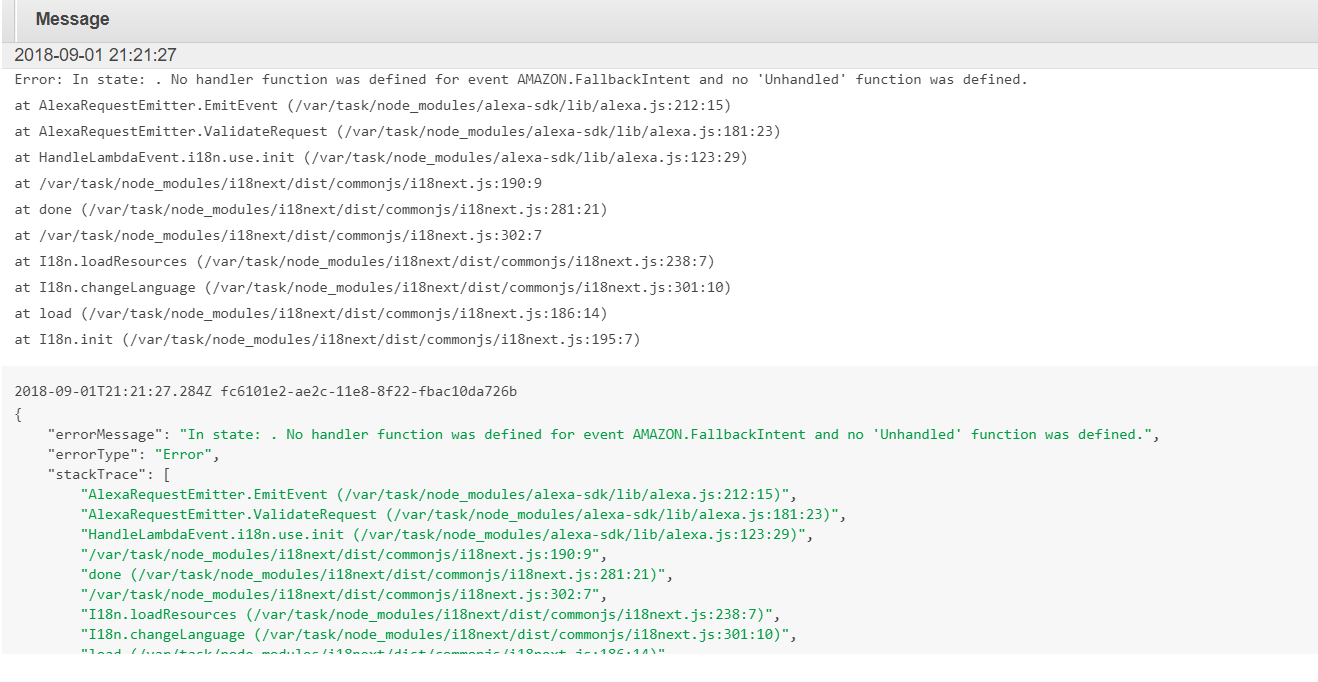
We need to continue reading
Denis -
Have you seen that the code makers repo has changed 2 files like 2 month ago? Though it didn’t make any difference still stuck at the same place as you. I think it’s something with the iot part and lamda function.
Let’s keep going ;)
-
@OceanK Well now i get no errors in Lamda but i dont think its working still this is what i did after a lot of reading in the internet and in the MM forums.
Step 1. Delete your archive.zip you have on your Rpi
2. Go to “MirrorMirrorOnTheWallSkill” open “src” folder and open to edit “index.js”
3. At the very end of that file right before the very last } bracket
enter the following:, 'Unhandled': function () { this.emit(':ask', 'Sorry I didnt understand that. Say help for assistance.'); }notice the “,” right after the prior to last } before 'Unhandled" … so it wont give you a syntax error.
4. Go all the way up almost at the beginning of the file “index.js” and replace the following:const appId = "amzn1.ask.skill.XXXXXXXXXXX-XXXXX-9b1c-3d309a950fcf"; const MirrorMirror = require('./MirrorMirror'); MirrorMirror.setup(); const Keys = require("./certs/keys.json"); const GoogleImages = require('google-images'); var googleImages = new GoogleImages(Keys.cse.ID, Keys.cse.API_key); const YouTube = require('youtube-node'); var youTube = new YouTube(); youTube.setKey(Keys.youtube.API_key); exports.handler = function(event, context, callback) { let alexa = Alexa.handler(event, context); alexa.appId = appId;Make sure to change your appId with your own
You will see no more errors on Lamda and if you ask after on the wall it will say i am sorry i dont understand and if you ask for help it will tell you what help it can provide but nothing more than that… yet.
To be continued
Denis -
Oh after that step 5 zip it back again and upload it to Lamda and save it
you should see no more errorsDenis
-
Ok cook I will try it. Just one more question. When you zip the files for the first time. Did you hardcode the MirrorMirror.js with the cert paths as well?
And then again hardcoded the cert path for the MMM-MirrorMirrorOnTheWall
Am I understanding it right?
-
@richland007 So need more info here about this: At the very end of that file right before the very last } bracket
enter the following:
,
‘Unhandled’: function () {
this.emit(‘:ask’, ‘Sorry I didnt understand that. Say help for assistance.’);
}
notice the “,” right after the prior to last } before 'Unhandled" … so it wont give you a syntax error.So if I copy the last part from the index.js it should look like this with that extra ?
// Send publish attempt to AWS IoT
MirrorMirror.showVideo(result.items[0].id.videoId, searchTerm, alexaEmit);
}
});
} else {
this.emit(‘:askWithCard’, this.t(“SHOW_VIDEO_ERR”), this.t(“SHOW_VIDEO_ERR”), this.t(“ERROR_CARD”), this.t(“SHOW_VIDEO_ERR”))
}
}
,
‘Unhandled’: function () {
this.emit(‘:ask’, ‘Sorry I didnt understand that. Say help for assistance.’);
}
}; -
One more thing I notice. So Im going to do this from scratch again. when I did the npm install in the src folder(MirrorMirrorOnTheWallSkill)
I did get these infor/error:
npm WARN deprecated alexa-sdk@1.0.25: This version of the Alexa Skills Kit SDK is no longer supported. Please use the v2 release found here: https://github.com/alexa/alexa-skills-kit-sdk-for-nodejs
do you think thats a problem ?
-
I still get lamda error. could you please add your whole index.js and MirrorMirror.js file? just delete your key. So I can see how its all together.
then I can repack the zip and upload to lamda and try it again
-
Here it is
'use strict';
/**
 * A Lambda function for handling Alexa Skill MirrorMirrorOnTheWall requests.
 *
 * Examples:
 * One-shot model:
 *  User: "Alexa On The Wall, find Snow White."
 *  Alexa: "Yes my Queen, showing images of Snow White."
 */

const Alexa = require('alexa-sdk');

/**
 * App ID for the skill
 *
 * replace with your app ID
 */
const appId = "amzn1.ask.skill.XXXXXXXXXX-48bd-9b1c-3d309a950fcf";

const MirrorMirror = require('./MirrorMirror');
MirrorMirror.setup();

const Keys = require("./certs/keys.json");
const GoogleImages = require('google-images');
var googleImages = new GoogleImages(Keys.cse.ID, Keys.cse.API_key);

const YouTube = require('youtube-node');
var youTube = new YouTube();
youTube.setKey(Keys.youtube.API_key);

exports.handler = function(event, context, callback) {
    let alexa = Alexa.handler(event, context);
    alexa.appId = appId;
    // To enable string internationalization (i18n) features, set a resources object.
    alexa.resources = languageStrings;
    alexa.registerHandlers(handlers);
    alexa.execute();
};

var languageStrings = {
    "en-US": {
        "translation": {
            "WELCOME_MESSAGE": "Hello my Queen, what can I do for you? ",
            "WELCOME_REPROMPT": "I can show you text and images, if you give me commands like 'say you are the fairest of them all' or 'find Snow White'. I can also open or close a magic mirror module, if you say commands like 'open compliments', or 'close weather forecast'. What can I do for you, my Queen?",
            "WELCOME_CARD": "Hello",
            "HELP_MESSAGE": "Hello my Queen, I can show you text and images, if you give me commands like 'say you are the fairest of them all' or 'find Snow White'. I can also open or close a magic mirror module, if you say commands like 'open compliments', or 'close weather forecast'. What can I do for you, my Queen?",
            "HELP_CARD": "Help",
            "STOP_MESSAGE": "See you next time, my Queen!",
            "STOP_CARD": "Goodbye",
            "SHOW_TEXT": "Yes, my Queen. %s.",
            "SHOW_TEXT_ERR": "Sorry, my Queen, I didn't get that. You can give me commands like 'display text of hello', or 'say you are the fairest of them all'. What can I do for you, my Queen?",
            "SHOW_TEXT_CARD": "Display Text",
            "SHOW_IMAGE": "Yes, my Queen, showing images of %s.",
            "SHOW_IMAGE_ERR": "Sorry, my Queen, I didn't get that. You can give me commands like 'find Snow White' or 'show me images of Bill Gates'. What can I do for you, my Queen?",
            "SHOW_IMAGE_CARD": "Show Image",
            "TURN_ON_MODULE": "Yes, my Queen, opening module %s.",
            "TURN_ON_MODULE_ERR": "Sorry, my Queen, I didn't get that. You can give me commands like 'open current weather' or 'turn on compliments'. What can I do for you, my Queen?",
            "TURN_ON_MODULE_CARD": "Open Module",
            "TURN_ON_ALL_MODULES": "Yes, my Queen, opening all modules.",
            "TURN_ON_ALL_MODULES_CARD": "Open All Modules",
            "TURN_OFF_MODULE": "Yes, my Queen, closing module %s.",
            "TURN_OFF_MODULE_ERR": "Sorry, my Queen, I didn't get that. You can give me commands like 'close current weather' or 'turn off compliments'. What can I do for you, my Queen?",
            "TURN_OFF_MODULE_CARD": "Close Module",
            "TURN_OFF_ALL_MODULES": "Yes, my Queen, closing all modules.",
            "TURN_OFF_ALL_MODULES_CARD": "Close All Modules",
            "SHOW_VIDEO": "Yes, my Queen, showing a video of %s.",
            "SHOW_VIDEO_ERR": "Sorry, my Queen, I didn't get that. You can give me commands like 'find a video of Snow White' or 'show me a video of Bill Gates'. What can I do for you, my Queen?",
            "SHOW_VIDEO_CARD": "Play Video",
            "ERROR_CARD": "Error"
        }
    },
    "en-GB": {
        "translation": {
            "WELCOME_MESSAGE": "Hello my Queen, what can I do for you? ",
            "WELCOME_REPROMPT": "I can show you text and images, if you give me commands like 'say you are the fairest of them all' or 'find Snow White'. I can also open or close a magic mirror module, if you say commands like 'open compliments', or 'close weather forecast'. What can I do for you, my Queen?",
            "WELCOME_CARD": "Hello",
            "HELP_MESSAGE": "Hello my Queen, I can show you text and images, if you give me commands like 'say you are the fairest of them all' or 'find Snow White'. I can also open or close a magic mirror module, if you say commands like 'open compliments', or 'close weather forecast'. What can I do for you, my Queen?",
            "HELP_CARD": "Help",
            "STOP_MESSAGE": "See you next time, my Queen!",
            "STOP_CARD": "Goodbye",
            "SHOW_TEXT": "Yes, my Queen. %s.",
            "SHOW_TEXT_ERR": "Sorry, my Queen, I didn't get that. You can give me commands like 'display text of hello', or 'say you are the fairest of them all'. What can I do for you, my Queen?",
            "SHOW_TEXT_CARD": "Display Text",
            "SHOW_IMAGE": "Yes, my Queen, showing images of %s.",
            "SHOW_IMAGE_ERR": "Sorry, my Queen, I didn't get that. You can give me commands like 'find Snow White' or 'show me images of Bill Gates'. What can I do for you, my Queen?",
            "SHOW_IMAGE_CARD": "Show Image",
            "TURN_ON_MODULE": "Yes, my Queen, opening module %s.",
            "TURN_ON_MODULE_ERR": "Sorry, my Queen, I didn't get that. You can give me commands like 'open current weather' or 'turn on compliments'. What can I do for you, my Queen?",
            "TURN_ON_MODULE_CARD": "Open Module",
            "TURN_ON_ALL_MODULES": "Yes, my Queen, opening all modules.",
            "TURN_ON_ALL_MODULES_CARD": "Open All Modules",
            "TURN_OFF_MODULE": "Yes, my Queen, closing module %s.",
            "TURN_OFF_MODULE_ERR": "Sorry, my Queen, I didn't get that. You can give me commands like 'close current weather' or 'turn off compliments'. What can I do for you, my Queen?",
            "TURN_OFF_MODULE_CARD": "Close Module",
            "TURN_OFF_ALL_MODULES": "Yes, my Queen, closing all modules.",
            "TURN_OFF_ALL_MODULES_CARD": "Close All Modules",
            "SHOW_VIDEO": "Yes, my Queen, showing a video of %s.",
            "SHOW_VIDEO_ERR": "Sorry, my Queen, I didn't get that. You can give me commands like 'find a video of Snow White' or 'show me a video of Bill Gates'. What can I do for you, my Queen?",
            "SHOW_VIDEO_CARD": "Play Video",
            "ERROR_CARD": "Error"
        }
    }
};

var handlers = {
    'LaunchRequest': function() {
        this.emit('SayHello');
    },
    'MirrorMirrorHelloIntent': function() {
        this.emit('SayHello');
    },
    'SayHello': function() {
        this.emit(':askWithCard', this.t("WELCOME_MESSAGE"), this.t("WELCOME_REPROMPT"), this.t("WELCOME_CARD"), this.t("WELCOME_MESSAGE") + this.t("WELCOME_REPROMPT"));
    },
    'AMAZON.HelpIntent': function() {
        this.emit(':askWithCard', this.t("HELP_MESSAGE"), this.t("HELP_MESSAGE"), this.t("HELP_CARD"), this.t("HELP_MESSAGE"));
    },
    'AMAZON.StopIntent': function() {
        this.emit('StopCommand');
    },
    'AMAZON.CancelIntent': function() {
        this.emit('StopCommand');
    },
    'StopCommand': function() {
        this.emit(':tellWithCard', this.t("STOP_MESSAGE"), this.t("STOP_CARD"), this.t("STOP_MESSAGE"));
    },
    'ShowTextIntent': function() {
        let displayText = this.event.request.intent.slots.displayText.value;
        if (displayText) {
            let alexa = this

            // Alexa voice/card response to invoke after text is published to AWS IoT successfully
            let alexaEmit = function() {
                alexa.emit(':tellWithCard', alexa.t("SHOW_TEXT", displayText), alexa.t("SHOW_TEXT_CARD"), displayText)
            }

            // Send publish attempt to AWS IoT
            MirrorMirror.displayText(displayText, alexaEmit);
        } else {
            this.emit(':askWithCard', this.t("SHOW_TEXT_ERR"), this.t("SHOW_TEXT_ERR"), this.t("ERROR_CARD"), this.t("SHOW_TEXT_ERR"))
        }
    },
    'ShowImagesIntent': function() {
        let searchTerm = this.event.request.intent.slots.searchTerm.value;
        if (searchTerm) {
            let alexa = this

            // Search for images
            googleImages.search(searchTerm).then(function(images) {
                // Only https urls are allowed for the Alexa cards
                let imageObj = {
                    smallImageUrl: images[0].thumbnail.url,
                    largeImageUrl: images[0].thumbnail.url
                };
                let alexaEmit = function() {
                    alexa.emit(':tellWithCard', alexa.t("SHOW_IMAGE", searchTerm), alexa.t("SHOW_IMAGE_CARD"), searchTerm, imageObj)
                }

                // Send publish attempt to AWS IoT
                MirrorMirror.showImages(images, searchTerm, alexaEmit);
            })
        } else {
            this.emit(':askWithCard', this.t("SHOW_IMAGE_ERR"), this.t("SHOW_IMAGE_ERR"), this.t("ERROR_CARD"), this.t("SHOW_IMAGE_ERR"))
        }
    },
    'TurnOnModuleIntent': function() {
        let moduleName = this.event.request.intent.slots.moduleName.value;
        if (moduleName) {
            let alexa = this
            let alexaEmit = function() {
                alexa.emit(':tellWithCard', alexa.t("TURN_ON_MODULE", moduleName), alexa.t("TURN_ON_MODULE_CARD"), alexa.t("TURN_ON_MODULE", moduleName))
            }

            // Send publish attempt to AWS IoT
            MirrorMirror.changeModule(moduleName, true, alexaEmit);
        } else {
            this.emit(':askWithCard', this.t("TURN_ON_MODULE_ERR"), this.t("TURN_ON_MODULE_ERR"), this.t("ERROR_CARD"), this.t("TURN_ON_MODULE_ERR"))
        }
    },
    'TurnOnAllModuleIntent': function() {
        let alexa = this
        let alexaEmit = function() {
            alexa.emit(':tellWithCard', alexa.t("TURN_ON_ALL_MODULES"), alexa.t("TURN_ON_ALL_MODULES_CARD"), alexa.t("TURN_ON_ALL_MODULES"))
        }
        MirrorMirror.changeModule('all_modules', true, alexaEmit);

    },
    'TurnOffModuleIntent': function() {
        let moduleName = this.event.request.intent.slots.moduleName.value;
        if (moduleName) {
            let alexa = this
            let alexaEmit = function() {
                alexa.emit(':tellWithCard', alexa.t("TURN_OFF_MODULE", moduleName), alexa.t("TURN_OFF_MODULE_CARD"), alexa.t("TURN_OFF_MODULE", moduleName))
            }

            // Send publish attempt to AWS IoT
            MirrorMirror.changeModule(moduleName, false, alexaEmit);
        } else {
            this.emit(':askWithCard', this.t("TURN_OFF_MODULE_ERR"), this.t("TURN_OFF_MODULE_ERR"), this.t("ERROR_CARD"), this.t("TURN_OFF_MODULE_ERR"))
        }
    },
    'TurnOffAllModuleIntent': function() {
        let alexa = this
        let alexaEmit = function() {
            alexa.emit(':tellWithCard', alexa.t("TURN_OFF_ALL_MODULES"), alexa.t("TURN_OFF_ALL_MODULES_CARD"), alexa.t("TURN_OFF_ALL_MODULES"))
        }
        MirrorMirror.changeModule('all_modules', false, alexaEmit);

    },
    'ShowVideoIntent': function() {
        let searchTerm = this.event.request.intent.slots.searchTermVideo.value;
        if (searchTerm) {
            let alexa = this

            // search for Youtube video
            youTube.search(searchTerm, 1, function(error, result) {
                if (error) {
                    console.log(error);
                } else {
                    console.log(JSON.stringify(result, null, 2));

                    let imageObj = {
                        smallImageUrl: result.items[0].snippet.thumbnails.default.url,
                        largeImageUrl: result.items[0].snippet.thumbnails.high.url
                    };
                    let alexaEmit = function() {
                        alexa.emit(':tellWithCard', alexa.t("SHOW_VIDEO", searchTerm), alexa.t("SHOW_VIDEO_CARD"), searchTerm, imageObj)
                    }

                    // Send publish attempt to AWS IoT
                    MirrorMirror.showVideo(result.items[0].id.videoId, searchTerm, alexaEmit);
                }
            });
        } else {
            this.emit(':askWithCard', this.t("SHOW_VIDEO_ERR"), this.t("SHOW_VIDEO_ERR"), this.t("ERROR_CARD"), this.t("SHOW_VIDEO_ERR"))
        }
    },
    'Unhandled': function () {
        this.emit(':ask', 'Sorry I didnt understand that. Say help for assistance.');
    }
};
Remember to change the appId
-
As far as the “alexa-skills-kit-sdk-for-nodejs” goes… it wont hurt to try i guess… but i remember i have gone before and “npm install” individually all those 4 most important dependencies listed on section 2 of instructions (granted that we had many other errors before that would have ruined anything good) but that made no difference than.
As far as hard coding the paths of certs in the mirrormirro.js file in the Skill before zipping it up…i have read it too that it should be done there also but it makes absolutely no sense to me. Because when the zip file gets unzipped in Lambda servers everything gets stored in “/var/task/…” (node_modules or etc etc directories) after /task/ so basically we are telling it to look at /pi/home/MirrorMirrorskill or whatever that does not exist. That does not exist in Lambda, unless it mirrors a mini Rpi server or whatever, but i doubt it because if you look at the other previous error logs the node_modules and its under diretories are now at /var/task/ not where we all have it locally respectively. However that syntax __dirname + “/certs/MagicMirror.private.key” in our case, means the directory stored plus the file name in nodejs as far as i can tell from a quick search since i do not know nodejs other than from here. So what i am trying to say it seems to me like its the right thing to have.
D -
I tried your index file and replaced my key but I still get errors from the lamda test. So strange!
I have to check more when I get home.
.

Hello! It looks like you're interested in this conversation, but you don't have an account yet.
Getting fed up of having to scroll through the same posts each visit? When you register for an account, you'll always come back to exactly where you were before, and choose to be notified of new replies (either via email, or push notification). You'll also be able to save bookmarks and upvote posts to show your appreciation to other community members.
With your input, this post could be even better 💗
Register Login