MagicMirror Forum
    • Recent
    • Tags
    • Unsolved
    • Solved
    • MagicMirror² Repository
    • Documentation
    • 3rd-Party-Modules
    • Donate
    • Discord
    • Register
    • Login
    A New Chapter for MagicMirror: The Community Takes the Lead
    Read the statement by Michael Teeuw here.

    Python in to the magic mirror.

    Scheduled Pinned Locked Moved Solved Troubleshooting
    43 Posts 4 Posters 22.0k Views 4 Watching
    Loading More Posts
    • Oldest to Newest
    • Newest to Oldest
    • Most Votes
    Reply
    • Reply as topic
    Log in to reply
    This topic has been deleted. Only users with topic management privileges can see it.
    • P Offline
      paulvanderheijden90 @Guest
      last edited by

      @sean said in Python in to the magic mirror.:

      @paulvanderheijden90
      Your node_helper.js is not correct.

      Hello Sean,
      Why is it wrong? I copy it from your post earlier.
      I started in Dev mode. I noticed that wenn I add the Node_helper.js module in the MMM-P2000 map the Magic mirror crashes and give only black screen.
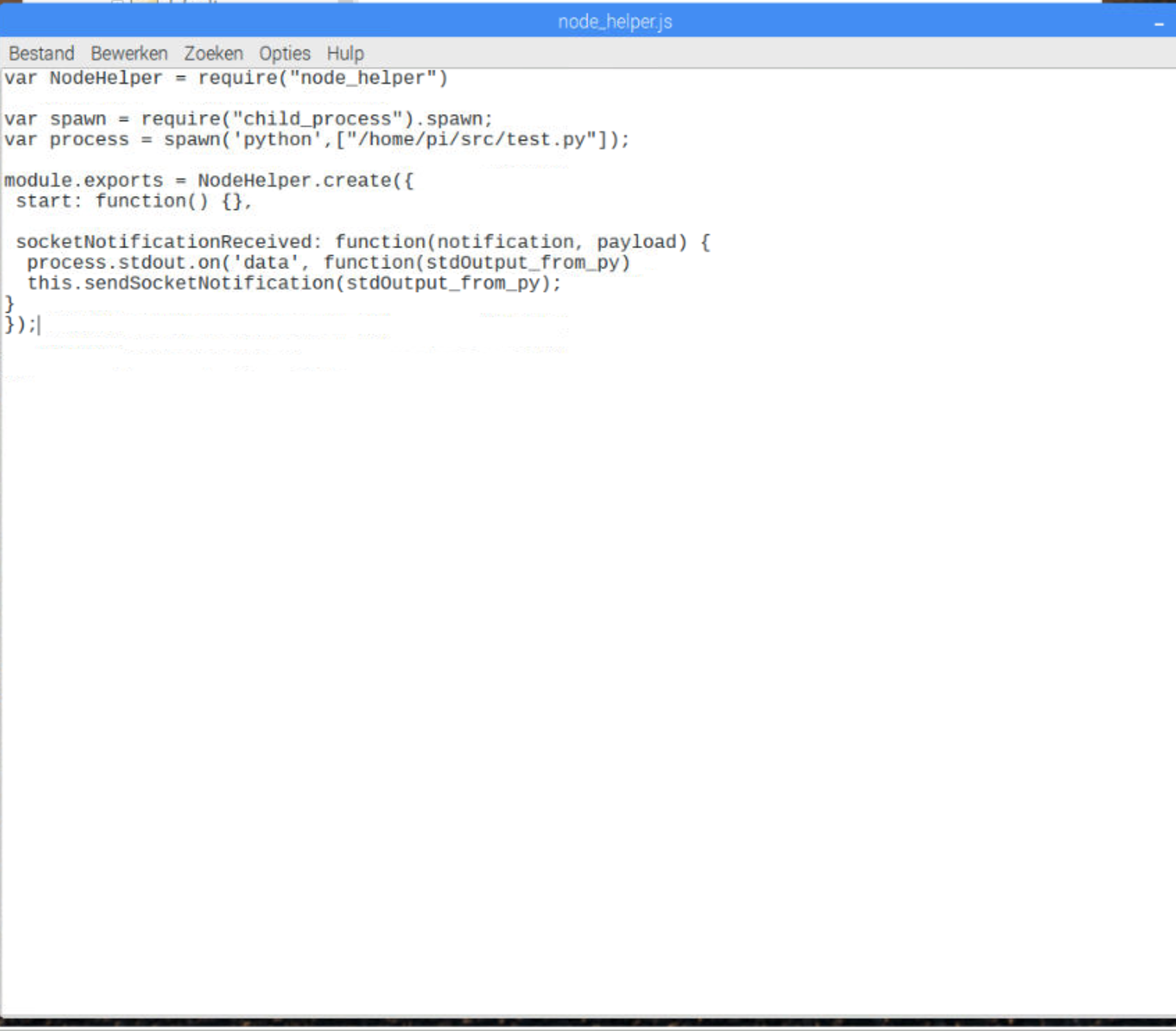
      I studyed the Node_helper file. I see in the first line you define the function and in the second line you define the settings for that function. So that’s clear to me. In the next lines you define the stdout of the process and copy it in de Console Log. so that’s also clear for me. So I down’t know why is it not working and crashes.

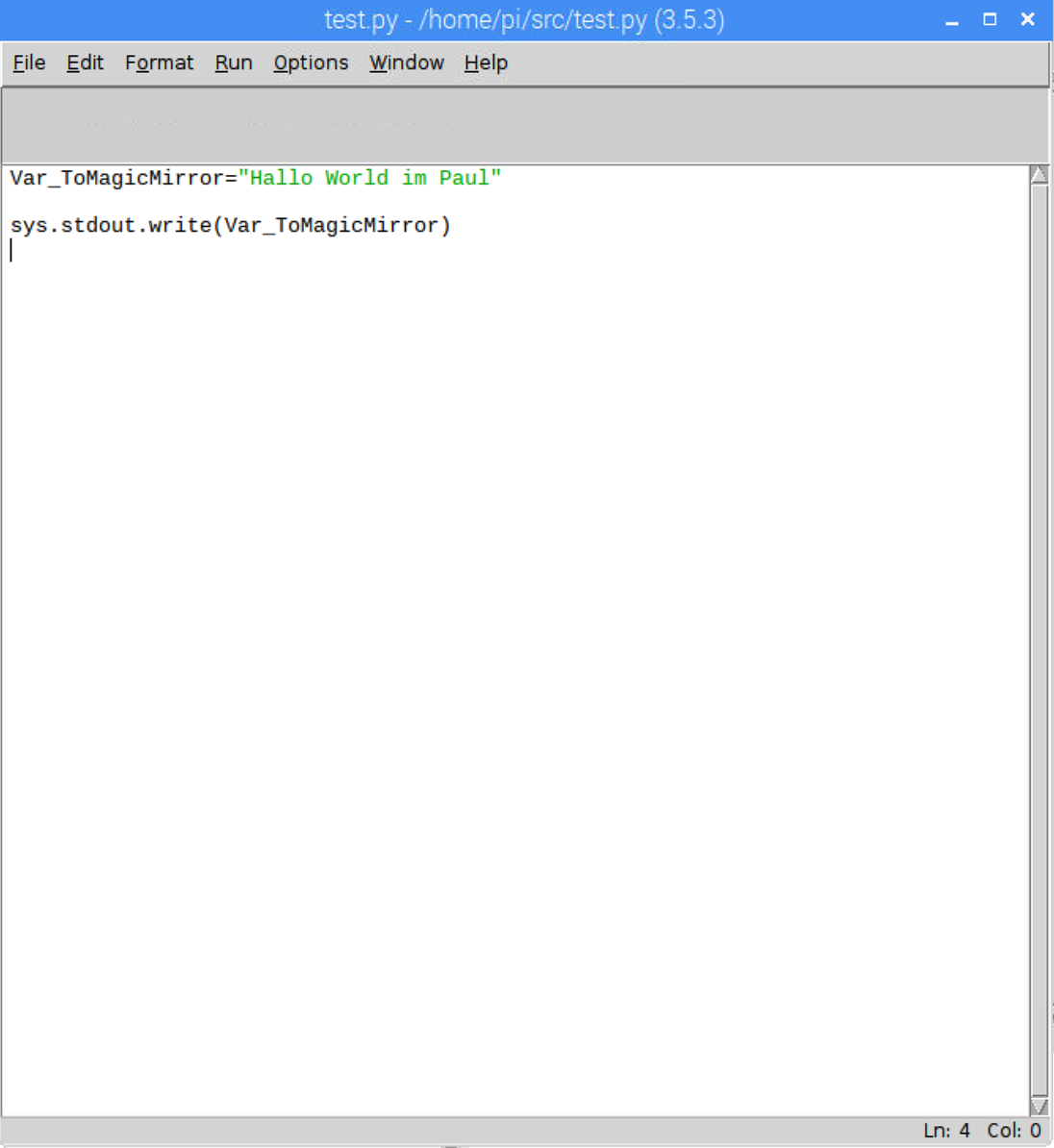
      I made in the same map ( home/pi/src/ ) a file called test.py Here I defined a string and I write the string to the stdout so as you say before the python project don’t need a separate call. So that should work as well.

      Node_helper.js:
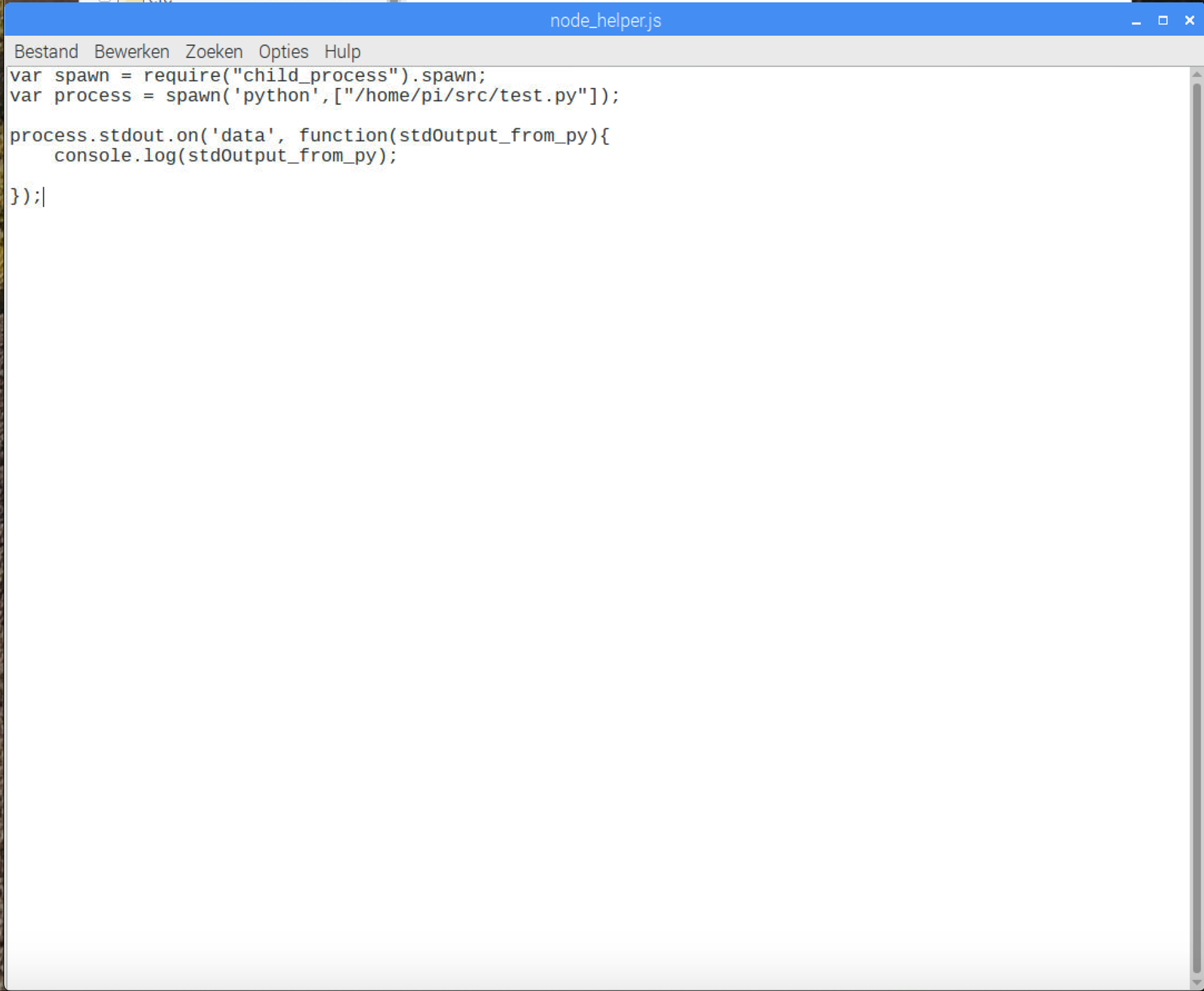
      0_1548328532225_Schermafbeelding 2019-01-24 om 12.08.18.png
      Python project:
      0_1548328572185_Schermafbeelding 2019-01-24 om 12.10.09.png

      I also getting in to the module setup so I changed the MMM-P2000.js and I think it is oke like this.
      First the start function restart every 1000mS the dom function.
      then the getdom Function is now showing the test “Hello World” in the module
      so that should be oke aswell. I

      How do I need to link the socked notification message to the Module string?
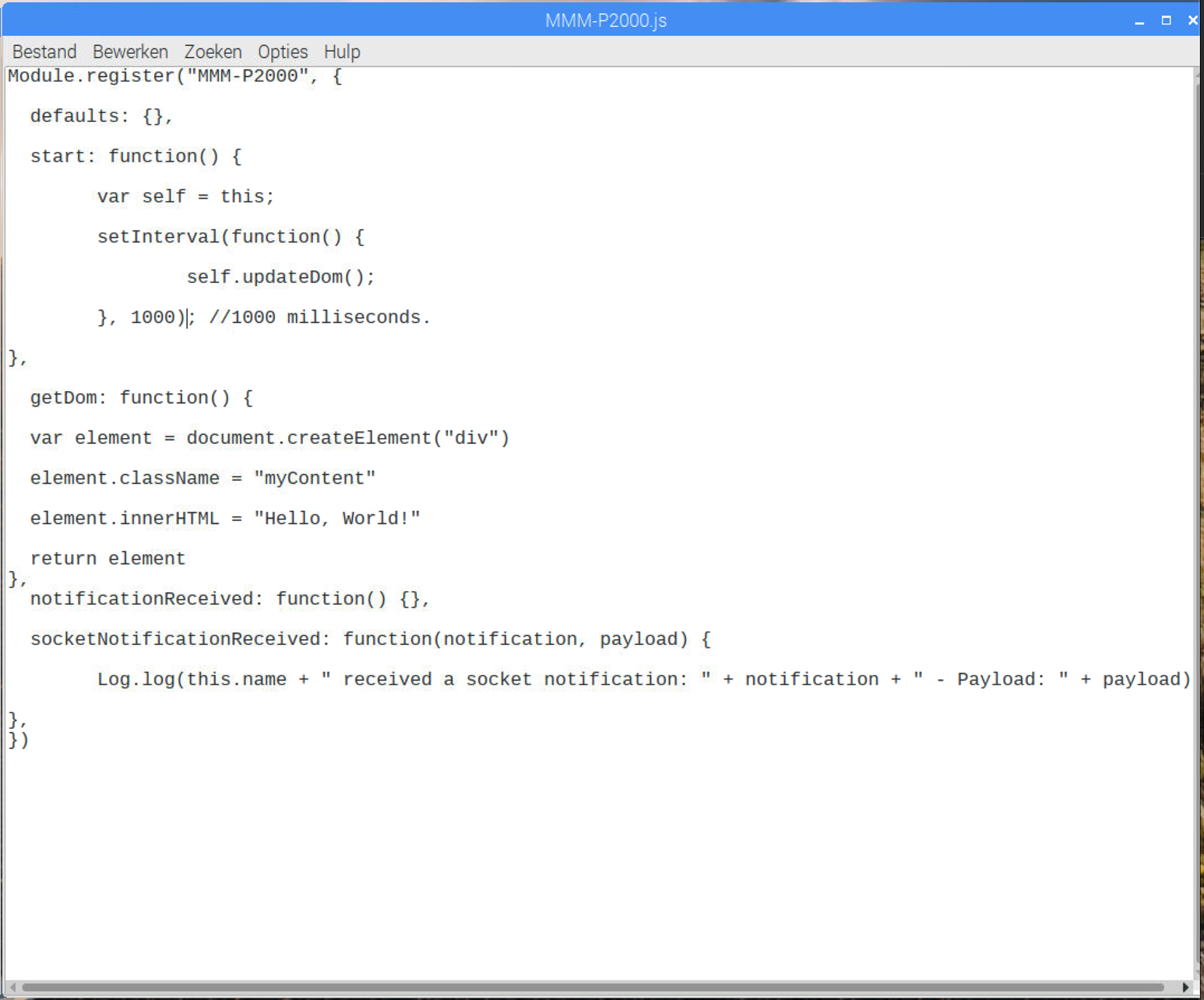
      0_1548329124803_Schermafbeelding 2019-01-24 om 12.25.08.png

      S 1 Reply Last reply Reply Quote 0
      • S Offline
        sdetweil @paulvanderheijden90
        last edited by sdetweil

        @paulvanderheijden90 node helper needs to look like this
        see the doc here https://github.com/MichMich/MagicMirror/tree/master/modules#the-node-helper-node_helperjs

        const NodeHelper = require('node_helper');
        
        // any other imports (javascript require)
        
        module.exports = NodeHelper.create({
           // local variables 
            self: 0,
        		pins_loaded:[],
        		pin_index:0,
        		results:{},
        		using_chartjs: true,
        		suspended: false,
        		timer:null,
        
            start: function() {
                console.log("Starting module: " + this.name);
                self = this;
            },
         socketNotificationReceived: function(notification, payload) {
                // usually the module send the config data down to the node_helper
                if (notification === 'CONFIG') {
                    this.config = payload;
                }
        
        // any other functions, u need, note, after each function is a ',' (comma)
        }
        });
        

        Sam

        How to add modules

        learning how to use browser developers window for css changes

        1 Reply Last reply Reply Quote 1
        • ? Offline
          A Former User
          last edited by

          node_helper.js is helper script of your module to use various features of NodeJS. your main module script(MMM-P2000.js) is just front-end javascript on Browser(Electron/Chromium). So when you need more features which are not supported on browser level, use node_helper.js

          MMM-P2000.js and node_helper.js can communicate with each other by socketNotification.

          you need to make proper node_helper.js which could be used in MM framework.

          Usual format is

          var NodeHelper = require("node_helper")
          
          module.exports = NodeHelper.create({
            start: function() {
              // ...
            },
            socketNotificationReceived: function(notification, payload) {
              // ...
            },
          })
          

          There are two entry points in node_helper.js from your main module .

          start will be called when MM is executed and your module is loaded. Usually you can prepare things here.

          socektNotificationReceived will be called when your main module send socketNotification with sendSocketNotification.

          With this, you can transfer config values, specific datas or order to do something.

          Your current MMM-P2000.js is not so good to use. I recommend you continue to read my https://forum.magicmirror.builders/topic/8534/head-first-developing-mm-module-for-extreme-beginners more.

          1 Reply Last reply Reply Quote 1
          • P Offline
            paulvanderheijden90
            last edited by

            I changed the Node_helper.js:
            0_1548334181951_Schermafbeelding 2019-01-24 om 13.47.25.png

            But the minute I run the Start dev I get white screens. so im not able to debug anything.
            Can I get a hand ?
            0_1548334276267_Schermafbeelding 2019-01-24 om 13.51.05.png

            ? 1 Reply Last reply Reply Quote 0
            • S Offline
              sdetweil
              last edited by

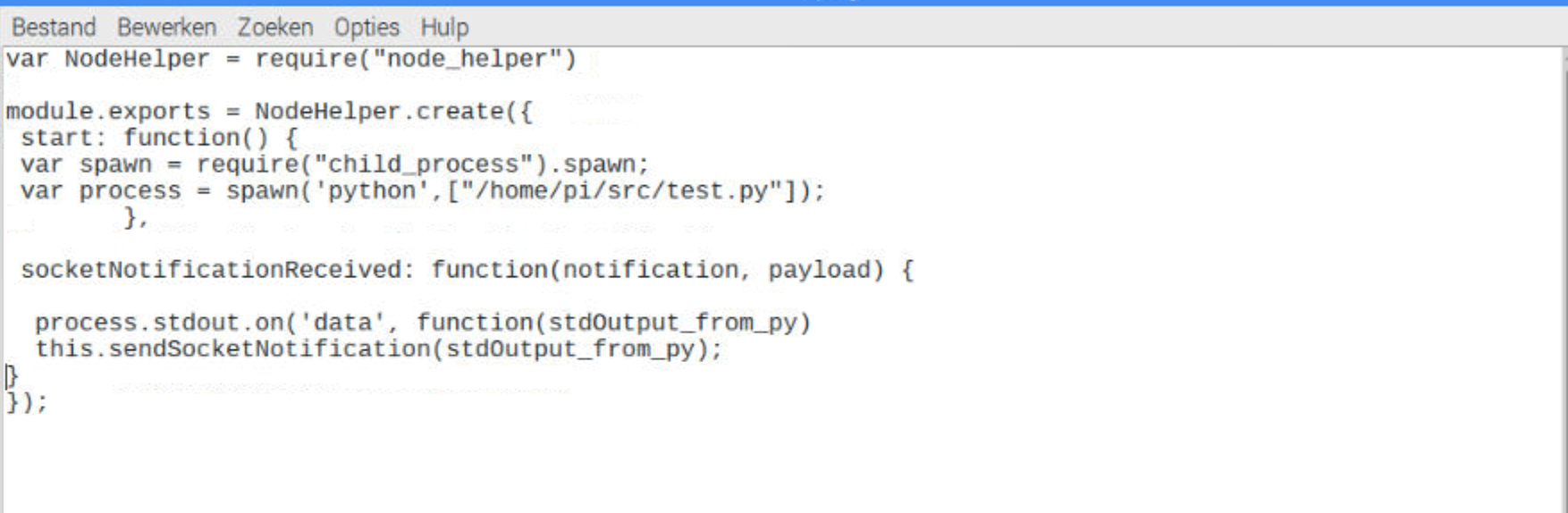
              the spawn stuff needs to be INSIDE the node helper…

              probably called in Start or in the socketNotificationReceived, when the config is sent down from the module…

              Sam

              How to add modules

              learning how to use browser developers window for css changes

              P 1 Reply Last reply Reply Quote 0
              • P Offline
                paulvanderheijden90 @sdetweil
                last edited by

                @sdetweil Thank you for you’re information.
                I changed it like you said but unfortunly still get the With screens.
                0_1548335197627_Schermafbeelding 2019-01-24 om 14.05.28.png

                1 Reply Last reply Reply Quote 0
                • ? Offline
                  A Former User @paulvanderheijden90
                  last edited by A Former User

                  @paulvanderheijden90
                  If possible, Instead image, post code itself.
                  Anyway, You’d better to read docs more carefully.

                  MMM-P2000.js

                  /// MMM-P2000.js
                  
                  Module.register("MMM-P2000", {
                    getDom: function() {
                      var e = document.createElement("div")
                      e.id = "DISPLAY"
                      return e
                    },
                    notificationReceived: function(notification, payload, sender) {
                      switch(notification) {
                        case "DOM_OBJECTS_CREATED":
                          var timer = setInterval(()=>{
                            this.sendSocketNotification("GIVE_ME_DATA")
                          }, 1000)
                          break
                      }
                    },
                    socketNotificationReceived: function(notification, payload) {
                      switch(notification) {
                        case "HERE_IS_DATA":
                          var e = document.getElementById("DISPLAY")
                          e.innerHTML = payload
                          break
                      }
                    },
                  })
                  

                  node_helper.js

                  /// node_helper.js
                  const spawn = require("child_process").spawn
                  var NodeHelper = require("node_helper")
                  
                  module.exports = NodeHelper.create({
                    socketNotificationReceived: function(notification, payload) {
                      switch(notification) {
                        case "GIVE_ME_DATA":
                          this.job()
                          break
                      }
                    },
                    job: function() {
                      var process = spawn("python", ["/home/pi/src/test.py"])
                      process.stdout.on("data", (data)=>{
                        console.log(data)
                        this.sendSocketNotification("HERE_IS_DATA", data)
                      })
                    }
                  })
                  

                  I didn’t test. I wrote this code with only my brain. so there could be errors, but you can catch the concept.

                  P 2 Replies Last reply Reply Quote 1
                  • P Offline
                    paulvanderheijden90 @Guest
                    last edited by

                    @Sean Thank you very much im going to check the code and see if I can implement it in the magic mirror.
                    Thank you I will let you know

                    1 Reply Last reply Reply Quote 0
                    • P Offline
                      paulvanderheijden90 @Guest
                      last edited by paulvanderheijden90

                      @sean
                      Hello Sean, Again thank you very much for you’re valued help!.

                      I spend yesterday after midday and evening with a friend figure out how you’re code is working. and we did some tests to send also somthing back to the Node helper and alote came clear by you’re example.
                      So realy thank u very much.

                      To day I spend my morning figure out one last problem the text on the screen is [ Object ArrayBuffer] and not the string I put true the stdout.write.
                      The text that is displayed on the screen is : 0_1548411234909_Schermafbeelding 2019-01-25 om 11.09.42.png
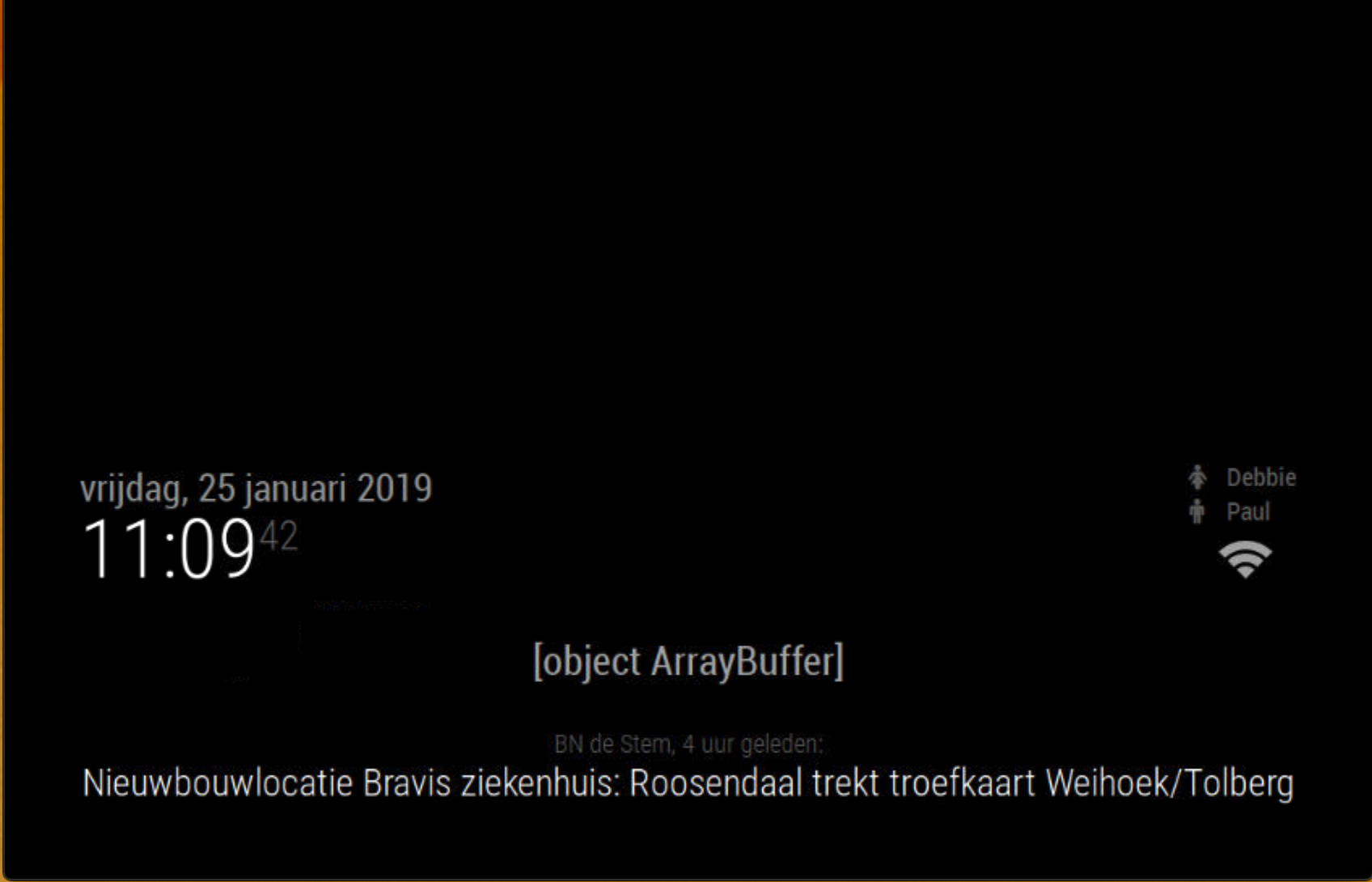
                      I did some debugging of my own. and wenn I override the data in the node helper just after it come from the spawn function this is displayed on the mirror. so the code is working until the spawn function.

                      /// node_helper.js
                      
                      const spawn = require("child_process").spawn
                      
                      var NodeHelper = require("node_helper")


                      module.exports = NodeHelper.create({
                      
                        socketNotificationReceived: function(notification, payload) {
                      
                          switch(notification) {
                      
                            case "GIVE_ME_DATA":
                      
                              this.job()
                      
                              break
                      
                          }
                      
                        },
                      
                        job: function() {
                      
                          var process = spawn("python", ["/home/pi/src/test.py"])
                      
                          process.stdout.on("data", (data)=>{
                      	data= "test hello World"
                            console.log(data)
                      
                            this.sendSocketNotification("HERE_IS_DATA", data)
                      
                          })
                      
                        }
                      
                      })
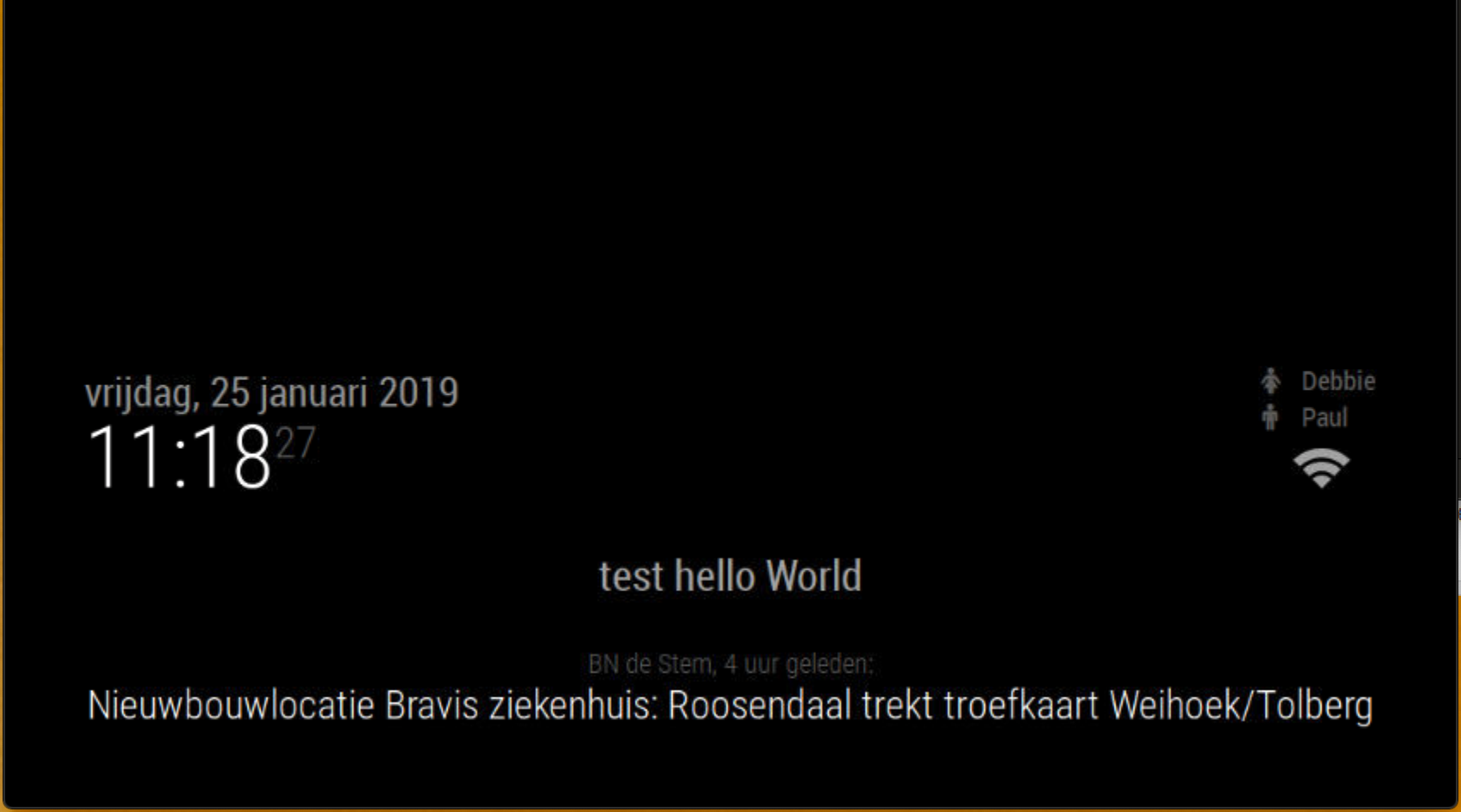
                      

                      0_1548411531981_Schermafbeelding 2019-01-25 om 11.18.28.png

                      So i tested also the python test project. and wenn I run it in the terminal it give no error. so the python project is fine aswell I think.

                      import sys
                      
                      
                      sys.stdout.write("Hallo Ik ben Paul")
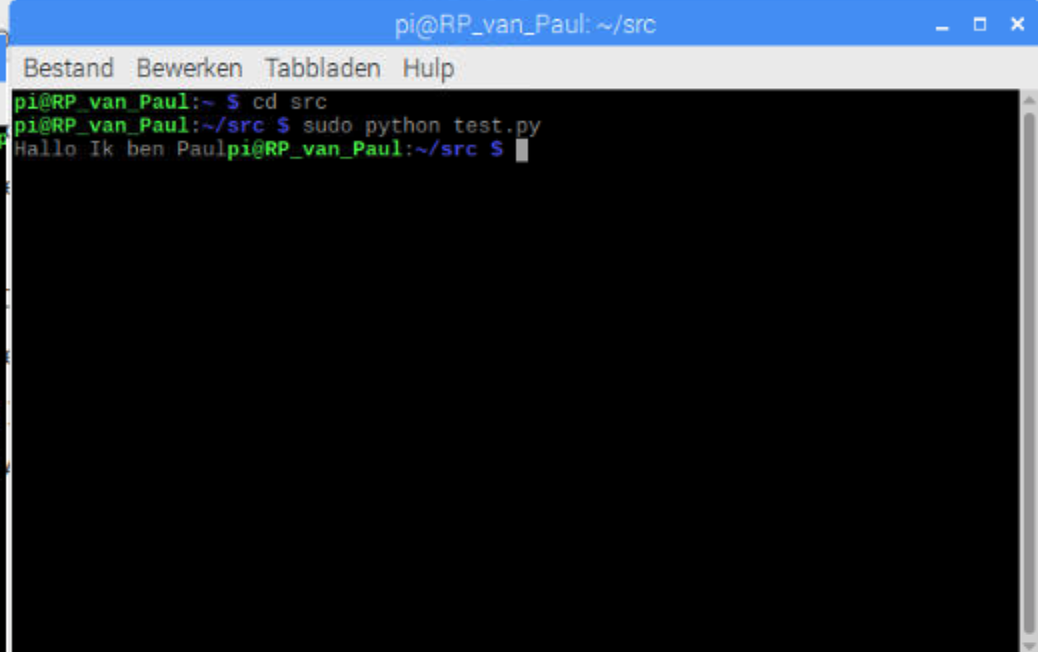
                      

                      0_1548411681323_Schermafbeelding 2019-01-25 om 11.10.18.png

                      So I think the spawn function is not correct at this time?
                      Can you help me out one more time please?

                      ? 1 Reply Last reply Reply Quote 0
                      • ? Offline
                        A Former User @paulvanderheijden90
                        last edited by A Former User

                        @paulvanderheijden90 said in Python in to the magic mirror.:

                        Object ArrayBuffer

                        is one of javascript Object type. not text itself. (Sorry for my prior example. it needs to be converted from Object to HTMLText.)

                        https://developer.mozilla.org/en-US/docs/Web/JavaScript/Reference/Global_Objects/ArrayBuffer

                        process.stdout.on("data", (data)=>{
                          console.log(data) 
                          // You can see the structure of this `data` object(ArrayBuffer) on the shell terminal.
                        
                          var result = String.fromCharCode.apply(null, new Uint16Array((data))
                          // You need to convert or filter or manipulate `data` object whatever for your real usage.
                        
                          this.sendSocketNotification("HERE_IS_DATA", result)
                         })
                        
                        P 1 Reply Last reply Reply Quote 0
                        • P Offline
                          paulvanderheijden90 @Guest
                          last edited by

                          @Sean Hello Sean,
                          I was thinking somting was wrong because I see the buffer printing in the terminal showing:

                          Buffer 48 61 6c 6c 6f 20 49 6b 20 62 65 6e 20 50 61 75 6c>

                          i was trying to figure out the text line that it was representing but it was not showing something.

                          So im happy you came up with the solution for the buffer.

                          Unfortunly wenn at the var result code the magic mirror is crashing again and im not able to debug.
                          Can you please heave a look at it

                          /// node_helper.js
                          
                          const spawn = require("child_process").spawn
                          
                          var NodeHelper = require("node_helper")


                          module.exports = NodeHelper.create({
                          
                            socketNotificationReceived: function(notification, payload) {
                          
                              switch(notification) {
                          
                                case "GIVE_ME_DATA":
                          
                                  this.job()
                          
                                  break
                          
                              }
                          
                            },
                          
                            job: function() {
                          
                              var process = spawn("python", ["/home/pi/src/test.py"])
                          
                              process.stdout.on("data", (data)=>{
                          	
                                console.log(data)
                          
                                var result = String.fromCharCode.apply(null, new Uint16Array((data))
                          
                                this.sendSocketNotification("HERE_IS_DATA", result)
                          
                              })
                          
                            }
                          
                          ? 1 Reply Last reply Reply Quote 0
                          • ? Offline
                            A Former User @paulvanderheijden90
                            last edited by

                            @paulvanderheijden90
                            Crashing? show me the error log.

                            P 1 Reply Last reply Reply Quote 0
                            • P Offline
                              paulvanderheijden90 @Guest
                              last edited by

                              @sean said in Python in to the magic mirror.:

                              Crashing? show me th

                              App threw an error during load
                              /home/pi/MagicMirror/modules/MMM-P2000/node_helper.js:76
                              }.call(this, exports, require, module, __filename, __dirname); });
                                                                                          ^
                              
                              SyntaxError: missing ) after argument list
                                  at createScript (vm.js:80:10)
                                  at Object.runInThisContext (vm.js:139:10)
                                  at Module._compile (module.js:606:28)
                                  at Object.Module._extensions..js (module.js:653:10)
                                  at Module.load (module.js:561:32)
                                  at tryModuleLoad (module.js:504:12)
                                  at Function.Module._load (module.js:496:3)
                                  at Module.require (module.js:586:17)
                                  at require (internal/module.js:11:18)
                                  at loadModule (/home/pi/MagicMirror/js/app.js:127:17)
                              Whoops! There was an uncaught exception...
                              /home/pi/MagicMirror/modules/MMM-P2000/node_helper.js:76
                              }.call(this, exports, require, module, __filename, __dirname); });
                                                                                          ^
                              
                              SyntaxError: missing ) after argument list
                                  at createScript (vm.js:80:10)
                                  at Object.runInThisContext (vm.js:139:10)
                                  at Module._compile (module.js:606:28)
                                  at Object.Module._extensions..js (module.js:653:10)
                                  at Module.load (module.js:561:32)
                                  at tryModuleLoad (module.js:504:12)
                                  at Function.Module._load (module.js:496:3)
                                  at Module.require (module.js:586:17)
                                  at require (internal/module.js:11:18)
                                  at loadModule (/home/pi/MagicMirror/js/app.js:127:17)
                              MagicMirror will not quit, but it might be a good idea to check why this happened. Maybe no internet connection?
                              If you think this really is an issue, please open an issue on GitHub: https://github.com/MichMich/MagicMirror/issues
                              Launching application.


                              ? 1 Reply Last reply Reply Quote 0
                              • ? Offline
                                A Former User @paulvanderheijden90
                                last edited by A Former User

                                @paulvanderheijden90 said in Python in to the magic mirror.:
                                Your log is telling you what is wrong.
                                See the 76 line of node_helper.js. There could be missing ) after argument list.

                                P 2 Replies Last reply Reply Quote 0
                                • P Offline
                                  paulvanderheijden90 @Guest
                                  last edited by

                                  @sean So sorry you’re totally right… I was little bit confused by all the “at” conclusens.
                                  Im sorry I could had fixed that. And I did !

                                  Now it is working !!!
                                  So very nice ! im going to put this in my P2000 Raspberry python Programma. and will heave a lot of play with it.

                                  I will post/ show you the and result !

                                  1 Reply Last reply Reply Quote 1
                                  • P Offline
                                    paulvanderheijden90
                                    last edited by paulvanderheijden90

                                    Hello @Sean,
                                    Again thank you for the help. As I say after your help it was possible for me to “print” a string variable on the magic mirror module through python.
                                    But is was not able to put my P2000 alarm from the fire department on my screen. I noticed that it was a problem in the python script of the alarm.
                                    I used the stdout.write function again. like you told me. but I needed to add the flush function as wel.
                                    so now it is

                                    sys.stdout.write("hallo ik ben Paul")
                                    sys.stdout.flush()


                                    And then it was working !
                                    so thank you and here the result:

                                    1 Reply Last reply Reply Quote 0
                                    • P Offline
                                      paulvanderheijden90 @Guest
                                      last edited by

                                      @sean
                                      Hello Sean,
                                      like I posted yesterday the app is running now. And it is showing wat I need to display. So im very happy.

                                      But…
                                      After a time ( more after a couple of runs ) the magic mirror app is crashed and freezed. So noting is updating any more.

                                      My feeling is telling that the buffer were I put in the string value is filling up.

                                      wenn i run the python script without the mirror it is running fine.

                                      Please can you give me a help?

                                      ? S 2 Replies Last reply Reply Quote 0
                                      • ? Offline
                                        A Former User @paulvanderheijden90
                                        last edited by

                                        @paulvanderheijden90
                                        I have no idea about Python. I think you’d better reboot once or twice per daily to maintain RPI to be stable. You can do it with cron automatically.
                                        The better approach would be implementing your job as native nodeJS MagicMirror module instead external python script.

                                        P 1 Reply Last reply Reply Quote 0
                                        • S Offline
                                          sdetweil @paulvanderheijden90
                                          last edited by

                                          @paulvanderheijden90 can u put your project on github and tell me where it is… I will look at it later today (us time)

                                          Sam

                                          How to add modules

                                          learning how to use browser developers window for css changes

                                          P 1 Reply Last reply Reply Quote 0
                                          • P Offline
                                            paulvanderheijden90 @sdetweil
                                            last edited by

                                            @sdetweil
                                            Hallo Thank you for you’re Replay

                                            I managed to upload the project on git hub ( new experience for me )
                                            I uploaded the magic mirror Module ( P2000) I made and the node helper.

                                            And I added the Python project.

                                            The python project works fine on it self. But wenn I call ( spawn ) the python. The magic mirror application stops and freezes.

                                            I think the flush/write fills the buffer and wenn it is it full the application is stoped.

                                            https://github.com/paulvanderheijden90/MMM-P2000-python-connect

                                            Here is the link

                                            1 Reply Last reply Reply Quote 0

                                            Hello! It looks like you're interested in this conversation, but you don't have an account yet.

                                            Getting fed up of having to scroll through the same posts each visit? When you register for an account, you'll always come back to exactly where you were before, and choose to be notified of new replies (either via email, or push notification). You'll also be able to save bookmarks and upvote posts to show your appreciation to other community members.

                                            With your input, this post could be even better 💗

                                            Register Login

                                            • 1
                                            • 2
                                            • 3
                                            • 1 / 3
                                            • First post
                                              Last post
                                            Enjoying MagicMirror? Please consider a donation!
                                            MagicMirror created by Michael Teeuw.
                                            Forum managed by Sam, technical setup by Karsten.
                                            This forum is using NodeBB as its core | Contributors
                                            Contact | Privacy Policy