MagicMirror Forum
    • Recent
    • Tags
    • Unsolved
    • Solved
    • MagicMirror² Repository
    • Documentation
    • 3rd-Party-Modules
    • Donate
    • Discord
    • Register
    • Login
    A New Chapter for MagicMirror: The Community Takes the Lead
    Read the statement by Michael Teeuw here.

    Anyone know how to use MMM-ShairportMetadata?

    Scheduled Pinned Locked Moved Unsolved Troubleshooting
    16 Posts 4 Posters 5.7k Views 4 Watching
    Loading More Posts
    • Oldest to Newest
    • Newest to Oldest
    • Most Votes
    Reply
    • Reply as topic
    Log in to reply
    This topic has been deleted. Only users with topic management privileges can see it.
    • J Offline
      jmartin1009
      last edited by

      I have Shairport-Sync working, but i can’t find a good guide on how to install the ShairportMetadata module. The GitHub page doesn’t seem to give much of a guide, unless literally all you have to do is copy the code into the array and it works. All help is appreciated, thanks!

      ? 1 Reply Last reply Reply Quote 0
      • ? Offline
        A Former User @jmartin1009
        last edited by A Former User

        @jmartin1009
        Open Shairport Sync configuration file at /etc/shairport-sync.conf (note that in FreeBSD it will be at /usr/local/etc/shairport-sync.conf).
        Then modify content by sample of MMM-ShairprtMetadata instruction. There aren’t so many things to do…

        1 Reply Last reply Reply Quote 0
        • J Offline
          jmartin1009
          last edited by

          so all i have to do is modify that file in the way it is on the Github page and then copy the code for the module into the module array and that’s it?

          ? 1 Reply Last reply Reply Quote 0
          • ? Offline
            A Former User @jmartin1009
            last edited by A Former User

            @jmartin1009
            Yes, that is all. Basically this module’s purpose is showing album art and song title of current playing via Shairport. That’s all, so there be not so many things to do.

            J A 2 Replies Last reply Reply Quote 0
            • J Offline
              jmartin1009 @Guest
              last edited by

              @sean i went into the .conf file and i changed the values for the metadata section, but when i try to save it says “permission denied”. What do i have to do to let it let me save the file?

              ? 1 Reply Last reply Reply Quote 0
              • ? Offline
                A Former User @jmartin1009
                last edited by

                @jmartin1009
                Open it with ‘sudo’

                J 2 Replies Last reply Reply Quote 0
                • J Offline
                  jmartin1009 @Guest
                  last edited by

                  @sean got it, thank you so much! Very new to this so not always sure what to do even for the “easy” stuff haha :smiling_face_with_open_mouth_cold_sweat:

                  1 Reply Last reply Reply Quote 0
                  • J Offline
                    jmartin1009 @Guest
                    last edited by

                    @sean Well, unfortunately i edited to metadata stuff and i put the code in the modules array in config.js, but the module isn’t appearing on the screen when i have music playing. Is there something i am missing?

                    ? 1 Reply Last reply Reply Quote 0
                    • ? Offline
                      A Former User @jmartin1009
                      last edited by

                      @jmartin1009
                      is a song been playing on default iphone “Music” app with AirPlay? You can set output stream to your shairport device name on the music app of iphone Then song will be played on MM via shairport.
                      If just cover or title is not shown but song is played, check pipe and address.

                      J 2 Replies Last reply Reply Quote 0
                      • J Offline
                        jmartin1009 @Guest
                        last edited by

                        @sean the pipe names/adresses match up, but what about the address? how does that come into play? I have it set to the default value that it came with and also says on Github, but if it needs to be changed what do i change it to? Thanks.

                        M 1 Reply Last reply Reply Quote 0
                        • J Offline
                          jmartin1009 @Guest
                          last edited by

                          @sean also, it is playing music due to the shairport-sync i set up, but nothing at all is displayed on screen when music is played.

                          ? 1 Reply Last reply Reply Quote 0
                          • ? Offline
                            A Former User @jmartin1009
                            last edited by

                            @jmartin1009
                            Hmmm… .with my previous experience, If you set pipe properly (both of module and Shairport) there might not be so much thing to do. Weird…

                            J 1 Reply Last reply Reply Quote 0
                            • J Offline
                              jmartin1009 @Guest
                              last edited by

                              @sean do I have to have anything to receive the metadata or anything? I know that’s a thing but I don’t know if it applys to this module, all I have is shairport-sync set up and then I set up mmm-shairportmetadata and idk if I need anything else. I can’t seem to find much on the module itself so idk what’s going wrong :/

                              1 Reply Last reply Reply Quote 0
                              • J Offline
                                jmartin1009
                                last edited by

                                Can anyone help? I did

                                cat /tmp/shairport-sync-metadata
                                

                                And it still isn’t working, could use help from anyone! Thanks!

                                1 Reply Last reply Reply Quote 0
                                • A Offline
                                  amaralia @Guest
                                  last edited by

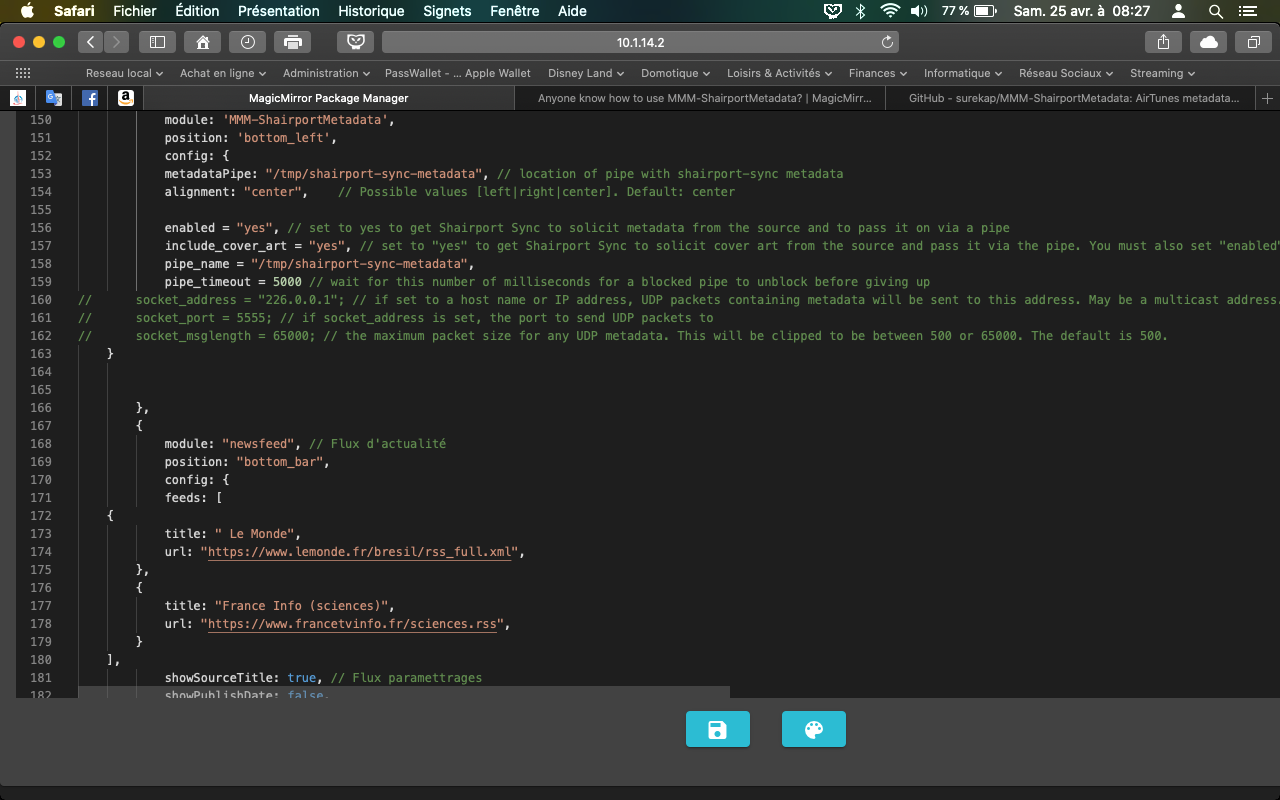
                                  @Sean Hello, and thank you for this module.
                                  I need your help because I don’t really understand how to add the code “metadata”

                                  Regards,

                                  Capture d’écran 2020-04-25 à 08.27.55.png

                                  1 Reply Last reply Reply Quote 0
                                  • M Offline
                                    monkeyjb123 @jmartin1009
                                    last edited by

                                    @jmartin1009 did you ever figure this out? Running into some trouble as well

                                    1 Reply Last reply Reply Quote 0

                                    Hello! It looks like you're interested in this conversation, but you don't have an account yet.

                                    Getting fed up of having to scroll through the same posts each visit? When you register for an account, you'll always come back to exactly where you were before, and choose to be notified of new replies (either via email, or push notification). You'll also be able to save bookmarks and upvote posts to show your appreciation to other community members.

                                    With your input, this post could be even better 💗

                                    Register Login

                                    • 1 / 1
                                    • First post
                                      Last post
                                    Enjoying MagicMirror? Please consider a donation!
                                    MagicMirror created by Michael Teeuw.
                                    Forum managed by Sam, technical setup by Karsten.
                                    This forum is using NodeBB as its core | Contributors
                                    Contact | Privacy Policy