Read the statement by Michael Teeuw here.
MMM-Carousel positional behaviour
-
Hi all
What’s the expected behaviour when using positional mode?
I have two modules with the same position, but Carousel isn’t rotating them. The two modules both appear on screen (stacked or located as you’d expect with two modules sharing the same position).
Should I expect them to appear like that at first, then end up rotating when the first rotation time period has taken place? Or should they rotate right from the start when MM is restarted?
Obviously they should EVENTUALLY rotate but it would help to know what the expected behaviour is.
config.js follows; any tips very welcome!
cheers
modules: [

	{
        module: 'MMM-Carousel',
        config: {
            transitionInterval: 5000,
	    ignoreModules: [],
            mode: 'positional',
            bottom_left: {enabled: true}
        }
    },

	{
		module: 'alert',
	},

	{
		module: 'clock',
		position: 'top_left'
	},
	{
		module: 'calendar',
		position: 'top_left',
		config: {
			calendars: [
				{
					symbol: 'calendar-check-o ',
					color: '#A7C5E3',
					url: '...'
				},
				{
					symbol: 'calendar-check-o ',
					color: '#AAAAAA',
					url: '...'
				}
			],
		maximumNumberOfDays: 7,
		maxTitleLength: 50,
		fetchInterval: 60000,
		fade:false,
		colored: true
		}
	},
	{
		module: 'compliments',
		position: 'lower_third',
		// position: 'middle_center',
		config: {
			remoteFile: 'compliments.json'
		}

	},
	{
		module: 'currentweather',
		position: 'top_right',
		config: {
			location: '...',
			locationID: '...',
			appid: '...',
			useBeaufort: false
		}
	},
	{
		module: 'weatherforecast',
		position: 'top_right',
		config: {
			location: '...',
			locationID: '...',
			appid: '...',
			showRainAmount: true,
			appendLocationNameToHeader: false,
			colored: true
		}
	},

	{
		module: 'MMM-daysToGo',
		position: 'top_center',
		config: {
    		targetDate: "2017-01-21 24:00:00",
    		toWhat: "...",
		present: "...",
		timesUp: "...",
		singular: "day to go!",
		plural: "days to go"
		}
	},


	{
		module: 'MMM-ImagesPhotos',
		position: 'bottom_left',
		config: {
			opacity: 0.9,
			animationSpeed: 500,
			updateInterval: 5000,
			getInterval: 10000,
			maxWidth: "35%"
		}
	},


	{
		module: 'MMM-TextFile',
		position: 'bottom_left',
		config: {
			remoteFile: 'jsonfile.json',
			updateInterval: 2000,
			header: ''
		}
	}

]
};
-
Did you find a solution to the problem? If so, please share!
-
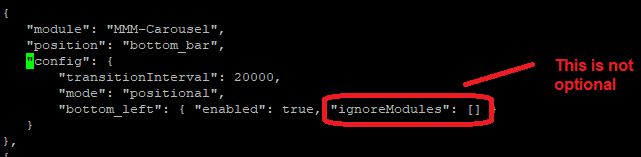
You have to specific the postion where you what to rotate
modules: [ { module: 'MMM-Carousel', config: { transitionInterval: 10000, ignoreModules: [], mode: 'positional', bottom_left: {enabled: true, ignoreModules: [], overrideTransitionInterval: 15000}, } } ] -
@Sonic @alang @Sun I have the same problem. I am just testing this so I am using the following but no matter what I do the modules stack. I have tried this as well as other modules (eg currentweather) and everything does the same. Is Carousel no longer working?
{ module: "weatherforecast", position: "bottom_left", header: "Weather Forecast", config: { location: "Brisbane", locationID: "2174003", appid: "secret!" } }, { module: "MMM-Bob-Ross", position: "bottom_left", config: { imgHeight: "30vh", videoHeight: "30vh", updateInterval: 1*60*60*1000, autoPlay: false } }, { module: 'MMM-Carousel', config: { transitionInterval: 10000, mode: 'positional', bottom_left: {enabled: true} } } -
Hello! It looks like you're interested in this conversation, but you don't have an account yet.
Getting fed up of having to scroll through the same posts each visit? When you register for an account, you'll always come back to exactly where you were before, and choose to be notified of new replies (either via email, or push notification). You'll also be able to save bookmarks and upvote posts to show your appreciation to other community members.
With your input, this post could be even better 💗
Register Login