Read the statement by Michael Teeuw here.
MMM-PIR-Sensor not working with latest release - display does not turn off
-
Dear all,
I’ve been using MM for over 1,5 years now. Unfortunately my SD card died yesterday so I took the opportunity to start from scratch.
I installed the latest release 2.7.1 on my RBPi 3. using the “Full KMS” OpenGl driver. Unfortunately my PIR Sensor does not work anymore as my display stays on all the time. Interestingly I’m able to turn the display on an off manually via SSH using
vcgencmd display_power 0vcgencmd display_power 1I already checked the wiring (which I actually did not change from my setup which was working for a long time) and I also checked the signal line of the PIR Sensor. Both are ok.
My configuration looks like this:
		{
			module: 'MMM-PIR-Sensor',
			config: {
				sensorPIN: 23,
				powerSavingDelay: 15
			}
		},
It would be great if someone could help me out as I’m clearly missing something…
-
@Kugelfang
Hi, I updated to 2.7.1 yesterday and also installed MMM-PIR-Sensor which works fine for me (https://youtu.be/5Cs3pCZamuM)
I am not using the Full KMS driver though
Did you follow these steps also:
Execute npm install to install the node dependencies.
Add your user (pi?) to the gpio group by executing sudo usermod -a -G gpio pi.
Execute sudo chmod u+s /opt/vc/bin/tvservice && sudo chmod u+s /bin/chvt to allow turning on/off the hdmi output.
Reboot your Pi. -
Yes, I did. to my best knowledge the tcservice does not work with the KMS driver.
Also looking into the details at GitHub I thought that MMM-PIR-Sensor actually uses the vcgencmd
-
@Kugelfang
I am really no expert at all but here is another tipp of mine:
I also use these modules to turn off my monitor:
MMM-ModuleScheduler + MMM-Remote-Control (at a certain time)
and MMM-NetworkScanner (when my phone is not connected to my WLAN) -
actually I checked the pm2 logs and found loots of this messages:
npm ERR! A complete log of this run can be found in:
npm ERR!     /home/pi/.npm/_logs/2019-04-03T22_01_36_315Z-debug.log
/home/pi/MagicMirror/node_modules/electron/dist/electron js/electron.js: symbol lookup error: /home/pi/MagicMirror/modules/MMM-PIR/node_modules/epoll/build/Release/epoll.node: undefined symbol: _ZN2v816FunctionTemplate3NewEPNS_7IsolateEPFvRKNS_20FunctionCallbackInfoINS_5ValueEEEENS_5LocalIS4_EENSA_INS_9SignatureEEEiNS_19ConstructorBehaviorENS_14SideEffectTypeE
npm ERR! file sh
npm ERR! code ELIFECYCLE
npm ERR! errno ENOENT
npm ERR! syscall spawn
npm ERR! magicmirror@2.7.1 start: `sh run-start.sh`
npm ERR! spawn ENOENT
npm ERR!
npm ERR! Failed at the magicmirror@2.7.1 start script.
npm ERR! This is probably not a problem with npm. There is likely additional logging output above.
does anybody know how to fix this?
-
@Kugelfang yes, you will need to install electron-rebuild in that module
from the MMM-PIR folder
npm install electron-rebuildthen run it to force the epoll rebuild
node_modules/.bin/electron-rebuild -
@sdetweil said in MMM-PIR-Sensor not working with latest release - display does not turn off:
node_modules/.bin/electron-rebuild
Holy SHIT that worked. I’m now using the MMM-PIR instead of the MMM-PIR-Sensor
thanks you so much!!!
EDIT:
for the record: there are two PIR modules avaliable: Initially I intended to go with MMM-PIR-Sensors as I’ve been using this in the past. Unfortunately I couldn’t get it to work with the newly installed setup. Hence I choose MMM-PIR.
Besides the suggestion from @sdetweil I also modified the displayOff.sh and displayON.sh from
tvservice -oto
vcgencmd display_power 0so the module works with the full KMS OpenGL driver.
-
-
@shgmongohh in the module folder
-
In which folder ?
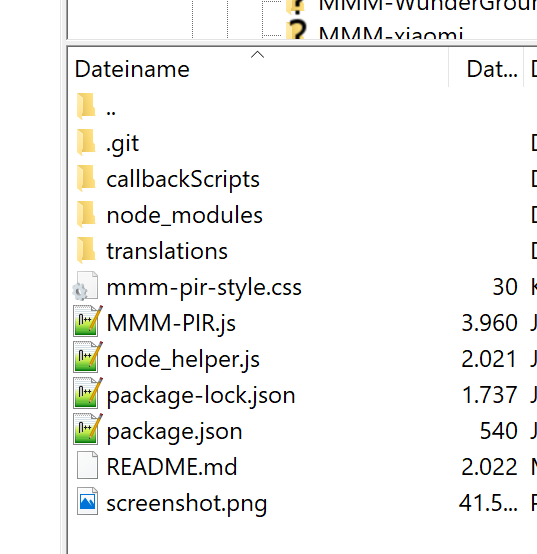
-
@shgmongohh too many pir modules
https://github.com/cowboysdude/Pir-Sensor has one
https://github.com/mboskamp/MMM-PIR has one, in callbackscripts folder

Hello! It looks like you're interested in this conversation, but you don't have an account yet.
Getting fed up of having to scroll through the same posts each visit? When you register for an account, you'll always come back to exactly where you were before, and choose to be notified of new replies (either via email, or push notification). You'll also be able to save bookmarks and upvote posts to show your appreciation to other community members.
With your input, this post could be even better 💗
Register Login