Read the statement by Michael Teeuw here.
2 Calendar modules do not line up
-
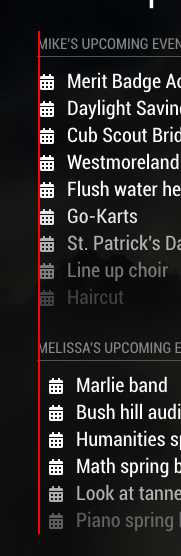
Any idea why these 2 calendar modules do not properly line up on the left? Note that the top one is a combination of 2 gmail and 1 work calendar and the bottom one is a iCloud calendar. But I do not see how that could possible matter. For some reason the 2nd calendar data is pushed to the left about 10px.
-
Seems this has taken care of itself. I suspect that the overall length of something was causing the issue but not sure what it was.
-
Actually no this has not fixed itself. It keeps coming back. I think it has to do with the time element on the righthand side.
Note that this is 2 different calendar modules running 1 - for myself and 1 for my wife. What I believe is happening is that when the time contains the string “Tomorrow at xx” or “Saturday at xx” in 1 of the calendars but not the other then the DIV and SPAN elements get pushed around causing the indention to get messed up.
If I put all of the calendar info into a single module then there are no problems.
Has anyone else seen this and if so how do you fix it?
-
Hey mlcampbe,
i have the same issue at my MM, but no idea how to fix this. I set up different time formats for different urls. But how can this effect the allignment of the left side?. -
@mr-fliffer
I never resolved the problem either. I went ahead and just used a single module for my purposes.
Hello! It looks like you're interested in this conversation, but you don't have an account yet.
Getting fed up of having to scroll through the same posts each visit? When you register for an account, you'll always come back to exactly where you were before, and choose to be notified of new replies (either via email, or push notification). You'll also be able to save bookmarks and upvote posts to show your appreciation to other community members.
With your input, this post could be even better 💗
Register Login