Read the statement by Michael Teeuw here.
MMM-Navigate, Navigation inside MagicMirror with Rotary Encoder
-
Here is my first module.
Description
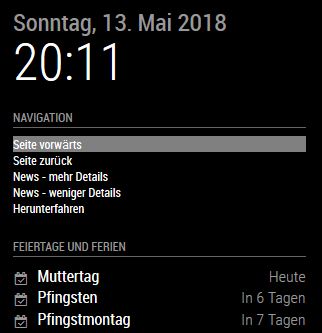
A module to connect a rotary encoder to MagicMirror and use it for Navigation inside of MagicMirror I wanted to use interaction to the MagicMirror and decided to use a rotary encoder, which has 3 functions: Clockwise, Counterclockwise and Press. These fucntions where combined to a navigation, so you have some possibilities, f.e.: Page increment/decrement, Newsfeed Article more/less details and actions for notification system. The navigation fades out, if not used.
Screenshot
Download
[card:Ax-LED/MMM-Navigate]
Update 06.06.2018
Version 1.1 is online
Changelog:- added ability to send notifications to MMM-Navigate by other modules
- added locked mode, so you can put two(2) actions in one(1) navigation link which belong together (like PAGE_INCREMENT and PAGE_DECREMENT). More details see Configuration options (Action).
- modified css, so locked mode is visual (red frame when locked) in MM
- added second click confirmation notification’ for the following REMOTE_ACTIONs (SHUTDOWN, RESTART, REBOOT)
Please let me know what you think.
AxLED
-
@axled said in MMM-Navigate, Navigation inside MagicMirror with Rotary Encoder:
@admins: How can i insert the github card for my module?
You use this code, just without spaces
[ card:Ax-LED/MMM-Navigate ] -
Thank you yawns
-
Hi to all,
version 1.1 is online, details see first topic of this thread.
AxLED
-
Hello,
I am using your module what is really great and works perfectly fine on my side.
I configure it to allow some others fonctions, after finding out that the fonctions from the module “MMM-Remote-Control” can be used on your navigation module. I also read part of the “node_helper.js” of this module to try to find out the possibilities avaliable.
This allow me to add the ability of “refresh” and “monitoroff” and “monitoron” on my navigation menu :
                {
                        module: "MMM-Navigate",
                        header: "Navigation",
                        position: "middle_center",
                        config: {
                                        Alias: [
                                                'Changer de Page (Press puis rotation)',
                                                'Luminosité écran (Press puis rotation)',
                                                'Afficher adresse Remote',
                                                'Ecran off/on (Press puis rotation)',
                                                'Recharger affichage',
                                                'Redemarrer le MagicMirror',
                                                'Reboot RPI',
                                                'Shutdown RPI'
                                        ],
                                        Action: [
                                                [{notification:'PAGE_INCREMENT',payload:''},{notification:'PAGE_DECREMENT',payload:''}],//action array, first press locks menu, after this rotation CW/CCW executes, second press release lo$
                                                [{notification: "REMOTE_ACTION", payload: {action: "BRIGHTNESS&value=100"}},{notification: "REMOTE_ACTION", payload: {action: "BRIGHTNESS&value=50"}}],
                                                {notification: "SHOW_ALERT", payload: {type:"notification",message:"http://192.168.xx.xx:8080/remote.html"}},//single action, execute on press
                                                [{notification: "REMOTE_ACTION", payload: {action: "MONITOROFF"}},{notification: "REMOTE_ACTION", payload: {action: "MONITORON"}}],
                                                {notification: "REMOTE_ACTION", payload: {action: "REFRESH"}},
                                                {notification: "REMOTE_ACTION", payload: {action: "RESTART"}},
                                                {notification: "REMOTE_ACTION", payload: {action: "REBOOT"}},
                                                {notification: "REMOTE_ACTION", payload: {action: "SHUTDOWN"}}
                                        ],
                                        GPIOPins: [26,20,19]//rotary cw, rotary ccw, rotary press (BCM Numbering)
                                        },
                },
But then I tried 2 others improvment that I couln’t fullfill :
- change the timer value to display the notification : to do so I add the value “timer” for the notification :
{notification: "SHOW_ALERT", payload: {type:"notification",message:"http://192.168.xx.xx:8080/remote.html",timer: 15}},But this had no impact…
- add the possibility to change the brightness of the screen directly from the navigation menu, to do so I tried :
[{notification: "REMOTE_ACTION", payload: {action: "BRIGHTNESS&value=100"}},{notification: "REMOTE_ACTION", payload: {action: "BRIGHTNESS&value=50"}}],but also :
[{notification: "REMOTE_ACTION", payload: {action: "BRIGHTNESS", value:100}},{notification: "REMOTE_ACTION", payload: {action: "BRIGHTNESS", value:50}}],but no way to make it work…
Would you have any advice how to realize such fonctions ?
Thank you in advance,
-
@AgP42
Hi,thanks for your request, i checked my code and can give you a solution for the brightness issue.
I found out, that it seems to be a problem with MMM-Remote-Control, node_helper.jsBut there is a workaround:
Replace line 618
res.send({"status": "success"});
through
if (res) { res.send({"status": "success"}); }Thanks to glitch452 who found the error, details see:
https://github.com/Jopyth/MMM-Remote-Control/issues/76Sample code for config.js, Module MMM-Navigate:
{notification: "REMOTE_ACTION", payload: {action: "BRIGHTNESS", value: "200"}},AxLED
-
Great ! Thank you so much !
But as said on the link you gave :
@axled said in MMM-Navigate, Navigation inside MagicMirror with Rotary Encoder:
Thanks to glitch452 who found the error, details see:
https://github.com/Jopyth/MMM-Remote-Control/issues/76the line to replace is
res.send({"status": "success"});and not
self.sendSocketNotification(query.action, query.value);Then it is working perfectly !
-
@AgP42
You are right, i told you the wrong line, i corrected my thread above.
I am glad it is working on your MM as needed.
AxLED -
Hi to all MM Builders,
i made an update to my module MMM-Navigate.
1.2 Changelog:
- tadded lock icon next to navigation alias, if locked
- code cleaned
Happy navigation.
AxLED
-
Hi,
i installed this module with the Rotary Encoder KY-040. Scroll through navigation work fine, but nothing happened, when I press the button on the encoder.
Test with Url (yourmmip:8080/remote?action=NOTIFICATION¬ification=PRESSED) works fine.
What could be the problem ??
-
@Eisblume
Did you use the right Pin (either in config or on the pi) for the ‘press’ signal of the rotary encoder?
Is the module MMM-Remote-Control installed and working?
AxLED -
Hi,
yes Pin 19, like you suggested. Everything else works fine, only the press action doesn’t work.
MMM-Remote-Control is installed.
I ordered a new Rotary Encoder, maybe this one I use has a defect .
Eisblume -
@Eisblume
You can also try to put clockwise or counterclockwise signal on pin 19 for testing, so cw or ccw should send the press command. So you can make sure if press switch of your rotary encoder is bad.
AxLED -
Thx for support !!
I will try and report !!
-
@AxLED
I bought some new Rotary Encoders and with each one i had the same result. No press result will send, when i press the button :-( !But when i put cw or cww on pin 19, the press signal will send when i turn cw or cww.
I tried other Pins for the press Signal, but it also doesn´t work.
I am confused…! Any ideas what i can try to solve my Problem?
Greets
Eisblume -
@Eisblume
So the pin is correct. Some ideas.
Press contains two operations, pressing and release. Did you try press and release in different speeds?
How long are your cables between rotary and pi? Could also be a debouncing problem. Which pi are you using? (I tested the module on pi 1 and pi 3).
AxLED -
@AxLed
I use a Raspberry Pi 3 b+. The F2F cables between the rotary and the pi are 20cm long.
I tried different speeds for pressing and releasing.When i debug the code, no action arrives when i press the button.
Is it possible that there are problem with other modules I use ??
Eisblume
-
@Eisblume
Conflicts with other modules are possible, but i dont think so, because press on cw/ccw works. You can try to change debounce time in node helper (i think, i am not sure about as i am on the road right now). I will check for the final line in node helper and let you know if i am in front of my computer.
AxLED -
@Eisblume
I found the line in node_helper.js, its line 35const C = new Gpio(self.config.GPIOPins[2], 'in', 'both',{debounceTimeout : 20 }); //BCM Pin 19Here you can try to increase/reduce the debounceTimeout between 10 and 50 (in steps of 10) and see if there is a difference for your “pressed” problem.
AxLED
-
@AxLed
I tried every very with different press speed. It doesn’t work. No press Signal will be sent :-(I don´t understand why cw and cww works fine, but not the press - Button?
Edit:
I test the Rotary with this: https://github.com/martinohanlon/KY040
Here the press button works fine.pi@raspberrypi:~/EncoderTest/KY040/examples $ python python3.py
turned - 0
turned - 0
turned - 1
turned - 1
button pressed
button pressed
button pressed
button pressed
button pressed
button pressed
Hello! It looks like you're interested in this conversation, but you don't have an account yet.
Getting fed up of having to scroll through the same posts each visit? When you register for an account, you'll always come back to exactly where you were before, and choose to be notified of new replies (either via email, or push notification). You'll also be able to save bookmarks and upvote posts to show your appreciation to other community members.
With your input, this post could be even better 💗
Register Login