Read the statement by Michael Teeuw here.
Raspberry Pi 4 Released !
-
@Cr4z33 ho ho, hold on you’re quite fast here with your conclusions.
What else should one do to deliver the picture via HDMI?Have you heard of more people having problems with HDMI adapters and the Pi 4?
-
@dazza120 said in Raspberry Pi 4 Released !:
Can I just upgrade the Pi 3 to the Buster OS so i can just swap the ssd over. Can someone confirm if it’s a plug and play boot from OS on an SSD? Rather than through the bios bit to enable it. Really looking forward to this PI I might get a heat sink but I want a big one not the little ones, need to see if I still have the one from the sky box, got a fan already for it but only activates when the TV is on
No you can’t!
But I guess you know that by now.Buster on the Pi3B+ and Buster on the Pi 4 need different kernel drivers.
So just switching the card won’t work.
A clean install is the best way at least on the Pi 4.
After all you can try to just move the MM directory to the Pi 4, but honestly I would install the modules and dependencies again as well. -
@lavolp3 said in Raspberry Pi 4 Released !:
@dazza120 said in Raspberry Pi 4 Released !:
Can I just upgrade the Pi 3 to the Buster OS so i can just swap the ssd over. Can someone confirm if it’s a plug and play boot from OS on an SSD? Rather than through the bios bit to enable it. Really looking forward to this PI I might get a heat sink but I want a big one not the little ones, need to see if I still have the one from the sky box, got a fan already for it but only activates when the TV is on
No you can’t!
But I guess you know that by now.Buster on the Pi3B+ and Buster on the Pi 4 need different kernel drivers.
So just switching the card won’t work.
A clean install is the best way at least on the Pi 4.
After all you can try to just move the MM directory to the Pi 4, but honestly I would install the modules and dependencies again as well.Yeah learnt this the hard way 😂, but right now I can’t even use my pi 4 I need boot from usb as that’s how I’m running my 3B+ Also need my heat sinks to come in so I can see what one to use
-
@dazza120 I’m afraid a heatsink won’t help much but am curious about your results. I haven’t had good results with heatsinks in the past.
-
@lavolp3 said in Raspberry Pi 4 Released !:
@Cr4z33 ho ho, hold on you’re quite fast here with your conclusions.
What else should one do to deliver the picture via HDMI?Have you heard of more people having problems with HDMI adapters and the Pi 4?
Yes on a Rpi Facebook group.
It surely might depend also on what adapter you are going to use, but don’t expect 100% guarantee that it will work fine at 4K@60Hz.
I spent € 7,00 for that crap adapter, sent it back to Amazon and got a proper micro HDMI to HDMI cable certified for 4K for the same amount.
-
@lavolp3 said in Raspberry Pi 4 Released !:
@dazza120 I’m afraid a heatsink won’t help much but am curious about your results. I haven’t had good results with heatsinks in the past.
Only because you haven’t seen my thermal solution lol, this is one seriously hot chip, had it upto 82 for one reading on the stress test but still at 1.5Ghz on the CPU after that reading it dropped to 80degress this is with just the heat sink no fan. 82degress was during my second stress test and that was just one reading the gap between tests was about 30seconds during both tests no CPU throttling happened. I have put a cable tie around the board and heatsink to keep the pressure on it so it transfers good heat. Not the prettiest but behind a tv well it’s not out of place at all. PS the stress test is 100% cpu usage and no let up during the test had task manager up and CPU usage never fell below 💯
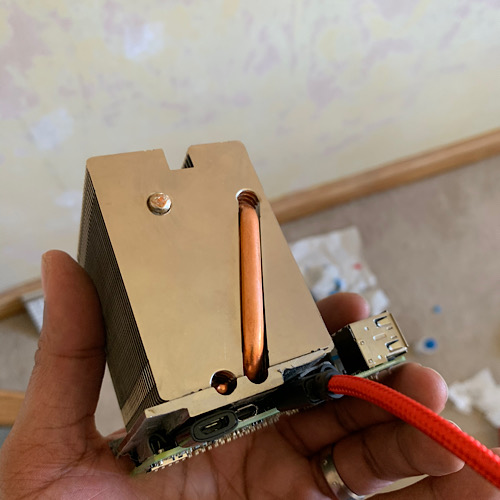
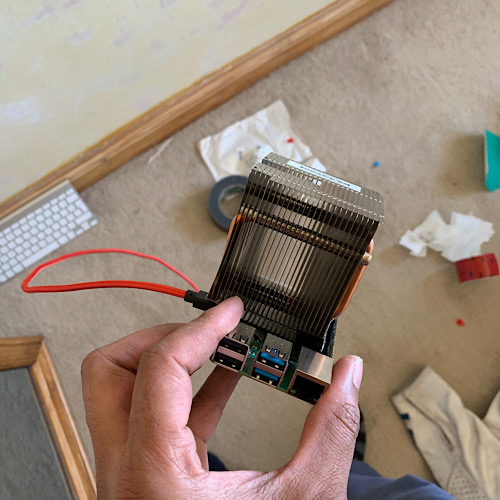
PS works fine on HDMI cable no issues at all
-
@dazza120 what heatsink beast is that? :grinning_face_with_smiling_eyes:
-
@Cr4z33 said in Raspberry Pi 4 Released !:
@dazza120 what heatsink beast is that? :grinning_face_with_smiling_eyes:
😂 it’s from a HP comp pro 6300 fits the LGA1155 socket, had to grind a bit by the hdmi port to fit the cable but no issues at the back by the pins I put duct tape so it doesn’t get into any trouble back there. Those cheap ally cast heatsinks would have died long time heat pipes in cooling makes a lot of difference
-
@dazza120 lol I see.
I wanted to preorder a Flirc Rpi4 metal case, but shipping is costing TWICE the value of the case…
-
@Cr4z33 said in Raspberry Pi 4 Released !:
@dazza120 lol I see.
I wanted to preorder a Flirc Rpi4 metal case, but shipping is costing TWICE the value of the case…
Flirc case is the same it’s too hard to cool once heated no fins no way for it to shift it once upto temp you get the run away temp where it just keeps rising. My solution has no such issues even though it was like out of one of Linus Tech Tips handbooks lol. I would like to see any other heatsink or case do 20min stress test 😂 and my temp in the house is 26.5c so that’s dam good going
-
@dazza120 and how did you fix the heatsink to the board?
-
@Cr4z33 said in Raspberry Pi 4 Released !:
@dazza120 and how did you fix the heatsink to the board?
Thermal tape and a cable tie around the board and heat sink as long as the pi isn’t viewable then it doesn’t really matter it is a lot taller with the heat sink though. But at least if you really wanted to you could run this passively, I will have a little fan as well but that works when the tv is on so running the mirror in the background would be all of this heat sink no fan
-
@dazza120 oh alright that’s the same solution I used with another board. 👍🏼
-
@Cr4z33 said in Raspberry Pi 4 Released !:
@dazza120 oh alright that’s the same solution I used with another board. 👍🏼
PS you will have to grid down the heat sink by the hdmi cable and the wings to allow it to fully seat the heat sink
-
@Cr4z33 said in Raspberry Pi 4 Released !:
@dazza120 oh alright that’s the same solution I used with another board. 👍🏼
@Cr4z33 new heat sink now an it sits flush with one thermal pad temp is 78 after two tests back to back better contact with CPU and less thermal transfer material.
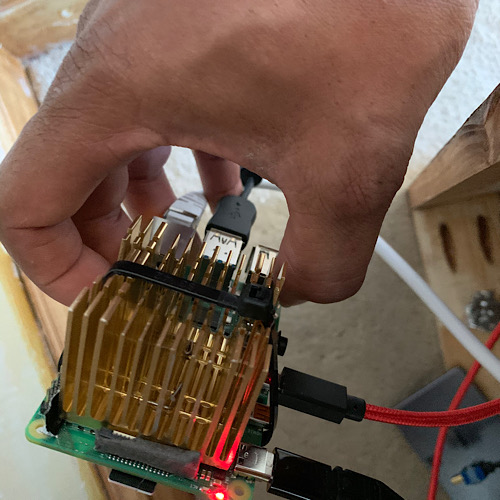
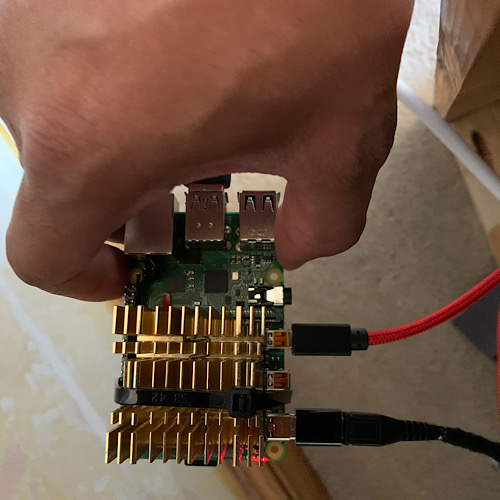
-
@dazza120 I assume we dont need all that cooling power just to run the mirror? :rolling_on_the_floor_laughing:
-
@mumblebaj said in Raspberry Pi 4 Released !:
@dazza120 I assume we dont need all that cooling power just to run the mirror? :rolling_on_the_floor_laughing:
😂 no but the Pi 4 is a really hot 🥵 CPU where cooling is most defo needed with heat sink it’s 55 at rest, others have reported it at 66 at rest and in a case at 77 heatsink is a must on this one. The second heatsink is more in line and I was able to bed it fully down with one thermal pad. Installing an update ie firmware took over 5mins on full gig and using 60 to 70% CPU that’s a lot of heat seen as my active cooling solution is only active with the TV on for the most part it will be passive, in the UK at the mo we are having a good summer so it’s hot room temp 25 so bigger the better 😝
-
Hi,
I am in the beginning of my first MM project and would like to buy a Pi 4. What RAM would you recommend? Shall I go with the 4GB or is 2 more than enough?
Thank you -
@MajorC I would just go with the 4GB version as it is not a massive difference in price. Now that the Pi has better graphics we are likely going to see much more capable and sophisticated modules. I’m thinking in particular things like facial recognition can get to the point where it is much more responsive than it is today (not sure if the extra memory helps in this particular scenario, but it’s just one example of many I’m sure).
Given how long it took for the 4 to be released, you’re better off future proofing yourself as much as you can now. It would be a shame to be handcuffed by a relatively inexpensive option you decided not to get.
If you haven’t built a mirror yet, you’ll find that the price of the Pi is one of the least expensive parts of the project. Go with the best available.
-
@j-e-f-f thank you. I found some play-money today and can start the first step now. Buy a Pi and try out the software.



Hello! It looks like you're interested in this conversation, but you don't have an account yet.
Getting fed up of having to scroll through the same posts each visit? When you register for an account, you'll always come back to exactly where you were before, and choose to be notified of new replies (either via email, or push notification). You'll also be able to save bookmarks and upvote posts to show your appreciation to other community members.
With your input, this post could be even better 💗
Register Login