Read the statement by Michael Teeuw here.
MMM-CalendarExt2: Module not showing
-
I have used MMM-CalendarExt before and now I try to change to MMM-CalendarExt2, but I don’t manage to get it showing.
This is my module config:modules: [ { module: "alert", }, { module: "updatenotification", }, { module: 'MMM-CalendarExt2', position: 'middle_center', config: { calendars : [ { name: "flemming_privat", url: "webcal://www.google.com/calendar/ical/flemmingss%40gmail.com/private-XXX/basic.ics", }, { name: "flemming_jobb", url: "https://calendar.google.com/calendar/ical/XXX%40group.calendar.google.com/private-XXX/basic.ics", }, { name: "flemming_facebook", url: "webcal://www.facebook.com/ical/u.php?uid=XXX&key=XXX", }, ], views: [ { mode: "month", }, ], scenes: [ { name: "DEFAULT", }, ], }, }, ]And this is what I see:

Anyone spot a mistake? The url’s are the same as in the old module, and the config is exact as the readme describes as basic config
-
problem detected :D
turns out MMM-CalendarExt2 did not support webcal:// like MMM-CalendarExt. Så I replaced all webcall;// with https:// and now it works. -
views: [ { mode: "month", calendars: [], }, ], scenes: [ { views: [], }, ], -
I have the same problem as above post.
This is my module config:
{
		  module: 'MMM-CalendarExt2',
		position: 'top_left',
		  config: {
		    calendars : [
			{
			    name: "US holiday",
			    icon: "noto-beach-with-umbrella",
			    className: "holiday",
			    url: "http://www.calendarlabs.com/templates/ical/US-Holidays.ics",
			  },
		    ],
		    views: [
		      {
			mode: "month",
			calendars: [],
		      },
		    ],
		    scenes: [
		      {
			views: [],
		      },
		    ],
		  },
		},
WIth this code I get the same picture as above.
I have no problem with the standard calendar.
-
- Remove module position. This module doesn’t need position of module itself. Instead, set the position of each view in view configuration.
- Your ical is not valid. It seems out-of-date. There is no valid events to load on this period.
Use other url likehttp://www.calendarlabs.com/ical-calendar/ics/76/US_Holidays.icsinstead of yours.
Then, it will show like this;
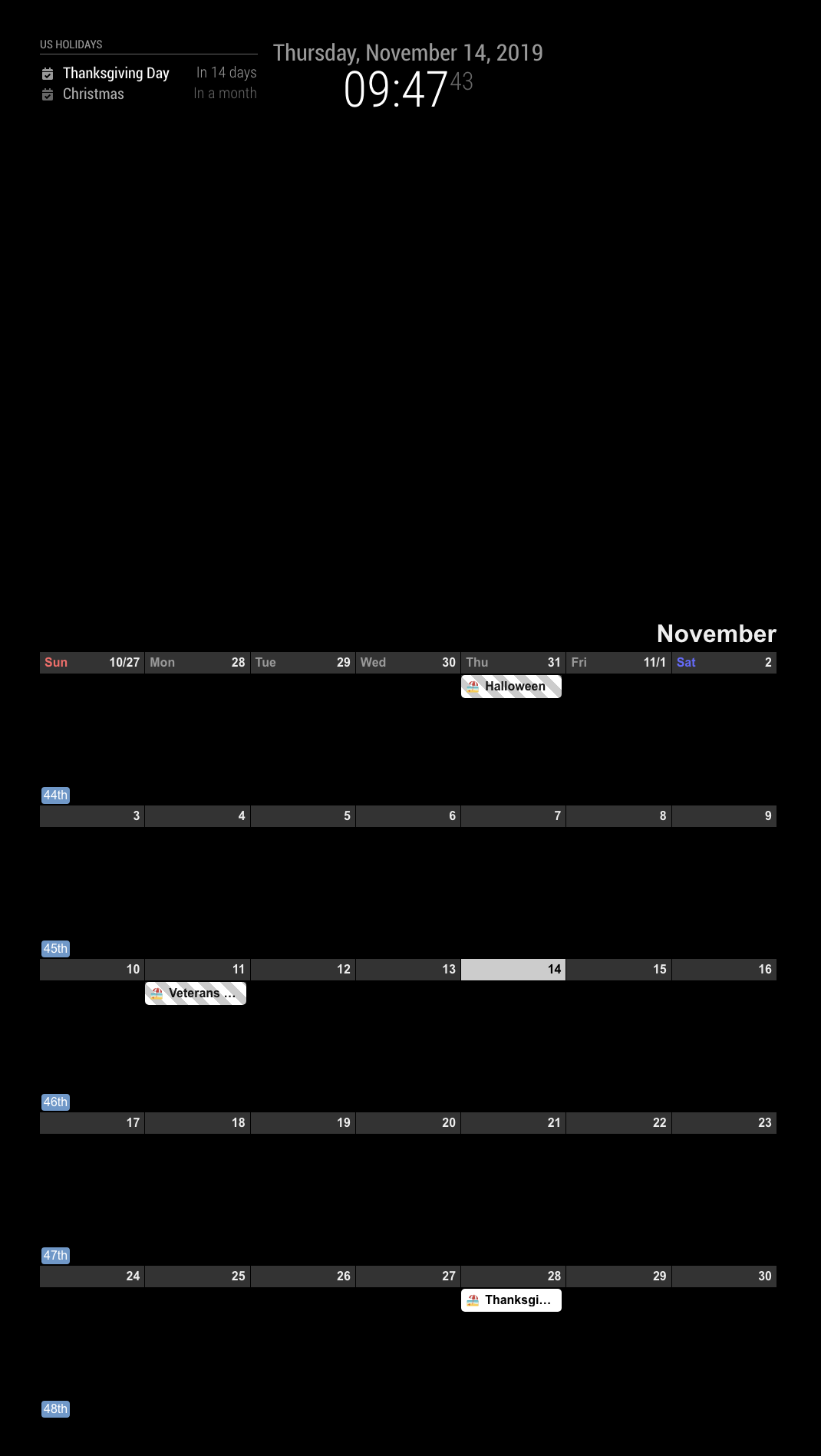
(I assignedbottom_baras the position of the view) -
@Sean said in MMM-CalendarExt2: Module not showing:
Jus t a black screenviews: [
{
mode: “month”,
calendars: [],
},
],
scenes: [
{
views: [],
},
],/* Magic Mirror Config Sample * * By Michael Teeuw http://michaelteeuw.nl * MIT Licensed. * * For more information how you can configurate this file * See https://github.com/MichMich/MagicMirror#configuration * */ var config = { address: "localhost", // Address to listen on, can be: // - "localhost", "127.0.0.1", "::1" to listen on loopback interface // - another specific IPv4/6 to listen on a specific interface // - "", "0.0.0.0", "::" to listen on any interface // Default, when address config is left out, is "localhost" port: 8080, ipWhitelist: [], // Set [] to allow all IP addresses // or add a specific IPv4 of 192.168.1.5 : // ["127.0.0.1", "::ffff:127.0.0.1", "::1", "::ffff:192.168.1.5"], // or IPv4 range of 192.168.3.0 --> 192.168.3.15 use CIDR format : // ["127.0.0.1", "::ffff:127.0.0.1", "::1", "::ffff:192.168.3.0/28"], language: "nb", timeFormat: 24, units: "metric", modules: [ { module: "alert", }, { module: "updatenotification", }, { module: 'MMM-CalendarExt2', config: { views: [ { mode: "month", calendars: [ { name: "flemming_privat", url: "webcal://www.google.com/calendar/ical/flemmingss%40gmail.com/private-XXX/basic.ics", }, { name: "flemming_jobb", url: "https://calendar.google.com/calendar/ical/XXX%40group.calendar.google.com/private-XXX/basic.ics", }, { name: "flemming_facebook", url: "webcal://www.facebook.com/ical/u.php?uid=XXX&key=XXX", }, }, ], scenes: [ { views: [], }, ], }, }, ] }; /*************** DO NOT EDIT THE LINE BELOW ***************/ if (typeof module !== "undefined") {module.exports = config;} -
problem detected :D
turns out MMM-CalendarExt2 did not support webcal:// like MMM-CalendarExt. Så I replaced all webcall;// with https:// and now it works.
Hello! It looks like you're interested in this conversation, but you don't have an account yet.
Getting fed up of having to scroll through the same posts each visit? When you register for an account, you'll always come back to exactly where you were before, and choose to be notified of new replies (either via email, or push notification). You'll also be able to save bookmarks and upvote posts to show your appreciation to other community members.
With your input, this post could be even better 💗
Register Login