MagicMirror Forum
    • Recent
    • Tags
    • Unsolved
    • Solved
    • MagicMirror² Repository
    • Documentation
    • 3rd-Party-Modules
    • Donate
    • Discord
    • Register
    • Login
    A New Chapter for MagicMirror: The Community Takes the Lead
    Read the statement by Michael Teeuw here.

    CSS Colur description

    Scheduled Pinned Locked Moved Custom CSS
    9 Posts 3 Posters 3.1k Views 2 Watching
    Loading More Posts
    • Oldest to Newest
    • Newest to Oldest
    • Most Votes
    Reply
    • Reply as topic
    Log in to reply
    This topic has been deleted. Only users with topic management privileges can see it.
    • V Offline
      Vauxdvihl
      last edited by

      Hi friends,

      i have a simple question.
      I am using @Sean calendarext2 module and i want to change some colors
      Currently i am using as a reference this page here:
      https://wiki.selfhtml.org/wiki/Grafik/Farbpaletten

      But i want to have a grey and a brown.
      I do not find these ones in the above standing link

      Can please somebody help me

      Thanks a lot

      brobergB 1 Reply Last reply Reply Quote 0
      • brobergB Offline
        broberg Project Sponsor @Vauxdvihl
        last edited by

        @Vauxdvihl

        go to : https://rgbcolorcode.com/

        There you can pick the color you want and then you use the codes to the right
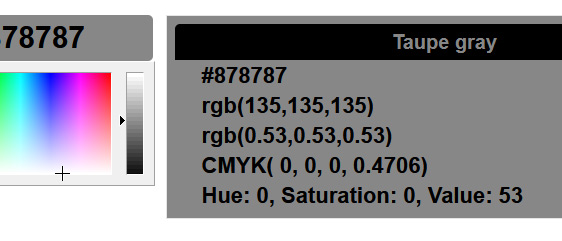
        0_1574239422834_coolorgef.jpg

        instead of using the color names

        color: red
        

        You can use Hexadecimal

        color: #FF0000
        

        Or RGB

        color: rgb(255,0,0)
        

        or RGBA (if you want the text to be translucent)

        color: rgba(255,0,0,0.8)
        

        (you can use many more, but these will do you just fine)

        1 Reply Last reply Reply Quote 2
        • V Offline
          Vauxdvihl
          last edited by

          Thanks for the answer

          But the calendar ext 2 supports only 3 digits

          .CX2 .AbfallRest {
            background-color:#330;
            color:#FFF;
           }
          

          Any other Idea?
          Thanks

          brobergB 1 Reply Last reply Reply Quote 0
          • brobergB Offline
            broberg Project Sponsor @Vauxdvihl
            last edited by

            @Vauxdvihl …

            It’s not special in any way, it’s just css and it can take whatever the css standard does.
            So yes, it will take all the different options I wrote in my answer.

            The three digit HEX (#FFF) is just a shorter (and less exact) version of the six digit HEX, like this

            #FFF is the same as #FFFFFF
            #330 is the same as #333300

            But you can’t get exact colors, you can only get a rough version of the colors, the 3 digit HEX is limited in that regard.

            1 Reply Last reply Reply Quote 1
            • brobergB Offline
              broberg Project Sponsor
              last edited by

              here is a list over the different values you can use in any option with colors in css : https://www.w3schools.com/cssref/css_colors_legal.asp

              1 Reply Last reply Reply Quote 1
              • V Offline
                Vauxdvihl
                last edited by

                @broberg
                Thanks a lot for your help
                but one question
                i want to have a “brown” like 8B 45 13
                What is here the 3 digit hex ;-)
                Thanks

                S brobergB 2 Replies Last reply Reply Quote 0
                • S Do not disturb
                  sdetweil @Vauxdvihl
                  last edited by

                  @Vauxdvihl find a hex to decimal converter

                  8b is 139

                  Sam

                  How to add modules

                  learning how to use browser developers window for css changes

                  1 Reply Last reply Reply Quote 0
                  • brobergB Offline
                    broberg Project Sponsor @Vauxdvihl
                    last edited by broberg

                    @Vauxdvihl just use that hex code, I don’t see why you would bother trying to use a three digit hex when you can’t get that color with just the three digit hex.

                    Slap a # on it and be done. (#8B4513)

                    And the closest three digit code is easily done by removing the second character in the pair.

                    So
                    8B would be 8
                    45 would be 4
                    13 would be 1

                    But this will result in #884411 instead of #8B4513.

                    1 Reply Last reply Reply Quote 0
                    • V Offline
                      Vauxdvihl
                      last edited by

                      @broberg
                      Thanks a lot
                      it is now clear

                      1 Reply Last reply Reply Quote 0

                      Hello! It looks like you're interested in this conversation, but you don't have an account yet.

                      Getting fed up of having to scroll through the same posts each visit? When you register for an account, you'll always come back to exactly where you were before, and choose to be notified of new replies (either via email, or push notification). You'll also be able to save bookmarks and upvote posts to show your appreciation to other community members.

                      With your input, this post could be even better 💗

                      Register Login

                      • 1 / 1
                      • First post
                        Last post
                      Enjoying MagicMirror? Please consider a donation!
                      MagicMirror created by Michael Teeuw.
                      Forum managed by Sam, technical setup by Karsten.
                      This forum is using NodeBB as its core | Contributors
                      Contact | Privacy Policy