MagicMirror Forum
    • Recent
    • Tags
    • Unsolved
    • Solved
    • MagicMirror² Repository
    • Documentation
    • 3rd-Party-Modules
    • Donate
    • Discord
    • Register
    • Login
    A New Chapter for MagicMirror: The Community Takes the Lead
    Read the statement by Michael Teeuw here.

    Raspbian is fullscreen, but the MM not

    Scheduled Pinned Locked Moved Unsolved Troubleshooting
    13 Posts 5 Posters 3.1k Views 4 Watching
    Loading More Posts
    • Oldest to Newest
    • Newest to Oldest
    • Most Votes
    Reply
    • Reply as topic
    Log in to reply
    This topic has been deleted. Only users with topic management privileges can see it.
    • C Offline
      Clubjack
      last edited by

      Hey.
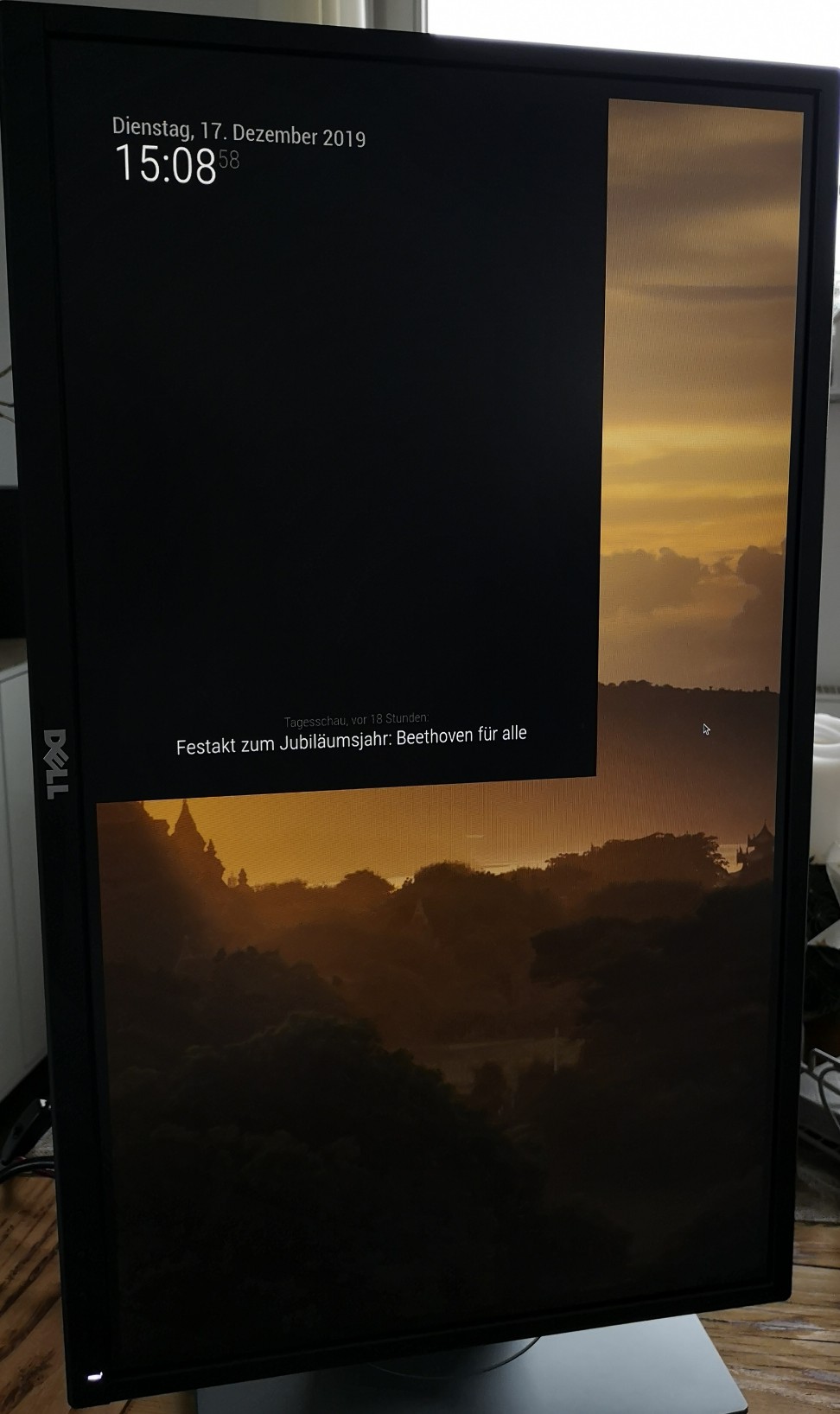
      I have a Problem with the Resolution from the MM Window.

      I changed in all config (raspbian-config, config.txt the Resolution to 1920x1080.
      The system runs fullscreen, but MM not.
      Somebody have an idea?
      0_1576592091010_IMG_20191217_151342-972x1636.jpg

      ? 1 Reply Last reply Reply Quote 0
      • ? Offline
        A Former User @Clubjack
        last edited by

        @Clubjack
        Is the monitor UHD(4K)?

        C 1 Reply Last reply Reply Quote 0
        • C Offline
          Clubjack @Guest
          last edited by

          @Sean
          No… Only full HD.

          S 1 Reply Last reply Reply Quote 0
          • S Offline
            sdetweil @Clubjack
            last edited by sdetweil

            @Clubjack part of the raspi buster setup asks you if you see a border around the screen, if so (looks like yes) it adjusts the overscan

            to fix, from the buster desktop, top left menu, select Preferences, Configuration, then System, screen overscan

            sorry, pic says that is not the problem… MM doesn’t understand rotated to portrait mode

            Sam

            How to add modules

            learning how to use browser developers window for css changes

            S 1 Reply Last reply Reply Quote 0
            • S Offline
              sdetweil @sdetweil
              last edited by

              @Clubjack how did u rotate the screen?

              Sam

              How to add modules

              learning how to use browser developers window for css changes

              B 1 Reply Last reply Reply Quote 0
              • B Offline
                BD0G @sdetweil
                last edited by BD0G

                @sdetweil Here is how I rotated mine and probably the same method was used.

                https://www.youtube.com/watch?v=pCB-CHvc6j0

                The video also discusses removing the black border as well.

                1 Reply Last reply Reply Quote 0
                • C Offline
                  Clubjack
                  last edited by

                  Hey.
                  I have no Problems with Black border.
                  Raspbian is fullscreen.
                  But MM is only in a small Window.

                  1 Reply Last reply Reply Quote 0
                  • T Offline
                    teandryk
                    last edited by

                    Have the same issue and can’t seem to find the answer. Did anyone figure out how to fix it? Can you share, please?

                    S 1 Reply Last reply Reply Quote 0
                    • S Offline
                      sdetweil @teandryk
                      last edited by

                      @teandryk do this

                      stop mm

                      cd ~
                      rm -rf .config/Electron
                      

                      note the dot in front of config

                      restart mm

                      Sam

                      How to add modules

                      learning how to use browser developers window for css changes

                      1 Reply Last reply Reply Quote 0
                      • T Offline
                        teandryk
                        last edited by

                        Thanks for the fast reply but it does not work. I done

                        cd ~
                        pm2 stop mm.sh
                        rm -rf .config/Electron
                        pm2 start mm.sh

                        and still have 600x800

                        S 1 Reply Last reply Reply Quote 0
                        • S Offline
                          sdetweil @teandryk
                          last edited by

                          @teandryk are u on the pi display or over vnc

                          Sam

                          How to add modules

                          learning how to use browser developers window for css changes

                          1 Reply Last reply Reply Quote 0
                          • T Offline
                            teandryk
                            last edited by

                            fount it,
                            in ~/MagicMirror/js/electron.js in

                            function createWindow()
                            …
                            width: 800,
                            height: 600,
                            …

                            To get the current resolution:

                            fbset

                            S 1 Reply Last reply Reply Quote 0
                            • S Offline
                              sdetweil @teandryk
                              last edited by

                              @teandryk u can set that in config.js

                              electronOptions: {width: xxx, height: yyy},

                              but it should have done it automatically

                              Sam

                              How to add modules

                              learning how to use browser developers window for css changes

                              1 Reply Last reply Reply Quote 0

                              Hello! It looks like you're interested in this conversation, but you don't have an account yet.

                              Getting fed up of having to scroll through the same posts each visit? When you register for an account, you'll always come back to exactly where you were before, and choose to be notified of new replies (either via email, or push notification). You'll also be able to save bookmarks and upvote posts to show your appreciation to other community members.

                              With your input, this post could be even better 💗

                              Register Login

                              • 1 / 1
                              • First post
                                Last post
                              Enjoying MagicMirror? Please consider a donation!
                              MagicMirror created by Michael Teeuw.
                              Forum managed by Sam, technical setup by Karsten.
                              This forum is using NodeBB as its core | Contributors
                              Contact | Privacy Policy