Read the statement by Michael Teeuw here.
MMM-Spotify
-
@t-architecture99
Maybe your ‘spotify.config.json’ would be wrong. Check it again. -
Hi did you figure this out, I’m stuck at this very same issue, I have Spotify working . how do I get voice assistant to integrate, do I modify the config.js file or the AssistantMK2.json file…??
-
Having an issue with the song info showing up on the MM.
I have everything installed correctly ( to my knowledge, or else it would work right?) and have the white Spotify symbol.
I entered my Client ID and Secret.
Callback and port are in there. I authorized through Spotify…
Not sure what i am missing…Help?
{
  			module: "MMM-Spotify",
  			position: "bottom_left",
  			config: {
    				style: "mini", // "default" or "mini" available
    				control: "default", //"default", "hidden" available
    				updateInterval: 1000,
    				onStart: null, // disable onStart feature with `null`
    				allowDevices: [], //If you want to limit devices to display info, use this.
    				// allowDevices: ["RASPOTIFY", "My iPhoneX", "My Home speaker"],
  				}
		},
{ "CLIENT_ID" : "xxxx", "CLIENT_SECRET" : "xxxx", "AUTH_DOMAIN" : "http://localhost", "AUTH_PATH" : "/callback", "AUTH_PORT" : "8888", "SCOPE" : "user-read-private app-remote-control playlist-read-private streaming user-read-playback-state user-modify-playback-state", "TOKEN" : "./token.json" } -
@bminer1
Tell me more details. What happens on MagicMirror when you activate your spotify app on your smartphone? -
@Sean i restarted the pi and my computer that is running the spotify. Everything is running and working as it should. buttons work, displays very well and its all good. Sorry, for the false alarm. noob moment.
-
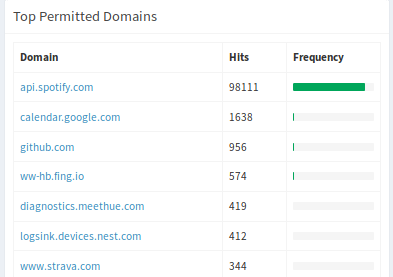
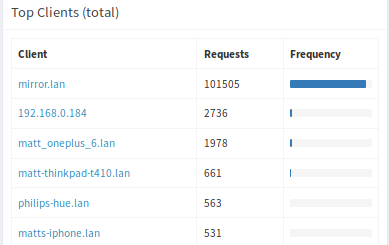
Love the module, but noticed it makes the mirror by far the noisiest device on my network. Any idea why it talks so much to the spotify api?
-
@matt216
Because, Spotify playback API doesn’t be designed topushthe status to the caller. The module should usepoolingto getCURRENTplayback status whenever it is needed. Set bigger value toupdateInterval. -
@Sean thanks, appreciate the reply. Makes sense!
-
Hello,
i am using your Module a couple of Months, it always worked well…
…but since the last Update, it “hangs” after a couple of Minutes, which means,
it still shows up, but the Title-Information and the Time is frozen.
I am using MMM-Spotify and MMM-NowPlayingOnSpotify (I also use MMM-Carousel,
so I have different “screens” on which I use both Modules, but not simultaneously.
While MMM-Spotify is “freezing”, MMM-NowPlayingonSpotify is going on well…They worked BOTH OK, before the Update…
Any Ideas?
-
@Mondfisch
Hmmm. A recent update was for just multi-account supporting. Can you show backend log when it happened? -
Thank you for answering…
I´m not sure which log do you mean… Can you give me a path, i will post it, then…
-
I have similar situation like @Mondfisch described. And once problem appears, I got below log:
[15:46:23.437] [LOG] [SPOTIFY] API Request fail on : /v1/me/player
[15:46:23.440] [LOG] { Error: Client network socket disconnected before secure TLS connection was established
at TLSSocket.onConnectEnd (_tls_wrap.js:1092:19)
at Object.onceWrapper (events.js:273:13)
at TLSSocket.emit (events.js:187:15)
at endReadableNT (_stream_readable.js:1090:12)
at process._tickCallback (internal/process/next_tick.js:63:19)
code: ‘ECONNRESET’,
path: null,
host: ‘api.spotify.com’,
port: 443,
localAddress: undefined } undefined
[15:46:23.458] [LOG] Whoops! There was an uncaught exception…
[15:46:23.461] [ERROR] TypeError: Cannot read property ‘statusCode’ of undefined
at Request.request [as _callback] (/home/pi/MagicMirror/modules/MMM-Spotify/Spotify.js:199:34)
at self.callback (/home/pi/MagicMirror/node_modules/request/request.js:185:22)
at Request.emit (events.js:182:13)
at Request.onRequestError (/home/pi/MagicMirror/node_modules/request/request.js:881:8)
at ClientRequest.emit (events.js:182:13)
at TLSSocket.socketErrorListener (_http_client.js:382:9)
at TLSSocket.emit (events.js:182:13)
at emitErrorNT (internal/streams/destroy.js:82:8)
at emitErrorAndCloseNT (internal/streams/destroy.js:50:3)
at process._tickCallback (internal/process/next_tick.js:63:19)
[15:46:23.470] [LOG] MagicMirror will not quit, but it might be a good idea to check why this happened. Maybe no internet connection?
[15:46:23.472] [LOG] If you think this really is an issue, please open an issue on GitHub: https://github.com/MichMich/MagicMirror/issues
[16:09:49.712] [LOG] Shutting down server…I tried to uninstall and install the module, but no luck, the problem keeps exist. Not sure if there is any solution on it.
-
@woodstock37
Try to setupdateInterval:to 2000 or 3000. I’ll inspect later. -
@Sean Thanks for your suggestion. It definitely helps. Thanks.
-
Re: [MMM - Spotify]
Hi @Sean
Just a suggestion, If you could include the heart/like button on the controls (to add the current song to your liked playlist)Thanks!
p.s installed and works perfectly with 2 accounts!
-
Hi @Sean, I just have a question I read the whole forum but I did not find the answer.
I installed Raspotify on my Raspberry pi, but when I launch my mirror, I cannot launch music by saying “music play”, only from my phone, once I have started the music from my phone and I connect it on raspotify I can change the music as well as all the other commands.
And spotify does not launch with onStart.{ module: "MMM-Spotify", position: "bottom_left", config: { style: "mini", // "default" or "mini" available control: "hidden", //"default", "hidden" available updateInterval: 1000, onStart: { deviceName: "RASPOTIFY", //if null, current(last) activated device will be. spotifyUri: "spotify:track:0hNduWmlWmEmuwEFcYvRu1" //when search is set, sportifyUri will be ignored. } } },thank you for your answers.
-
@Lasmazze
Limitation of api. Until spotify really starts, api doesn’t return even the device list. So module can do nothing. Sorry. -
Hi,
im wondering if its possible to allign the spotify module to the right edge of the screen? ive recently added a covid-19 module and the spotify module alligns its self with the longer left edge. also is it possible to increse the padding on the bottom, i just want to space it away from th e covid module.
hopefully the link works and you can see what i mean…
https://drive.google.com/open?id=1_n5ntrUBSJITaOsOVct8U_-VpiiMSaAr
thanks,
Richie -
@banbutcher
Try this. (But it could make unexpected result by your other modules. anyway worthy to try)/* In your `css/custom.css` */ #SPOTIFY { position: absolute; right:0; }Or you can adjust by manual.
#SPOTIFY { left: 150px ; /* depends on your layout */ } -
@Sean Ok thank you for your answer. apart from that your modules work really well, continue like that!
Hello! It looks like you're interested in this conversation, but you don't have an account yet.
Getting fed up of having to scroll through the same posts each visit? When you register for an account, you'll always come back to exactly where you were before, and choose to be notified of new replies (either via email, or push notification). You'll also be able to save bookmarks and upvote posts to show your appreciation to other community members.
With your input, this post could be even better 💗
Register Login